Pods: BUG: Add New is Deactivated now for Single Select Relationships in 2.7.13
Describe the bug
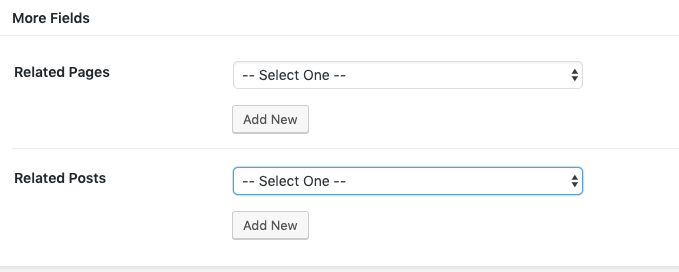
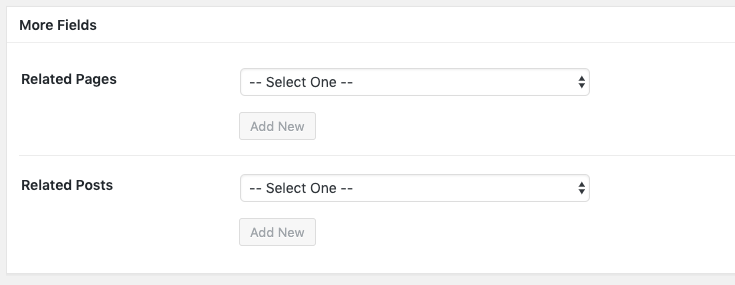
When you add two Single Select relationships (Drop-down, Add New Checked, the DEFAULT) to a Pod, when you add new within the Pod, the Add New buttons will be deactivated.
Workaround: You can select an option and then de-select the option and the Add New will become active. I verified against 2.7.12 and this was not the behavior previously. Previously, all Add News were active when nothing was selected.
To Reproduce
Steps to reproduce the behavior:
- Create a new Custom Post Type (or anything), add two relationship fields two it (to posts, to pages), make them the default Single Select, Dropdown, Add New Checked.
- Add New in that Custom Post Type. You'll see the deactivated Add New with the Select placeholders in place.
Expected behavior
This is mentioned in #4469 but the default should be 'Add New' is always active unless something is actually selected.
Screenshots
2.7.12 Behavior on Add New Post:
2.7.13 Behavior on Add New Post:
Pods Version
Please provide the version of Pods you are running: 2.7.13
WordPress Environment
wp-core
version: 5.2.2
site_language: en_US
user_language: en_US
permalink: /%postname%/
https_status: true
user_registration: 0
default_comment_status: open
multisite: false
user_count: 2
dotorg_communication: true
wp-paths-sizes
wordpress_path: /app/public
wordpress_size: loading...
uploads_path: /app/public/wp-content/uploads
uploads_size: loading...
themes_path: /app/public/wp-content/themes
themes_size: loading...
plugins_path: /app/public/wp-content/plugins
plugins_size: loading...
database_size: loading...
total_size: loading...
wp-active-theme
name: Twenty Nineteen
version: 1.4
author: the WordPress team
author_website: https://wordpress.org/
parent_theme: none
theme_features: automatic-feed-links, title-tag, post-thumbnails, menus, html5, custom-logo, customize-selective-refresh-widgets, wp-block-styles, align-wide, editor-styles, editor-style, editor-font-sizes, editor-color-palette, responsive-embeds, widgets
theme_path: /app/public/wp-content/themes/twentynineteen
wp-themes (3)
Twenty Fifteen: version: 2.5, author: the WordPress team
Twenty Seventeen: version: 2.2, author: the WordPress team
Twenty Sixteen: version: 2.0, author: the WordPress team
wp-plugins-active (3)
Classic Editor: version: 1.5, author: WordPress Contributors
Pods - Custom Content Types and Fields: version: 2.7.13, author: Pods Framework Team
WordPress Reset: version: 1.4.1, author: Aristeides Stathopoulos, Matt Martz
wp-plugins-inactive (3)
Members: version: 2.1.0, author: Justin Tadlock
Simple CSS: version: 1.1, author: Tom Usborne
Yoast SEO: version: 11.1.1, author: Team Yoast (latest version: 11.5)
wp-media
image_editor: WP_Image_Editor_Imagick
imagick_module_version: 1673
imagemagick_version: ImageMagick 6.8.9-9 Q16 x86_64 2018-05-18 http://www.imagemagick.org
imagick_limits:
imagick::RESOURCETYPE_AREA: 2 GB
imagick::RESOURCETYPE_DISK: -1
imagick::RESOURCETYPE_FILE: 786432
imagick::RESOURCETYPE_MAP: 2 GB
imagick::RESOURCETYPE_MEMORY: 996 MB
imagick::RESOURCETYPE_THREAD: 1
gd_version: bundled (2.1.0 compatible)
ghostscript_version: 9.06
wp-server
server_architecture: Linux 4.9.93-boot2docker x86_64
httpd_software: nginx/1.10.1
php_version: 7.2.0 64bit
php_sapi: fpm-fcgi
max_input_variables: 3000
time_limit: 900
memory_limit: 256M
max_input_time: -1
upload_max_size: 1000M
php_post_max_size: 1000M
curl_version: 7.38.0 OpenSSL/1.0.1t
suhosin: false
imagick_availability: true
wp-database
extension: mysqli
server_version: 5.5.60-0+deb8u1
client_version: mysqlnd 5.0.12-dev - 20150407 - $Id: b396954eeb2d1d9ed7902b8bae237b287f21ad9e $
wp-constants
WP_HOME: undefined
WP_SITEURL: undefined
WP_CONTENT_DIR: /app/public/wp-content
WP_PLUGIN_DIR: /app/public/wp-content/plugins
WP_MAX_MEMORY_LIMIT: 256M
WP_DEBUG: false
WP_DEBUG_DISPLAY: true
WP_DEBUG_LOG: false
SCRIPT_DEBUG: false
WP_CACHE: false
CONCATENATE_SCRIPTS: undefined
COMPRESS_SCRIPTS: undefined
COMPRESS_CSS: undefined
WP_LOCAL_DEV: undefined
wp-filesystem
wordpress: writable
wp-content: writable
uploads: writable
plugins: writable
themes: writable
pods
pods-server-software: nginx/1.10.1
pods-user-agent: Mozilla/5.0 (Macintosh; Intel Mac OS X 10_14_5) AppleWebKit/537.36 (KHTML, like Gecko) Chrome/75.0.3770.100 Safari/537.36
pods-session-save-path: undefined
pods-session-save-path-exists: No
pods-session-save-path-writable: No
pods-session-max-lifetime: 1440
pods-opcode-cache-apc: No
pods-opcode-cache-memcached: No
pods-opcode-cache-opcache: Yes
pods-opcode-cache-redis: No
pods-object-cache-apc: No
pods-object-cache-apcu: No
pods-object-cache-memcache: No
pods-object-cache-memcached: No
pods-object-cache-redis: Yes
pods-memory-current-usage: 14.126M
pods-memory-current-usage-real: 10.000M
pods-network-wide: No
pods-install-location: /app/public/wp-content/plugins/pods/
pods-developer: No
pods-tableless-mode: No
pods-light-mode: No
pods-strict: No
pods-allow-deprecated: Yes
pods-api-cache: Yes
Pods Package Export (helpful!)
{"meta":{"version":"2.7.13","build":1561827991},"pods":{"5":{"id":5,"name":"test","label":"Tests","description":"","type":"post_type","storage":"meta","object":"","alias":"","fields":{"related_pages":{"id":6,"name":"related_pages","label":"Related Pages","description":"","help":"","class":"","type":"pick","weight":0,"pick_object":"post_type","pick_val":"page","sister_id":"","required":"0","pick_format_type":"single","pick_format_single":"dropdown","pick_format_multi":"checkbox","pick_allow_add_new":"1","pick_taggable":"0","pick_show_icon":"1","pick_show_edit_link":"1","pick_show_view_link":"1","pick_limit":"0","pick_user_role":[],"pick_post_status":["publish"],"admin_only":"0","restrict_role":"0","restrict_capability":"0","hidden":"0","read_only":"0","roles_allowed":["administrator"],"rest_read":"0","rest_write":"0","rest_pick_response":"array","rest_pick_depth":"2","unique":"0","pick_select_text":"","pick_table_id":"","pick_table_index":"","pick_display":"","pick_where":"","pick_orderby":"","pick_groupby":""},"related_posts":{"id":9,"name":"related_posts","label":"Related Posts","description":"","help":"","class":"","type":"pick","weight":1,"pick_object":"post_type","pick_val":"post","sister_id":"","required":"0","pick_format_type":"single","pick_format_single":"dropdown","pick_format_multi":"checkbox","pick_allow_add_new":"1","pick_taggable":"0","pick_show_icon":"1","pick_show_edit_link":"1","pick_show_view_link":"1","pick_limit":"0","pick_user_role":[],"pick_post_status":["publish"],"admin_only":"0","restrict_role":"0","restrict_capability":"0","hidden":"0","read_only":"0","roles_allowed":["administrator"],"rest_read":"0","rest_write":"0","rest_pick_response":"array","rest_pick_depth":"2","pick_select_text":"","pick_table_id":"","pick_table_index":"","pick_display":"","pick_where":"","pick_orderby":"","pick_groupby":""}},"show_in_menu":"1","label_singular":"Test","public":"1","show_ui":"1","supports_title":"1","supports_editor":"1","publicly_queryable":"1","exclude_from_search":"0","capability_type":"post","capability_type_custom":"test","capability_type_extra":"1","has_archive":"0","hierarchical":"0","rewrite":"1","rewrite_with_front":"1","rewrite_feeds":"0","rewrite_pages":"1","query_var":"1","can_export":"1","default_status":"draft","supports_author":"0","supports_thumbnail":"0","supports_excerpt":"0","supports_trackbacks":"0","supports_custom_fields":"0","supports_comments":"0","supports_revisions":"0","supports_page_attributes":"0","supports_post_formats":"0","built_in_taxonomies_category":"0","built_in_taxonomies_link_category":"0","built_in_taxonomies_post_tag":"0","show_in_nav_menus":"1","show_in_admin_bar":"1","pfat_enable":"0","pfat_run_outside_loop":"0","pfat_append_single":"append","pfat_filter_single":"the_content","pfat_append_archive":"append","pfat_filter_archive":"the_content","rest_enable":"0","read_all":"0","write_all":"0"}}}
Additional context
See notes/discussion in #4469
Possible Workaround
Backrev to 2.7.13 or just inform the user to select and item and de-select before adding new ones.
 jimtrue
All 8 comments
Issue-Label Bot is automatically applying the label Type: Bug to this issue, with a confidence of 0.98. Please mark this comment with :thumbsup: or :thumbsdown: to give our bot feedback!
Links: app homepage, dashboard and code for this bot.
![issue-label-bot[bot] picture](https://avatars.githubusercontent.com/in/27079?v=4&s=40) issue-label-bot[bot]
on 29 Jun 2019
issue-label-bot[bot]
on 29 Jun 2019
Updated, this happens whether its one relationship field or more than one. It's all Single Select, Add New.
jimtrue
on 30 Jun 2019
Nothing in the console? It's doubtful it's due to an actual error but worth asking just in case.
 pglewis
on 30 Jun 2019
pglewis
on 30 Jun 2019
I believe this was introduced in #5255
https://github.com/pods-framework/pods/issues/5031#issuecomment-449507590: "This is a sweeping change that may also have unintended side-effects...".
pglewis
on 1 Jul 2019
I think this is an accessibility issue. Instead of using index 0 for ''---- Select One ----", shouldn't the value be "" ?
jimtrue
on 1 Jul 2019
The value is set to "", that's what 5255 fixes.
I don't believe that PR is a problem nor the actual cause on this, rather it uncovered a problem with how selection limits work in conjunction with the "add new" button. I think #4469 needs to be revisited.
pglewis
on 1 Jul 2019
I don't believe that PR is a problem nor the actual cause on this, rather it uncovered a problem with how selection limits work in conjunction with the "add new" button.
Indeed, 2.7.12 is somewhat broken as well. The "Add New" button does not re-enable when you pick the "-- Select One --" option after previously selecting a valid option.
pglewis
on 1 Jul 2019
5404 should at least properly re-enable the "Add New" button specifically for single select dropdowns.
pglewis
on 1 Jul 2019
Related issues
 Ramoonus
·
5Comments
Ramoonus
·
5Comments
 benfavre
·
3Comments
jimtrue
·
3Comments
benfavre
·
3Comments
jimtrue
·
3Comments
 tuanmh
·
5Comments
tuanmh
·
5Comments
 sc0ttkclark
·
4Comments
sc0ttkclark
·
4Comments
Most helpful comment
Issue-Label Bot is automatically applying the label
Type: Bugto this issue, with a confidence of 0.98. Please mark this comment with :thumbsup: or :thumbsdown: to give our bot feedback!Links: app homepage, dashboard and code for this bot.