Pods: Relationship field && Required ( if not set all sorts of issues on save )
Issue Overview
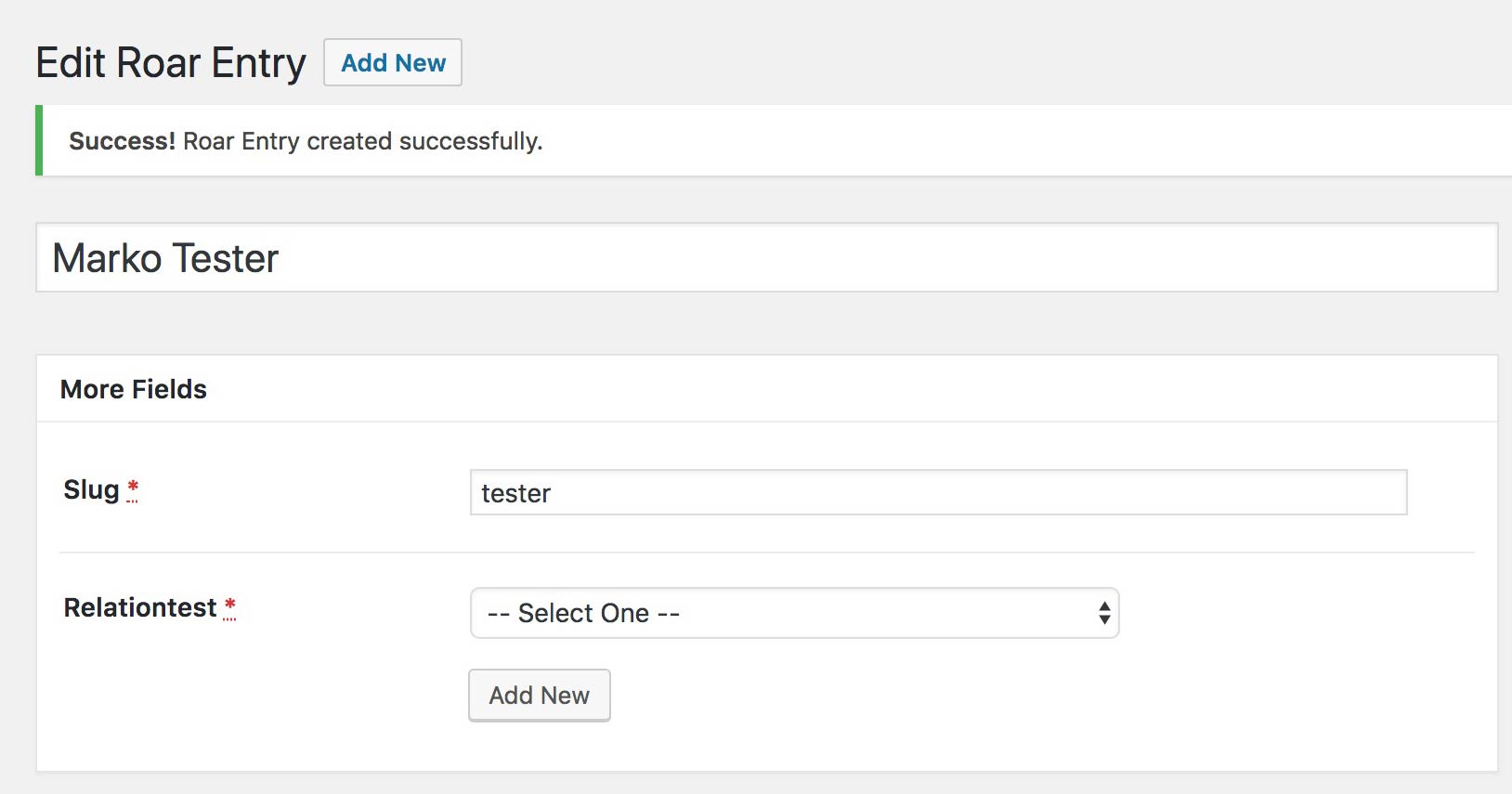
Required field not being honoured when using a relationship field set as a single-select dropdown.
Expected Behavior
Pod entry shouldn't be created unless a selection is chosen from the dropdown list.
Current Behavior
Pod entry is created when the dropdown list is left on the default option, wether that's something custom I've set in the Default Select Text field or the default -- Select One -- option.
Possible Solution
It might be passing validation as there is a value of '0' set in the html for that select field.
<select name="pods_field_relationtest" class="pods-form-ui-field pods-form-ui-field-type-pick pods-form-ui-field-name-pods-field-relationtest pods-validate pods-validate-required" data-name-clean="pods-field-relationtest" id="pods-form-ui-pods-field-relationtest" tabindex="2">
<option value="0">-- Select One --</option>
<option value="8">8</option>
<option value="9">9</option>
<option value="10">10</option>
<option value="11">11</option>
</select>
WordPress Environment
WordPress 4.9.6
```
Debug Information
WordPress Version: 4.9.6
PHP Version: 5.6.31-4+wpengine10
MySQL Version: 5.6.40
Server Software: Apache
Your User Agent: Mozilla/5.0 (Macintosh; Intel Mac OS X 10_13_1) AppleWebKit/537.36 (KHTML, like Gecko) Chrome/66.0.3359.181 Safari/537.36
Session Save Path: /var/lib/php/sessions
Session Save Path Exists: Yes
Session Save Path Writeable: Yes
Session Max Lifetime: 1440
Opcode Cache:
Apc: No
Memcached: No
OPcache: No
Redis: No
Object Cache:
APC: No
APCu: No
Memcache: No
Memcached: Yes
Redis: Yes
WPDB Prefix: wp_
WP Multisite Mode: Yes
WP Memory Limit: 64M
Pods Network-Wide Activated: Yes
Pods Install Location: /nas/content/live/eos4u/wp-content/plugins/pods/
Pods Tableless Mode Activated: No
Pods Light Mode Activated: No
Currently Active Theme: EOS
Currently Active Plugins:
Admin Columns Pro: 4.0.5
Adminimize: 1.11.4
Advanced Custom Fields PRO: 5.6.9
AmazonSimplePay Signature Generator: 1.0.0
Contact Form 7: 5.0.1
Disable Emojis: 1.7
Disqus for WordPress: 3.0.13
Email Users: 4.8.8
Entries Admin: 1.0
Export Users to CSV: 1.1.1
Google Analytics Dashboard for WP (GADWP): 5.2.3.1
Gravity Forms: 2.2.5
Gravity Forms Stripe Add-On: 2.3
Hide Admin Bar: 0.3.9.1
HOS Cron: 0.1.0
Multisite User Management: 1.1
OptionTree: 2.6.0
Paid Memberships Pro: 1.9.4.3
Paid Memberships Pro - Add Member Admin: .3
Paid Memberships Pro - Email Templates Add On: 0.7.1
Paid Memberships Pro - Gift Levels Add On: .2.3
Paid Memberships Pro - Group Discount Codes Add On: .3.1
Paid Memberships Pro - Subscription Delays Addon: .4.4
Pods - Custom Content Types and Fields: 2.7.1
Theme My Login: 6.4.10
TinyMCE Spellcheck: 1.3
User Role Editor: 4.41
WordPress Importer: 0.6.3
WP-PageNavi: 2.92
WP Admin UI Customize: 1.5.11
WP All Import: 3.4.9
WPMU DEV Dashboard: 4.0.7
WP Smush Pro: 2.1.3```
 Ojay
Ojay
All 9 comments
We're having this issue as well. We are _not_ using a placeholder in our select field like the original bug explanation.
Issue Overview
Required field not being honored when using a relationship field set as a single-select _or_ multi-select dropdown.
On some of our Pods content types, we are using a multi-select dropdown field that is a relationship to another Pods content type. Even though it is marked as a required field, the user can leave it empty, hit "publish" or "update," then click the back button on the browser and see that the content was published/updated despite the missing relationship field value.
Expected Behavior
Pod entry shouldn't be created or updated unless a selection is chosen from the dropdown list.
Would be helpful to serve an error message beside the field or highlight the field in some way to show the user it is required.
Current Behavior
Pod entry is successfully created or updated when the dropdown list is empty.
Here's a step-by-step:
- Create new Pods post and fill in all the required fields, except for a required hero image field which is a relationship to another Pods content type
- Publish the post
- Page redirects to a '500 Internal Server Error'
- Use the browser back button to go back to index page and see that the post has been published
- Edit the published post and see that all of the required fields are missing, though the post is published which causes errors in the build

In the screenshot, you can see that the status is published, though the "hero" field is missing and should have a "required" validation on it.
There are no Javascript errors occurring because of this bug, but there is a JS console error that exists on every page of our WP admin (unsure if this is related to this issue):

 lesliecdubs
on 10 Jul 2018
lesliecdubs
on 10 Jul 2018
Was able to reproduce with Single Select, 'Drop-down' as the selection. List View
Multiple Select with Multi-select (and other Checkboxes, AutoComplete and List View) all error if nothing is 'selected'. So I am not seeing the Multiple-select allowing 'required' to pass through, that both of the posters are mentioning.
I also believe the problem is the option with a value of 0; it should be blank.
 jimtrue
on 12 Jul 2018
jimtrue
on 12 Jul 2018
@lesliecdubs You've got something else wrong if you're getting the
Page redirects to a '500 Internal Server Error'
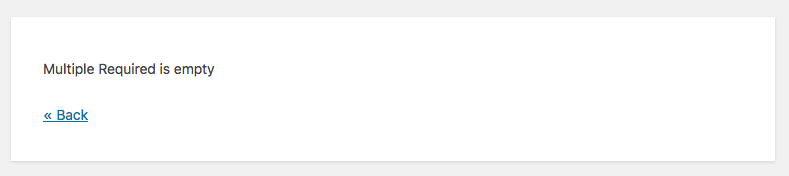
This is what you should be getting. And yes, we agree that our error reporting would be better handled on the field prior to submit, but that is going to require switching our fields to DFV and adding #4231
jimtrue
on 12 Jul 2018
similar to #4739
Steps:
- create a new CPT entry
- omit a relationship field set to required
- hit save
- get redirected via php - xyz is empty, a new complete empty Draft! is created
- klick back, see your data
- can't publish again! (spinner and publish greyed out!)
 quasel
on 31 Aug 2018
quasel
on 31 Aug 2018
another flavor of it #3835 -> Happens for Relationship fields in Taxonomies Terms
quasel
on 2 Sep 2018
Same issue here.
Removing value="0" from <option value="0">-- Select One --</option> using browser inspector tool didn't solve the problem.
UPDATE:
Actually, value="0" should be value="".
<option value="">-- Select One --</option> will work!
 th-santos
on 20 Dec 2018
th-santos
on 20 Dec 2018
https://github.com/pods-framework/pods/blob/master/classes/fields/pick.php?ts=4#L1170-L1171
We force IDs to int, probably under the assumption that they were always going to be valid WordPress IDs. That assumption didn't consider the case of the placeholder in select lists, which we inject into the item data with an empty string as the ID and consequently gets forced to zero.
 pglewis
on 21 Dec 2018
pglewis
on 21 Dec 2018
5255 clears this up for my very limited test that reproduced it, so anyone who is experiencing this and has a development site to test on, please do.
This is a sweeping change that may also have unintended side-effects so I'd like to do a good amount of manual retesting with various combinations of relationship fields in general.
pglewis
on 21 Dec 2018
Worked! 👏👏👏
th-santos
on 21 Dec 2018
Related issues
 PodsBot
·
4Comments
PodsBot
·
4Comments
 pdewouters
·
7Comments
pdewouters
·
7Comments
 devont3
·
3Comments
devont3
·
3Comments
 Kpudlo
·
4Comments
Kpudlo
·
4Comments
 Ramoonus
·
5Comments
Ramoonus
·
5Comments