Pods: Backend - overlapping fields from middle (contents) columns disable right column actions (e.g. Update)
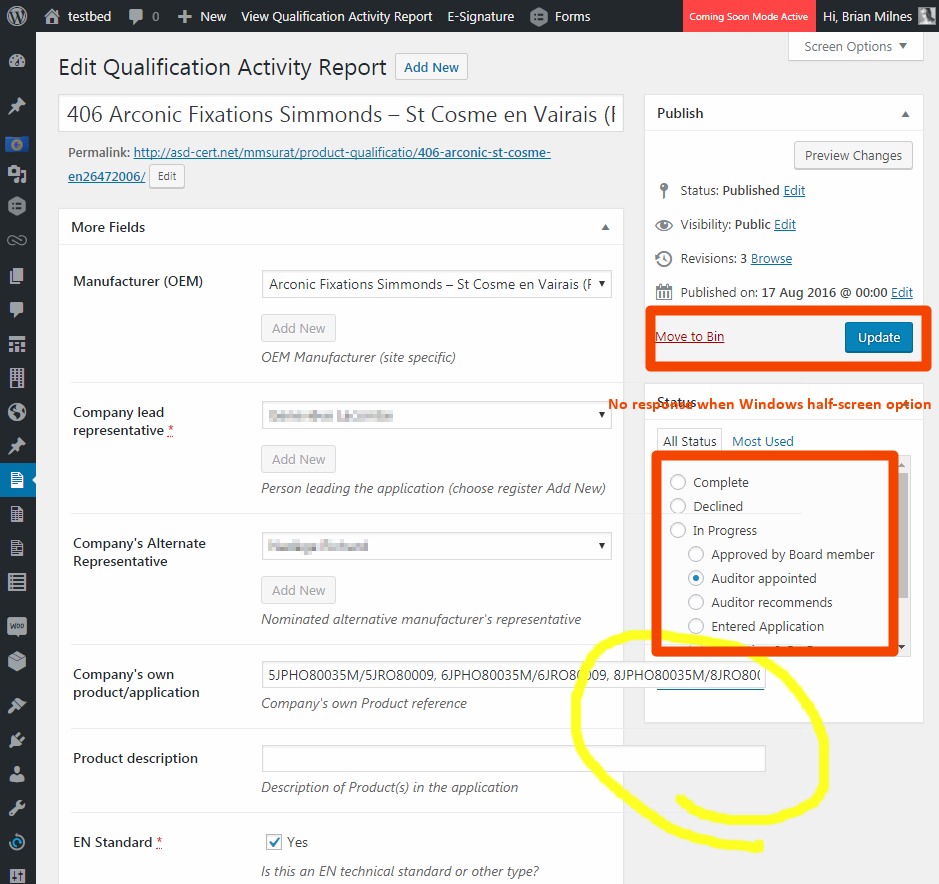
When you are editing a post, if you use a narrow Windows pane (such as the auto-half screen), the WordPress "middle column" edit boxes may "overlap" the right hand column and suppress the operation of contents therein. (Like Update, Move to Bin, or Category seleciton)
These images from TwentySeventeen Theme (responsive front and back end)
 Brian-Milnes
All 7 comments
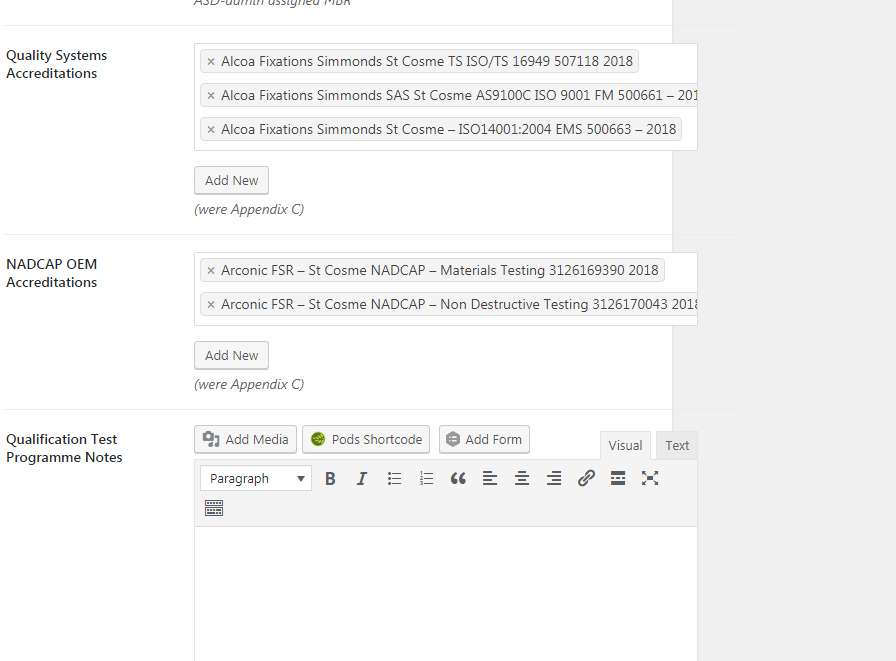
Thanks for picking up on this @sc0ttkclark Discovered a pretty bad/worst case scenario with an Autocomplete field having such a long input, that, without any wordwrapping or right margin/boundary, it pretty much disables saving an edit.

"Guilty" field on a full width on a 1920 px monitor:

Brian-Milnes
on 11 Jan 2018
Appreciate the feedback, we'll get this fixed and cleaned up.
 sc0ttkclark
on 11 Jan 2018
sc0ttkclark
on 11 Jan 2018
I'm wondering how you would be able to 'cut' the content of that one post-title so it _could_ wrap. I just noticed that one of your items in your list that is overlapping was one _incredibly_ long post title. Since that's considered all one block for drag and drop in the Select2, I'm not sure if the AutoComplete can allow a block to 'wrap' within itself; @nicdford is that a possibility?
 jimtrue
on 11 Jan 2018
jimtrue
on 11 Jan 2018
This is what I was wondering from a usability perspective. I'll do some digging, but I think wrapping the text instead of having it cut off at a certain width with might be our best option.
 nicdford
on 11 Jan 2018
nicdford
on 11 Jan 2018
.postbox table.form-table{ table-layout: fixed; }
solved the problem, was the workround from my coder...
Brian-Milnes
on 18 Jan 2018
Thanks @Brian-Milnes i'll get a commit made up for this shortly
nicdford
on 9 Apr 2018
After doing a bit of digging, I believe WooSelect is limiting what we can do with regards to UX (scrolling/wrapping items instead of just one big long line of text). I've done my best with just CSS at the moment, but I think i'll need to dig into the JS to see what SelectWoo is doing to calculate height or if they're setting the height with JS or something like that. Anyway, the fixes with regards to width, should be addressed in a PR i'll have up tonight once some other blockers go through.
nicdford
on 9 Apr 2018
Related issues
 pdewouters
·
7Comments
pdewouters
·
7Comments
 HmCody
·
4Comments
HmCody
·
4Comments
 sundco
·
5Comments
sundco
·
5Comments
 JoryHogeveen
·
3Comments
JoryHogeveen
·
3Comments
 Ramoonus
·
5Comments
Ramoonus
·
5Comments