Podman: Missing podman 1.8.0 conmon binaries on ubuntu 18 system
Is this a BUG REPORT or FEATURE REQUEST? (leave only one on its own line)
/kind bug
Description
missing podman 1.8.0 conmon binaries on ubuntu 18 system
Steps to reproduce the issue:
Install podman according to official documentation
Execute
podman pscommandAn error message appears:
Error: error creating libpod runtime: could not find a working conmon binary
Describe the results you received:
podman ps command fails to run
Describe the results you expected:
podman ps command works
Additional information you deem important (e.g. issue happens only occasionally):
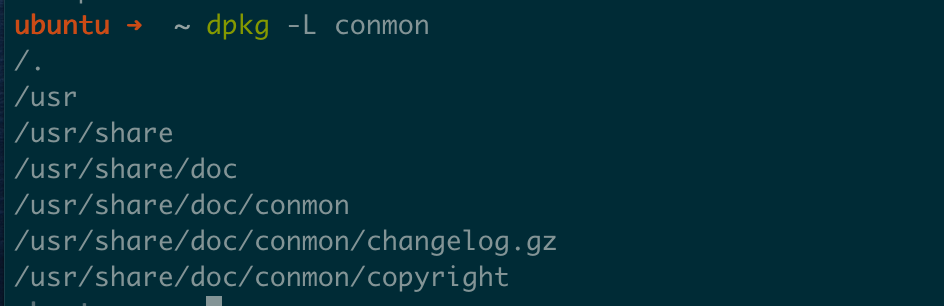
After searching with dpkg command, it seems that the conmon package does not contain any binary files
Output of podman version:
ubuntu ➜  ~ podman version
Version:            1.8.0
RemoteAPI Version:  1
Go Version:         go1.10.1
OS/Arch:            linux/amd64
Output of podman info --debug:
Cannot run command
Error: could not get runtime: could not find a working conmon binary (configured options: [/usr/libexec/podman/conmon /usr/local/libexec/podman/conmon /usr/local/lib/podman/conmon /usr/bin/conmon /usr/sbin/conmon /usr/local/bin/conmon /usr/local/sbin/conmon /run/current-system/sw/bin/conmon]): invalid argument
Package info (e.g. output of rpm -q podman or apt list podman):
ubuntu ➜  ~ apt list podman
Listing... Done
podman/unknown,now 1.8.0~7 amd64 [installed]
Additional environment details (AWS, VirtualBox, physical, etc.):
Ubuntu 18
 mritd
mritd
All 15 comments
Same here, Ubuntu 18.04. Installed with instructions from https://podman.io/getting-started/installation.
Error: could not get runtime: could not find a working conmon binary (configured options: [/usr/libexec/podman/conmon /usr/local/libexec/podman/conmon /usr/local/lib/podman/conmon /usr/bin/conmon /usr/sbin/conmon /usr/local/bin/conmon /usr/local/sbin/conmon /run/current-system/sw/bin/conmon]): invalid argument
podman version 1.8.0
WARN[0000] unable to find /home/user/.config/containers/registries.conf. some podman (image shortnames) commands may be limited
 DsDeesu
on 8 Mar 2020
DsDeesu
on 8 Mar 2020
A previous provided build of 1.8.0 for ubuntu 18.04 was working properly. Is there anyhow a way to get a previous build of the version 1.8.0 via apt-get ?
 ReveredMachine
on 8 Mar 2020
ReveredMachine
on 8 Mar 2020
@ReveredMachine You can make it work by manually compiling conmon:
# install build deps
apt install build-essential libc6-dev libglib2.0-dev pkg-config -y
# clone source
git clone http://github.com/containers/conmon
# install
cd conmon && make install PREFIX=/usr
But this is not the best solution ... I still can't believe the lack of binary files in deb (theoretically, it should pass the test before releasing the release version).
mritd
on 8 Mar 2020
I even look forward to officially adding a make deb option to the Makefile so that we can build deb packages on our own; however, most open source projects are built by a dedicated repository, and the repository contains a more professional package build configuration (I prefer fpm to package, because I don't want to learn build specifications for specific packages... 😂)
mritd
on 8 Mar 2020
A previous provided build of 1.8.0 for ubuntu 18.04 was working properly. Is there anyhow a way to get a previous build of the version 1.8.0 via apt-get ?
Similar to the kubeadm official documentation, it is best practice to use the apt-mark hold command to maintain the version after the specific version is installed, so that we don't have to worry about problems caused by accidental upgrades 😂
mritd
on 8 Mar 2020
Related: https://github.com/containers/conmon/issues/126 (or probably the issue). Maybe installing and older version of conmon via apt solves this issue ? Otherwise download the precompiled binary from https://github.com/containers/conmon/releases .
 johscheuer
on 8 Mar 2020
johscheuer
on 8 Mar 2020
So, I wanted to try podman for the first time and encountered this bug. This is rather embarrassing :laughing:
 Diaoul
on 8 Mar 2020
Diaoul
on 8 Mar 2020
Ran into this after upgrading to conmon-2.0.11-2 from conmon-2.0.10~2
 hunleyd
on 8 Mar 2020
hunleyd
on 8 Mar 2020
@mritd Thank you for the hint regarding _apt-mark hold_ with this I can prevent an upgrade from podman which I have already installed on a machine. But unfortunately this will not help if I have to install it on another machine too.
It seems to be that it also will not work if I install conmon manually (see comment from @hunleyd) or am I wrong ?
ReveredMachine
on 8 Mar 2020
@lsm5?
 TomSweeneyRedHat
on 9 Mar 2020
TomSweeneyRedHat
on 9 Mar 2020
@ReveredMachine I tested by manually compiling conmon that works.
@ReveredMachine You can make it work by manually compiling conmon:
# install build deps
apt install build-essential libc6-dev libglib2.0-dev pkg-config -y
# clone source
git clone http://github.com/containers/conmon
# install
cd conmon && make install PREFIX=/usr
But this is not the best solution ... I still can't believe the lack of binary files in deb (theoretically, it should pass the test before releasing the release version).
mritd
on 9 Mar 2020
@mritd I also tested it, and it worked. Thus for a development system it can be done as a feasible workaround.
But for none development systems the development packages (build-essential libc6-dev libglib2.0-dev) will usually not be instzalled, so there this kind of workaround is not a good solution.
ReveredMachine
on 9 Mar 2020
sorry about that everyone. Fixes building on testing and stable repos: https://build.opensuse.org/package/show/devel:kubic:libcontainers:testing/conmon and https://build.opensuse.org/package/show/devel:kubic:libcontainers:stable/conmon . Should be installable in a bit.
 lsm5
on 9 Mar 2020
lsm5
on 9 Mar 2020
@lsm5 Thanks for fixing this, it has worked after testing. Should I close the issue or wait for feedback from others?
mritd
on 9 Mar 2020
I closed issue, reopen if this was a mistake.
 rhatdan
on 9 Mar 2020
rhatdan
on 9 Mar 2020
Related issues
 jtligon
·
4Comments
jtligon
·
4Comments
 yangm97
·
5Comments
yangm97
·
5Comments
 juansuerogit
·
5Comments
juansuerogit
·
5Comments
 daltschu22
·
4Comments
daltschu22
·
4Comments
 oblitum
·
5Comments
oblitum
·
5Comments
Most helpful comment
sorry about that everyone. Fixes building on testing and stable repos: https://build.opensuse.org/package/show/devel:kubic:libcontainers:testing/conmon and https://build.opensuse.org/package/show/devel:kubic:libcontainers:stable/conmon . Should be installable in a bit.