podman-1.3 breaks my fedora-toolbox-user-* containers
/kind bug
Description
After updating to podman-1.3.1-1.git7210727.fc30 my fedora-toolbox-
Steps to reproduce the issue:
podman start fedora-toolbox-petersen-30
Describe the results you received:
WARN[0000] no such directory for freezer.state
WARN[0000] no such directory for freezer.state
Error: unable to start container "fedora-toolbox-petersen-30": error reading container (probably exited) json message: EOF
With debugging output:
$ podman --log-level debug start fedora-toolbox-petersen-30
INFO[0000] running as rootless
WARN[0000] The configuration is using `runtime_path`, which is deprecated and will be removed in future.  Please use `runtimes` and `runtime`
WARN[0000] If you are using both `runtime_path` and `runtime`, the configuration from `runtime_path` is used
DEBU[0000] Initializing boltdb state at /var/home/petersen/.local/share/containers/storage/libpod/bolt_state.db
DEBU[0000] Using graph driver overlay
DEBU[0000] Using graph root /var/home/petersen/.local/share/containers/storage
DEBU[0000] Using run root /run/user/1000
DEBU[0000] Using static dir /var/home/petersen/.local/share/containers/storage/libpod
DEBU[0000] Using tmp dir /run/user/1000/libpod/tmp
DEBU[0000] Using volume path /var/home/petersen/.local/share/containers/storage/volumes
DEBU[0000] Set libpod namespace to ""
DEBU[0000] [graphdriver] trying provided driver "overlay"
DEBU[0000] overlay: mount_program=/usr/bin/fuse-overlayfs
DEBU[0000] backingFs=extfs, projectQuotaSupported=false, useNativeDiff=false, usingMetacopy=false
DEBU[0000] Initializing event backend file
DEBU[0000] overlay: mount_data=lowerdir=/var/home/petersen/.local/share/containers/storage/overlay/l/7OABBYYYL2ZOXY4SMJECBDSSIT:/var/home/petersen/.local/share/containers/storage/overlay/l/HTDOJ4BKT5UWE2SSFGCLHTXITU:/var/home/petersen/.local/share/containers/storage/overlay/l/VAIT6OAFKPIV7WRVHXILPLRQOQ,upperdir=/var/home/petersen/.local/share/containers/storage/overlay/bd5a5c134ed8e0a274462edac873aaac6d357d47efd6fa0cbbf656a30fdc94d8/diff,workdir=/var/home/petersen/.local/share/containers/storage/overlay/bd5a5c134ed8e0a274462edac873aaac6d357d47efd6fa0cbbf656a30fdc94d8/work,context="system_u:object_r:container_file_t:s0:c94,c213"
DEBU[0000] mounted container "d207f6acb71845b8f1a86c33e0238efb8f41b0063d1ac4b3c7aa6965b849cfa7" at "/var/home/petersen/.local/share/containers/storage/overlay/bd5a5c134ed8e0a274462edac873aaac6d357d47efd6fa0cbbf656a30fdc94d8/merged"
DEBU[0000] Created root filesystem for container d207f6acb71845b8f1a86c33e0238efb8f41b0063d1ac4b3c7aa6965b849cfa7 at /var/home/petersen/.local/share/containers/storage/overlay/bd5a5c134ed8e0a274462edac873aaac6d357d47efd6fa0cbbf656a30fdc94d8/merged
DEBU[0000] /etc/system-fips does not exist on host, not mounting FIPS mode secret
WARN[0000] User mount overriding libpod mount at "/dev/shm"
DEBU[0000] set root propagation to "rslave"
DEBU[0000] Created OCI spec for container d207f6acb71845b8f1a86c33e0238efb8f41b0063d1ac4b3c7aa6965b849cfa7 at /var/home/petersen/.local/share/containers/storage/overlay-containers/d207f6acb71845b8f1a86c33e0238efb8f41b0063d1ac4b3c7aa6965b849cfa7/userdata/config.json
DEBU[0000] /usr/libexec/podman/conmon messages will be logged to syslog
DEBU[0000] running conmon: /usr/libexec/podman/conmon    args=[-c d207f6acb71845b8f1a86c33e0238efb8f41b0063d1ac4b3c7aa6965b849cfa7 -u d207f6acb71845b8f1a86c33e0238efb8f41b0063d1ac4b3c7aa6965b849cfa7 -r /usr/bin/runc -b /var/home/petersen/.local/share/containers/storage/overlay-containers/d207f6acb71845b8f1a86c33e0238efb8f41b0063d1ac4b3c7aa6965b849cfa7/userdata -p /run/user/1000/overlay-containers/d207f6acb71845b8f1a86c33e0238efb8f41b0063d1ac4b3c7aa6965b849cfa7/userdata/pidfile -l /var/home/petersen/.local/share/containers/storage/overlay-containers/d207f6acb71845b8f1a86c33e0238efb8f41b0063d1ac4b3c7aa6965b849cfa7/userdata/ctr.log --exit-dir /run/user/1000/libpod/tmp/exits --conmon-pidfile /var/home/petersen/.local/share/containers/storage/overlay-containers/d207f6acb71845b8f1a86c33e0238efb8f41b0063d1ac4b3c7aa6965b849cfa7/userdata/conmon.pid --exit-command /usr/bin/podman --exit-command-arg --root --exit-command-arg /var/home/petersen/.local/share/containers/storage --exit-command-arg --runroot --exit-command-arg /run/user/1000 --exit-command-arg --log-level --exit-command-arg error --exit-command-arg --cgroup-manager --exit-command-arg cgroupfs --exit-command-arg --tmpdir --exit-command-arg /run/user/1000/libpod/tmp --exit-command-arg --runtime --exit-command-arg runc --exit-command-arg --storage-driver --exit-command-arg overlay --exit-command-arg container --exit-command-arg cleanup --exit-command-arg d207f6acb71845b8f1a86c33e0238efb8f41b0063d1ac4b3c7aa6965b849cfa7 --socket-dir-path /run/user/1000/libpod/tmp/socket --log-level debug --syslog]
WARN[0000] Failed to add conmon to cgroupfs sandbox cgroup: mkdir /sys/fs/cgroup/systemd/libpod_parent: permission denied
WARN[0000] no such directory for freezer.state
WARN[0000] no such directory for freezer.state
DEBU[0000] Cleaning up container d207f6acb71845b8f1a86c33e0238efb8f41b0063d1ac4b3c7aa6965b849cfa7
DEBU[0000] Network is already cleaned up, skipping...
DEBU[0000] unmounted container "d207f6acb71845b8f1a86c33e0238efb8f41b0063d1ac4b3c7aa6965b849cfa7"
ERRO[0000] unable to start container "fedora-toolbox-petersen-30": error reading container (probably exited) json message: EOF
Describe the results you expected:
The container to continue working, like it does with podman-1.2.0-2.git3bd528e.fc30.
Additional information you deem important (e.g. issue happens only occasionally):
I also tried latest podman-1.3.2-1559070567.git8649dbdc.fc30.x86_64 (https://copr.fedorainfracloud.org/coprs/baude/Upstream_CRIO_Family/build/916392/) and got the same result.
Output of podman version:
Version:            1.3.1
RemoteAPI Version:  1
Go Version:         go1.12.2
OS/Arch:            linux/amd64
Output of podman info --debug:
debug:
  compiler: gc
  git commit: ""
  go version: go1.12.2
  podman version: 1.3.1
host:
  BuildahVersion: 1.8.2
  Conmon:
    package: podman-1.3.1-1.git7210727.fc30.x86_64
    path: /usr/libexec/podman/conmon
    version: 'conmon version 1.12.0-dev, commit: c9a4c48d1bff85033b7fc9b62d25961dd5048689'
  Distribution:
    distribution: fedora
    version: "30"
  MemFree: 11986960384
  MemTotal: 16450535424
  OCIRuntime:
    package: runc-1.0.0-93.dev.gitb9b6cc6.fc30.x86_64
    path: /usr/bin/runc
    version: |-
      runc version 1.0.0-rc8+dev
      commit: e3b4c1108f7d1bf0d09ab612ea09927d9b59b4e3
      spec: 1.0.1-dev
  SwapFree: 8296329216
  SwapTotal: 8296329216
  arch: amd64
  cpus: 8
  hostname: localhost.localdomain
  kernel: 5.0.17-300.fc30.x86_64
  os: linux
  rootless: true
  uptime: 5m 48.6s
registries:
  blocked: null
  insecure: null
  search:
  - docker.io
  - registry.fedoraproject.org
  - quay.io
  - registry.access.redhat.com
  - registry.centos.org
store:
  ConfigFile: /home/petersen/.config/containers/storage.conf
  ContainerStore:
    number: 4
  GraphDriverName: overlay
  GraphOptions:
  - overlay.mount_program=/usr/bin/fuse-overlayfs
  GraphRoot: /var/home/petersen/.local/share/containers/storage
  GraphStatus:
    Backing Filesystem: extfs
    Native Overlay Diff: "false"
    Supports d_type: "true"
    Using metacopy: "false"
  ImageStore:
    number: 12
  RunRoot: /run/user/1000
  VolumePath: /var/home/petersen/.local/share/containers/storage/volumes
Additional environment details (AWS, VirtualBox, physical, etc.):
physical (Fedora Silverblue 30)
 juhp
juhp
All 11 comments
cc @debarshiray
edited: okay in the end I now have toolbox-0.10 containers working with podman-1.2 at latest, but not 1.3.
juhp
on 29 May 2019
Can you check journalctl for any messages from Conmon? The real error is
being lost before it can be printed, but should have been logged to syslog
On Wed, May 29, 2019, 00:50 Jens Petersen notifications@github.com wrote:
cc @debarshiray https://github.com/debarshiray
—
You are receiving this because you are subscribed to this thread.
Reply to this email directly, view it on GitHub
https://github.com/containers/libpod/issues/3219?email_source=notifications&email_token=AB3AOCFNRVKBXYXFRS253FLPXYDSZA5CNFSM4HQJBAQ2YY3PNVWWK3TUL52HS4DFVREXG43VMVBW63LNMVXHJKTDN5WW2ZLOORPWSZGODWOE6KQ#issuecomment-496783146,
or mute the thread
https://github.com/notifications/unsubscribe-auth/AB3AOCB6ON2VN4JYRYX3HN3PXYDSZANCNFSM4HQJBAQQ
.
 mheon
on 29 May 2019
mheon
on 29 May 2019
With podman-2:1.3.1-1.git7210727.fc30 I cannot run any container on my system, getting the same error as described above.
I had tried to remove podman and reinstall an older version:
sudo dnf install podman-2:1.2.0-2.git3bd528e.fc30.x86_64
but my containers remained broken. I had to delete the containers and create them from scratch.
 GoodMirek
on 29 May 2019
GoodMirek
on 29 May 2019
(@GoodMirek I think you need to remove podman-manpages at the same time, if you want to downgrade)
juhp
on 30 May 2019
(@GoodMirek I think you need to remove podman-manpages at the same time, if you want to downgrade)
@juhp I had no issue with the downgrade, it just did not help.
GoodMirek
on 30 May 2019
https://docs.fedoraproject.org/en-US/fedora-silverblue/troubleshooting/
As a workaround, it is possible to override podman packages newer than version 1.2.0 following these steps:
Download podman-1.2.0-2.git3bd528e.fc30.x86_64.rpm from Koji

Remove podman-manpages issuing: rpm-ostree override remove podman-manpages

Override the currenty installed podman package (using the package you have downloaded on the first step) by: rpm-ostree override replace podman-1.2.0-2.git3bd528e.fc30.x86_64.rpm

    Alternatively, you can avoid downloading the file by issuing the following command: rpm-ostree override replace https://kojipkgs.fedoraproject.org//packages/podman/1.2.0/2.git3bd528e.fc30/x86_64/podman-1.2.0-2.git3bd528e.fc30.x86_64.rpm
You can now reboot the system for the change to take effect.
 tmstaedt
on 1 Jun 2019
tmstaedt
on 1 Jun 2019
Yep, you can even do it in a single command:
$ rpm-ostree override --remove=podman-manpages replace https://kojipkgs.fedoraproject.org//packages/podman/1.2.0/2.git3bd528e.fc30/x86_64/podman-1.2.0-2.git3bd528e.fc30.x86_64.rpm
:-)
juhp
on 1 Jun 2019
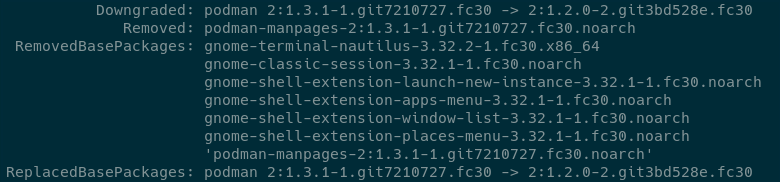
Is it intended that both podman and podman-manpages get listed twice (on the then next deployment) in rpm-ostree status -v?
 fbruetting
on 1 Jun 2019
fbruetting
on 1 Jun 2019
I don't think I can reproduce anymore with podman-1.3.2-1559353158.git2068919e.fc30 (from baude's copr) (and toolbox-0.0.10).
juhp
on 1 Jun 2019
1.4.0 has been released, and should be trickling into F30 over the next few days (we hit some additional issues with the 29 packages, so they'll take longer). Closing as such.
mheon
on 11 Jun 2019
I can confirm that the issue is fixed in podman-1.4.0-1.fc30.x86_64.
GoodMirek
on 11 Jun 2019
Related issues
 raukadah
·
4Comments
raukadah
·
4Comments
 juansuerogit
·
5Comments
juansuerogit
·
5Comments
 SergeyBear
·
4Comments
SergeyBear
·
4Comments
 daltschu22
·
4Comments
daltschu22
·
4Comments
 pkubatrh
·
4Comments
pkubatrh
·
4Comments