Category
- [ ] Enhancement
- [x] Bug
- [ ] Question
- [ ] Documentation gap/issue
Version
Please specify what version of the library you are using: [ 2.1.0 ]
Please specify what version(s) of SharePoint you are targeting: [online]
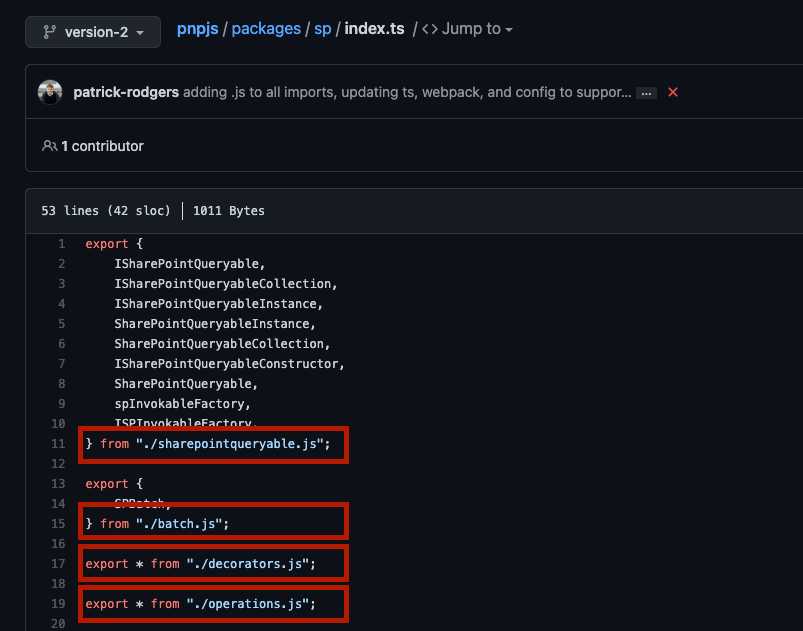
Having some issues with PnPjs definitions (d.ts files), I can see that there are references to .js files, this must be wrong?

 tavikukko
All 12 comments
Hmm. for some reason all the .ts code files are importing files at .js files. There must be reason for this, but I think these should be removed from the definitions. d.ts files?
tavikukko
on 19 Jan 2021
This change was made to support Node 15 and Webpack 5 so unfortunately, we cannot change this...
 juliemturner
on 19 Jan 2021
juliemturner
on 19 Jan 2021
@patrick-rodgers -- can you confirm about the .d.ts files?
juliemturner
on 19 Jan 2021
The ".d.ts" files just take the literal strings we use for imports so this isn't a setting we can change. My understanding is that this doesn't affect the .d.ts files working as expected - are we seeing issues?
 patrick-rodgers
on 19 Jan 2021
patrick-rodgers
on 19 Jan 2021
Ok, I got issue in my project, but got workaround for that. Im using the d.ts files as definitions in SP Editor, so with .js endings things will fail, but as I said, I fixed it in my project. Someone could have similar issue thou.
tavikukko
on 19 Jan 2021
When I tested in SPFx project it all seemed to work. If you can provide a repro we can have a look. Certainly don't want to be breaking folks 🙂
patrick-rodgers
on 19 Jan 2021
I guess it was/is in SP Editor?
 koltyakov
on 19 Jan 2021
koltyakov
on 19 Jan 2021
I copy all d.ts files from node_modules/@pnp/* and load them to monaco-editor to have intelligence, not actually building anything. And as i don't copy the .js files, I get file not found kinda issues. But not a biggie for my project, as I'm already digging trough all the files so I can fix it just by modifying them. But anyways, d.ts files stand for definitions and do not really go with referencing .js/.ts files, or at least it should not work like that.
tavikukko
on 19 Jan 2021
@tavikukko - understood and I agree. The entire module stuff is a bit of a mess currently and everyone is essentially saying it is the other folks problem. Will do some research on the best way to resolve this. Trying hard to not post-process all the files, but may come to that.
patrick-rodgers
on 19 Jan 2021
Yeah, maybe we just need a list of requirements and we can all try to think solution for this.
- make node happy
- make browser happy
- make definitions happy
- what else?
tavikukko
on 19 Jan 2021
I would add make the project happy. We have lots of various pipelines (F5 debug, build, test, serve, etc.) that all need to work. Making all that work in node 15 (and through that work webpack 5) was not trivial. We need to avoid doing something that makes all that overly complicated, slow, or introduce failures. Having to post-process all the files just to hit F5 debug is really undesirable for the folks working on the library. There is also an open issue on (#1438) on packaging just the types, so perhaps this work can feed into that work
Right now the first two items should be done (not that there won't be issues, but things are working generally). The third, definitions, are happy except in the case where someone copies them away from the source which introduces file not found issues due to the extension.
patrick-rodgers
on 19 Jan 2021
Just dropping a link to a representative issue in the TS repo to inform this conversation. Long story short the TS answer is to include the ".js" extension in your code. TS handles resolving that during build.
There is also an open issue that seems to be around the declaration issue you bring up.
patrick-rodgers
on 21 Jan 2021
Related issues
 jcosta33
·
3Comments
jcosta33
·
3Comments
 simonagren
·
3Comments
simonagren
·
3Comments
 Holden15
·
3Comments
Holden15
·
3Comments
 ITAndy23
·
3Comments
ITAndy23
·
3Comments
 AJIXuMuK
·
3Comments
AJIXuMuK
·
3Comments
Most helpful comment
I would add make the project happy. We have lots of various pipelines (F5 debug, build, test, serve, etc.) that all need to work. Making all that work in node 15 (and through that work webpack 5) was not trivial. We need to avoid doing something that makes all that overly complicated, slow, or introduce failures. Having to post-process all the files just to hit F5 debug is really undesirable for the folks working on the library. There is also an open issue on (#1438) on packaging just the types, so perhaps this work can feed into that work
Right now the first two items should be done (not that there won't be issues, but things are working generally). The third, definitions, are happy except in the case where someone copies them away from the source which introduces file not found issues due to the extension.