Pnpjs: validateUpdateListItem on file item ref doesn't work
Category
- [ ] Enhancement
- [x] Bug
- [ ] Question
- [ ] Documentation gap/issue
Version
Please specify what version of the library you are using: [^1.3.11]
Please specify what version(s) of SharePoint you are targeting: [SPO]
Expected / Desired Behavior / Question
I expect the following code to work:
const web = new Web(window.location.origin + webUrl)
const fileRef = await web.getFolderByServerRelativeUrl(folderRelativeUrl)
      .files
      .add(file.name, file, true)

const item = await fileRef.file.getItem()
const validation = await item.validateUpdateListItem(metadata, true)
Observed Behavior
The URL the command is run against is wrong:
common.es5.js?f02b:306 POST https://TENANT.sharepoint.com/sites/SITE/validateupdatelistitem 404
Steps to Reproduce
(see code)
 johannes-z
All 9 comments
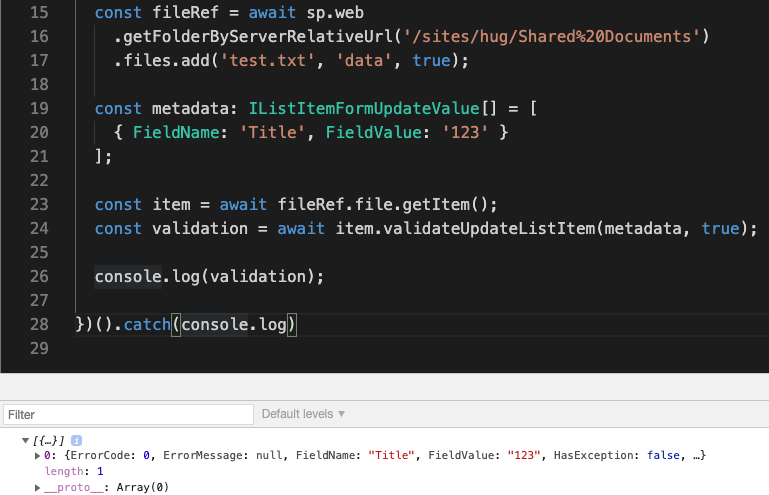
Don't think it's an issue anymore, v1 is a pretty old one. With a recent version:
@pnp/js-lib-team Are we pushing any changes to v1?
 koltyakov
on 14 Dec 2020
koltyakov
on 14 Dec 2020
No, we are no longer updating v1, and haven't for about 5 or 6 months. Is there anything blocking you from upgrading @johannes-z?
 patrick-rodgers
on 14 Dec 2020
patrick-rodgers
on 14 Dec 2020
Ah I thought that fixes like that would still be added to v1. I'll try v2 then.
johannes-z
on 15 Dec 2020
I updated to ^2.0.13 but get the same error. My entire code is:
import { Web } from '@pnp/sp/webs'
import '@pnp/sp/folders'
import '@pnp/sp/files'
import { IItem } from '@pnp/sp/items'

interface FormValue {
  FieldName: string
  FieldValue: any
}

export async function uploadFile (webUrl: string, folderRelativeUrl: string, file: File, metadata?: FormValue[], openDialog: boolean = false) {
  console.log(file)

  const web = Web(window.location.origin + webUrl)

  console.log('Upload file to:', webUrl, folderRelativeUrl) // Upload file to: /sites/SITE /sites/SITE/Docs

  let fileRef
  if (file.size <= 10485760) {
    // small upload
    fileRef = await web.getFolderByServerRelativeUrl(folderRelativeUrl)
      .files
      .add(file.name, file, true)
  } else {
    // large upload
    fileRef = await web.getFolderByServerRelativeUrl(folderRelativeUrl)
      .files
      .addChunked(file.name, file, data => {
        console.log('progress...', data)
      }, true)
  }
  const item: IItem = await fileRef.file.getItem()

  console.log(item)

  if (metadata && metadata.length > 0) {
    // update metadata
    const validation = await item.validateUpdateListItem(metadata, true)
    return {
      item,
      validation,
    }
  }

  return {
    item,
  }
}
I can however confirm, that the test @koltyakov posted works:
  const fileRef = await sp.web
    .getFolderByServerRelativeUrl('/sites/SITE/Docs')
    .files.add('test.txt', 'data', true)

  const metadata = [
    { FieldName: 'Title', FieldValue: '123' }
  ]

  const item = await fileRef.file.getItem()
  const validation = await item.validateUpdateListItem(metadata, true)
  console.log(validation)
Found the issue. Setting odata to nometadata breaks the function, i.e. this breaks the call:
    sp.setup({
      sp: {
        headers: {
          Accept: 'application/json;odata=nometadata',
        },
      },
    })
Good catch @johannes-z, you're right, unfortunately, nometadata often breaks things with constructing OData URLs capabilities. It's a kind of omission on the library end. The common "I know it's clunky" recommendation is using minimalmetadata instead and nometadata mode only per specific requests when it's totally required.
koltyakov
on 16 Dec 2020
We get stuck without metadata, makes it hard to do much backend url building to plumb some of the things. Should work for most pure data requests.
patrick-rodgers
on 16 Dec 2020
Seems like either a case for the docs or adding a check in functions relying on metadata, to make the error message more useful.
johannes-z
on 17 Dec 2020
Closing this as answered and docs have been updated in this release.
 juliemturner
on 15 Jan 2021
juliemturner
on 15 Jan 2021
Related issues
 un-dres
·
3Comments
un-dres
·
3Comments
 AJIXuMuK
·
3Comments
AJIXuMuK
·
3Comments
 alirobe
·
3Comments
alirobe
·
3Comments
 DennisGaida
·
3Comments
DennisGaida
·
3Comments
 bogeorge
·
3Comments
bogeorge
·
3Comments