Pnpjs: Cannot add subscriptions to a list on a site where the url contains æ, ø, å
Category
- [ ] Enhancement
- [X] Bug
- [ ] Question
- [ ] Documentation gap/issue
Version
Please specify what version of the library you are using: [2.0.12]
Please specify what version(s) of SharePoint you are targeting: [Online]
Expected / Desired Behavior / Question
Adding webhook subscriptions to a list that exists on a site with non-English characters (æøå) in the url should work.
Observed Behavior
This call:
await list.subscriptions.add(notificationUrl, expiresDateIso)
fails with a 404 for any url that contains æ, ø, å or Æ, Ø, Å while this call to the exact same list works:
await list.subscriptions.get()
Steps to Reproduce
Create a site collection and a subsite with any of the characters æ, ø, å, Æ, Ø, Å in the url.
Run this code in node:
import { sp } from "@pnp/sp-commonjs"
import addDate from "date-fns/add"

sp.setup(...) // Authenticate however you need to

// Open the subsite
const { web } = await sp.site.openWebById("[web id]")

// Get a list or library that exists on the site (edit: corrected name)
const list = web.lists.getByTitle("Site Pages")

// Try to get all subscriptions (works)
const subs = await list.subscriptions.get()

// Set a date to expire in the future
const expires = addDate(new Date(), {days: 6})

// Try to add a webhook subscription (fails 404)
await list.subscriptions.add(config.listWebhookReceiverUrl, expires.toISOString())
The last line will fail with a 404 error.
I suspect the url for this specific endpoint is not passed through a encodeURI filter or something like that since the get() works fine.
Edit: I've tested it on a separate subsite without æøå in the url, but with æøå in the list title. It works fine so it just seems to be the site url.
 rudfoss
All 19 comments
Could you try encodeURIComponent (list.subscriptions.add(encodeURIComponent(notificationUrl), expiresDateIso))? Will it work?
UPD: Missed that the special chars are not in the notification URL but the part of SP resources.
 koltyakov
on 13 Dec 2020
koltyakov
on 13 Dec 2020
@koltyakov Thanks for the quick response. I tried that now, but it had no effect.
rudfoss
on 13 Dec 2020
Btw, web.lists.getByTitle("SitePages") is not likely a correct one, as site pages document library's display name is "Site Pages".
koltyakov
on 13 Dec 2020
@koltyakov That's just an example. It doesn't have to be that list as any list seems to fail.
Edit: I've corrected the typo just in case.
rudfoss
on 13 Dec 2020
After a quick try, I was not able to reproduce.
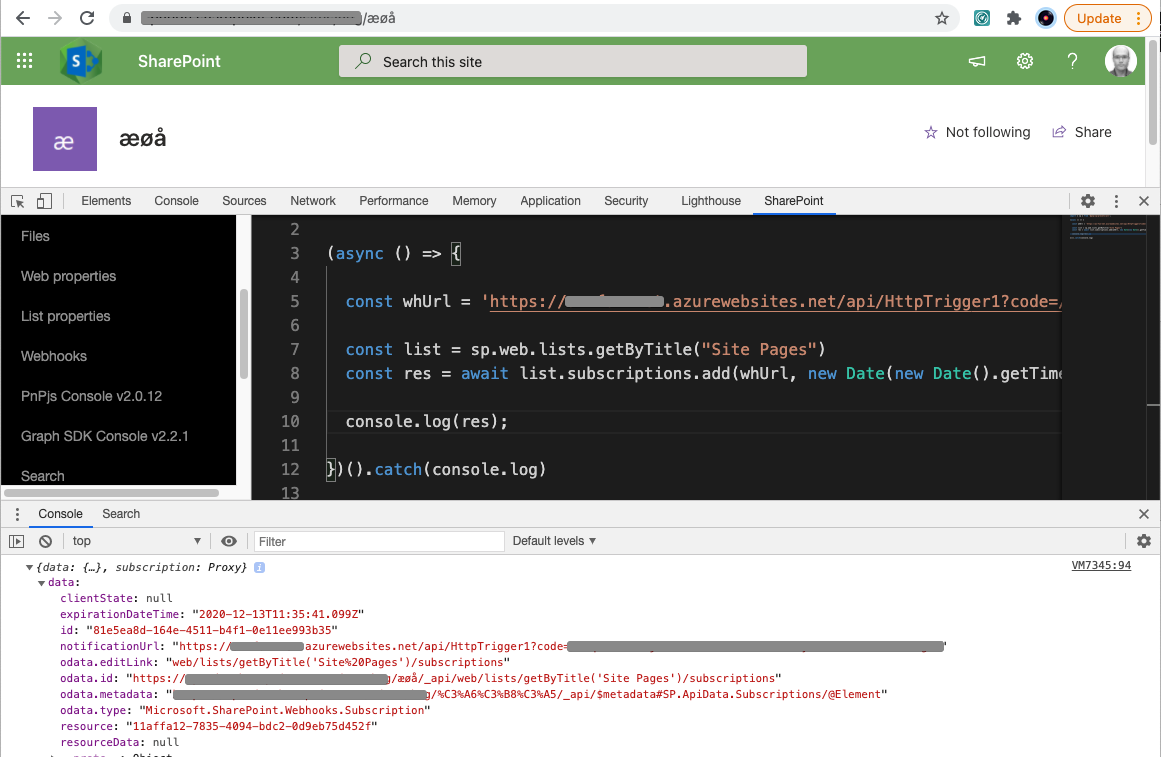
With sp.site.openWebById, also works.
koltyakov
on 13 Dec 2020
@koltyakov That is very strange. Could you try with a subsite with the url: "Balkan og Øst-Europa" ?
That is the exact site that keeps failing for me. I'm also using this library to do username/password authentication if it matters. I'm running from node and not inside a SharePoint site (this is part of an azure function).
rudfoss
on 13 Dec 2020
@koltyakov I tried running the exact same code in the SP Editor extension and it works there. Could there be a difference between this and @pnp/sp-commonjs which I'm using from node?
rudfoss
on 13 Dec 2020
Here is an exact copy of the file I'm using to test this:
import { spConnect } from "./sp/spConnect"
import { getConfig } from "./utils/getConfig"
import { sp } from "@pnp/sp-commonjs"
import addDate from "date-fns/add"

export const start = async () => {
    console.log("Getting config")
    const config = getConfig()

    console.log(`Setup SP Context to "${config.spSiteUrl}"`)
    spConnect({
        siteCollectionAbsoluteUrl: config.spSiteUrl,
        username: config.username,
        password: config.password
    })

    const { web } = await sp.site.openWebById("05a01ee4-8ab6-43ec-aa43-6fb7ab0db463")
    const list = web.lists.getByTitle("Områdesider")
    const expires = addDate(new Date(), {days: 1})
    const results = await list.subscriptions.add(config.listWebhookReceiverUrl, expires.toISOString())
    console.log("done", results)
}

start().catch(error => {
    console.error(error, error.stack)
    process.exit(1)
})
It might be my spConnect function that is causing issues as it uses username/password auth internally using node-sp-auth, but it has worked for every other API call I've done including breaking and restoring permission inheritance on items (which should also be POST requests if I'm not mistaken).
getConfig only reads configurations from the environment so it should not affect anything.
rudfoss
on 13 Dec 2020
No problem with Balkan og Øst-Europa as well.
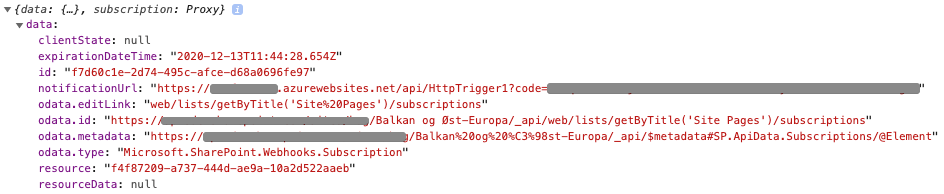
Also, tried from Node.js:
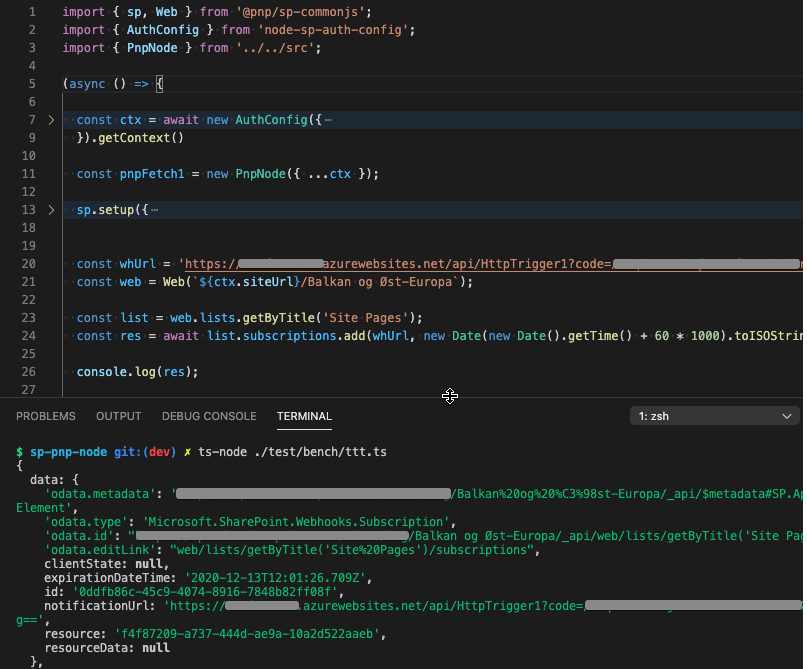
I have a bit different setup with authentication, thought also SAML and node-sp-auth.
koltyakov
on 13 Dec 2020
@koltyakov Thanks for your help so far! I still don't know what I'm doing wrong though...
I've tried it again now and it still does not work. I've also tried it with your Web([siteurl]) initializer call without any luck (same error).
Subsite url: /Balkan og Øst-Europa/Nord-Makedonia
List title: Områdesider
The list in question is the Site Pages list from a Norwegian localized SP site.
Here are the logs from the last run:
Getting config
Setup SP Context to "[SITE_URL]"
Message: [f65a3b65-b66e-4fee-8a1d-6a23b3e7667e] (1607861335320) Calling request pipeline method logStart.
Message: [f65a3b65-b66e-4fee-8a1d-6a23b3e7667e] (1607861335321) Beginning POST request (_api/site/openWebById('05a01ee4-8ab6-43ec-aa43-6fb7ab0db463')) Data: {"batch":null,"batchIndex":-1,"cachingOptions":null,"cloneParentCacheOptions":null,"cloneParentWasCaching":false,"hasResult":false,"isBatched":false,"method":"POST","options":{"headers":{"X-PnPjs-Tracking":"si.openWebById"}},"parentUrl":"_api/site","parser":{},"pipes":[null,null,null],"query":{},"requestId":"f65a3b65-b66e-4fee-8a1d-6a23b3e7667e","url":"_api/site/openWebById('05a01ee4-8ab6-43ec-aa43-6fb7ab0db463')","useCaching":false}
Message: [f65a3b65-b66e-4fee-8a1d-6a23b3e7667e] (1607861335321) Calling request pipeline method caching.
Message: [f65a3b65-b66e-4fee-8a1d-6a23b3e7667e] (1607861335322) Calling request pipeline method send.
Message: [f65a3b65-b66e-4fee-8a1d-6a23b3e7667e] (1607861335323) Sending request.
Message: [f65a3b65-b66e-4fee-8a1d-6a23b3e7667e] (1607861336791) Calling request pipeline method logEnd.
Message: [f65a3b65-b66e-4fee-8a1d-6a23b3e7667e] (1607861336793) Completing POST request. Data: {"batch":null,"batchIndex":-1,"cachingOptions":null,"cloneParentCacheOptions":null,"cloneParentWasCaching":false,"hasResult":true,"isBatched":false,"method":"POST","options":{"headers":{},"method":"POST","cache":"no-cache","credentials":"same-origin"},"parentUrl":"_api/site","parser":{},"pipes":[],"query":{},"requestId":"f65a3b65-b66e-4fee-8a1d-6a23b3e7667e","url":"_api/site/openWebById('05a01ee4-8ab6-43ec-aa43-6fb7ab0db463')","useCaching":false,"result":{"odata.metadata":"[SITE_URL]/_api/$metadata#SP.ApiData.Webs/@Element","odata.type":"SP.Web","odata.id":"[SITE_URL]/Balkan og Øst-Europa/Nord-Makedonia/_api/Web","odata.editLink":"[SITE_URL]/Balkan%20og%20%C3%98st-Europa/Nord-Makedonia/_api/Web","AllowRssFeeds":true,"AlternateCssUrl":"","AppInstanceId":"00000000-0000-0000-0000-000000000000","ClassicWelcomePage":null,"Configuration":3,"Created":"2020-02-15T13:07:16","CurrentChangeToken":{"StringValue":"1;2;05a01ee4-8ab6-43ec-aa43-6fb7ab0db463;637434581349370000;548317252"},"CustomMasterUrl":"[SITE_RELATIVE_URL]/Balkan og Øst-Europa/Nord-Makedonia/_catalogs/masterpage/seattle.master","Description":"","DesignPackageId":"00000000-0000-0000-0000-000000000000","DocumentLibraryCalloutOfficeWebAppPreviewersDisabled":false,"EnableMinimalDownload":false,"FooterEmphasis":0,"FooterEnabled":false,"FooterLayout":0,"HeaderEmphasis":3,"HeaderLayout":2,"HideTitleInHeader":false,"HorizontalQuickLaunch":false,"Id":"05a01ee4-8ab6-43ec-aa43-6fb7ab0db463","IsHomepageModernized":false,"IsMultilingual":true,"IsRevertHomepageLinkHidden":false,"Language":1044,"LastItemModifiedDate":"2020-12-13T12:07:30Z","LastItemUserModifiedDate":"2020-12-13T12:07:30Z","LogoAlignment":0,"MasterUrl":"[SITE_RELATIVE_URL]/Balkan og Øst-Europa/Nord-Makedonia/_catalogs/masterpage/seattle.master","MegaMenuEnabled":false,"NavAudienceTargetingEnabled":false,"NoCrawl":false,"ObjectCacheEnabled":false,"OverwriteTranslationsOnChange":false,"ResourcePath":{"DecodedUrl":"[SITE_URL]/Balkan og Øst-Europa/Nord-Makedonia"},"QuickLaunchEnabled":true,"RecycleBinEnabled":true,"SearchScope":0,"ServerRelativeUrl":"[SITE_RELATIVE_URL]/Balkan og Øst-Europa/Nord-Makedonia","SiteLogoUrl":null,"SyndicationEnabled":true,"TenantAdminMembersCanShare":0,"Title":"Makedonia","TreeViewEnabled":false,"UIVersion":15,"UIVersionConfigurationEnabled":false,"Url":"[SITE_URL]/Balkan og Øst-Europa/Nord-Makedonia","WebTemplate":"STS","WelcomePage":"SitePages/Home.aspx"}}
Message: [f65a3b65-b66e-4fee-8a1d-6a23b3e7667e] (1607861336794) Returning result from pipeline. Set logging to verbose to see data. Data: {"odata.metadata":"[SITE_URL]/_api/$metadata#SP.ApiData.Webs/@Element","odata.type":"SP.Web","odata.id":"[SITE_URL]/Balkan og Øst-Europa/Nord-Makedonia/_api/Web","odata.editLink":"[SITE_URL]/Balkan%20og%20%C3%98st-Europa/Nord-Makedonia/_api/Web","AllowRssFeeds":true,"AlternateCssUrl":"","AppInstanceId":"00000000-0000-0000-0000-000000000000","ClassicWelcomePage":null,"Configuration":3,"Created":"2020-02-15T13:07:16","CurrentChangeToken":{"StringValue":"1;2;05a01ee4-8ab6-43ec-aa43-6fb7ab0db463;637434581349370000;548317252"},"CustomMasterUrl":"[SITE_RELATIVE_URL]/Balkan og Øst-Europa/Nord-Makedonia/_catalogs/masterpage/seattle.master","Description":"","DesignPackageId":"00000000-0000-0000-0000-000000000000","DocumentLibraryCalloutOfficeWebAppPreviewersDisabled":false,"EnableMinimalDownload":false,"FooterEmphasis":0,"FooterEnabled":false,"FooterLayout":0,"HeaderEmphasis":3,"HeaderLayout":2,"HideTitleInHeader":false,"HorizontalQuickLaunch":false,"Id":"05a01ee4-8ab6-43ec-aa43-6fb7ab0db463","IsHomepageModernized":false,"IsMultilingual":true,"IsRevertHomepageLinkHidden":false,"Language":1044,"LastItemModifiedDate":"2020-12-13T12:07:30Z","LastItemUserModifiedDate":"2020-12-13T12:07:30Z","LogoAlignment":0,"MasterUrl":"[SITE_RELATIVE_URL]/Balkan og Øst-Europa/Nord-Makedonia/_catalogs/masterpage/seattle.master","MegaMenuEnabled":false,"NavAudienceTargetingEnabled":false,"NoCrawl":false,"ObjectCacheEnabled":false,"OverwriteTranslationsOnChange":false,"ResourcePath":{"DecodedUrl":"[SITE_URL]/Balkan og Øst-Europa/Nord-Makedonia"},"QuickLaunchEnabled":true,"RecycleBinEnabled":true,"SearchScope":0,"ServerRelativeUrl":"[SITE_RELATIVE_URL]/Balkan og Øst-Europa/Nord-Makedonia","SiteLogoUrl":null,"SyndicationEnabled":true,"TenantAdminMembersCanShare":0,"Title":"Makedonia","TreeViewEnabled":false,"UIVersion":15,"UIVersionConfigurationEnabled":false,"Url":"[SITE_URL]/Balkan og Øst-Europa/Nord-Makedonia","WebTemplate":"STS","WelcomePage":"SitePages/Home.aspx"}
Message: [0c330040-79cb-47a8-947a-0149ad988266] (1607861336806) Calling request pipeline method logStart.
Message: [0c330040-79cb-47a8-947a-0149ad988266] (1607861336807) Beginning POST request ([SITE_URL]/Balkan og Øst-Europa/Nord-Makedonia/_api/web/lists/getByTitle('Omr%C3%A5desider')/subscriptions) Data: {"batch":null,"batchIndex":-1,"cachingOptions":null,"cloneParentCacheOptions":null,"cloneParentWasCaching":false,"hasResult":false,"isBatched":false,"method":"POST","options":{"headers":{"X-PnPjs-Tracking":"subs.add","Content-Type":"application/json"},"body":"{\"expirationDateTime\":\"2020-12-14T12:08:56.803Z\",\"notificationUrl\":\"[NOTIFICATION_URL]\",\"resource\":\"[SITE_URL]/Balkan og Øst-Europa/Nord-Makedonia/_api/web/lists/getByTitle('Omr%C3%A5desider')/subscriptions\"}"},"parentUrl":"[SITE_URL]/Balkan og Øst-Europa/Nord-Makedonia/_api/web/lists/getByTitle('Omr%C3%A5desider')","parser":{},"pipes":[null,null,null],"query":{},"requestId":"0c330040-79cb-47a8-947a-0149ad988266","url":"[SITE_URL]/Balkan og Øst-Europa/Nord-Makedonia/_api/web/lists/getByTitle('Omr%C3%A5desider')/subscriptions","useCaching":false}
Message: [0c330040-79cb-47a8-947a-0149ad988266] (1607861336808) Calling request pipeline method caching.
Message: [0c330040-79cb-47a8-947a-0149ad988266] (1607861336809) Calling request pipeline method send.
Message: [0c330040-79cb-47a8-947a-0149ad988266] (1607861336809) Sending request.
Message: Error making HttpClient request in queryable [404] Not Found ::>  Data: {"response":{"size":0,"timeout":0},"status":404,"statusText":"Not Found","isHttpRequestError":true}
Error: Error making HttpClient request in queryable [404] Not Found ::>
    at new HttpRequestError (c:\projects\ldb\packages\odata\parsers.ts:133:9)
    at Function.<anonymous> (c:\projects\ldb\packages\odata\parsers.ts:139:16)
    at step (c:\projects\ldb\azure-jobs\node_modules\tslib\tslib.js:140:27)
    at Object.next (c:\projects\ldb\azure-jobs\node_modules\tslib\tslib.js:121:57)
    at fulfilled (c:\projects\ldb\azure-jobs\node_modules\tslib\tslib.js:111:62)
    at processTicksAndRejections (internal/process/task_queues.js:97:5) {
  response: Response {
    size: 0,
    timeout: 0,
    [Symbol(Body internals)]: { body: [PassThrough], disturbed: false, error: null },
    [Symbol(Response internals)]: {
      url: '[SITE_URL]/Balkan%20og%20Øst-Europa/Nord-Makedonia/_api/web/lists/getByTitle(%27Omr%C3%A5desider%27)/subscriptions',
      status: 404,
      statusText: 'Not Found',
      headers: [Headers]
    }
  },
  status: 404,
  statusText: 'Not Found',
  isHttpRequestError: true
} Error: Error making HttpClient request in queryable [404] Not Found ::>
    at new HttpRequestError (c:\projects\ldb\packages\odata\parsers.ts:133:9)
    at Function.<anonymous> (c:\projects\ldb\packages\odata\parsers.ts:139:16)
    at step (c:\projects\ldb\azure-jobs\node_modules\tslib\tslib.js:140:27)
    at Object.next (c:\projects\ldb\azure-jobs\node_modules\tslib\tslib.js:121:57)
    at fulfilled (c:\projects\ldb\azure-jobs\node_modules\tslib\tslib.js:111:62)
    at processTicksAndRejections (internal/process/task_queues.js:97:5)
I really have no additional clues, tried recreating the same names for list and subsite, and those worked for me in a browser and Node with common-js and preset.
What if you created a new test site or checked the same exact code you use on a different test tenant?
What if you rip off the URL from the log which ended up with 404 and put it into a browser will it lead to page not found error?
koltyakov
on 13 Dec 2020
Ok, thanks for helping me out this far. I really appreciate it.
I have no further ideas myself either. I've tried the URL in the browser, but there are so many security mechanisms on top of SharePoint it's almost impossible to actually get a plain POST request to function. The GET request on the same URL works fine in a browser though.
rudfoss
on 13 Dec 2020
In any case, I guess this can be closed as there does not seem to be an issue with the lib after all.
rudfoss
on 13 Dec 2020
Tried a couple of more things if anyone comes looking at this again:
- Creating a new site under the same parent as the other.
- Creating a brand new site collection using the team site template as well as subsites to match the url
/Balkan og Øst-Europa/Nord-Makedonia
All result in the same error when trying to add subscriptions
I also tried creating a brand new site collection using the Team Site template with subsites matching the url except replacing the Ø with an O and then it works! This HAS to be a problem with how the URL is parsed in some way. The exact code works without issues.
Url: /Balkan og Ost-Europa/Nord-Makedonia
Every site is using language: Norwegian
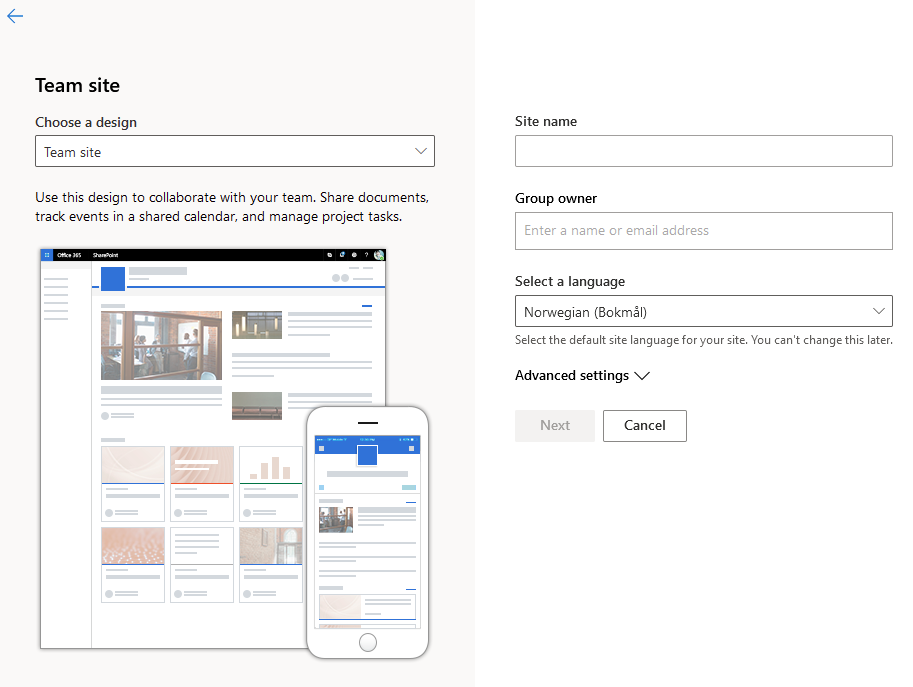
rudfoss
on 13 Dec 2020
@koltyakov I know I have no right to ask you, but could you try one more thing to reproduce it?
Create a new Team Site named
language-test-1with "Norwegian" as language.

Create a subsite below the root site named
Balkan og Øst-Europawith these exact settings:
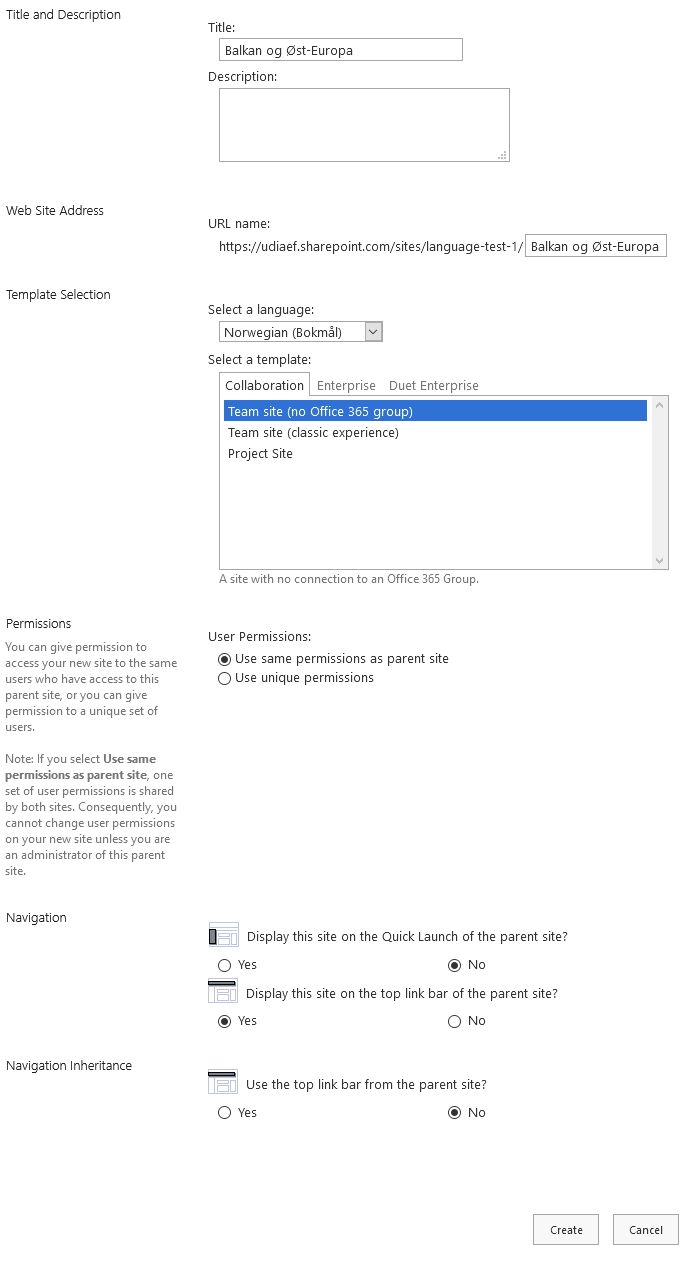
Create a subsite below the new
Balkan og Øst-Europasite namedNord-Makedoniawith these exact settings:
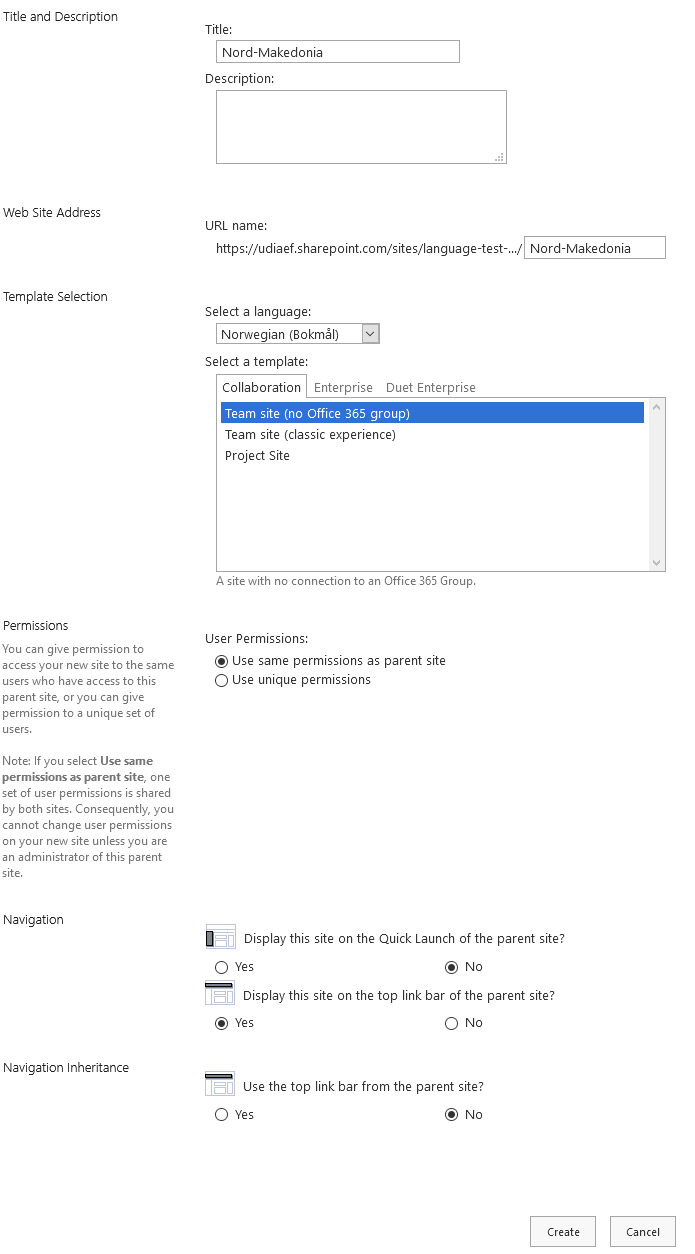
Run this code (swapping in your context info):
import { getConfig } from "./utils/getConfig"
import { spConnect } from "./sp/spConnect"
import { Web } from "@pnp/sp-commonjs"

export const start = async () => {
    console.log("Getting config")
    const config = getConfig()

    console.log(`Setup SP Context to "${config.spSiteUrl}"`)
    spConnect({
        siteCollectionAbsoluteUrl: config.spSiteUrl,
        username: config.username,
        password: config.password
    })

    const web = Web(`${config.spSiteUrl}/Balkan og Øst-Europa/Nord-Makedonia`)
    const list = web.lists.getByTitle("Områdesider")
    await list.subscriptions.get()
    console.log("--->list subs worked<---")

    const expires = new Date(new Date().getTime() + 1000 * 60)
    const results = await list.subscriptions.add(config.listWebhookReceiverUrl, expires.toISOString())
    console.log("results", results)
}

start().catch(error => {
    console.error(error, error.stack)
    process.exit(1)
})
This is a clean, new SP site without any custom extensions or configuration and it still fails with a 404 error for me. Could there be a problem with my tenant?
rudfoss
on 13 Dec 2020
I obviously can't run the code you've provided, as I have no spConnect and other helpers. But I run it with my setup and following mentioned steps regarding localization and naming and sub-sites structure, also tweaked the cod a bit to see the subscription had been added:
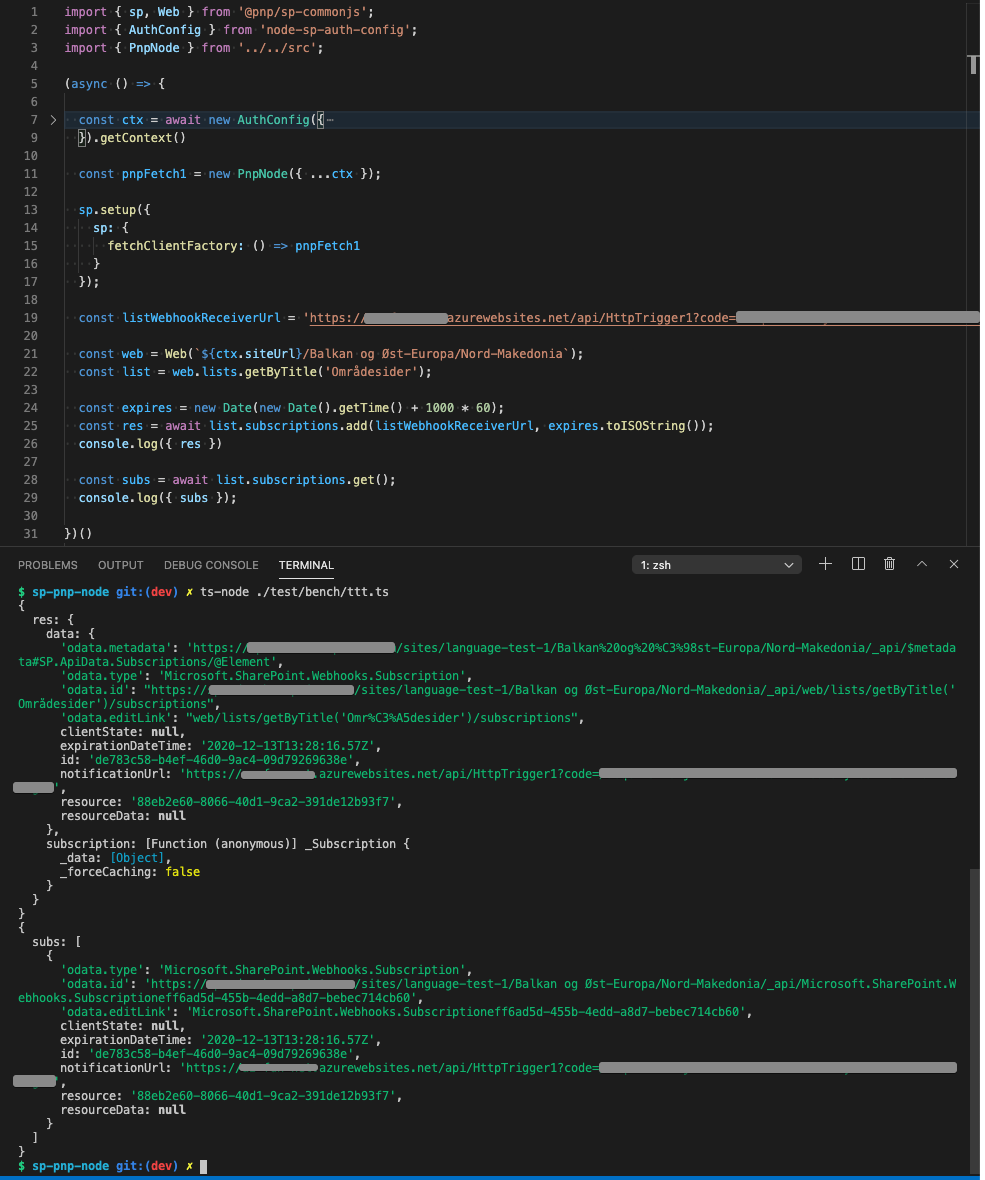
koltyakov
on 13 Dec 2020
@koltyakov Thanks for testing it! I get that you cannot run the exact same code. Since this is still not working for me and everything except the sp.setup call is the same I'll try to change that instead. I'll post the result here without tagging you so I don't bug you anymore.
Thanks again for helping me debug this.
rudfoss
on 13 Dec 2020
So, swapping out my own auth with PnpNode seems to have done the trick. I still don't know why my code breaks, but using PnpNode solves it. Here is how I set up authentication:
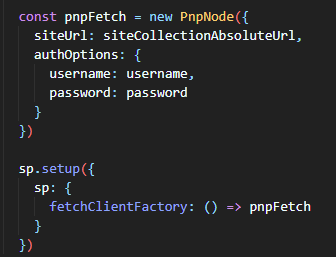
rudfoss
on 13 Dec 2020
Strange that it wasn't 401/403 but 404 anyway.
koltyakov
on 13 Dec 2020
Related issues
 simonagren
·
3Comments
simonagren
·
3Comments
 drewcook
·
3Comments
drewcook
·
3Comments
 SpliceVW
·
3Comments
SpliceVW
·
3Comments
 jcosta33
·
3Comments
jcosta33
·
3Comments
 DennisGaida
·
3Comments
DennisGaida
·
3Comments