Thank you for reporting an issue, suggesting an enhancement, or asking a question. We appreciate your feedback - to help the team understand your
needs please complete the below template to ensure we have the details to help. Thanks!
Please check out the Docs to see if your question is already addressed there. This will help us ensure our documentation covers the most frequent questions.
Category
- [ ] Enhancement
- [ ] Bug
- [X] Question
- [ ] Documentation gap/issue
Version
Please specify what version of the library you are using: [ 2.0.2 ]
Please specify what version(s) of SharePoint you are targeting: [ SPO ]
If you are not using the latest release, please update and see if the issue is resolved before submitting an issue.
Expected / Desired Behavior / Question
I developed a Carousal webpart on React reusable control with PNP, the webpart is loading correctly in Chrome but not working in IE11.
Observed Behavior
The webpart is giving 2 Types of error -
- Failed to load entry point from component "4bf426d8-dc35-401c-8db1-dc086d96186e" (CarousalWebPart). Original error: Error loading https://component-id.invalid/4bf426d8-dc35-401c-8db1-dc086d96186e_0.0.1
Object doesn't support property or method 'defineProperty' - Cannot load Primitive type..
Steps to Reproduce
I included polyfill as explained but still the webpart is not loading in IE11
Submission Guidelines
Thank you for your feedback!
 NamrataSah9
All 17 comments
I'm assuming that you have also set ie11:true in setup -- for reference: https://github.com/pnp/pnpjs/issues/941
 juliemturner
on 28 Sep 2020
juliemturner
on 28 Sep 2020
Hi Julie,
Yes, I have set the ie11 property.
NamrataSah9
on 28 Sep 2020
Unfortunately, I'm not sure what else to tell you to do. I suspect you are using or have some other issue with your code. Please see our statement General Statement on Polyfills for a more complete answer. You might try individually importing the polyfills instead of using the bundle.
juliemturner
on 28 Sep 2020
defineProperty is probably Reflect which is included in our list of required polyfills.
 patrick-rodgers
on 28 Sep 2020
patrick-rodgers
on 28 Sep 2020
Yes, sometimes it's giving Reflect package is missing...but in PNP V1 it's
included under 'es' folder.
On Mon, 28 Sep, 2020, 6:39 PM Patrick Rodgers, notifications@github.com
wrote:
defineProperty is probably Reflect which is included in our list of
required polyfills.—
You are receiving this because you authored the thread.
Reply to this email directly, view it on GitHub
https://github.com/pnp/pnpjs/issues/1392#issuecomment-699995831, or
unsubscribe
https://github.com/notifications/unsubscribe-auth/ARFGUSWSFTAPJXOY3IXXRLLSICDI3ANCNFSM4R3W54FA
.
NamrataSah9
on 28 Sep 2020
If this is only happening sometimes you might have a race condition and would need to ensure the polyfills are loaded before the other code is run in all cases. V1 and V2 are different code bases so what was in v1 won't necessarily be in v2 the same way.
patrick-rodgers
on 28 Sep 2020
The issue is happening all the time but sometimes it give Reflect not found
and rest of the times it give cannot find primitive type..I tried with what
you said importing polyfill as first import in .ts file but that time it
gave primitive type cannot be found but on reloading the page it loads the
webpart correctly. Very strange.
On Mon, 28 Sep, 2020, 6:44 PM Patrick Rodgers, notifications@github.com
wrote:
If this is only happening sometimes you might have a race condition and
would need to ensure the polyfills are loaded before the other code is run
in all cases. V1 and V2 are different code bases so what was in v1 won't
necessarily be in v2 the same way.—
You are receiving this because you authored the thread.
Reply to this email directly, view it on GitHub
https://github.com/pnp/pnpjs/issues/1392#issuecomment-699998406, or
unsubscribe
https://github.com/notifications/unsubscribe-auth/ARFGUSQUVG6Y32C7MBNL4UDSICD2HANCNFSM4R3W54FA
.
NamrataSah9
on 28 Sep 2020
I see that you are using version 2.0.2, did you try upgrading to a more recent version?
I remember that the polyfill for Reflect was not in the library initially, it was added by @patrick-rodgers after I reported the issue.
 PathToSharePoint
on 28 Sep 2020
PathToSharePoint
on 28 Sep 2020
2.0.2 is the latest version of the @pnp/polyfill-ie11 package.
juliemturner
on 28 Sep 2020
How to load the polyfill library before anything else?
On Mon, 28 Sep, 2020, 9:52 PM Julie Turner, notifications@github.com
wrote:
2.0.2 is the latest version of the @pnp/polyfill-ie11 package.
—
You are receiving this because you authored the thread.
Reply to this email directly, view it on GitHub
https://github.com/pnp/pnpjs/issues/1392#issuecomment-700139718, or
unsubscribe
https://github.com/notifications/unsubscribe-auth/ARFGUSUKHMDFZCA5KLWCWFTSICZ3ZANCNFSM4R3W54FA
.
NamrataSah9
on 28 Sep 2020
Thanks @juliemturner for confirming the version.
(line removed)
Could you tell us more about your implementation? Are you using the control as is?
@patrick-rodgers and @juliemturner : I looked at the source code and there's something that doesn't look right to me: initializeIcons is in the middle of the import statements.
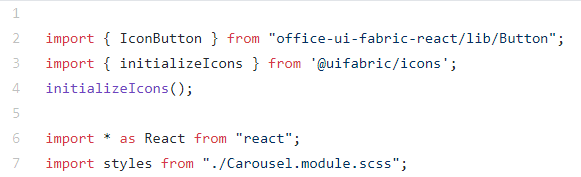
What do you think?
PathToSharePoint
on 28 Sep 2020
@NamrataSah9 I did a quick test of the carousel, without images, and got the Web Part to render in IE11 without error.
What I did:
- Import the polyfill as the very first line in the code

- In the Web Part Component itself:
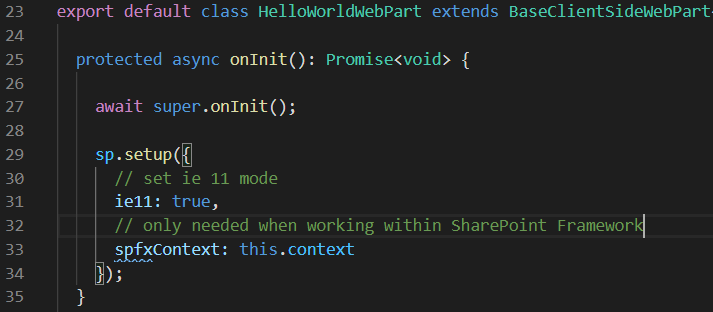
The important part is to have the polyfill at the very top.
PathToSharePoint
on 29 Sep 2020
Yes I did both, once I place polyfill at line 1, it gives error for the
first time but when I refresh it, the webpart opens.
On Tue, 29 Sep, 2020, 10:23 AM PathToSharePoint, notifications@github.com
wrote:
@NamrataSah9 https://github.com/NamrataSah9 I did a quick test of the
carousel, without images, and got the Web Part to render in IE11:What I did:
1.
Import the polyfill as the very first line in the code
[image: image]
https://user-images.githubusercontent.com/40323257/94513867-a9e53f00-01d4-11eb-8dee-3d50de8050f9.png
2.In the Web Part Component itself:
[image: image]
https://user-images.githubusercontent.com/40323257/94513929-c97c6780-01d4-11eb-9358-4c70f8bd757a.pngThe important part is to have the polyfill at the very top.
—
You are receiving this because you were mentioned.
Reply to this email directly, view it on GitHub
https://github.com/pnp/pnpjs/issues/1392#issuecomment-700425203, or
unsubscribe
https://github.com/notifications/unsubscribe-auth/ARFGUST4BYB7SWKNOFWCRU3SIFR3PANCNFSM4R3W54FA
.
NamrataSah9
on 29 Sep 2020
Sorry, I missed that part in your earlier message. I didn't pay attention the first time but I am actually seeing the same issue.
I tried to add a React polyfill ("react-app-polyfill") but that didn't make any difference.
Considering that it only happens the first time, and works fine on refreshes, I would bet on a race condition during initialization, just as @patrick-rodgers said. Or maybe an issue with an element that is only used during initialization, such as a spinner. At this point I would suggest to check with the author of the widget on IE11 support.
PathToSharePoint
on 29 Sep 2020
I did a couple more tests with interesting results.
I completely removed the polyfill and all references to pnpjs, and the widget loaded without error. Then I re-added the polyfill, without pnpjs, and got the error.
So it seems to me that there's a compatibility issue between the polyfill and the widget. And that pnpjs itself has nothing to do with the issue.
PathToSharePoint
on 29 Sep 2020
If you go back and review our General Statement on Polyfills you can see a completely listing of the polyfills the package provides. You can do selective imports with the polyfill package and I would suggest doing so as I often find that I cannot use the core-js/stable/symbol polyfill because it conflicts with something else on the page.
juliemturner
on 29 Sep 2020
Closing this issue as answered. If you have additional questions or we did not answer your question, please open a new issue, ref this issue, and provide any additional details available. Thank you!
patrick-rodgers
on 9 Oct 2020
Related issues
 SpliceVW
·
3Comments
SpliceVW
·
3Comments
 Holden15
·
3Comments
Holden15
·
3Comments
 alirobe
·
3Comments
alirobe
·
3Comments
 ITAndy23
·
3Comments
ITAndy23
·
3Comments
 drewcook
·
3Comments
drewcook
·
3Comments
Most helpful comment
2.0.2 is the latest version of the @pnp/polyfill-ie11 package.