Pnpjs: By setting sp headers to accept application/json the result is still xml
Category
- [ ] Enhancement
- [X] Bug
- [ ] Question
- [ ] Documentation gap/issue
Version
Please specify what version of the library you are using: [ 2.0.8 ]
Please specify what version(s) of SharePoint you are targeting: [ 2019 ]
Expected / Desired Behavior / Question
Adding an item to a list completes successfull
Observed Behavior
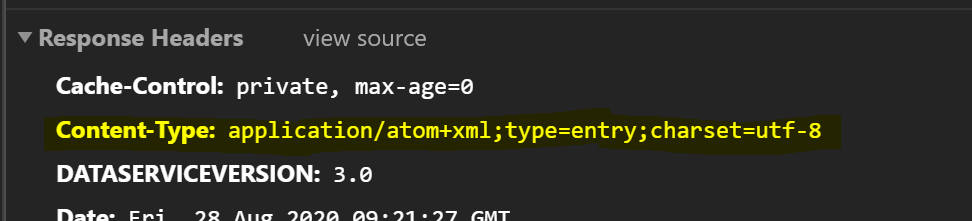
parsers.js:22 Uncaught (in promise) SyntaxError: Unexpected token < in JSON at position 0
at JSON.parse (
at parsers.js:22

Steps to Reproduce
sp.setup({
  ie11: false,
  sp: {
    baseUrl: "<URL>",
    headers: {
      Accept: "application/json; odata=minimalmetadata",
      "Content-Type": "application/json",
    }
  },
  spfxContext: this.context,
});
 bclevering
All 6 comments
This problem is on the Microsoft Edge (Version 84.0.522.63 and 85.0.564.41) browser. If i use Google Chrome this isn't an issue...
bclevering
on 28 Aug 2020
If you don't set anything except the context in the config does it work as expected? The fact it works in one browser but not another makes me think it isn't something with the library. What if you remove the "Content-Type" header? We are using this: "application/json;odata=verbose;charset=utf-8" by default.
 patrick-rodgers
on 1 Sep 2020
patrick-rodgers
on 1 Sep 2020
@patrick-rodgers
if i use:
_sp.setup({
ie11: false,
sp: {
headers: {
"Accept": "application/json;odata=verbose;charset=utf-8",
"Content-Type": "application/json",
}
},
spfxContext: this.context,
});_
it doesn't work for Edge but it is still working for Chrome.
If i remove the Content-Type and/or the Accept header:
_sp.setup({
ie11: false,
spfxContext: this.context,
});_
The request doesn't work on Chrome and Edge.
The strange thing is if i remove everything except the context the call that is crashing is the /_api/web/currentuser request (this one is translated to xml) if i add the options of above then the /_api/web/currentuser request is correct but then the "/_api/web/lists/getByTitle" request is translated to xml...
bclevering
on 2 Sep 2020
i've written the whole procedure completly in code and then it works on Edge and Chrome.
bclevering
on 4 Sep 2020
Unsure on "i've written the whole procedure completely in code" but the issues you are reporting are ones we aren't able to reproduce. The library processes billions of requests a month across many browsers - unsure what might be wrong here. Do you have anything locally in your network or other configuration that may change these behaviors? If you test the same calls against SPO do they work as expected?
If you look at the response in the browser tools - what does it look like? Is it the data just in xml format - or is it something else like an error page or other type of response?
patrick-rodgers
on 4 Sep 2020
i've completly written out the functionality to create a list item (obtaining ListItemEntityTypeFullName, getting the formdigest and then adding an item to a list) if i use this funcionality it's working correctly...
if i then use the functionality of the PnPJS library:
_const iar: IItemAddResult = await sp.web.lists.getByTitle("My List").items.add({
Title: "Title",
Description: "Description"
});_
then it crashes on the obtaining the ListItemEntityTypeFullName with the error i described above. The xml is the XML output of the request with the ListItemEntityFullName.
for now it's "fixed" because the code is now working....
bclevering
on 4 Sep 2020
Related issues
 bogeorge
·
3Comments
bogeorge
·
3Comments
 un-dres
·
3Comments
un-dres
·
3Comments
 jcosta33
·
3Comments
jcosta33
·
3Comments
 AJIXuMuK
·
3Comments
AJIXuMuK
·
3Comments
 alirobe
·
3Comments
alirobe
·
3Comments