Pnpjs: Diacritics (characters like á) not working when uploading file to Document Library
Category
- [ ] Enhancement
- [ ] Bug
- [X] Question
- [ ] Documentation gap/issue
Version
Please specify what version of the library you are using: [ 2.0.2 ]
Please specify what version(s) of SharePoint you are targeting: [ Online ]
Expected / Desired Behavior / Question
I convert json object to csv and upload to sharepoint using pnpjs add method.
The content of the json object contains diacritics (alpha characters with glyphs attached like á)
Observed Behavior
The file is uploaded correctly but:
When I preview the csv (excel online) in sharepoint the diacritic is garbled.
When I download and view in excel desktop the diacritic is garbled.
Also observed:
- When I open downloaded file via notepad++ the diacritic is fine.
- If I create a csv containing diacritic content on my desktop and upload manually then it renders fine.
Steps to Reproduce
const folder = folders.getByName(itemId);
await folder.files .add(`attachment.csv`, content)
and tried below thinking changing the content type might help, but it hasn't:
const folder = folders.getByName(itemId);
await folder.files
        .configure({
            headers: {
                "Content-Type": "text/csv;charset=utf-8"
            }
        })
        .add(`attachment.csv`, content)
Payload looks ok.

Result in excel preview:
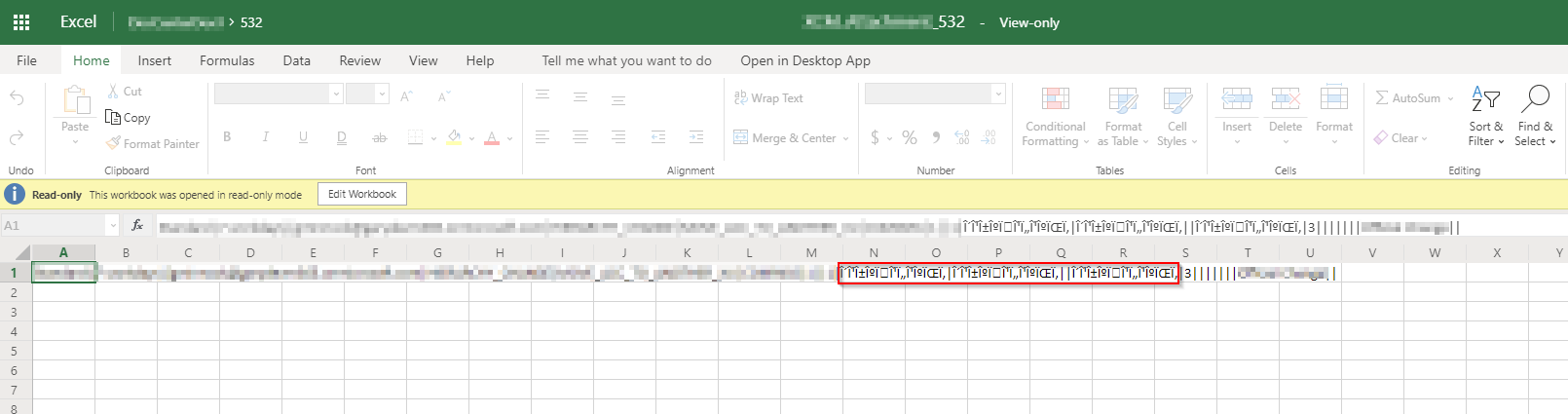
Question: I am thinking this is some kind of encoding issue. Is there some way to correct this?
Thanks!
 gbminnock
All 4 comments
Your issue is really not related to the library, as you've already outlined the issue is with the content-type most likely or some other aspect of the header... I apologize but I don't recognize the language, is it possible that the charset isn't supposed to be UTF-8?
 juliemturner
on 27 Jul 2020
juliemturner
on 27 Jul 2020
@gbminnock What is interesting, is that when you download file and open in Notepad++, it works.
On Excel desktop, when opening CSV file, the wizard allows to specify encoding to use when opening CSV file. Isn't possible that Excel CSV-loading logic is somehow garbling the file encoding? (Probably by trying to be too smart...)
Maybe you could try to replicate this issue with uploading just .txt and/or arbitrary .bin file with binary characters and then download it. This would separate whether the issue is in PNPJS library or whether it is in Excel opener (the later would be my bet).
 michal-kocarek
on 27 Jul 2020
michal-kocarek
on 27 Jul 2020
Hi @juliemturner and @michal-kocarek , thank you for your feedback.
The specific use-case is Dutch, but the one I referenced is from wikipedia.
I have tried a couple of things since:
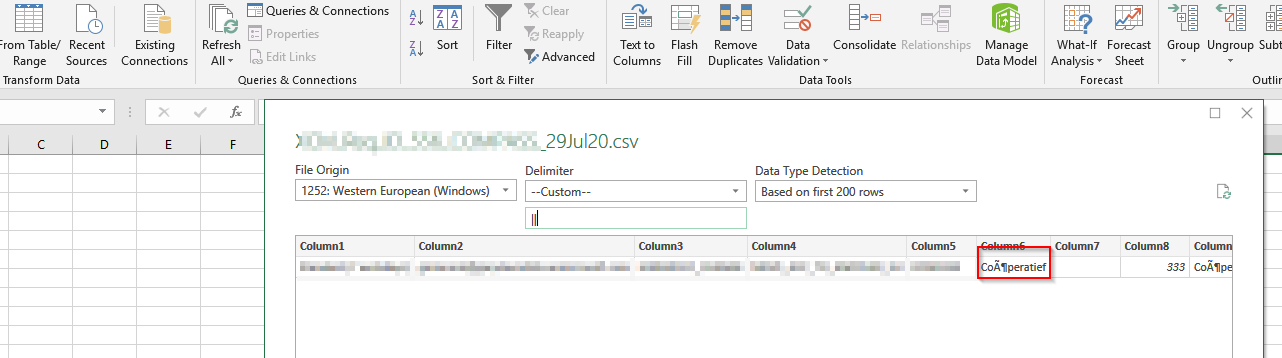
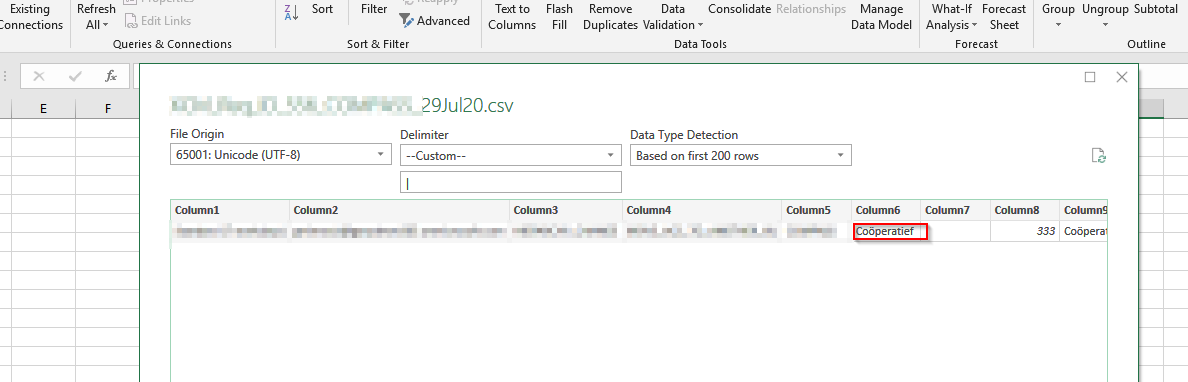
Instead of double clicking on the csv, I imported the csv. It shows a wizard asking which encoding you would like to use. The default option is 1252: Western European (Windows) - this doesnt decode correctly. If I choose UTF-8 then it decodes correctly. I've captured in the screenshots below:
1252:Western European
UTF
@michal-kocarek I tried your suggestion and used a txt file extension and it renders correctly in sharepoint:
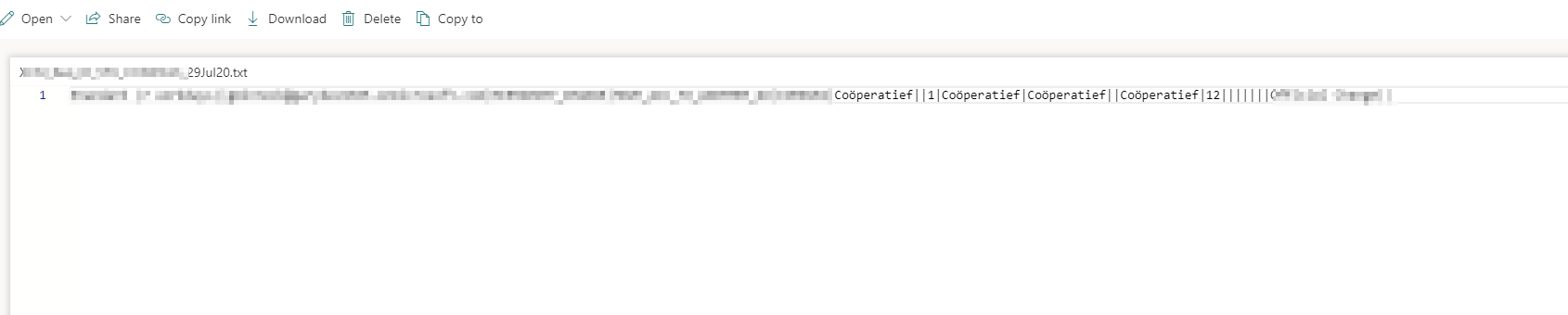
So at the moment it does look like Excel is the issue here and is not choosing utf as the encoding. This might be acceptable to users.
Thanks again.
Gary
gbminnock
on 29 Jul 2020
Hi all,
I got the sorted in the end by pre-pending \uFEFF to the content of the csv from following advice on this thread: https://stackoverflow.com/questions/155097/microsoft-excel-mangles-diacritics-in-csv-files
Basically adding the BOM allows excel to correctly identify the file encoding.
Thanks again,
Gary
gbminnock
on 29 Jul 2020
Related issues
 AJIXuMuK
·
3Comments
AJIXuMuK
·
3Comments
 KieranDaviesV
·
3Comments
KieranDaviesV
·
3Comments
 ahsanranjha
·
3Comments
ahsanranjha
·
3Comments
 SpliceVW
·
3Comments
SpliceVW
·
3Comments
 jcosta33
·
3Comments
jcosta33
·
3Comments