- [x] Question
Please specify what version of the library you are using: [ 1.3.8 ]
Please specify what version(s) of SharePoint you are targeting: [ 2013 and online ]
It seems that renderListDataAsStream is the only way of paging through all the items that are stored in a given folder (see #890). getPaged on a filter of items doesn't work, and I want to get around the 5000 item query limit.
However, there seems to be no way to get the next page in the data stream.
I'm trying to find a surefire way of recursively walking sharepoint folders starting at the root folder, one level at a time (so I can ignore folders I don't care about). I would like to get the item ids while walking, because the ways to work with the UUIDs in sharepoint are too limited.
 wmertens
All 7 comments
So basically you have something like (below), but have more than 5000 items and want to page through them? I haven't tried it specifically with the RenderListDataAsStream but I suspect it would work the same way as @sympmarc shows in his blog post Yes, Virginia, You Can Get More than 5000 SharePoint Items with REST
var allPages: IPageProperties[] = [];
const viewXml = `<View Scope='RecursiveAll'><ViewFields><FieldRef Name='ID'/>....</ViewFields><Query></Query></View>`;
const viewUrl = `${this._context.pageContext.site.absoluteUrl}/_api/web/Lists/GetById('${this._sitePagesLibraryId}')/RenderListDataAsStream`;
const body = { "parameters": { "RenderOptions": 0, "ViewXml": viewXml } };

var fieldOptions = {
  headers: { Accept: "application/json;odata.metadata=none" },
  body: JSON.stringify(body)
};

let response = await this._context.spHttpClient.post(viewUrl, SPHttpClient.configurations.v1, fieldOptions);
 juliemturner
on 12 Jun 2020
juliemturner
on 12 Jun 2020
Right, with the difference being that if I use render...Stream, I get back an object with 30 rows (seems like default page size) something like __next but not a full URL, just a query parameter. (Not at my computer right now to check)
Since this library is Fluent, I would expect to be able to call a method on the result to get the next 30 items.
Failing that, explaining how to use the authenticated fetch client to grab the next page would be useful too.
wmertens
on 12 Jun 2020
So I hear you but everything we're discussing has nothing to do with pnpjs, you're really talking about using the SharePoint API so this discussion isn't really valid for here, and because of that, I'm going to close it.
Suffice it to say I suggest you look into changing the definition of the view, because there is a way to specify the number of records it returns and then review that blog post and see if you can find others who have blogged or written about using RenderListDataAsStream. Best of luck!
juliemturner
on 12 Jun 2020
Actually, I'm using the PNP library exclusively, and using the SharePoint API directly is therefore a lot more difficult, since PNP hides all the details.
Here's how I call it
$ node -r @babel/register --experimental-repl-await
[... set up w to be a PNP Web]

> l=w.lists.getByTitle('Documents')
List {
  _query: Map {},
  _options: { headers: {} },
  _url: "https://mysite.sharepoint.com/sites/mysite/_api/web/lists/getByTitle('Documents')",
  _parentUrl: 'https://mysite.sharepoint.com/sites/mysite/_api/web/lists',
  _useCaching: false,
  _cachingOptions: null,
  _cloneParentWasCaching: false,
  _cloneParentCacheOptions: null,
  _requestPipeline: null,
  _batch: null,
  _batchDependency: null,
  _forceCaching: false
}
> f=await l.rootFolder.get()
> i=await l.renderListDataAsStream({ViewXml:'',FolderServerRelativeUrl:f.ServerRelativeUrl})
This results in the plain object i with keys
> Object.keys(i).map(k =>`${k}: ${typeof i[k]}`)
[
  'Row: object',
  'FirstRow: number',
  'FolderPermissions: string',
  'LastRow: number',
  'RowLimit: number',
  'NextHref: string',
  'FilterLink: string',
  'ForceNoHierarchy: string',
  'HierarchyHasIndention: string',
  'CurrentFolderSpItemUrl: string'
]
and I don't know how to use
> i.NextHref
'?Paged=TRUE&p_SortBehavior=1&p_FileLeafRef=Zdj%c4%99cia%20daszk%c3%b3w%20PAL&p_ID=482&RootFolder=%2fsites%2fmysite%2fShared%20Documents&PageFirstRow=31&View=72f373e8-c0ca-4c11-b1ef-7d418eed34b8'
So my question is, how do I use PNP to get the next set of results?
wmertens
on 12 Jun 2020
@juliemturner is the previous comment sufficient reason to reopen?
wmertens
on 12 Jun 2020
I get that you're using the library but your issue is not with the library but with how to use the underlying call, which we are effectively just passing through.
Have you read, and tried, Marc's blog post on how to use NextHref?
juliemturner
on 12 Jun 2020
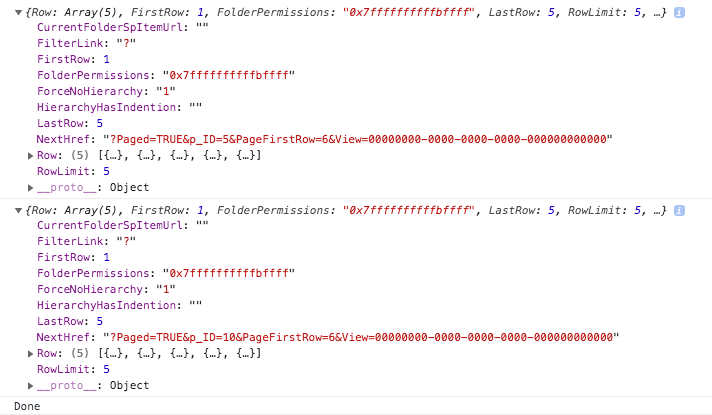
Just put it here:
import { sp } from '@pnp/sp/presets/all';

(async () => {

  const getPaged = (pageToken?: string) => {
    const list = sp.web.lists.getByTitle('Site Pages');
    return list.renderListDataAsStream({
      ViewXml: `
        <View>
          <RowLimit Paged="TRUE">5</RowLimit>
        </View>
      `,
      Paging: pageToken
    });
  }

  const p1 = await getPaged();
  console.log(p1);

  const p2 = await getPaged(p1.NextHref.split('?')[1]);
  console.log(p2);

  console.log('Done');

})().catch(console.log)
 koltyakov
on 12 Jun 2020
koltyakov
on 12 Jun 2020
Related issues
 drewcook
·
3Comments
drewcook
·
3Comments
 unnieayilliath
·
3Comments
unnieayilliath
·
3Comments
 alirobe
·
3Comments
alirobe
·
3Comments
 ITAndy23
·
3Comments
ITAndy23
·
3Comments
 KieranDaviesV
·
3Comments
KieranDaviesV
·
3Comments