Pnpjs: Error - typescript - node_modules/@pnp/sp/appcatalog/types.d.ts(29,33): error TS1110: Type expected.
Category
- [ ] Enhancement
- [x] Bug
- [ ] Question
- [ ] Documentation gap/issue
Version
Please specify what version of the library you are using: [ pnp v.2 (I suppose..)]
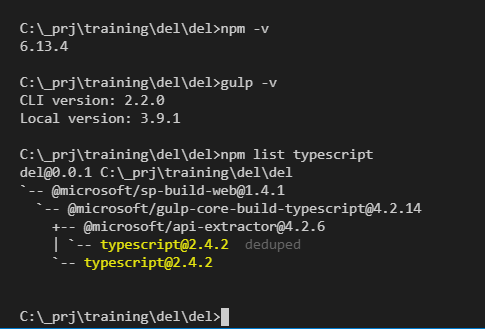
Please specify what version(s) of SharePoint you are targeting: [ 2019 on-premise and Online, webpart ]
If you are not using the latest release, please update and see if the issue is resolved before submitting an issue.
Expected / Desired Behavior / Question
Successfull bundle expected
Observed Behavior
[17:14:14] Error - typescript - node_modules\@pnp\sp\appcatalogtypes.d.ts(29,33): error TS1110: Type expected.
[17:14:14] Error - typescript - node_modules\@pnp\sp\appcatalogtypes.d.ts(29,98): error TS1005: '(' expected.
[17:14:14] Error - typescript - node_modules\@pnp\sp\appcatalogtypes.d.ts(65,26): error TS1110: Type expected.

Steps to Reproduce
1) make webpart targeted to 2019+Online,
2) install pnp:
npm install @pnp/logging @pnp/common @pnp/odata @pnp/sp --save
3) write in Your code
import { sp } from "@pnp/sp/presets/all";
4) gulp bundle
package.json:
https://gist.github.com/Gennady-G/4940ad39a0c74249b0fec194629d7e29
maybe related with:
https://github.com/pnp/pnpjs/issues/978
 Gennady-G
All 9 comments
This is tricky, it looks that the version of the build tools shipped with SPFx which targeted for SP2019 don't respect skipLibCheck option. This should theoretically lead to similar issues when using any dependency with which the old version of SPFx's build tools and related dependencies, TypeScript in particular, are not happy with.
Not sure if we can do anything on our end to fix this. As this is not the bug to have an up to date toolchains.
I tried a couple of options with tsconfig.json in SPFx v1.4 project, such as exclude option and legacy skipDefaultLibCheck but nothing worked for me as well. Only bumping TypeScript to the recent version in a hacky way in package-lock.json worked, which I can't suggest as a solution as there are potential side effects and fragility.
Currently puzzled if this can be resolved at all.
 koltyakov
on 28 Apr 2020
koltyakov
on 28 Apr 2020
I haven't anything to add to what @koltyakov mentioned here other than just a general usage point that changed from v1 to v2, you don't need to import common, odata, etc anymore, just the sp library.
npm install @pnp/sp --save
 juliemturner
on 28 Apr 2020
juliemturner
on 28 Apr 2020
Thank You much for answers!
As I said in related thread, I can resolve with this workaround:
npm install @pnp/[email protected] @pnp/[email protected] @pnp/[email protected] @pnp/[email protected]
Thanks to @patrick-rodgers https://github.com/pnp/pnpjs/issues/983#issuecomment-569959137
So if I understand You correctly - for 2019 I can use old versions, but in O365, in "modern toolchain" it works well..
I develop in on-prem and then upload solutions to O365, it is Ok for me.
Best regards, Gennady
Gennady-G
on 30 Apr 2020
Hi @Gennady-G ,
setting the pnp/sp version to 1.3.8 solver the typescript error,
but introduces the following:
Error - typescript - src\extensions\helloWorld\HelloWorldCommandSet.ts(17,19): error TS2307: Cannot find module '@pnp/sp/presets/all'.
Did you experience the same error? if so how did you managed?
Best regards,
Jose Valente
 josemvalente
on 4 May 2020
josemvalente
on 4 May 2020
In v1 there was no concept of partial imports and presets. So, with v1 (1.3.11 is the latest from v1 branch, btw) it should be an import from '@pnp/sp' but not '@pnp/sp/presets/all'.
koltyakov
on 4 May 2020
Hi @koltyakov !
Had same error and yes, exactly, used
import { sp } from "@pnp/sp";
instead..
Gennady-G
on 4 May 2020
Hi,
thanks for the quick reply guys, solved :)
josemvalente
on 4 May 2020
I hate to say that this is a solution. But likely with SPFx for On-Prem until the version of the build tools is bumped in there, we can only recommend sticking with v1 due to the nuances spotlighted in the thread.
koltyakov
on 4 May 2020
Going to close this one as it is answered as best we can. If there are updates on this front that change things we will be sure to let folks know. Thanks!
 patrick-rodgers
on 8 May 2020
patrick-rodgers
on 8 May 2020
Related issues
 AJIXuMuK
·
3Comments
AJIXuMuK
·
3Comments
 simonagren
·
3Comments
AJIXuMuK
·
3Comments
simonagren
·
3Comments
AJIXuMuK
·
3Comments
 unnieayilliath
·
3Comments
unnieayilliath
·
3Comments
 SpliceVW
·
3Comments
SpliceVW
·
3Comments
Most helpful comment
I haven't anything to add to what @koltyakov mentioned here other than just a general usage point that changed from v1 to v2, you don't need to import common, odata, etc anymore, just the sp library.
npm install @pnp/sp --save