Pnpjs: Search bug: searchWithCaching - TypeError: Cannot read property 'RelevantResults' of undefined
Category
- [ ] Enhancement
- [x] Bug
- [ ] Question
- [ ] Documentation gap/issue
Version
Please specify what version of the library you are using: [2.0.2-5]
Please specify what version(s) of SharePoint you are targeting: [SPO]
Expected / Desired Behavior / Question
I want to execute a search with caching in an otherwise blank webpart.
Observed Behavior
I created a blank new SPFx webpart using the latest beta package as suggested in issue https://github.com/pnp/pnpjs/issues/1027.
When performing a search using await await sp.searchWithCaching("contentclass:STS_Site path:https://[tenant].sharepoint.com/sites/[prefix]*", cacheOptions), the search request is executed but the SearchResults object contains only undefined properties. When attempting to use the search results the browser console window reports the error: TypeError: Cannot read property 'RelevantResults' of undefined.
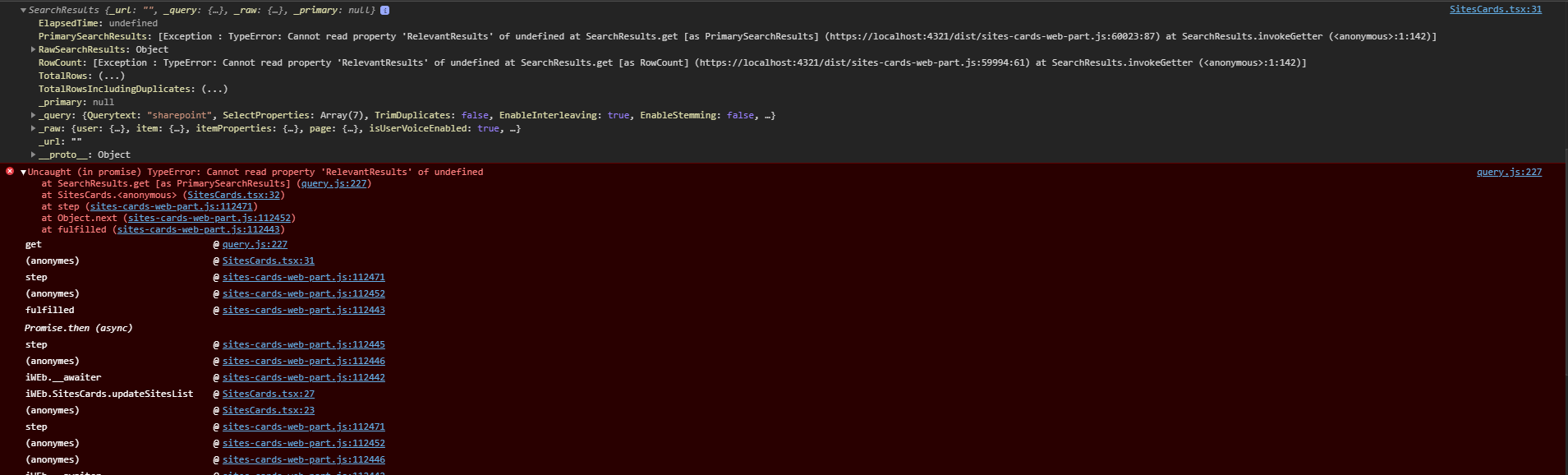
When the same search is executed with sp.search("contentclass:STS_Site path:https://[tenant].sharepoint.com/sites/[prefix]*") with the same parameter (except for the caching options), everything goes smoothly.
Steps to Reproduce
Create a new blank SPFx webpart using the latest Yeoman generator
Add the relevant imports (@pnp/[email protected] in particular), setup and add a search using await sp.searchWithCaching("[your query]", cacheOptions).
Run the webpart in a hosted workbench
 Gernouille
All 7 comments
Can you try with the latest published version, 2.0.4? That beta is old at this point.
 patrick-rodgers
on 16 Apr 2020
patrick-rodgers
on 16 Apr 2020
I updated to 2.0.4 and it's still happening.
To be sure that I'm running on 2.0.4 package, I did the whole thing:
- npm i @pnp/[email protected] --save
- gulp clean
- node_modules folder deletion
- npm install
Gernouille
on 16 Apr 2020
Ok, thanks. We'll have a look when we have a chance.
patrick-rodgers
on 16 Apr 2020
Yep, this was a bug. The url wasn't getting set right so it wasn't hitting search at all, which when you're trying to search doesn't help. Fixed and will go out in next release. Thanks for reporting this!
patrick-rodgers
on 4 May 2020
@patrick-rodgers thanks for fixing this. Do you when is the next release? Any way for me to get the build with this fix?
 unnieayilliath
on 5 May 2020
unnieayilliath
on 5 May 2020
@unnieayilliath We intend to release in the coming week but I cannot guarantee that will happen. You can, of course, fork the repo and build it yourself, so it is doable just maybe not ideal.
 juliemturner
on 5 May 2020
juliemturner
on 5 May 2020
Thanks @juliemturner , for the time being I will use the sp.search as everything is working smoothly in that method
unnieayilliath
on 5 May 2020
Related issues
 drewcook
·
3Comments
drewcook
·
3Comments
 BrianBusby
·
3Comments
BrianBusby
·
3Comments
 Holden15
·
3Comments
Holden15
·
3Comments
 muraray
·
3Comments
unnieayilliath
·
3Comments
muraray
·
3Comments
unnieayilliath
·
3Comments
Most helpful comment
Yep, this was a bug. The url wasn't getting set right so it wasn't hitting search at all, which when you're trying to search doesn't help. Fixed and will go out in next release. Thanks for reporting this!