Thank you for reporting an issue, suggesting an enhancement, or asking a question. We appreciate your feedback - to help the team understand your
needs please complete the below template to ensure we have the details to help. Thanks!
Please check out the Docs to see if your question is already addressed there. This will help us ensure our documentation covers the most frequent questions.
Category
- [ ] Enhancement
- [ ] Bug
- [X] Question
- [ ] Documentation gap/issue
Version
Please specify what version of the library you are using: [ 2.0.3 ]
Please specify what version(s) of SharePoint you are targeting: [ SharePoint Online ]
If you are not using the latest release, please update and see if the issue is resolved before submitting an issue.
Expected / Desired Behavior / Question
I've been trying to find a reference on how to use @pnp/sp on an Azure hosted application but I'm not sure I'm looking in the right place. It would be a react application and I created an App Registration through the Azure AD portal with the highest level of SharePoint permissions (for testing purposes). I'm using MSAL and I'm able to get what I need using the @microsoft/microsoft-graph-client but I want to use @pnp/sp since our current application already uses it. Any examples or references to this type of setup would be truly appreciated.
Below are some of the references I've already looked at.
- MSAL React Sample Application
-- Currently app setup and working with @microsoft/microsoft-graph-client - Working in Nodejs
This is my current @pnp/sp setup:
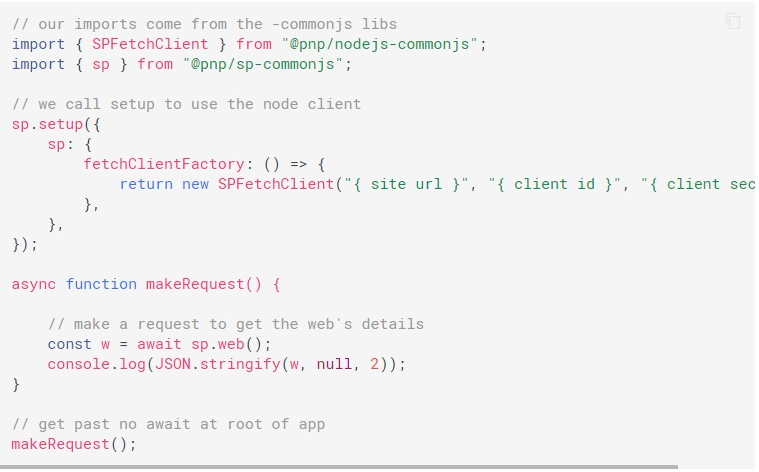
The current issue I get with this setup is a CORs error in localhost and when pushed up to Azure
Access to fetch at '{ site url }/_vti_bin/client.svc' from origin 'http://localhost:3000' has been blocked by CORS policy: Response to preflight request doesn't pass access control check: Redirect is not allowed for a preflight request.
I did not follow these steps (register an add in) as I assumed I could use the app I had registered in the Azure AD Portal (register app). If I'm wrong, feel free to let me know.
Thank you all.
 freyes17
All 3 comments
Hey @freyes17,
Your current setup is for Node.js (server-side) - that not gonna work in a browser page, obviously. In a Node.js app you can't get CORS message. So, I'm assuming you try such setup for a JS code with intention running on a page.
What you probably search for might be this docs section. Yet, it's ADAL.
For MSAL, I'd recommend this article by @s-KaiNet.
 koltyakov
on 24 Mar 2020
koltyakov
on 24 Mar 2020
Thank you so much @koltyakov I will take a look at that and get back to you.
Cheers
freyes17
on 24 Mar 2020
Going to close this as no updates in some time, hope things are resolved. If you continue to have issues please open a new issue and ref this one with additional details.
 patrick-rodgers
on 13 Apr 2020
patrick-rodgers
on 13 Apr 2020
Related issues
 ITAndy23
·
3Comments
ITAndy23
·
3Comments
 KieranDaviesV
·
3Comments
KieranDaviesV
·
3Comments
 pavan2920
·
3Comments
pavan2920
·
3Comments
 drewcook
·
3Comments
drewcook
·
3Comments
 SpliceVW
·
3Comments
SpliceVW
·
3Comments
Most helpful comment
Hey @freyes17,
Your current setup is for Node.js (server-side) - that not gonna work in a browser page, obviously. In a Node.js app you can't get CORS message. So, I'm assuming you try such setup for a JS code with intention running on a page.
What you probably search for might be this docs section. Yet, it's ADAL.
For MSAL, I'd recommend this article by @s-KaiNet.