Pnpjs: Occur "Invariant Violation" error when use IE11 mode
Category
- [ ] Enhancement
- [x] Bug
- [ ] Question
- [ ] Documentation gap/issue
Version
Please specify what version of the library you are using: [ 2.0.3 ]
Please specify what version(s) of SharePoint you are targeting: [ Online ]
Expected / Desired Behavior / Question
Running well after using IE11 mode in IE11.
Observed Behavior
There are errors happened, and the page turn to blank.
Steps to Reproduce
Build an application customizer extension, and follow this doc to use IE11 mode, and then deploy it to SharePoint. When run it in ie11, it work fine at first, but then an error occur and the page turn into blank.
Code

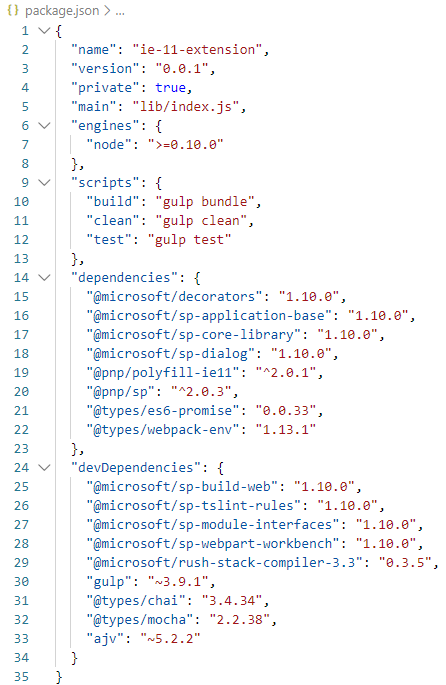
package.json
Error info



Detailed error info in ie console log
 YanYi2017
All 26 comments
Not sure if it actually comes from PnPjs.
React validation detects unhandled promise which was rejected.
Could you try Debug mode with the non-minified build? It could potentially expose the real source of the issue.
 koltyakov
on 10 Mar 2020
koltyakov
on 10 Mar 2020
@koltyakov Tanks for your reply. Do you mean follow this way to debug? And gulp without "--ship" to get the non-minified build?
YanYi2017
on 10 Mar 2020
I was thinking of this debug technique https://docs.microsoft.com/en-us/sharepoint/dev/spfx/debug-modern-pages
koltyakov
on 10 Mar 2020
Ok, I will try it later. Thanks
YanYi2017
on 10 Mar 2020
@YanYi2017 ....this was happening to me as well for IE 11 in one of the project.... Issue has nothing to do with pnp js....For me it was an import statement(refer below) that was not giving compile error but generating invariant Violation at runtime..... check all your import statements in your ts and tsx file...if there is something like below this error will be generated.
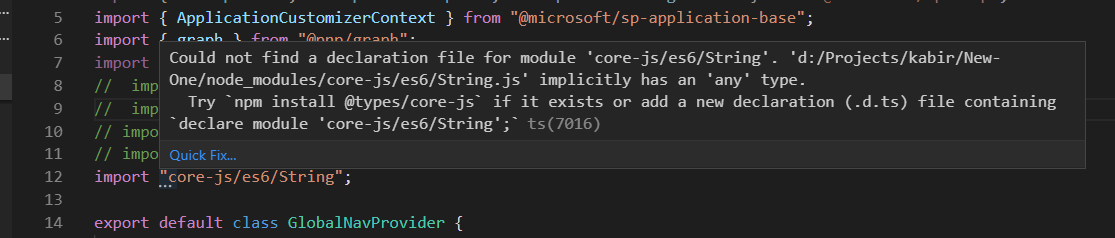
hope this helps..!!
 siddharth-vaghasia
on 14 Mar 2020
siddharth-vaghasia
on 14 Mar 2020
I have faced such issue in IE after using Pnp 2.0 with IE Mode Enabled,The solution works on all pages in Chrome but not on IE.I have deployed my solution on 3 pages and then checked in IE:
1.Classic Page - it works fine on classic page
- Modern Page on Communication Site - It works fine if you turn off comments of Modern page and then deploy the solution.
3.Modern Page on Team Site - not working
Whats happening is The solution loads then everything goes blank.I was trying to deploy default solution that comes @microsoft/sharepoint generator with Pnp 2.0 and IE11 Mode enabled.Please help if anybody knows why this is happening.I have also installed @pnp/polyfill-ie11
 AkshayKishorChauhan
on 2 Apr 2020
AkshayKishorChauhan
on 2 Apr 2020
@YanYi2017 or @AkshayKishorChauhan if you can provide a repo that shows the error we can clone we can try and take a look, but this feels like something external to the library. Or if you can pinpoint what is causing the error we can have a look.
 patrick-rodgers
on 2 Apr 2020
patrick-rodgers
on 2 Apr 2020
@patrick-rodgers Thank you so much for looking into this,I have uploaded the code to https://github.com/AkshayKishorChauhan/helloGithub
This solution is also giving error in IE on Modern Communication page and Modern Team Page.Please let me know in case you need more info.
AkshayKishorChauhan
on 2 Apr 2020
Doesn't look like you are importing the polyfills anywhere? Perhaps that will help.
patrick-rodgers
on 7 Apr 2020
Hi @patrick-rodgers ,Thank you for the reply I have imported the polyfills https://github.com/AkshayKishorChauhan/helloGithub/blob/master/src/webparts/helloGithub/components/HelloGithub.tsx at line 5.
I am not sure where else to add.
AkshayKishorChauhan
on 7 Apr 2020
I would try moving it to the main webpart class. I have never put that import in a component before. And I am far from a React expert but is it common to do async operations within componentDid* calls?
I have in the past done all my data calls in the upper most webpart and updated components via the model. Not what you are doing is wrong, just an approach I haven't taken.
patrick-rodgers
on 7 Apr 2020
I have tried moving polyfills to main webpart class,still the same issue.We can call operations within componentDidMount.I have just made an sample solution you can modify it as needed.The only solution I have found is to revert back to Pnp 1.x. And this issue is reproduced by many of my friends who are using pnp.
AkshayKishorChauhan
on 8 Apr 2020
Same issue I'm facing which @AkshayKishorChauhan is facing once we deploy our web part on app catalog and when we add the webpart in modern Pages of SharePoint. It get showed and then disappears.
 harshcse1025
on 9 Apr 2020
harshcse1025
on 9 Apr 2020
Hi All,
I was able to replicate the issue and I Found that
import "core-js/stable/symbol";
in below mentioned file is causing the issue by removing this it worked for me
https://github.com/pnp/pnpjs/blob/version-2/tools/polyfill-ie11/index.ts
Below are the modules which needs to be installed
"core-js": "3.4.7",
"es6-map": "0.1.5",
"whatwg-fetch": "3.0.0"
Below are the imports which needs to be used
import "core-js/stable/array/from";
import "core-js/stable/array/fill";
import "core-js/stable/array/iterator";
import "core-js/stable/promise";
import "core-js/stable/reflect";
import "es6-map/implement";
import "whatwg-fetch";
I will raise a PR for the change in the @pnp/polyfill-ie11
 kunj-sangani
on 10 Apr 2020
kunj-sangani
on 10 Apr 2020
Well, doesn't that remove the polyfill for symbol which was added to resolve #996. How deeply have you tested your changes? This is not an error that we see often and we have been unable to reproduce. Until we can I am reluctant to merge your PR which removes a fix for a previous bug.
patrick-rodgers
on 10 Apr 2020
For reproducing the issue you can use a sample project which I have created
pnpjs2ie11Test
Deploy it Modern Team Site where we are able to reproduce the issue
Hope this helps
kunj-sangani
on 10 Apr 2020
I have also came across this issue, we've been developing several extensions and they all fail in IE11 compatibility mode when we go into edit mode, everything else works flawlessly, right now I'm going back to pnp/[email protected] but I still have the hope to find the specific issue, I'm also using React for my extensions and what I have found is polyfill v2.0.1 fails with react, it gives this error when going to react error-decoder "Objects are not valid as a React child (found: object with keys {$$typeof, type, key, ref, props, _owner})." going down to v1.0.2 seems to be the solution but i'm still not quite certain on this, I'll keep you posted or be pending on this matter for any updates.
 dave-flex
on 14 Apr 2020
dave-flex
on 14 Apr 2020
@dave-flex - if you can please report the issue you describe with details that would be good. Thanks!
patrick-rodgers
on 14 Apr 2020
Hi @patrick-rodgers any update on @kunj-sangani and my issue. kunj have already shared the solution as well
harshcse1025
on 14 Apr 2020
So I cloned your repo and tested it and had no issues with the webpart. Loaded fine and other than normally seen console errors with IE11 nothing was reported.

 juliemturner
on 15 Apr 2020
juliemturner
on 15 Apr 2020
my @pnp/sp, odata, common and logging version: 2.0.4
my @pnp/polyfill-ie11 version: 2.0.1
the extension loads in the page correctly but when i click on the edit button in the page after a few seconds this is what I get:
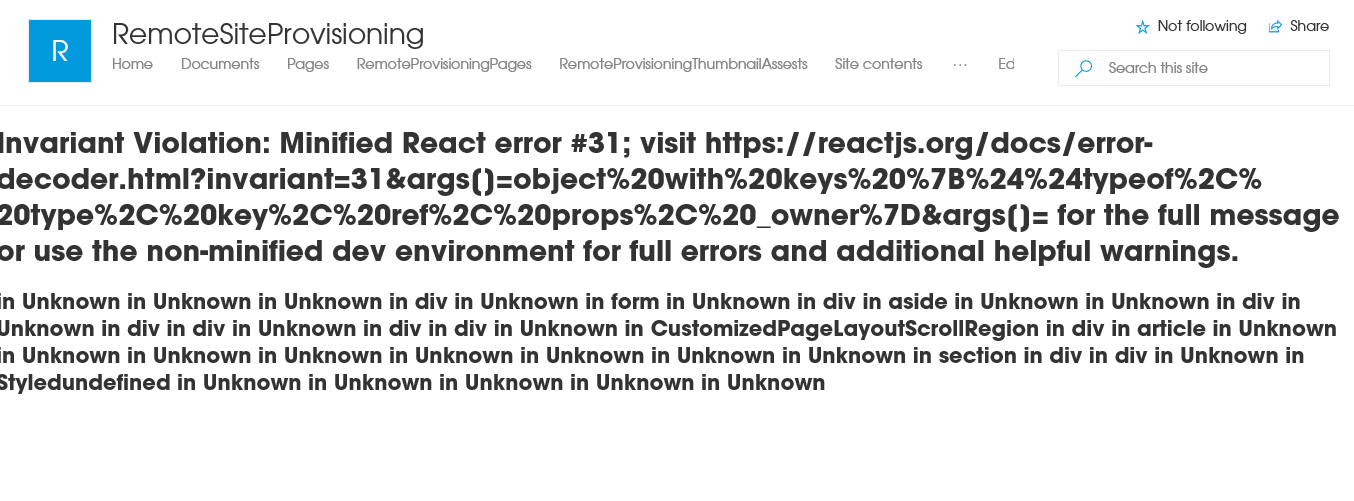
again this is only happening on IE11
dave-flex
on 15 Apr 2020
Ok, but that's an issue with react.js, not PnPJS. We were simply trying to validate that we can/cannot reproduce an issue with the PnPJS polyfill. As I understand it there are polyfills for react.js to make it work on ie11 but to be honest I have not worked with them.
juliemturner
on 15 Apr 2020
So I cloned your repo and tested it and had no issues with the webpart. Loaded fine and other than normally seen console errors with IE11 nothing was reported.
@juliemturner To replicate the issue we have to use the webpart in SharePoint Teams Site and not in SharePoint Communication site
@dave-flex If you can try removing the comment section present in the page this should help
remove the comment section from chrome and then test in IE
kunj-sangani
on 15 Apr 2020
Did you visit the link and search on the problem?
As Julie said things appear to be working for us.
patrick-rodgers
on 15 Apr 2020
Hi, I probably had to add some more detail on what i was facing so I opened this to provide further information on the matter.
Thanks!
dave-flex
on 15 Apr 2020
After much thought we determined we don't have a great way to support every possible combination of polyfills folks might need. To that end we have an updated statement around our polyfills. We have included the ability to selectively import just the polyfills you need based on your application. There are just too many different libraries and scenarios for a single package to universally work without conflicts. Thank you to all for the discussion, we appreciate your ideas. If you have continued thoughts please share them in a new issue. Thanks!
patrick-rodgers
on 8 May 2020
Related issues
 KieranDaviesV
·
3Comments
KieranDaviesV
·
3Comments
 simonagren
·
3Comments
simonagren
·
3Comments
 drewcook
·
3Comments
drewcook
·
3Comments
 AJIXuMuK
·
3Comments
AJIXuMuK
·
3Comments
AJIXuMuK
·
3Comments
AJIXuMuK
·
3Comments