Category
- [ ] Enhancement
- [x] Bug
- [ ] Question
- [ ] Documentation gap/issue
Version
Please specify what version of the library you are using: [v2.0.1/latest]
Please specify what version(s) of SharePoint you are targeting: [SharePoint Online]
Expected / Desired Behavior / Question
sp.web should not be undefined.
Observed Behavior
sp.web is undefined
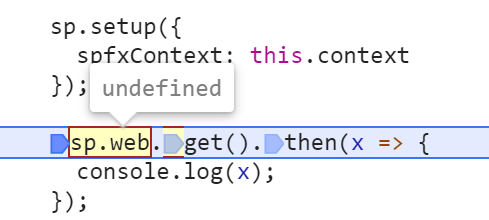
Steps to Reproduce
- Create an SPFx project
- Edit the webpart settings
import { sp } from "@pnp/sp";
import '@pnp/sp/presets/all';
// ...
  protected onInit(): Promise<void> {
    return super.onInit().then(_ => {
      sp.setup({
        spfxContext: this.context
      });

      sp.web.get().then(x => {
        console.log(x);
      });
    });
  }
// ...
- gulp serve
 KEMiCZA
All 21 comments
Should not it be import { sp } from "@pnp/sp/presets/all";?
 koltyakov
on 17 Jan 2020
koltyakov
on 17 Jan 2020
With your solution it works.
But when I only use the following import import { sp } from "@pnp/sp";
web is not available. And in version 2.0.0 it did work.
As documented here: https://pnp.github.io/pnpjs/sp/
KEMiCZA
on 17 Jan 2020
Dumb question, but if you move the import '@pnp/sp/presets/all'; before the import { sp } from "@pnp/sp"; does it then work? I wonder if this is because we had to fall back on commonjs modules so it doesn't work as smoothly. Sigh.
Edit: OH - those docs are also wrong. You would need to include other things as sp will never have web attached without importing @pnp/sp/webs. See here
 patrick-rodgers
on 17 Jan 2020
patrick-rodgers
on 17 Jan 2020
I updated those getting started docs to include the required webs import.
patrick-rodgers
on 17 Jan 2020
I actually think there might be an issue as well, unless I'm doing something wrong, but it was working great with version 2.0.0-19. I'm doing imports as such:
import { sp } from '@pnp/sp';
import { Web, IWeb } from "@pnp/sp/webs";
and then this call:
let storageValue = await sp.web.getStorageEntity("xyz")
fails because web is undefined.
I find that I cannot just import "@pnp/sp/webs" because then a reference to IWeb is undefined.
 juliemturner
on 17 Jan 2020
juliemturner
on 17 Jan 2020
Ok - this is due to commonjs being awful and I am not really certain how best to address this. Open to ideas. The issue is that when built you end up with code like:
"use strict";
Object.defineProperty(exports, "__esModule", { value: true });
var types_1 = require("./types");
var rest_1 = require("../rest");
var types_2 = require("./types");
exports.Web = types_2.Web;
exports.Webs = types_2.Webs;
Reflect.defineProperty(rest_1.SPRest.prototype, "web", {
configurable: true,
enumerable: true,
get: function () {
return types_1.Web(this._baseUrl).configure(this._options);
},
});
rest_1.SPRest.prototype.createBatch = function () {
return this.web.createBatch();
};
//# sourceMappingURL=index.js.map
What is happening there is that we are doing a require() for rest_1 and then we extend the prototype rest_1.SPRest.prototype. Which because of everything needing to be hard is only augmenting that LOCAL rest_1.SPRest.prototype. This kills the selective imports which will only rightly work with es modules. You can test this using these imports with 2.0.1:
import "@pnp/sp/module/webs";
import { sp } from "@pnp/sp/module";
How do we address it?
I see a few choices, and am open to other's thoughts.
Option 1. For each package create a single export that is special for nodejs support and return the modules to being in es format. This is the future looking idea. Imports for JS client side/ SPFx would be:
import { sp } from "@pnp/sp";
import "@pnp/sp/webs";
as explained in the current docs. Imports for node would then be something like:
import { sp } from "@pnp/sp/presets/node";
This preset would be a copy of preset/all but with possibly some stuff changed in the future. It gives us a special place to import for node (and we would follow this patter for all modules. Meaning you would @pnp/common/node). This covers all versions of node that DO not support ES modules, while keeping the quality experiece for our most frequent users, SPFx and client side devs. Selective imports don't matter in node so not having that functionality is probably easier anyway.
Option 2. Folks have to use a special path for client side dev work. I dislike this idea
Option 3. We include everything in the @pnp/nodejs package and you can import "sp" and "graph" etc. from that package directly. It is built as commonjs and the other packages are exclusively es modules. It essentially becomes a commonjs version of the pnpjs rollup library. OK but creates a broken experience in that you use the library differently in different places.
Option 4. ???
patrick-rodgers
on 17 Jan 2020
I've reviewed your proposals a couple of times and can't see anything better than Option 1. I feel like node support is probably lesser-used, but I don't have visibility into any metrics to support that supposition, it's just a guess. So all that said, Option 1 seems to clearly make the best sense.
juliemturner
on 18 Jan 2020
I just published and tested a beta that I think fixes this. I tried it in SPFx, node 10, and node 12. Will update the docs and create a sample but for client-side dev (SPFx, etc) usage is just as outlined in the docs. For nodejs:
// this sp var will have everything loaded and should work for commonjs projects
// note the sub-folder named "commonjs" which now exists within each packaged library (currently in beta)
import { sp } from "@pnp/sp/commonjs/presets/all";
import { stringIsNullOrEmpty } from "@pnp/common/commonjs";
This decision was based on SPFx and client-side dev being our primary use case. We need that to be the first class experience. Nodejs dev should work, but can be a little harder until nodejs catches up and you can easily use the esmodules.
npm ci @pnp/sp@beta --save
Welcome your feedback, please test these beta versions out, want to ensure this module mess is sorted before we do another release (2.0.2). This will be the only fix added to what was in the now unpublished 2.0.1. Thanks!
patrick-rodgers
on 22 Jan 2020
Tested successfully on an SPFx webpart.
I'm not able to get it working with an Azure Function:
Compilation works fine but after running I get an error:
package.json
{
"name": "pnpnodetest",
"version": "1.0.0",
"description": "",
"scripts": {
"build": "tsc",
"watch": "tsc -w",
"prestart": "npm run build",
"start": "func start",
"test": "echo \"No tests yet...\""
},
"dependencies": {
"@pnp/nodejs": "2.0.0",
"@pnp/sp": "2.0.2-1"
},
"devDependencies": {
"@azure/functions": "^1.0.2-beta2",
"typescript": "^3.3.3"
}
}
index.ts
import { AzureFunction, Context } from "@azure/functions"
import { sp } from "@pnp/sp/commonjs/presets/all";
// import { stringIsNullOrEmpty } from "@pnp/common/commonjs";
import { SPFetchClient } from "@pnp/nodejs";
const timerTrigger: AzureFunction = async function (context: Context, myTimer: any): Promise<void> {
var timeStamp = new Date().toISOString();
if (myTimer.IsPastDue) {
context.log('Timer function is running late!');
}
context.log('Timer trigger function ran!', timeStamp);
sp.setup({
sp: {
fetchClientFactory: () => {
return new SPFetchClient("https://kemiczadev.sharepoint.com", "XXX", "YYY");
},
},
});
const web = await sp.web.get();
context.log('Timer trigger function ran!', web.Title);
};
export default timerTrigger;
node .\dist\TimerTriggerPnPjs\index.js
PS C:\p\pnpnodetest> node .\dist\TimerTriggerPnPjs\index.js
C:\p\pnpnodetest\node_modules\@pnp\common\index.js:1
(function (exports, require, module, __filename, __dirname) { export * from "./collections";
^^^^^^
SyntaxError: Unexpected token export
at createScript (vm.js:80:10)
at Object.runInThisContext (vm.js:139:10)
at Module._compile (module.js:617:28)
at Object.Module._extensions..js (module.js:664:10)
at Module.load (module.js:566:32)
at tryModuleLoad (module.js:506:12)
at Function.Module._load (module.js:498:3)
at Module.require (module.js:597:17)
at require (internal/module.js:11:18)
at Object.<anonymous> (C:\p\pnpnodetest\node_modules\@pnp\sp\commonjs\splibconfig.js:3:16)
Node version:
PS C:\p\pnpnodetest> node -v
v8.16.2
Hmmm, let me try updating the nodejs package to point to the commonjs exports of the other libraries - that might be the issue.
Edit: ugh, so this will be a bit of a pain since those paths don't exist until build time so I can't ref them. This might be a vote for the nodejs package being a commonjs rollup of everything. But let me keep trying...
Edit 2: updating just the paths in the nodejs package is a no go since all the other paths would then need to be updated. I think we have two viable options:
- Use existing nodejs package and include all functionality from the other libraries there - similar to pnpjs rollup lib, but in commonjs format.
- Produce a mirror set of libraries for systems that require commonjs modules. Something like @pnp/sp-commonjs or something. This seems like a pain.
Thoughts? @sympmarc @andrewconnell @wobba @waldekmastykarz @juliemturner @PopWarner @koltyakov everyone else too
patrick-rodgers
on 22 Jan 2020
I haven't used it outside of SPFx, so if the work of building two versions is not too high, it might be the best approach. And document on the getting started docs which one to pick for which scenario.
Maybe debug mode could detect the runtime and spit out a warning if you are using the wrong package? If this approach would allow the same kind of imports for both scenarios it makes it easy for the dev, and docs would be the same on usage.
 wobba
on 22 Jan 2020
wobba
on 22 Jan 2020
@wobba - is that a vote for option 2? Have a commonjs set of libraries and an es set of libraries? That is certainly easier in a lot of ways. One issue is that selective imports don't really work with commonjs, but that is easy enough to call out in the docs.
patrick-rodgers
on 22 Jan 2020
Yup, vote for option 2 of your last suggestion with mirrored packages. Would be good to get the opinion from a node developer as well.
wobba
on 22 Jan 2020
Being in the circle of mostly SPFx usage, I'm with @wobba, despite the pain.
@patrick-rodgers, with Selective Imports not working with commonjs, I think we figured that was ok in our convo yesterday since the biggest use case for SI was with SPFx...am I recollecting that accurately? :)
 PopWarner
on 22 Jan 2020
PopWarner
on 22 Jan 2020
I consider it OK for that reason, and package size doesn't matter in node.
patrick-rodgers
on 22 Jan 2020
I agree with @wobba -- The original solution was nice and elegant but if it's not working I think the mirrored libraries would be the easiest way forward.
juliemturner
on 22 Jan 2020
Wow, so it turns out the work I did to try and fix this the first time in the build system makes it super easy to publish two mirrored packages. Also for the sp and graph commonjs packages I am going to point main entry point to the "all" preset so everything will just be included at the root. Trying to make things easy - and selective imports don't work there anyway.
Packages will be:
es modules:
@pnp/sp
commonjs modules:
@pnp/sp-cjs
- OR -
@pnp/sp-commonjs
patrick-rodgers
on 22 Jan 2020
With regard to our previous discussion, I think just from a visibility perspective I prefer
@pnp/sp-commonjs as it makes it super clear from a _I'm just reading the code_ perspective but either is probably fine.
juliemturner
on 22 Jan 2020
OK - fresh beta versions published. There are now two sets of libraries (docs are NOT yet updated). For es modules anywhere they are supported:
npm install @pnp/sp@beta --save
No changes to docs for those. For places where you need commonjs modules (node) you can now use:
npm install @pnp/nodejs-commonjs@beta --save
npm install @pnp/sp-commonjs@beta --save
import { SPFetchClient } from "@pnp/nodejs-commonjs";
// this targets preset/all so you just need to include sp
import { sp } from "@pnp/sp-commonjs";

sp.setup({
    sp: {
        fetchClientFactory: () => {
            return new SPFetchClient("{ site url }", "{ client id }", "{ client secret }");
        },
    },
});

async function makeRequest() {

    const w = await sp.web();
    console.log(JSON.stringify(w, null, 2));
}

// get past no await at root of app
makeRequest();
That code will also be included in a new samples linked from the updated docs. Please give the latest beta a try (2.0.2-5) and let me know if things seem to be working for everyone.
patrick-rodgers
on 22 Jan 2020
Works fine on node now!
PS C:\p\pnpnodetest> node .\node_modules\typescript\bin\tsc
PS C:\p\pnpnodetest> node .\dist\TimerTriggerPnPjs\index.js
{
  "odata.type": "SP.Web",
   ........
  "WebTemplate": "SITEPAGEPUBLISHING",
  "WelcomePage": "SitePages/DevHome.aspx"
}
Thanks everybody for the hard work.
KEMiCZA
on 23 Jan 2020
OK, going to publish these libraries as 2.0.2. As best I can tell things are fixed.
patrick-rodgers
on 23 Jan 2020
Related issues
 SpliceVW
·
3Comments
SpliceVW
·
3Comments
 bogeorge
·
3Comments
bogeorge
·
3Comments
 ITAndy23
·
3Comments
ITAndy23
·
3Comments
 AJIXuMuK
·
3Comments
AJIXuMuK
·
3Comments
 ahsanranjha
·
3Comments
ahsanranjha
·
3Comments
Most helpful comment
OK - fresh beta versions published. There are now two sets of libraries (docs are NOT yet updated). For es modules anywhere they are supported:
npm install @pnp/sp@beta --saveNo changes to docs for those. For places where you need commonjs modules (node) you can now use:
That code will also be included in a new samples linked from the updated docs. Please give the latest beta a try (2.0.2-5) and let me know if things seem to be working for everyone.