Pnpjs: RenderListDataAsStream not returning all calendar/list fields
Category
- [ ] Enhancement
- [X] Bug
- [X] Question
- [ ] Documentation gap/issue
Version
Please specify what version of the library you are using: [2.0.0]
Please specify what version(s) of SharePoint you are targeting: [Sharepoint Online]
Expected / Desired Behavior / Question
Observed Behavior
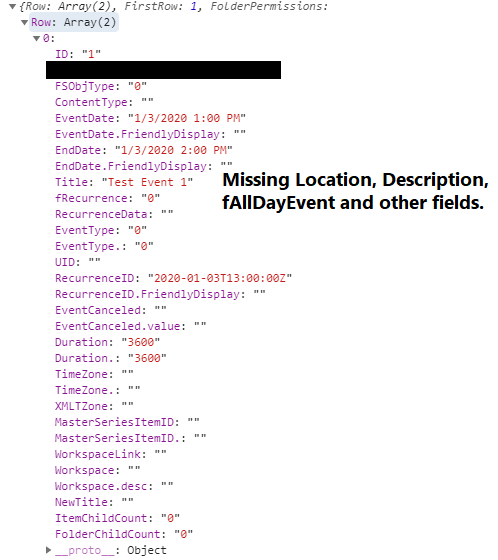
After adding a filter on a Calendar on Sharepoint, using RenderListDataAsStream no longer returns the 'Location', 'Category', 'Description' and certain other fields, which are default fields on the calendar.
Steps to Reproduce
- Add a Calendar app to a Sharepoint site.
- Add different views to the calendar (not sure if this step plays a factor). Use the "Calendar Overlay" feature to show the views on the default 'calendar' view.
- Populate the calendar with items.
At this point, RenderListDataAsStream returns results and the fields correctly. Code below. Next step (step 5) causes the issue.
sp.web.lists.getByTitle('TestCalendar').renderListDataAsStream({
  OverrideViewXml: '
  <Query>
      <Where>
        <DateRangesOverlap>
            <FieldRef Name="EventDate" />
            <FieldRef Name="EndDate" />
            <FieldRef Name="RecurrenceID" />
            <Value Type="DateTime">
              <Today />
            </Value>
        </DateRangesOverlap>
      </Where>
  </Query>
'
}).then
  ((response) => {
    console.log(response);
   }
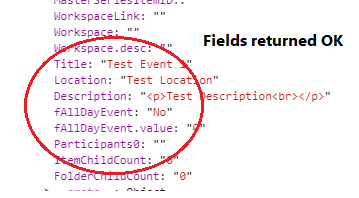
Go to the Calendar's list settings and add a filter to the default view (i.e. calendar). In my case, since I have different views and overlays, I add a filter such as the below (although I do believe any filter will trigger this issue).
_Show items only when the following is true:
Show the items when column
Category
is equal to
(Blank)
*NOTE that the above filter may not return any results if views and items aren't set up properly, and this isn't the issue. The issue is that on the items that do get returned, fields are missing as shown in step 6)._- RenderListDataAsStream no longer returns the "Description", "Location" and "Category" and various other fields/columns after the filter is applied. Removing the filter to show all items again doesn't fix the issue as results continue to get returned with missing fields. The fields that do get returned are accurate, however.
 Vee8
Vee8
All 3 comments
This doesn't seem like an issue with the library and rather a SharePoint behavior, no? Not sure what we would do to address this - are we missing a parameter option or setting?
 patrick-rodgers
on 6 Jan 2020
patrick-rodgers
on 6 Jan 2020
Upon further testing, it looks like the issue is occurring with how the views are being processed more so on the Sharepoint end. If I specify OverrideViewXML or leave it blank (no Override or ViewXML), which should take the lists/calendars default "View XML", then renderListDataasstream doesn't return the fields specified above. If I do specify ViewXML (note no Override), then the fields do get returned. I suppose this is due to how Sharepoint stores info for each view.
For my use case I created a new view (Standard View with expanded recurring events) and was able to use the code as I had listed above (while specifying the new views GUID -- {View: 'GUID'} ). With the "Standard" view on Sharepoint you can include/exclude columns into the view (simply check the columns to be returned on Sharepoint and renderListDataasstream will return them).
I'm not sure how the library can be modified to address this but since this seems to be more on the Sharepoint end, you can close if necessary. Thanks!
Vee8
on 6 Jan 2020
Sounds good, thanks! Let us know if you run into any limitations with the library and we can have a look at addressing them. Thanks!
patrick-rodgers
on 6 Jan 2020
Related issues
 jcosta33
·
3Comments
jcosta33
·
3Comments
 muraray
·
3Comments
muraray
·
3Comments
 SpliceVW
·
3Comments
SpliceVW
·
3Comments
 KieranDaviesV
·
3Comments
KieranDaviesV
·
3Comments
 alirobe
·
3Comments
alirobe
·
3Comments