Pnpjs: How to use pnpjs in SPFx in Teams tab on Desktop
Category
- [ ] Enhancement
- [ ] Bug
- [x] Question
- [ ] Documentation gap/issue
Version
Please specify what version of the library you are using: [Latest]
Please specify what version(s) of SharePoint you are targeting: [Online]
Question
Hi, I'm trying to use pnpjs (graph) in SPFx as a Teams tab. (documentation)
It's working fine in the Teams on web. However, it doesn't work in Teams on desktop.
I'm using below code to setup the graph:
graph.setup({
  spfxContext: this.context
});
Is it still valid for Teams on desktop?
Thank you.
 AriGunawan
All 11 comments
When you say doesn't work on desktop - are you getting an error you can share?
 patrick-rodgers
on 20 Aug 2019
patrick-rodgers
on 20 Aug 2019
@AriGunawan Are you able to use Fiddler or similar to see what the error is from a network trace and figure out which call might be failing and why?
 wobba
on 20 Aug 2019
wobba
on 20 Aug 2019
Also what version of SPFx are you running? Do you know if you are using the plus-beta flag? You might need to upgrade to the GA supported version for Teams.
patrick-rodgers
on 20 Aug 2019
Thanks for the response.
I'm using SPFx v1.8.2.
I'm using pnpjs to get groups from AD.
I see this error message using fiddler:
AADSTS65001: The user or administrator has not consented to use the application with ID '00000003-0000-0ff1-ce00-000000000000' named 'Office 365 SharePoint Online'. Send an interactive authorization request for this user and resource
There are no other errors from teams process.
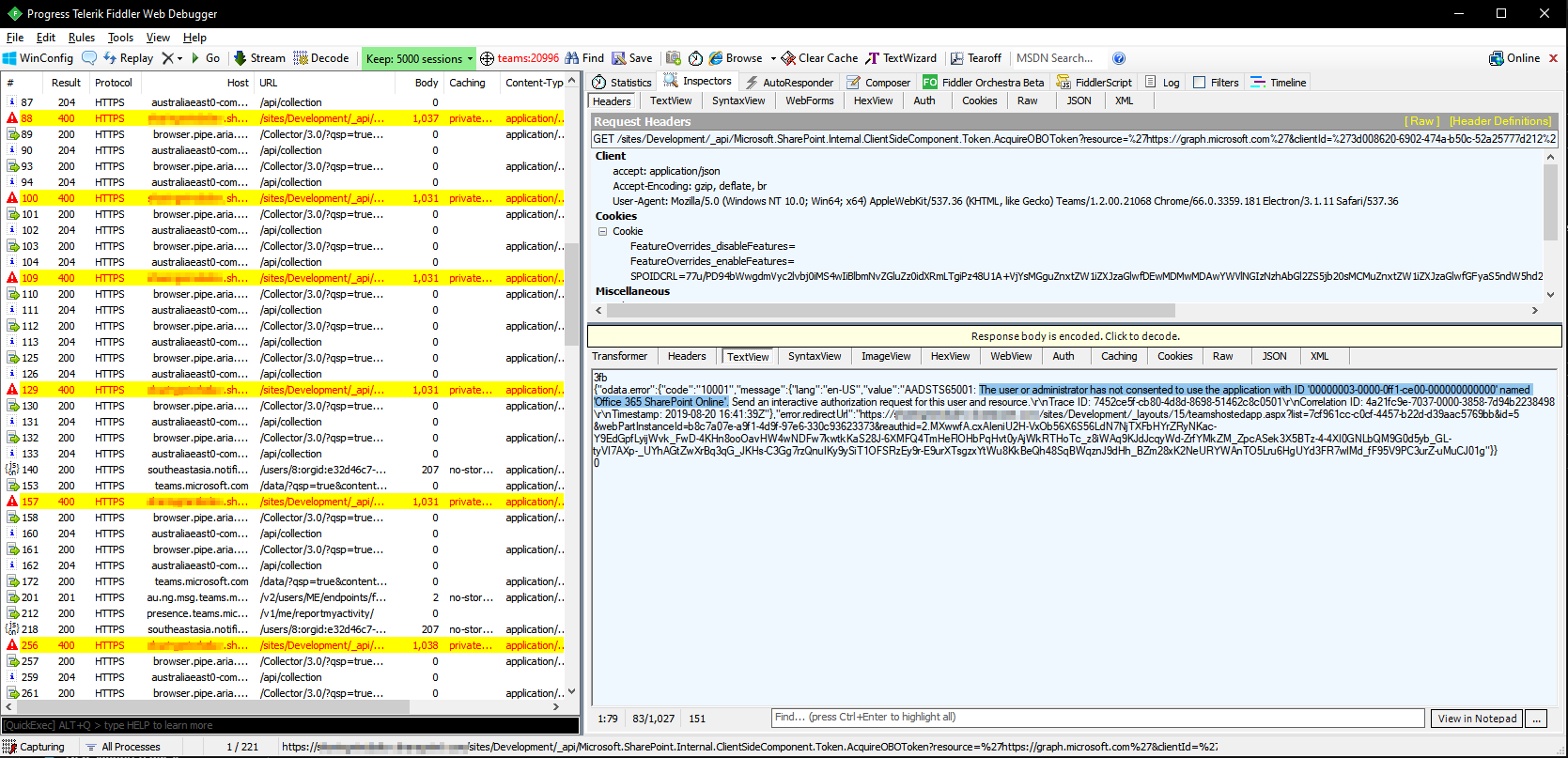
I found the ''Office 365 SharePoint Online" app in the Azure Portal. However, I'm not really sure what to do with it.
 ari-sharingminds
on 20 Aug 2019
ari-sharingminds
on 20 Aug 2019
Can you verify that the graph scopes are approved for your app? https://docs.microsoft.com/en-us/sharepoint/dev/spfx/use-aad-tutorial#deploy-the-solution-and-grant-permissions
wobba
on 20 Aug 2019
Yes, all scopes (User.Read.All and Group.Read.All) have been approved several weeks ago when I deployed it for the first time.
Now I remember getting similar error message when I haven't approved the scopes.
But it's already approved and the app is working well on the SharePoint page and Teams web.
There are no pending approvals on the API Management page.
AriGunawan
on 21 Aug 2019
You could try to re-consent as an admin to the scopes in that app from the azure admin UI. But indeed weird.
wobba
on 21 Aug 2019
I couldn't find any permissions/scopes for re-consent in the azure portal.

I've also tried to re-consent (remove access - redeploy app - approve access) the scopes on the API Management page. After waiting for several minutes, the webpart on a SharePoint page and Teams web is working as expected (just like before) but the webpart on the Teams desktop still doesn't work with same error message (on fiddler).
AriGunawan
on 21 Aug 2019
@AriGunawan can you try using the context.graphHttpClient directly in a call to test? To see if it's pnpjs related or a general bug. If general we should move the issue to sp-dev-docs.
wobba
on 21 Aug 2019
Sure, I will try it and let you know the result.
AriGunawan
on 21 Aug 2019
@wobba , I tried to create a super simple app that calling graph api using context.msGraphClientFactory. The result is similar: works on a SharePoint page and Teams web but doesn't work on Teams desktop.
So, I move the question to sp-dev-docs (issue) because it seems that it's not pnpjs issue.
Thanks for your help!
AriGunawan
on 21 Aug 2019
Related issues
 AJIXuMuK
·
3Comments
AJIXuMuK
·
3Comments
 simkessy
·
3Comments
AJIXuMuK
·
3Comments
simkessy
·
3Comments
AJIXuMuK
·
3Comments
 jcosta33
·
3Comments
jcosta33
·
3Comments
 BrianBusby
·
3Comments
BrianBusby
·
3Comments