Pnpjs: sp search for a site collection and use a result source
Thank you for reporting an issue, suggesting an enhancement, or asking a question. We appreciate your feedback - to help the team understand your
needs please complete the below template to ensure we have the details to help. Thanks!
Please check out the Docs to see if your question is already addressed there. This will help us ensure our documentation covers the most frequent questions.
Category
- [X] Enhancement
- [X] Bug
- [X] Question
- [ ] Documentation gap/issue
Version
Please specify what version of the library you are using: [ 1.3.3 ]
Please specify what version(s) of SharePoint you are targeting: [ Online ]
If you are not using the latest release, please update and see if the issue is resolved before submitting an issue.
Expected / Desired Behavior / Question
If you are reporting an issue please describe the expected behavior. If you are suggesting an enhancement please
describe thoroughly the enhancement, how it can be achieved, and expected benefit. If you are asking a question, ask away!
I want to be able to search on an internal site collection (not the root or tenant site collection as I don't have permission there but I am site collection admin on this internal site collection ) and I want to be able to specify the result source id. Actually I am using SP Proxy pointing at tenant level and configuration in my Angular project to get instance of various webs to get data. In this setting, I want to be able to search using sp.search but since the proxy is pointing to tenant site collection, I am unable to use the result source which is different than the one Proxy is pointing to.
Observed Behavior
If you are reporting an issue please describe the behavior you expected to occur when performing the action. If you are making a
suggestion or asking a question delete this section.
Steps to Reproduce
If you are reporting an issue please describe the steps to reproduce the bug in sufficient detail to allow testing. If you are making
a suggestion or asking a question delete this section.
Submission Guidelines
Delete this section after reading
- All suggestions, questions and issues are welcome, please let us know what's on your mind.
- Remember to include sufficient details and context.
- Please check back occasionally on your issue as we may have follow up questions.
- If you have multiple suggestions, questions, or bugs please submit them in seperate issues so we can track resolution.
Thank you for your feedback!
 ssprajput
All 8 comments
Hi @ssprajput!
Great description of the issue. Appreciate you've spent so much time describing your needs and reading the documentation before posting an issue marking it as a bug. Thanks!
The docs describe SearchQuery usage https://pnp.github.io/pnpjs/sp/docs/search/#search
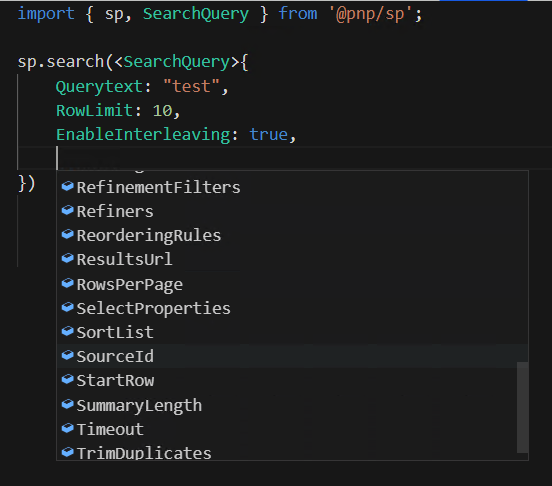
You can provide all the variety of search params which REST Search API ever supports:
import { sp, SearchQuery } from '@pnp/sp';

sp.search(<SearchQuery>{
    Querytext: "test",
    RowLimit: 10,
    EnableInterleaving: true,
})
    .then((r) => {
        console.log(r.PrimarySearchResults);
    });
 koltyakov
on 22 Jun 2019
koltyakov
on 22 Jun 2019
So this is exactly I did in my coding as this is theer in documentation. The issue is, in this sp.search, the sp by default is an instance of the SiteCollection at root level. I use SPProxy for local development and the proxy points to contoso.sharepoint.com. This is because the app uses multiple site collections for getting and sending data so I cannot point the proxy to this app hosting site collection. So in my case, for example, if my tenant is contoso.sharepoint.com, this sp is referring to root site collection there. And my app site is under a different path for example teams/billingdev. I tried instantiating an object of a Site and realized that search is not available at Site object, I think sp in sp.search is an instance of SPRest object pointing. So if I build and deploy on site collection, it works though then it has different issue, but that is for another post. So ideally I should be able to provide an URL to sp object and force it to use my site collection and the result source that I am using exist in my teams/billing site collection. Then it would work on my local mode using SPProxy on tennat site collection as base. Without that being available, it doesn't find the result source on contoso.sharepoint.com.
 esandeep
on 22 Jun 2019
esandeep
on 22 Jun 2019
That's how Search API works. You can try changing site context with new Search(webAbsUrl).
This might be helpful: https://github.com/pnp/pnpjs/issues/606#issuecomment-492262934
koltyakov
on 22 Jun 2019
Thanks a bunch, This is exactly what I looking for. Not sure if I should ask it here but this is another issue. List items have multiple attachments The search result received doesn't tell the attachment file name where it found the searched term. I see some places people have used LinkOfficeChild managed property and I am trying to see if that sill works, but even then that would render all the attachment for the item without tell which attachment had the searched term.
ssprajput
on 22 Jun 2019
@ssprajput a list item counts as one item only in search, regardless of the number of attachments. That's just a limit we've lived with for over 10 years in SharePoint and search. It's a hard technical challenge to solve in a good way. Attachments are great, but also comes with disadvantages.
 wobba
on 23 Jun 2019
wobba
on 23 Jun 2019
Going to close this as answered, thanks all!
 patrick-rodgers
on 2 Jul 2019
patrick-rodgers
on 2 Jul 2019
Seems like this is not valid anymore and I cannot find anything on the pnp js site.
Can someone please help me doing the same?
 sandeepvootoori
on 23 Apr 2020
sandeepvootoori
on 23 Apr 2020
@SV932 a bit hard to understand your issue. And ask new issues as new items, don't comment on closed ones.
wobba
on 23 Apr 2020
Related issues
 AJIXuMuK
·
3Comments
AJIXuMuK
·
3Comments
 alirobe
·
3Comments
alirobe
·
3Comments
 bogeorge
·
3Comments
bogeorge
·
3Comments
 KieranDaviesV
·
3Comments
KieranDaviesV
·
3Comments
 SpliceVW
·
3Comments
SpliceVW
·
3Comments
Most helpful comment
@ssprajput a list item counts as one item only in search, regardless of the number of attachments. That's just a limit we've lived with for over 10 years in SharePoint and search. It's a hard technical challenge to solve in a good way. Attachments are great, but also comes with disadvantages.