Pnpjs: 1.3.1-1 version addClientSidePage - wrong request URL generated
Category
- [ ] Enhancement
- [X] Bug
- [ ] Question
- [ ] Documentation gap/issue
Version
Please specify what version of the library you are using: [1.3.1-1 BETA]
Please specify what version(s) of SharePoint you are targeting: [SharePoint Online]
If you are not using the latest release, please update and see if the issue is resolved before submitting an issue.
Expected / Desired Behavior / Question
Create page in the default SitePages library (it seems that the third parameter has been removed).
Observed Behavior
Wrongly generated URL to the end point
https://SiteCollectionUrl/_api/web/_api/sitepages/pages
Steps to Reproduce
const page = await sp.web.addClientSidePage("pnp130test.aspx", "pnp130test");
 Sartor87
All 13 comments
Not an issue but a configuration gap. spfxContext must be configured.
 koltyakov
on 19 Mar 2019
koltyakov
on 19 Mar 2019
Reopening this, had a quick test and it indeed is generating the wrong url in the beta. Will update and push out a new beta. Thanks for letting us know!
 patrick-rodgers
on 19 Mar 2019
patrick-rodgers
on 19 Mar 2019
Oh, oops, was 100% sure that it's a context thing. Sorry!
koltyakov
on 19 Mar 2019
No worries, looked like it but @Sartor87 uses the library enough I figured I'd have a quick look. I will include this in my already open PR.
patrick-rodgers
on 19 Mar 2019
OK, got this fixed and published a new beta, @Sartor87 please give the latest beta a try if you have a few moments. Thanks!
patrick-rodgers
on 19 Mar 2019
It sill gives the same error.
Here is how I've updated the version to the latest beta
- Removed from node_modules the PnP modules
- Removed lib folder, package lock file
- Updated as per documentation https://pnp.github.io/pnpjs/documentation/beta-versions/
- Ran gulp build -> gulp serve
Here is what npm outdated gives me
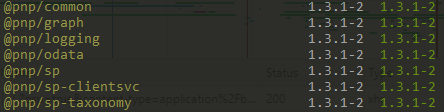
Sartor87
on 19 Mar 2019
Can you share your full code? I can no longer repro the error, I was able to when I tested but it appears fixed to me.
Edit:
Here is how I am testing (node):
import { SPFetchClient } from "@pnp/nodejs";
import { sp, ClientSideText } from "@pnp/sp";

sp.setup({
    sp: {
        fetchClientFactory: () => {
            return new SPFetchClient(settings.testing.sp.url, settings.testing.sp.id, settings.testing.sp.secret);
        },
    },
});

const page = await sp.web.addClientSidePage("pnp130test-5.aspx", "pnp130test-5");

page.addSection().addColumn(12).addControl(new ClientSideText("Hello"));

await page.save();
Here is a stripped down version, but I reproduce it in a clean env. I was thinking if I had issues with setting up the beta module.
sp.setup({ spfxContext: this.context });
try {
  const ct = await sp.web.contentTypes.getById("0x0101009D1CB255DA76424F860D91F20E6C4118").get();
  const contentTypeId = ct.Id.StringValue;
  const pageName = params.url + ".aspx";

  const page = await sp.web.addClientSidePage(pageName, params.name);
await page.disableComments();
} catch (error) { console.error(error); }
Hmm, I still can't reproduce. Steps I took:
- Update SPFx to 1.8 release (this shouldn't matter)
- Create new webpart no framework project (again, shouldn't matter)
- Installed beta libraries for pnp
npm install @pnp/common@beta @pnp/odata@beta @pnp/logging@beta @pnp/sp@beta - Edit web part file to use setup with context (as you have done)
protected onInit(): Promise<void> {
  return super.onInit().then(_ => {
    sp.setup({ spfxContext: this.context });
  });
}
- Edit render method to create a page
try {
  const page = await sp.web.addClientSidePage("test565-1", "another title");
  page.save();
} catch (error) { console.error(error); }
gulp serve- Test in online workbench
Do you see any differences compared to what you are doing?
patrick-rodgers
on 19 Mar 2019
@patrick-rodgers, I've followed your procedure but still produces the same issue with site collection's workbench. It generates /_api/sitepages/pages
Here is the full code of the web part
import { Version } from '@microsoft/sp-core-library';
import {
  BaseClientSideWebPart,
  IPropertyPaneConfiguration,
  PropertyPaneTextField
} from '@microsoft/sp-webpart-base';
import { escape } from '@microsoft/sp-lodash-subset';

import styles from './HelloWorldWebPart.module.scss';
import * as strings from 'HelloWorldWebPartStrings';
import { sp, ClientSidePageComponent, ClientSideText, Item, ClientSideWebpart } from '@pnp/sp';

export interface IHelloWorldWebPartProps {
  description: string;
}

export default class HelloWorldWebPart extends BaseClientSideWebPart<IHelloWorldWebPartProps> {

  protected onInit(): Promise<void> {
    return super.onInit().then(_ => {
      sp.setup({ spfxContext: this.context });
    });
  }

  public async render(): Promise<void> {

    try {
      const page = await sp.web.addClientSidePage("test565-1", "another title");
      page.save();
    } catch (error) { console.error(error); }

    return Promise.resolve();
  }

  protected get dataVersion(): Version {
    return Version.parse('1.0');
  }

  protected getPropertyPaneConfiguration(): IPropertyPaneConfiguration {
    return {
      pages: [
        {
          header: {
            description: strings.PropertyPaneDescription
          },
          groups: [
            {
              groupName: strings.BasicGroupName,
              groupFields: [
                PropertyPaneTextField('description', {
                  label: strings.DescriptionFieldLabel
                })
              ]
            }
          ]
        }
      ]
    };
  }
}
Here is the package.json
{
  "name": "spfx",
  "version": "0.0.1",
  "private": true,
  "engines": {
    "node": ">=0.10.0"
  },
  "scripts": {
    "build": "gulp bundle",
    "clean": "gulp clean",
    "test": "gulp test"
  },
  "dependencies": {
    "@microsoft/sp-core-library": "1.6.0",
    "@microsoft/sp-lodash-subset": "1.6.0",
    "@microsoft/sp-office-ui-fabric-core": "1.6.0",
    "@microsoft/sp-webpart-base": "1.6.0",
    "@pnp/common": "^1.3.1-2",
    "@pnp/logging": "^1.3.1-2",
    "@pnp/odata": "^1.3.1-2",
    "@pnp/sp": "^1.3.1-2",
    "@types/es6-promise": "0.0.33",
    "@types/webpack-env": "1.13.1"
  },
  "devDependencies": {
    "@microsoft/sp-build-web": "1.6.0",
    "@microsoft/sp-module-interfaces": "1.6.0",
    "@microsoft/sp-webpart-workbench": "1.6.0",
    "tslint-microsoft-contrib": "~5.0.0",
    "gulp": "~3.9.1",
    "@types/chai": "3.4.34",
    "@types/mocha": "2.2.38",
    "ajv": "~5.2.2"
  }
}
If it matters, I've ran it through the docker image and updated the following files as per documentation
node_modules\@microsoft\sp-build-web\lib\SPWebBuildRig.js
config\write-manifests.json
./config/serve.json
Sartor87
on 20 Mar 2019
It generates /_api/sitepages/pages
That is the correct url? Do you mean it is still "/_api/web/_api/sitepages/pages"?
This one is tough since I could see the issue and now it appears fixed on my side. And I don't see any differences in your code vs mine. And you are testing on the online hosted workbench?
patrick-rodgers
on 20 Mar 2019
@patrick-rodgers, I've managed to test it with the original production project - happy to report that the issue has been addressed. It seems some nasty caching on my side.
However, another issue arose - https://github.com/pnp/pnpjs/issues/569
Sartor87
on 20 Mar 2019
Great thanks, will close this one.
patrick-rodgers
on 20 Mar 2019
Related issues
 Holden15
·
3Comments
Holden15
·
3Comments
 AJIXuMuK
·
3Comments
AJIXuMuK
·
3Comments
 muraray
·
3Comments
muraray
·
3Comments
 ITAndy23
·
3Comments
ITAndy23
·
3Comments
 BrianBusby
·
3Comments
BrianBusby
·
3Comments