Pnpjs: Can I use pnpjs to add classic page to a site?
Hey,
I'm using the latest PNPJS. I need to create a classic page in Site Pages within multiple sub-sites that container a Content Editor Webpart which references a JS app in the root site.
I've seen the documentation on adding pages but it's creating modern page. Is there any option to create Class pages with Webparts?
Thanks.
 simkessy
All 9 comments
Hi @simkessy,
You can create a classic page using files.addTemplateFile:
import { Web } from '@pnp/sp';
const webAbsUrl = 'https://contoso.sharepoint.com/sites/site';
const pageRootFolder = '/sites/site/SitePages';
const pageName = 'MyClassicWebpartPage1.aspx';
(async () => {
const web = new Web(webAbsUrl);
const folder = web.getFolderByServerRelativeUrl(pageRootFolder);
const page = await folder.files.addTemplateFile(`${pageRootFolder}/${pageName}`, 0);
console.log('Done');
})()
.catch(console.warn);
But, there is no way in REST API to add webparts to classic pages. AddWebPart method is not exposed to REST. JSOM/CSOM should be used instead.
 koltyakov
on 17 Mar 2019
koltyakov
on 17 Mar 2019
Extended @koltyakov sample with pagelayout & webpart support
Only difference is the library, I used Pages library from a publishingsite
import { Site, Web, SPHttpClient } from '@pnp/sp';
const webAbsUrl = 'https://contoso.sharepoint.com/sites/site';
const pageRootFolder = '/sites/site/pages';
const pageName = 'MyClassicWebpartPage1.aspx';
const pageLayoutDesc = 'Article Left';
const pageLayoutUrl = 'https://contoso.sharepoint.com/sites/site/_catalogs/masterpage/ArticleLeft.aspx';
const endpoint = 'https://contoso.sharepoint.com/_vti_bin/client.svc/ProcessQuery';
(async () => {
const site = new Site(webAbsUrl);
const web = new Web(webAbsUrl);
const siteObj = await site.select('Id').get();
const siteid = siteObj.Id;
const webObj = await web.select('Id').get();
const webid = webObj.Id;
const listObj = await web.getList(pageRootFolder).select('Id').get();
const listid = listObj.Id
const folder = web.getFolderByServerRelativeUrl(pageRootFolder);
const page = await folder.files.addTemplateFile(`${pageRootFolder}/${pageName}`, 0);
const item = await page.file.listItemAllFields.select('Id').get()
const itemid = item.Id
const layoutPayload = `<Request xmlns="http://schemas.microsoft.com/sharepoint/clientquery/2009" SchemaVersion="15.0.0.0" LibraryVersion="16.0.0.0" ApplicationName="Javascript Library"><Actions><Method Name="SetFieldValue" Id="183" ObjectPathId="177" Version="1"><Parameters><Parameter Type="String">PublishingPageLayout</Parameter><Parameter TypeId="{fa8b44af-7b43-43f2-904a-bd319497011e}"><Property Name="Description" Type="String">${pageLayoutDesc}</Property><Property Name="Url" Type="String">${pageLayoutUrl}</Property></Parameter></Parameters></Method><Method Name="Update" Id="184" ObjectPathId="177" Version="1" /><Query Id="185" ObjectPathId="177"><Query SelectAllProperties="true"><Properties><Property Name="PublishingPageLayout" ScalarProperty="true" /></Properties></Query></Query></Actions><ObjectPaths><Identity Id="177" Name="76ddc99e-008b-0000-52e1-6169baaec1dc|740c6a0b-85e2-48a0-a494-e0f1759d4aa7:site:${siteid}:web:${webid}:list:${listid}:item:${itemid},0" /></ObjectPaths></Request>`
// add pagelayout
const client = new SPHttpClient();
await client.post(endpoint, {
headers: {
'Accept': '*/*',
'Content-Type': 'text/xml',
'X-Requested-With': 'XMLHttpRequest',
},
body: layoutPayload
})
// add webpart
const webpartPayload = `<Request xmlns="http://schemas.microsoft.com/sharepoint/clientquery/2009" SchemaVersion="15.0.0.0" LibraryVersion="16.0.0.0" ApplicationName="Javascript Library"><Actions><ObjectPath Id="41" ObjectPathId="40" /><ObjectPath Id="43" ObjectPathId="42" /><ObjectIdentityQuery Id="44" ObjectPathId="42" /><ObjectPath Id="46" ObjectPathId="45" /><ObjectPath Id="48" ObjectPathId="47" /><ObjectIdentityQuery Id="49" ObjectPathId="47" /><Query Id="50" ObjectPathId="45"><Query SelectAllProperties="true"><Properties /></Query></Query></Actions><ObjectPaths><Method Id="40" ParentId="28" Name="GetLimitedWebPartManager"><Parameters><Parameter Type="Number">1</Parameter></Parameters></Method><Method Id="42" ParentId="40" Name="ImportWebPart"><Parameters><Parameter Type="String"><?xml version="1.0" encoding="utf-8"?><WebPart xmlns="http://schemas.microsoft.com/WebPart/v2"><Assembly>Microsoft.SharePoint, Version=16.0.0.0, Culture=neutral, PublicKeyToken=71e9bce111e9429c</Assembly><TypeName>Microsoft.SharePoint.WebPartPages.ContentEditorWebPart</TypeName><Title>$Resources:core,ContentEditorWebPartTitle;</Title><Description>$Resources:core,ContentEditorWebPartDescription;</Description><PartImageLarge>/_layouts/15/images/mscontl.gif</PartImageLarge></WebPart></Parameter></Parameters></Method><Property Id="45" ParentId="42" Name="WebPart" /><Method Id="47" ParentId="40" Name="AddWebPart"><Parameters><Parameter ObjectPathId="45" /><Parameter Type="String">Main</Parameter><Parameter Type="Number">1</Parameter></Parameters></Method><Identity Id="28" Name="82d7c99e-f015-0000-6402-fdbb9f2aa54d|740c6a0b-85e2-48a0-a494-e0f1759d4aa7:site:${siteid}:web:${webid}:file:${pageRootFolder}/${pageName}" /></ObjectPaths></Request>`
await client.post(endpoint, {
headers: {
'Accept': '*/*',
'Content-Type': 'text/xml',
'X-Requested-With': 'XMLHttpRequest',
},
body: webpartPayload
})
console.log('Done');
})()
.catch(console.warn);
 tavikukko
on 17 Mar 2019
tavikukko
on 17 Mar 2019
Yet another way to create classic publishing page using only PnPjs and you can even set needed properties ex. pagelayout and contenttype.
import { sp } from "@pnp/sp";
const mynewpageContent =
`<%@ Page Inherits="Microsoft.SharePoint.Publishing.TemplateRedirectionPage,Microsoft.SharePoint.Publishing,Version=16.0.0.0,Culture=neutral,PublicKeyToken=71e9bce111e9429c" %> <%@ Reference VirtualPath="~TemplatePageUrl" %> <%@ Reference VirtualPath="~masterurl/custom.master" %>
<%@ Register Tagprefix="SharePoint" Namespace="Microsoft.SharePoint.WebControls" Assembly="Microsoft.SharePoint, Version=16.0.0.0, Culture=neutral, PublicKeyToken=71e9bce111e9429c" %>
<html xmlns:mso="urn:schemas-microsoft-com:office:office" xmlns:msdt="uuid:C2F41010-65B3-11d1-A29F-00AA00C14882"><head>
<!--[if gte mso 9]><SharePoint:CTFieldRefs runat=server Prefix="mso:" FieldList="FileLeafRef,Comments,PublishingStartDate,PublishingExpirationDate,PublishingContactEmail,PublishingContactName,PublishingContactPicture,PublishingPageLayout,PublishingVariationGroupID,PublishingVariationRelationshipLinkFieldID,PublishingRollupImage,Audience,PublishingIsFurlPage,PublishingPageImage,PublishingPageContent,SummaryLinks,SummaryLinks2,SeoBrowserTitle,SeoMetaDescription,SeoKeywords,RobotsNoIndex"><xml>
<mso:CustomDocumentProperties>
<mso:PublishingPageContent msdt:dt="string"></mso:PublishingPageContent>
<mso:ContentType msdt:dt="string">Welcome Page</mso:ContentType>
<mso:PublishingPageLayout msdt:dt="string">https://contoso.sharepoint.com/sites/site/_catalogs/masterpage/ArticleLeft.aspx, Article Left</mso:PublishingPageLayout>
</mso:CustomDocumentProperties>
</xml></SharePoint:CTFieldRefs><![endif]-->
<title>Home</title></head>`;

(async () => {

    const page = await sp.web.getFolderByServerRelativeUrl('/sites/site/pages').files.add('mynewpage.aspx', mynewpageContent, true)
    console.log('Done');

})()
    .catch(console.warn);
Going to close this as answered as you got several great examples of how to accomplish this. Thanks everyone for jumping in and responding.
 patrick-rodgers
on 19 Mar 2019
patrick-rodgers
on 19 Mar 2019
Thanks everyone, very useful.
@patrick-rodgers if these examples could be added to the docs that might be helpful.
simkessy
on 19 Mar 2019
@simkessy they can be added to the docs, certainly. Here is the page if you want to submit a PR adding them that would be very helpful. it would be a great way to "give back" since you asked a question and got some great answers.
patrick-rodgers
on 19 Mar 2019
Yea I can do that. I'll try to do it this week.
simkessy
on 19 Mar 2019
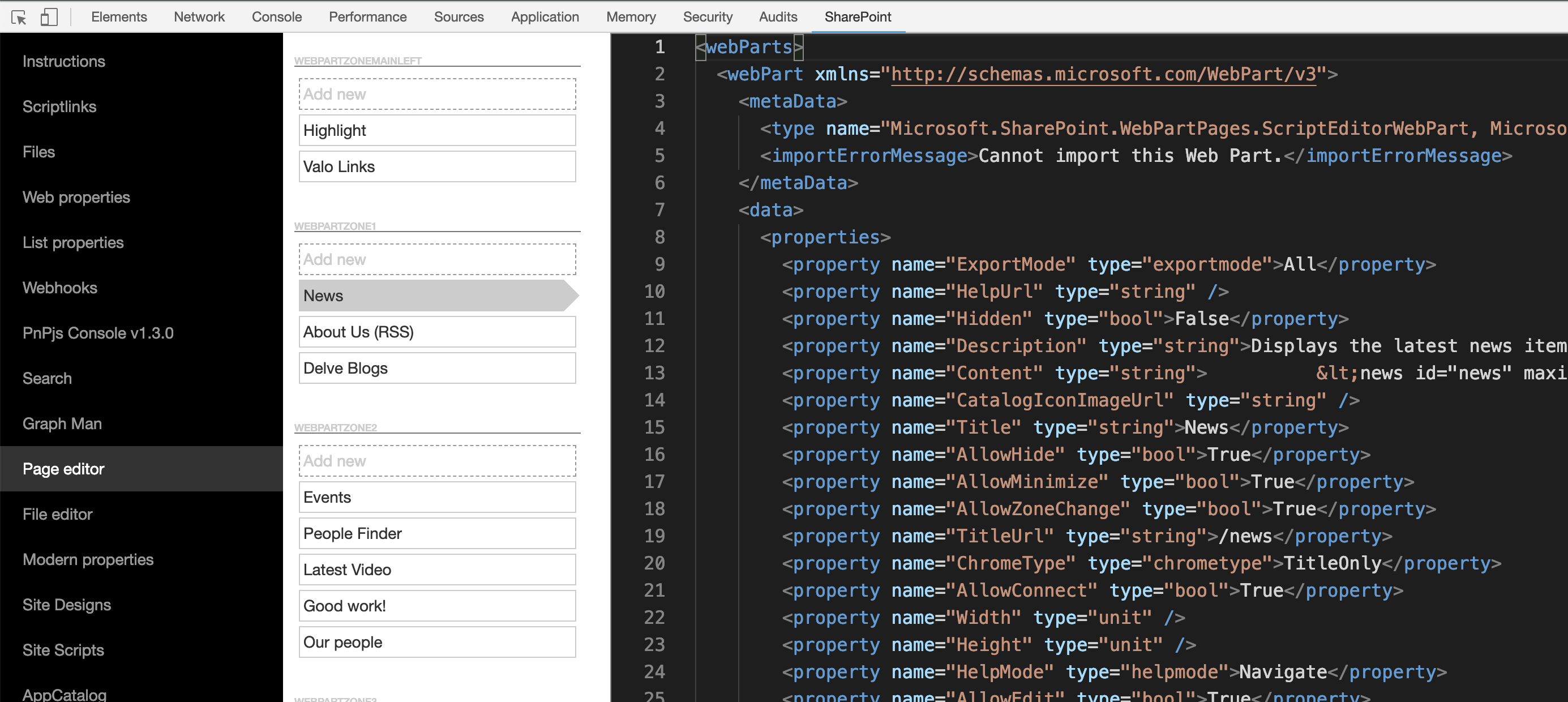
@simkessy you can use SP Editors "Page editor" feature to grab your webpart xml from a page.
tavikukko
on 19 Mar 2019
Hey @tavikukko I ended up just grabbing the page from SP Designer. But this helps moving forwards. Thanks again. I used your solution above and it's working great. Cheers.
simkessy
on 19 Mar 2019
Related issues
 pavan2920
·
3Comments
pavan2920
·
3Comments
 SpliceVW
·
3Comments
SpliceVW
·
3Comments
 AJIXuMuK
·
3Comments
AJIXuMuK
·
3Comments
 KieranDaviesV
·
3Comments
SpliceVW
·
3Comments
KieranDaviesV
·
3Comments
SpliceVW
·
3Comments
Most helpful comment
Yet another way to create classic publishing page using only PnPjs and you can even set needed properties ex. pagelayout and contenttype.