Category
- [x] Enhancement
- [ ] Bug
- [x] Question
- [ ] Documentation gap/issue
Version
Please specify what version of the library you are using: "^1.2.9"
Please specify what version(s) of SharePoint you are targeting: O365
Expected / Desired Behavior / Question
I'm trying to page using renderListDataAsStream. The official list webpart implementation appends this as a query string: Paged=TRUE&p_Title=Test%20Item%2012586&p_ID=3076&PageFirstRow=61&View=c7242a57-83ad-4756-86f1-fef46db112cb, which translates to an object like this:
var queryparams = {
  PageFirstRow: "31"
  Paged: "TRUE"
  View: "c7242a57-83ad-4756-86f1-fef46db112cb"
  p_ID: "3101"
  p_Title: "Test Item 13284"
}
There currently seems to be no way of adding a query string parameter to the .renderListDataAsStream function. Using overrideParameters does not help either because there is no way to actually page using it (or at least I haven't found a way to do it...).
Also PrevHref is always missing. I only get NextHref.
My Code:
        // this.list -> relative url to list
        data = await this.web.getList(this.list).renderListDataAsStream({}, {
          View: this.view, // this.view -> view id
        })
        console.log(data)
 johannes-z
All 6 comments
I originally brought this up in #383
I have brought this up before but just allowing query params on this endpoint would be great. We ended up having to write direct fetch and page management for this.
So here's the issues we've discovered and pinned down:
- All Views are saved using CAML, therefore if you have any reliance on views it must be caml.
- RenderListData as stream only uses CAML and is the only way to get filtered totals.
- The GetItems endpoint DOES NOT handle paging correctly, the skip param (Not available in PNP) here actually only skips the first page of the CAML request. There appears to be no query param here you can use to get pages of items. I still have not found a way to get a second page by CAML other than using the last ID of the previous page and adding a GT tag for the next page. (Nothing PNP can do about this I think aside from creating some nice wrappers to handle this.)
- RenderListData as stream returns a totally different format for ListItem objects so just to make it that little more fun.
- Therefore there are two options for RenderListData. Use the ID GT trick but this breaks item totals as it now skips X items. This part of PNP could get some use out of integrating paging for this endpoint.
My Proposal:
A Paged Request to RenderListDataAsStream looks like the following:
/_api/web/GetList('LIST_TITLE')/RenderListDataAsStream?Paged=TRUE&p_ID=445&PageFirstRow=101&View=c9bddb8b-c30b-4b2b-8b71-6cf8228590bc
So 3 Query Params that need to be given:
- Paged=TRUE
- p_ID (Given by last ID of the Page)
- PageFirstRow (Can be calculated from (RowLimit * (PageNumber - 1)) + 1)
RowLimit is a Column of the View List Item that you are using. Just 'Select' this value.
I hope this provides some info on what is possible with RenderListDataAsStream and pnpjs. If you need to get up and running you'd definitely have to write this fetch yourself.
 CPritch
on 22 Mar 2019
CPritch
on 22 Mar 2019
@patrick-rodgers I know you're busy, but are there any plans yet of addressing this issue? Otherwise I'll have to implement this myself.
Some suggestions though: Why is the renderListDataAsStream function a Promise already? I think it would be cool if it was like the list.items object from which I can call multiple functions, e.g. getAll, get and getPaged. This would allow you to have different kinds of calls against the same endpoint more consistently with the rest of the library...
johannes-z
on 24 Mar 2019
Hi guys,
Answering some of your questions, not all. But this already could be useful maybe.
Paging can be passed to renderListDataAsStream:
const web = new Web(webAbsUrl);
const list = web.getList(listUri);
const data = await list.renderListDataAsStream({
    ViewXml: `
        <View>
            <ViewFields>
                <FieldRef Name='ID' />
            </ViewFields>
            <RowLimit>5</RowLimit>
        </View>
    `,
    Paging: 'Paged=TRUE&p_ID=82' // <- Should contain correct paging token
});

console.log({ data });

So 3 Query Params that need to be given:
- Paged=TRUE
- p_ID (Given by last ID of the Page)
- PageFirstRow (Can be calculated from (RowLimit * (PageNumber - 1)) + 1)
RowLimit is a Column of the View List Item that you are using. Just 'Select' this value.
This isn't a correct logic, well only partly correct which only works with a view ordered by ID. When a custom order is applied, paging token also should contain p_[Field] values to work correctly.
 koltyakov
on 24 Mar 2019
koltyakov
on 24 Mar 2019
Some additions:
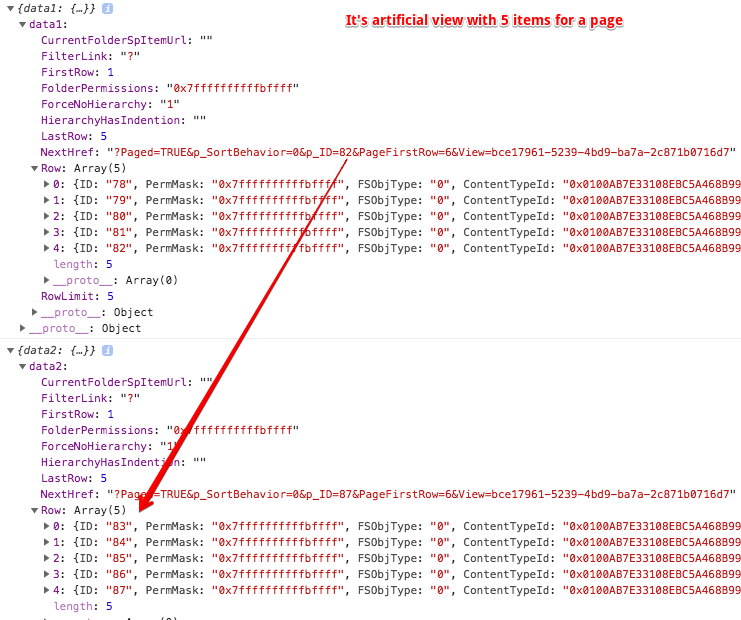
Looks like NextHref is returned when providing View ID in overrideParameters. Would love to hear if anyone knows about other options as by default there is no NextHref in response payload.
When using existing views, but not a custom ViewXml it's possible to paginate like this:
const web = new Web(webAbsUrl);
const list = web.getList(listUri);
const { Id: viewId } = await list.defaultView.get();

const data1 = await list.renderListDataAsStream(
    { Paging: '' },
    { View: viewId }
);
console.log({ data1 });

const data2 = await list.renderListDataAsStream(
    { Paging: data1.NextHref.split('?')[1] },
    { View: viewId }
);
console.log({ data2 });
koltyakov
on 24 Mar 2019
Going to close this as answered. Thanks all for the great discussion!
 patrick-rodgers
on 3 Apr 2019
patrick-rodgers
on 3 Apr 2019
Looks like
NextHrefis returned when providingViewID inoverrideParameters. Would love to hear if anyone knows about other options as by default there is noNextHrefin response payload.
I found a different way rather than creating an arbitrary View ID that seems somewhat more the way it was designed. You have to both:
- Specify
<RowLimit Paged="TRUE">#</RowLimit>in your ViewXML - this gets you NextHref_, but not PrevHref_ - Provide
PageFirstRowas part of the query string, even if the parameter is included in thePagingstring in the body parameters
 SpliceVW
on 23 Aug 2019
SpliceVW
on 23 Aug 2019
Related issues
 bogeorge
·
3Comments
bogeorge
·
3Comments
 KieranDaviesV
·
3Comments
KieranDaviesV
·
3Comments
 Holden15
·
3Comments
Holden15
·
3Comments
 ahsanranjha
·
3Comments
ahsanranjha
·
3Comments
 DennisGaida
·
3Comments
DennisGaida
·
3Comments
Most helpful comment
Hi guys,
Answering some of your questions, not all. But this already could be useful maybe.
Paging can be passed to
renderListDataAsStream:This isn't a correct logic, well only partly correct which only works with a view ordered by ID. When a custom order is applied, paging token also should contain
p_[Field]values to work correctly.