Pnpjs: Unable to appear People web part with descriptive layout
Category
- [ ] Enhancement
- [x] Bug
- [ ] Question
- [ ] Documentation gap/issue
Version
Please specify what version of the library you are using: [ 1.2.8 ]
Please specify what version(s) of SharePoint you are targeting: [ SharePoint Online]
Expected / Desired Behavior / Question
I am trying to copy the properties of people webpart inside a ClientSideWebpart. Here is the result of the getProperties :

When I use setProperties, I have the same properties :

But when I open the page in sharepoint, the webpart appear with the compact layout. Here is the code I use :
const webPartCopy = ClientSideWebpart.fromComponentDef(partDef);
const properties = webPart.propertieJson;
webPartCopy.setProperties(getProperties(properties));
Thank you for your feedback!
 umaknow-annie
All 6 comments
Can you share your full code? Including where you load and save the page? Want to ensure we can duplicate your code and find the issue. Thanks!
 patrick-rodgers
on 26 Feb 2019
patrick-rodgers
on 26 Feb 2019
This is how i get the page
const pageFile = (await this.getListByUrl("SitePages", web)).items.getById(id).file;
return ClientSidePage.fromFile(pageFile);
Here is the set properties code
const properties = {
     layout: 2,
     persons: [
          {
               department: "",
               id: "[email protected],
               linkName: "Facebook",
               phone: "",
               role: "[email protected],
               sip: "",
               upn: ""
         },
          {
               department: "",
               id: "[email protected],
               phone: "",
               role: "[email protected],
               sip: "",
               upn: ""
         },
     ]
}

webPart.setProperties(properties);
And this is how i save the page
targetPage.addSection().addControl(webpart);
targetPage.save()
I guess this one also is connected to the general issue with client-side pages webparts provisioning https://github.com/pnp/pnpjs/issues/504
 koltyakov
on 26 Feb 2019
koltyakov
on 26 Feb 2019
@koltyakov - maybe, I haven't had a chance to really dig into it yet.
patrick-rodgers
on 26 Feb 2019
I have a similar problem with the image web part. When I crop an image the properties are set in the web part. The caption text appear but the image doesn't appear. Here is the json properties of my client side web part.
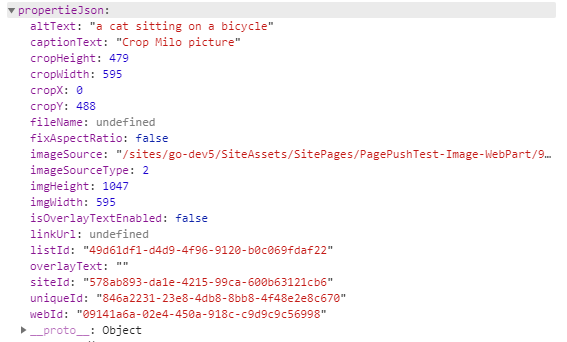
umaknow-annie
on 27 Feb 2019
Closing this as a duplicate of #504 - please retest and open a new issue after the next release this Friday March 8 2019. You can see more details in the issue thread on exactly what happened. Thanks!
patrick-rodgers
on 7 Mar 2019
Related issues
 ahsanranjha
·
3Comments
ahsanranjha
·
3Comments
 ITAndy23
·
3Comments
ITAndy23
·
3Comments
 bogeorge
·
3Comments
bogeorge
·
3Comments
 unnieayilliath
·
3Comments
unnieayilliath
·
3Comments
 KieranDaviesV
·
3Comments
KieranDaviesV
·
3Comments