Category
- [ ] Enhancement
- [ ] Bug
- [x ] Question
- [ ] Documentation gap/issue
We have encountered this issue in our spfx app when users try to create list item this is the scenario:
(1) There are total 12,272 records in EventBookingDetails list.
(2) Among those, there are 3,744 booking whose status are TRUE.
(3) However, following query return threshold limit error:
https://siteURL/_api/web/lists/getByTitle('EventBookingDetails')/items?$filter=(IsCurrentBooking eq 1) and (Venues/ID eq 66) and ((EventDate ge '2018-12-19T02:00:00.000Z' and EventDate le '2018-12-19T02:00:00.000Z') or (EndDate ge '2018-12-19T02:00:00.000Z' and EndDate le '2018-12-19T02:00:00.000Z') or (EventDate le '2018-12-19T02:00:00.000Z' and EndDate ge '2018-12-19T02:00:00.000Z')) and (BookingStatus ne 'Cancelled') and (BookingStatus ne 'Rejcted')&$select=ID,EventDate,Venues/ID,Venues/Title&$top=2000&$expand=Venues
this is the code that generates the query above:
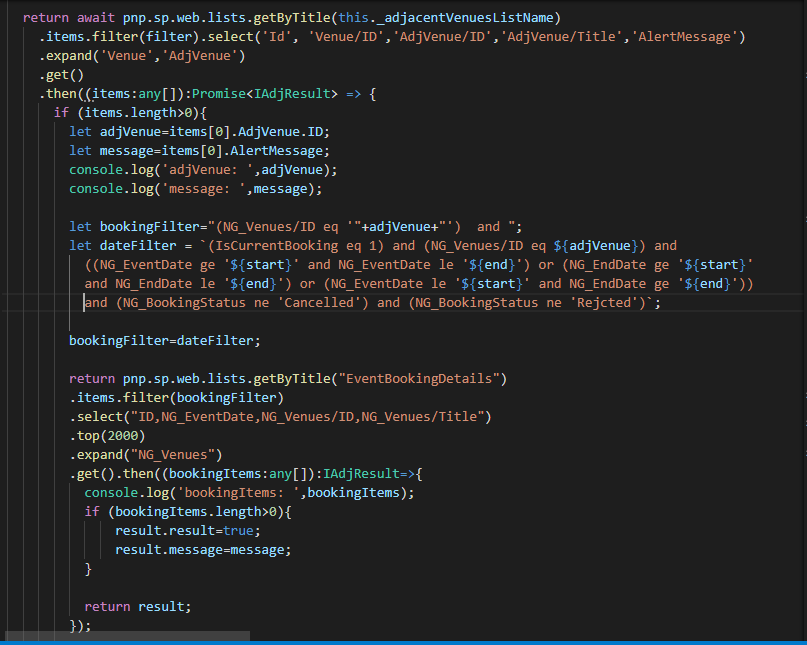
As a workaround we have removed the items from the first list being queried from in the code (adjacentVenuesListName). this did not result in an error. but we need to have it resolved. any suggestions on what we can do?
 paigeflourin
All 10 comments
Have you tried index the columns used by the filter?
 tsekityam
on 17 Jan 2019
tsekityam
on 17 Jan 2019
Have you tried index the columns used by the filter?
@tsekityam ,
these are the indexedColumns i have for the EventBookings List.
Created (Automatically created)
Created By (Automatically created)
IsChecking (Automatically created)
IsCurrentBooking
Modified (Automatically created)
NG_BookingStatus
NG_EndDate
NG_EventBookingId (Automatically created)
NG_EventDate (Automatically created)
Title (Automatically created)
paigeflourin
on 17 Jan 2019
Nothing really can be done on the library side cause it's how SharePoint API works with throttling.
If the first condition over the indexed field doesn't trim the results down to 5000 items (default list view throttling for a user) the request fails.
The only solution is to architect your data model and storage in a way you can retrieve active data.
The possible options are:
- Use indexed columns and logical conditions with field conditions which can trim results down to throttling limitation
- Archive old data to a separate list(s), etc.
- Use search API, especially for archive data
- For long running procedures (mostly backend process),
getAllmethod can be used (but no filter or order conditions should be provided)
 koltyakov
on 17 Jan 2019
koltyakov
on 17 Jan 2019
@koltyakov ,
"If the first condition over the indexed field doesn't trim the results down to 5000 items (default list view throttling for a user) the request fails."
the first condition over the indexed field does not exceed 5000. we have followed microsoft's advice to create subfolders, and move items periodically into a new list.
paigeflourin
on 17 Jan 2019
What are you actually trying to do with this operation? Just looking at the code it feels like there is a more efficient way to accomplish this operation. Setting aside the method, what is the use case you are solving here?
 patrick-rodgers
on 17 Jan 2019
patrick-rodgers
on 17 Jan 2019
Hi @patrick-rodgers ,
it wasnt actually my code it was just passed down to us but basically the whole process is that:
1) users would create a master list item from the SPFX app.
2) the application would then check if another list item's venue (list field) is adjacent to the one being created by the user
3) we have a list called Adjacent venue which lists out the all the adjacent venues. this is what it looks like:
Venue AdjVenue Alertmessage
Venue 1 Venue2 there is a current booking at Venue 2.
so when a user creates an item with venue as Venue1 on January 19, 2019 and in the master list there is a booking on January 19,2019 on Venue2. the system would prompt the user that there is a boking on Venue2 on the same day.
4) since we have a bookingStatus in the master list where status = 1 if it is an upcoming event, they used that as the first filter which isnt exceeding the 5k limit.
5) we are also maintaining the list by moving past events to subfolders.
is there a better and more sufficient way?
paigeflourin
on 18 Jan 2019
My stake is that something wrong with your filter conditions. Please, try to simplify it and also check if the corresponding filtering would work in an OOTB view with show items in all folders setting.
Moving old items to subfolders won't help if you anyways request for all items recursively. Folder index works in case of getting a folder object and when items in it, e.g. using renderListDataAsStream:
sp.web.lists.getByTitle('MyList')
    .renderListDataAsStream({
        ViewXml: `
          <View>
            <ViewFields>
              <FieldRef Name="ID" />
              <FieldRef Name="Title" />
            </ViewFields>
            <!-- Other CAML conditions -->
            <RowLimit Paged="TRUE">5000</RowLimit>
          </View>
        `,
        FolderServerRelativeUrl: '/path/to/folder/in/a/list'
    })
    .then(console.log)
Anyways, it sounds very much as a general question "how to achieve something with REST/API" rather than a library specific for me.
koltyakov
on 18 Jan 2019
I agree with @koltyakov on this. You aren't getting an error from the library itself but rather the code isn't working. For example this line bookingFilter=dateFilter actually is overwriting the filter condition created earlier. I think you need to re-work the code and ensure the filter conditions work. I will leave this issue open for now, but I think this is best resolved on your side at this point.
patrick-rodgers
on 18 Jan 2019
Hi all,
Thank you for all the input i guess i'll just rework the code to get my needed data.
paigeflourin
on 19 Jan 2019
Going to close this per your last comment. Please open a new issue if you do find a limitation within the library. Thanks!
patrick-rodgers
on 22 Jan 2019
Related issues
 SpliceVW
·
3Comments
SpliceVW
·
3Comments
 AJIXuMuK
·
3Comments
AJIXuMuK
·
3Comments
 Holden15
·
3Comments
Holden15
·
3Comments
 bogeorge
·
3Comments
bogeorge
·
3Comments
 ITAndy23
·
3Comments
ITAndy23
·
3Comments
Most helpful comment
Nothing really can be done on the library side cause it's how SharePoint API works with throttling.
If the first condition over the indexed field doesn't trim the results down to 5000 items (default list view throttling for a user) the request fails.
The only solution is to architect your data model and storage in a way you can retrieve active data.
The possible options are:
getAllmethod can be used (but no filter or order conditions should be provided)