Pnpjs: Items.skip works with ordering by ID field ONLY
Category
- [x] Enhancement
- [ ] Bug
- [ ] Question
- [ ] Documentation gap/issue
Version
Please specify what version of the library you are using: [1.2.7]
Please specify what version(s) of SharePoint you are targeting: [SharePoint Server 2019]
Expected / Desired Behavior / Question
Items.skip(skip, reverse) need to be extended to support ordering not only by ID field
Observed Behavior
Items.skip(skip, reverse) - is only working with ordering by ID field
If I add something like that '_.orderBy('myField')_' - it's not working.
Submission Guidelines
To handle that right now I'm using the following hack:
let _query = this.list.items.select('ID').orderBy('pubdate', false).top(10);
  (_query as any)._query.set('$skiptoken', encodeURIComponent(`Paged=TRUE&PagedPrev=TRUE&p_ID=${id}&p_pubdate=${pubdate}`));
 AndreyFedotov
All 10 comments
Hi Andrey,
For this purposes, getPaged and nextPage helpers can be used. getPaged helper takes care of using correct skip token which includes ordering and skip values from the last paged collection. Yet, previous page navigation still needs manually crafted skip token with first values of the sorted keys. Can provide a sample for backwards navigation of the customly ordered collection tomorrow when will be closer to the sources. Also, will think if it can be generalized such a way to be included as helper method.
 koltyakov
on 25 Dec 2018
koltyakov
on 25 Dec 2018
Hi there,
Here is an oversimplified naive implementation of getPrev for custom ordered paged collection:
import { sp, Items, PagedItemCollection } from '@pnp/sp';

const list = sp.web.lists.getByTitle('Custom');
const items = list.items.orderBy('Title').top(5);

(async () => {

    let paged = await items.getPaged();

    console.log('1st page results', paged.results.map(r => `${r.Id} - ${r.Title}`));
    // console.log(`Has next page ${paged.hasNext}`);

    paged = await paged.getNext();
    console.log('2nd page results', paged.results.map(r => `${r.Id} - ${r.Title}`));

    paged = await getPrev(items, paged);
    console.log('1st page again', paged.results.map(r => `${r.Id} - ${r.Title}`));

})();

const getPrev = <T>(items: Items, paged: PagedItemCollection<T>): Promise<PagedItemCollection<T>> => {
    const nextUrl = (paged as any).nextUrl; // Private
    const prevUrl = nextUrl
        .split('skiptoken=')[1].split('&')[0].split('%26')
        .map(p => p.split('%3d'))
        .filter(p => p[0].indexOf('p_') === 0)
        .reduce((r, p) => {
            const value = p[0].replace('p_', '').split('_x005f_').reduce((res, prop) => {
                return res[prop];
            }, paged.results[0]);
            return r.replace(p.join('%3d'), `${p[0]}%3d${value}`);
        }, nextUrl)
        .replace(new RegExp('Paged%3dTRUE', 'i'), 'Paged%3dTRUE%26PagedPrev%3dTRUE');
    const pagedCollection = new PagedItemCollection<T>(items, prevUrl, null);
    return pagedCollection.getNext();
};
This is just how paging works for list items. Why it was done this way using an ID based skip token I am not sure, but it just is. Another approach is to store the previous pages of items in memory, local storage, or session storage, and when they are needed pull them from the store instead of making a new request. This method doesn't provide a great way to jump into the middle of a collection (say page 5 of 10) but does work using the getPaged and getNext combination to work through the items.
 patrick-rodgers
on 2 Jan 2019
patrick-rodgers
on 2 Jan 2019
Going to close this as answered. Thanks for checking out the library!
patrick-rodgers
on 4 Jan 2019
This is just how paging works for list items.
Here is an oversimplified native implementation
const getPrev = <T>(items: Items, paged: PagedItemCollection<T>): Promise<PagedItemCollection<T>> => {
    // ..
};

Can You please make it more simplified.. for newbies..
Best regards, Gennady
 Gennady-G
on 8 Jul 2020
Gennady-G
on 8 Jul 2020
As a more simple solution, I'd suggest storing an array of next page tokens in memory for prev navigation. Sometimes reversing a token is not possible, e.g. if a sort is applied on an expanded lookup value which is empty.
UPD: That's exactly what Patrick suggested. Sorry for the repetition.
koltyakov
on 8 Jul 2020
Sometimes reversing a token is not possible, e.g. if a sort is applied on an expanded lookup value which is empty.
For me this is Ok and applicable , I don't have lookup fields - only few "Title"/"Description" fields and need simple "Prev"/"Next" buttons. Think Your example is cool but I don't know to implement it in react component webpart. What library is needed for these... templates?
Cannot find name 'T'.

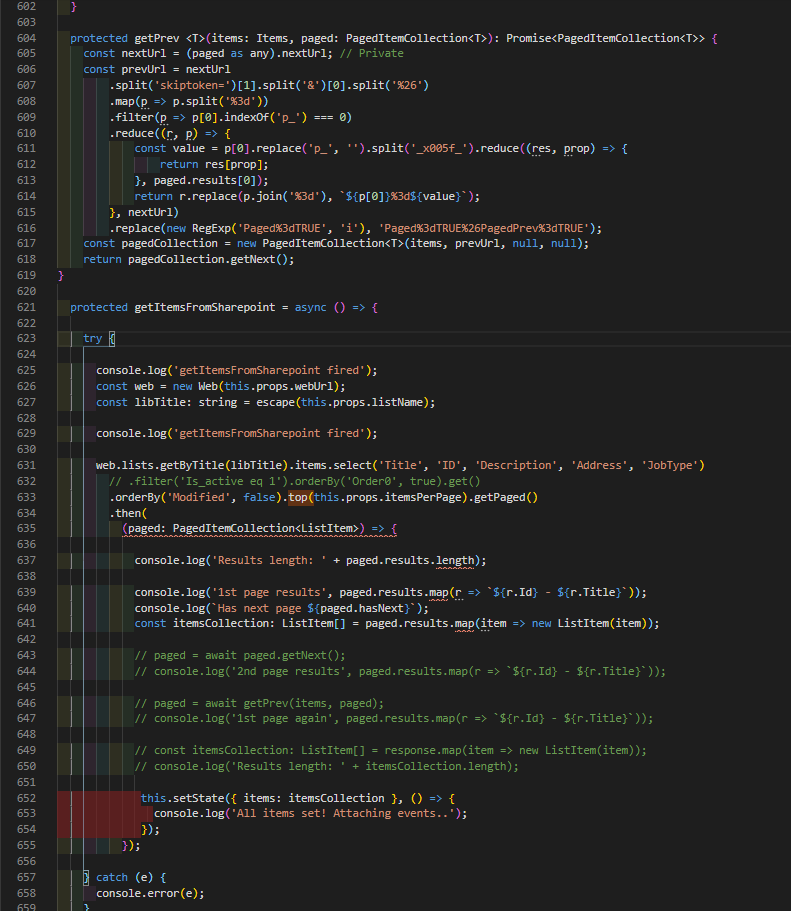
upd.: gist
Gennady-G
on 8 Jul 2020
Old TypeScript? That's just generics. You can try removing <T> and replacing T with a specific type. Also, my example is from 2018 and some naming things have been changed in v2 (e.g. Items now are IItems). The idea behind prev page token is simple it's almost the same as the next page token, but includes PagedPrev=TRUE all the values of sorted fields should be replaced to the corresponding from the first item in the collection.
koltyakov
on 8 Jul 2020
Well, now 'Next' works for me like a charm. "Prev" button gets wrong id, as i understand. Original code gives error, maybe something changed in new versions. Added 'new ODataDefaulParser()' parameter here
const pagedCollection = new PagedItemCollection<ListItem>(items, prevUrl, null, new ODataDefaultParser());
Troed to play with p_ID key and replace it in new url, but don't see any changes.. prevUrl works, but looks like gets only one previous item..
public currentPagedItems: any;  // paging

  protected getItemsFromSharepoint = async () => {

    try {

      console.log('getItemsFromSharepoint fired');
      const web = new Web(this.props.webUrl);
      const libTitle: string = escape(this.props.listName);

      console.log('getItemsFromSharepoint fired');

      web.lists.getByTitle(libTitle).items.select('Title', 'ID', 'Description', 'Address', 'JobType')
        .orderBy('Modified', false).top(this.props.itemsPerPage).getPaged()
        .then(
          (paged) => {

            this.currentPagedItems = paged;
            const itemsCollection: ListItem[] = paged.results.map(item => new ListItem(item));

            this.setState({ items: itemsCollection }, () => {
              console.log('All items set! Attaching events..');
            });
          });

    } catch (e) {
      console.error(e);
    }
  }

  protected getNextItemsFromSharepoint = async () => {

    try {

      if (this.currentPagedItems.hasNext) {

        this.currentPagedItems = await this.currentPagedItems.getNext();
        const itemsCollection: ListItem[] = this.currentPagedItems.results.map(item => new ListItem(item));

        this.setState({ items: itemsCollection }, () => {
          console.log('Next items set!');
        });

      } else {
        console.log('No Next items');
      }

    } catch (e) {
      console.error(e);
    }
  }


  protected getPrev(items: Items, paged: PagedItemCollection<ListItem>): Promise<PagedItemCollection<ListItem>> | void {

    try {
      const nextUrl = (paged as any).nextUrl; // Private

      // don't understand what is here.. Tried '_' instead of '_x005f_' but no luck

      // let prevUrl = nextUrl
      //     .split('skiptoken=')[1].split('&')[0].split('%26')
      //     .map(p => p.split('%3d'))
      //     .filter(p => p[0].indexOf('p_') === 0)
      //     .reduce((r, p) => {
      //         const value = p[0].replace('p_', '').split('_x005f_').reduce((res, prop) => {
      //             return res[prop];
      //         }, paged.results[0]);
      //         return r.replace(p.join('%3d'), `${p[0]}%3d${value}`);
      //     }, nextUrl)
      //     .replace(new RegExp('Paged%3dTRUE', 'i'), 'Paged%3dTRUE%26PagedPrev%3dTRUE');

      // let prevUrl = nextUrl.replace(new RegExp('Paged%3dTRUE', 'i'), 'Paged%3dTRUE%26PagedPrev%3dTRUE');
      let prevUrl = nextUrl.replace('Paged%3dTRUE', 'Paged%3dTRUE%26PagedPrev%3dTRUE');

      // TODO: tried to get previous page id starts from
      let prevId = nextUrl.substring(nextUrl.lastIndexOf('p_ID%3d') + 7, nextUrl.lastIndexOf('&%24select='));
      let prevIdReplaced = +prevId; // convert to number and decrement value
      prevIdReplaced -= (this.props.itemsPerPage + 1);  // if page size 3, then 10 will be 7, etc. Not sure..

      if ((prevIdReplaced - this.props.itemsPerPage) >= 0) {

        // if page size '3', then '10' will be '7', etc. Not sure..
        prevUrl = prevUrl.replace(`p_ID%3d${prevId}&%24select=`,`p_ID%3d${prevIdReplaced.toString()}&%24select=`);

        const pagedCollection = new PagedItemCollection<ListItem>(items, prevUrl, null, new ODataDefaultParser());  // not sure, added ' new ODataDefaultParser()'

        if (pagedCollection.hasNext) {
          return pagedCollection.getNext();
        }
      } else {

        console.log('No place for previous call');
        return;
      }
    } catch (ex) {

      console.log('Exception getting previous items, refresh data from scratch');
      this.getItemsFromSharepoint();
    }
  }


  protected getPrevItemsFromSharepoint = async () => {

    try {

      this.currentPagedItems = await this.getPrev(this.currentPagedItems, this.currentPagedItems);
      const itemsCollection: ListItem[] = this.currentPagedItems.results.map(item => new ListItem(item));

      this.setState({ items: itemsCollection }, () => {
        console.log('Prev items set!');
      });

    } catch (e) {
      console.error(e);
    }
  }
Next url:
https://server.sharepoint.com/sites/sitecol/_api/web/lists/getByTitle('MyList')/items?%24skiptoken=Paged%3dTRUE%26p_Modified%3d20200708%252016%253a37%253a37%26p_ID%3d10&%24select=Title%2cID%2cDescription%2cAddress%2cJobType&%24orderby=Modified+desc&%24top=3
Prev url:
https://server.sharepoint.com/sites/sitecol/_api/web/lists/getByTitle('MyList')/items?%24skiptoken=Paged%3dTRUE%26PagedPrev%3dTRUE%26p_Modified%3d20200708%252016%253a37%253a30%26p_ID%3d13&%24select=Title%2cID%2cDescription%2cAddress%2cJobType&%24orderby=Modified+desc&%24top=3
Original code gives 'undefined' after 'Modified' key:
https://serve.sharepoint.com/sites/soitecol/_api/web/lists/getByTitle('MyList')/items?%24skiptoken=Paged%3dTRUE%26PagedPrev%3dTRUE%26p_Modified%3dundefined%26p_ID%3d14&%24select=Title%2cID%2cDescription%2cAddress%2cJobType&%24orderby=Modified+desc&%24top=3
Gennady-G
on 8 Jul 2020
Ok, for this version I manually store current id position, an use it in getPrev query. getPrev is the same, without "Prev" flag; the only I do is replace id value, something like this:
  this.currentIdPosition: number;
  // ..
  protected getPrev(): Promise<PagedItemCollection<ListItem>> | void {

    try {

      if ((+this.currentIdPosition) - (+this.props.itemsPerPage) >= 0) {
        console.log('Old position: ' + this.currentIdPosition);

        this.currentIdPosition = (+this.currentIdPosition) - (+this.props.itemsPerPage);
        console.log('New position: ' + this.currentIdPosition);

        let nextUrl = `${this.props.webUrl}/_api/web/lists/getByTitle('${encodeURIComponent(this.props.listName)}')/items?%24skiptoken=Paged%3dTRUE%26p_ID%3d${this.currentIdPosition - this.props.itemsPerPage}&%24select=Title%2cID%2cDescription%2cAddress%2cJobType&%24orderby=ID+asc&%24top=${this.props.itemsPerPage}`;
        console.log(`nextUrl url is: ${nextUrl}`);

        const pagedCollection = new PagedItemCollection<ListItem>(this.currentPagedItems, nextUrl, null, new ODataDefaultParser());  // not sure, added ' new ODataDefaultParser()'
        return pagedCollection.getNext();

      } else {

        console.log('No place for previous call.');
      }
    } catch (ex) {

      console.log('Exception getting previous items, refresh data from scratch');
      this.getItemsFromSharepoint();
    }
  }
In next version I'll try to change to one query and use cache. Thank You for pointing in right direction!
Best regards, Gennady
Gennady-G
on 9 Jul 2020
Related issues
 simkessy
·
3Comments
simkessy
·
3Comments
 unnieayilliath
·
3Comments
unnieayilliath
·
3Comments
 DennisGaida
·
3Comments
DennisGaida
·
3Comments
 ITAndy23
·
3Comments
ITAndy23
·
3Comments
 bogeorge
·
3Comments
bogeorge
·
3Comments
Most helpful comment
Old TypeScript? That's just generics. You can try removing
<T>and replacingTwith a specific type. Also, my example is from 2018 and some naming things have been changed in v2 (e.g.Itemsnow areIItems). The idea behind prev page token is simple it's almost the same as the next page token, but includesPagedPrev=TRUEall the values of sorted fields should be replaced to the corresponding from the first item in the collection.