Pnpjs: Is it possible to set the http headers accept odata=nometada on batch requests?
Category
- [ ] Enhancement
- [ ] Bug
- [x ] Question
- [ ] Documentation gap/issue
Version
Please specify what version of the library you are using: [ latest ]
Please specify what version(s) of SharePoint you are targeting: [ online ]
I'm making a batch call and the http header request is "accept: application/json" my call is about 7s long due to the number of columns and items being returns (17mb).
I'm hoping if there's a way to set the batch request to run under odata=nometadata it might improve performance.
 simkessy
All 5 comments
Hi @simkessy,
Yes, possible, via .configure method:
import { sp } from '@pnp/sp';

const list1 = sp.web.lists.getByTitle('List1');
const list2 = sp.web.lists.getByTitle('List2');
const data: any = {};

const batch = sp.web.createBatch();
const headers = {
    Accept: 'application/json;odata=nometadata'
};
list1.configure({ headers }).items.inBatch(batch)
    .get().then(items => data.items1 = items);
list2.configure({ headers }).items.inBatch(batch)
    .get().then(items => data.items2 = items);

batch.execute().then(_ => console.log(data));
 koltyakov
on 15 Nov 2018
koltyakov
on 15 Nov 2018
Hey I gave it a shot:
        let result = null;

        let web = new pnp.Web(mysiteurl);
        let batch = web.createBatch();

        const headers = {
            Accept: "application/json;odata=nometadata"
        };

        web.lists
            .getByTitle(listName)
            .configure({ headers })
            .items.top(5000)
            .select(selectFields.join())
            .expand(expandFields.join())
            .filter("Active eq 1")
            .inBatch(batch)
            .get()
            .then(function(data) {
                result = data;
            });

        return batch.execute().then(function() {
            return result;
        });
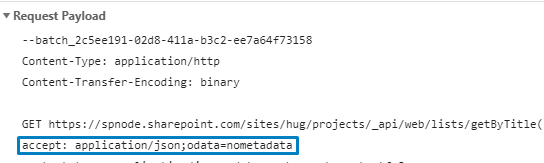
But my payload looks like this:
Content-Type: application/http
Content-Transfer-Encoding: binary
I was looking at the wrong section for the payload. This works really well.
@patrick-rodgers
I think an example on how to use configure should be added to the documentation. Looking at the documentation here I would have no idea this is what it meant.
simkessy
on 15 Nov 2018
That's fair, reopening as a documentation gap.
 patrick-rodgers
on 16 Nov 2018
patrick-rodgers
on 16 Nov 2018
Closing this with docs update complete
patrick-rodgers
on 20 Nov 2018
Related issues
 BrianBusby
·
3Comments
BrianBusby
·
3Comments
 muraray
·
3Comments
muraray
·
3Comments
 AJIXuMuK
·
3Comments
AJIXuMuK
·
3Comments
 jcosta33
·
3Comments
jcosta33
·
3Comments
 simonagren
·
3Comments
simonagren
·
3Comments
Most helpful comment
Hi @simkessy,
Yes, possible, via
.configuremethod: