Pnpjs: How to enable Global Search Scope in Pnp Search Query
I am trying to fetch sites using the below code.I am able to retrieve sites using the below code.
But when I try to access it from root like https://contoso.sharepoint.com , I get all proper results
But the same thing doesnt work with https://contos.sharepoint/sites/common
It gives me different search result. I guess this issue is because of scope.
How can i enable global search scope in the query.
Here you can see that the scope is for this web request , it would be great to have a web request parameter to change search scope
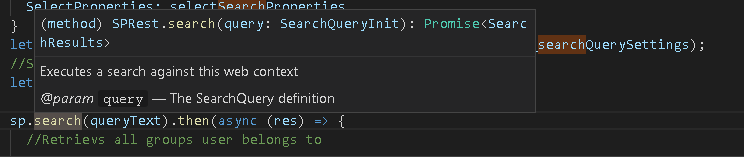
const _searchQuerySettings: SearchQuery = {
      //Search Properties
      TrimDuplicates: true,
      RowLimit: 500,
      EnableSorting:true,

      SelectProperties:["Title","WebTemplate","OriginalPath","LastModifiedTime","Author","Path"]

    }
    let queryText = SearchQueryBuilder("WebTemplate:GROUP OR WebTemplate:STS OR WebTemplate:SITEPAGEPUBLISHING" , _searchQuerySettings);
One way of changing the scope is
sp.setup({
  sp: {
    headers: {
      Accept: "application/json;odata=verbose",
    },
    baseUrl: "absolute url"
  },
});
Is this a good practice ?
 harshdamaniahd
All 4 comments
To answer your last question first, yes you can use the setup to change the base url of the request.
You could also import the Search class and use it directly.
import { Search } from "@pnp/sp";

const search = new Search("Your URL");

const results = await search.execute({your query object or string})
Give that a try and let us know if that doesn't help. Thanks for using the library!
 patrick-rodgers
on 29 Oct 2018
patrick-rodgers
on 29 Oct 2018
First of all thanks for making our life simple and creating pnp js.
Yeah this approach works :
import { Search } from "@pnp/sp";
const search = new Search("Your URL");
const results = await search.execute({your query object or string})
So i guess this approach is better than changing the base url right ?
harshdamaniahd
on 30 Oct 2018
I think that approach is better in that you are only setting the url for that one search request and not affecting any other requests. BUT if all your requests need to go to some other url you can use the baseUrl. Both work but the second way, setting the url in Search class constructor, is IMO cleaner and easier to understand what is happening for others reading the code.
patrick-rodgers
on 30 Oct 2018
Going to close this issue as answered, please _reopen_ should you want to continue the conversation. Thanks!
patrick-rodgers
on 30 Oct 2018
Related issues
 BrianBusby
·
3Comments
BrianBusby
·
3Comments
 simonagren
·
3Comments
simonagren
·
3Comments
 muraray
·
3Comments
muraray
·
3Comments
 simkessy
·
3Comments
simkessy
·
3Comments
 KieranDaviesV
·
3Comments
KieranDaviesV
·
3Comments