Category
- [ ] Enhancement
- [ ] Bug
- [x] Question
- [ ] Documentation gap/issue
Version
Please specify what version of the library you are using: [ 1.2.1 ]
Please specify what version(s) of SharePoint you are targeting: [SPO]
If you are not using the latest release, please update and see if the issue is resolved before submitting an issue.
Expected / Desired Behavior / Question
Filter should work as it does on Chrome and other supported browsers.
Observed Behavior
The call to the API does not happen due to a browser error.
web.lists.getByTitle(surveyListTitle).fields.select("ID, Title, StaticName, TypeAsString, Choices, CanBeDeleted").
Steps to Reproduce
This code should reproduce the issue:
sp.web.lists.getByTitle("List Title").fields.filter("CanBeDeleted eq true").top(1)
This might be because of a missing poly fill but not sure yet.
 saulpreciado
All 24 comments
Hi @saulpreciado,
I'm wondering, did you installed these polyfills?
 koltyakov
on 8 Oct 2018
koltyakov
on 8 Oct 2018
Hi @koltyakov,
Yes, we are using CoreJS for Classic sites (attached to a masterpage) but the code in question is running on an SPFx Web Part on a Modern Site.
saulpreciado
on 8 Oct 2018
Just doublechecked, with PnPjs ver. 1.2.1, filter works in IE. So probably array polyfills are really missed in the project setup. As, for example, removing array from polyfill from a page leads to failure in IE.
koltyakov
on 8 Oct 2018
I'll check out the poly fills then.
saulpreciado
on 8 Oct 2018
I just added the poly fill and it works but now the .filter does not apply the filter tag in the query. It's just returning all the values. Any ideas?
It's worth to mention that we started to have these issues when we upgraded to the new pnp libraries, this was working fine with the previous PNPJs libraries.
saulpreciado
on 9 Oct 2018
Please make sure you check the latest polyfills article. It was updated with the last release after folks found some issues with IE11. If you continue having issues please let us know so we can get you sorted out. Thanks!
 patrick-rodgers
on 9 Oct 2018
patrick-rodgers
on 9 Oct 2018
I'm also experiencing the same issue trying to use .filter in my list query in IE11 and I'm using the exact polyfill setup as in the article and PnPCoreJS:@pnp-1.2.1.
The response still holds all the data and ignores the filter options.
Polyfill setup:
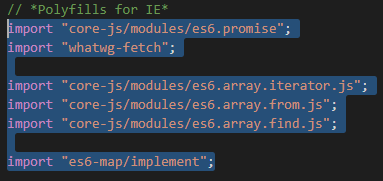
Code used:
myWeb.lists.getById(listId).items.select("Title", "UserId").filter("UserId eq '10'").get().then((items: any[]) =>
The results are filtered appropriately in Chrome/Firefox.
Any help would be much appreciated!
 Ermabo
on 11 Oct 2018
Ermabo
on 11 Oct 2018
For boolean values your REST filter string must be 'CanBeDeleted eq 1'.
 pedro-pedrosa
on 11 Oct 2018
pedro-pedrosa
on 11 Oct 2018
The only thing I can think is that the Array.from polyfill is not being applied as it is used within the method that builds the query string.
patrick-rodgers
on 11 Oct 2018
I tried various approaches, even adding the poly fills the same way as Ermabo is doing it but I kept running into various behaviors, so I ended up removing the use of Pnp for this particular functionality due to deadlines. I ended up going with a Vanilla approach.
saulpreciado
on 11 Oct 2018
Sorry to hear that, will have a look.
patrick-rodgers
on 11 Oct 2018
Not sure if this helps, but I had ran into issues with polyfills before and this looks like it could be the same issue.
The Array.from call is receiving a Map as an argument, which is also pollyfilled. SharePoint uses its own polyfill which does not adhere to spec, specifically when called with a spec-adherent Array.from implementation such as core-js's.
I fixed that on my code by checking whether the Map identifier was native or if it was a polyfill (microsoft's broken version). If it is a polyfill, make it undefined, then import your own polyfill. Same for Set
import 'whatwg-fetch';
import 'core-js/es6/promise';
import 'core-js/fn/array/from';
import 'core-js/fn/array/fill';
import 'core-js/fn/array/find';
import 'core-js/fn/array/find-index';
// Check for native support of Map vs Polyfill
if(Map.toString().indexOf('function Map()') === -1)
{
    Map = undefined;
}
import 'core-js/fn/map';
if(Set.toString().indexOf('function Set()') === -1)
{
    Set = undefined;
}
import 'core-js/fn/set';
I think you are in the right path @pedro-pedrosa, while I was doing my debugging I noticed Array.from started to give me some issues, I fixed that and then it moved to Array.find. After that it started to give me a variety of mixed results but at this point I had to find a solution so I moved to a vanilla approach. I was following the same train of thought you are describing in your code though so I'm thinking what you have implemented could be the answer.
saulpreciado
on 11 Oct 2018
Can't reproduce on my end, with the polyfills from PnPjs docs filtering (as well as any other functionality with the exception of search builder) works in IE11 with SPO and On-Prem (tested on 2013/2016 which have browser compatibility mode equals to IE10). Tested this on the examples mentioned above and some internal apps with more complex logic and a variety of REST capabilities used.
koltyakov
on 12 Oct 2018
I will close this issue as a question for anyone running into this behavior. References are mentioned above.
saulpreciado
on 12 Oct 2018
Please now see the updated article on the new polyfill package to hopefully make things easier.
patrick-rodgers
on 12 Oct 2018
I tried using the npm package for IE11 polyfills but I still can't get select().filter() to work in IE11. It still returns all the data and doesn't append the query string for filter in the request.
Unfortunately I can't use the code provided for the Array.map and Array.from polyfills. Probably cause I'm using TypeScript.

Ermabo
on 15 Oct 2018
Very strange, I'm using typescript too and it works fine for me. What version of typescript are you using on VSCode?
Anyway you can always cast to any as a work around:
(Map as any) = undefined;
I got it working now when using your code @pedro-pedrosa to unset Map and Set before importing the polyfills for them.
Thank you so much!
P.S. I'm using TypeScript version 2.6.2
Ermabo
on 16 Oct 2018
No problem. Maybe you were getting that error with undefined because you're using strictNullChecks in your ts.config.
@Ermabo @saulpreciado can you confirm that you were experiencing this issue with .filter() in the context of one of the following:
- Modern experience page
- Classic experience page containing an SPFx web part
If so, @patrick-rodgers maybe this needs to be addressed in the documentation regarding polyfills.
More info (original issue where I discovered this work-around): SharePoint/sp-dev-docs#888
pedro-pedrosa
on 16 Oct 2018
Update:
My webpart worked fine the first time I loaded it, but upon the second reload I got an Out of stack space error

The error occurs as soon as I implement the Map and Set overwrites.
I'm on a modern page and the solution is a SPFx web part.
Ermabo
on 16 Oct 2018
i also get this error:

tried adding:
import "es6-promise/auto";
import "babel-polyfill";
but i got out of stack error instead.
need some assistance with this
 paigeflourin
on 19 Dec 2018
paigeflourin
on 19 Dec 2018
Not sure, that the error is from the library.
@paigeflourin, it's better to reopen or create a separate issue rather than posting comments to a closed one. The chances of missing comments in already closed issues are very hight.
At the end of the day, I can't understand did you follow the requirement on polyfills package or not, why you're importing something else but not what is mentioned in the docs?
Can you provide us with a bare minimal project repo which let us clone and reproduces the behavior which you experience? But before it please make sure you followed the polyfills article notes. Thanks!
koltyakov
on 19 Dec 2018
Hi @koltyakov ,
ah apologies for that one.
yeah i have import "@pnp/polyfill-ie11"; in my import but i still get IE11 error.
i kind of fixed it by adding
import 'core-js/es6/array';
import 'core-js/es6/number';
so i'll just open another issue in case i encounter one. Thank You and apologies!
paigeflourin
on 19 Dec 2018
Related issues
 jcosta33
·
3Comments
jcosta33
·
3Comments
 DennisGaida
·
3Comments
DennisGaida
·
3Comments
 BrianBusby
·
3Comments
BrianBusby
·
3Comments
 ahsanranjha
·
3Comments
ahsanranjha
·
3Comments
 un-dres
·
3Comments
un-dres
·
3Comments
Most helpful comment
Hi @saulpreciado,
I'm wondering, did you installed these polyfills?