Hello
I have a simple SFXx Extension on SP2019 using pnpjs to get list titles.
In IE the $select is not appended at the request url
In Chrome everything works ok.
I am loading es6-promise and whatwg-fetch before pnp-js
What am I doing wrong?
Category
- [ ] Enhancement
- [ ] Bug
- [x] Question
- [ ] Documentation gap/issue
Version
@microsoft/generator-sharepoint : 1.4.1
SP2019 Build: 16.0.10336.20039
Package.json extract:
"dependencies": {
"@microsoft/decorators": "~1.4.1",
"@microsoft/sp-application-base": "~1.4.1",
"@microsoft/sp-core-library": "~1.4.1",
"@microsoft/sp-dialog": "~1.4.1",
"@pnp/common": "^1.2.1",
"@pnp/logging": "^1.2.1",
"@pnp/odata": "^1.2.1",
"@pnp/sp": "^1.2.1",
"@types/webpack-env": ">=1.12.1 <1.14.0",
"core-js": "^2.5.7",
"jquery": "^3.3.1",
"whatwg-fetch": "^3.0.0"
},
"devDependencies": {
"@microsoft/sp-build-web": "~1.4.1",
"@microsoft/sp-module-interfaces": "~1.4.1",
"@microsoft/sp-webpart-workbench": "~1.4.1",
"@types/chai": ">=3.4.34 <3.6.0",
"@types/mocha": ">=2.2.33 <2.6.0",
"@types/sharepoint": "^2016.1.1",
"ajv": "~5.2.2",
"gulp": "~3.9.1"
}
My Service:
import { polyfill } from 'es6-promise';
import 'whatwg-fetch';
import { sp } from '@pnp/sp';
export default class WebService {
constructor() {
    polyfill();
}

public GetWebContents = () => {
    console.log("WebService.GetWebContents");
        sp.web.lists.select('Title, DefaultViewUrl').get().then((items: any[]) => {
            console.log('WebService.GetWebContents', items);
        });
}
}
Network monitor in IE11
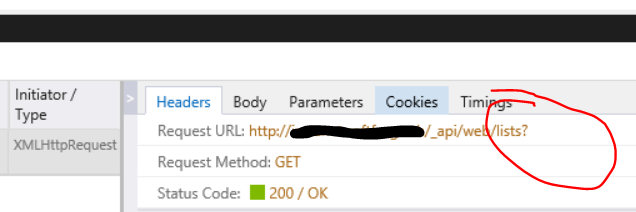
Network monitor in Chrome:

 hohenp
All 4 comments
This is because we have moved to using the Map class that is not supported in IE. We have updated the docs but not yet published them to cover this scenario. Please see the updated article and let us know if that helps.
 patrick-rodgers
on 25 Sep 2018
patrick-rodgers
on 25 Sep 2018
Hi Patrick, Thanks for the quick answer. Thought there might be an ignite delay :)
I just read the article, included the missing polyfills and now everything works.
Sorry, I didn't realize that the Map polyfill is missing.
Thanks Pascal
hohenp
on 25 Sep 2018
No worries, we hadn't updated the article before making the change (which we should have). Sorry for the confusion. Going to close this as answered, I also did publish the docs to the site this morning after reading this so you can now refer there as well. Thanks!
patrick-rodgers
on 25 Sep 2018
Please now see the updated article on the new polyfill package to hopefully make things easier.
patrick-rodgers
on 12 Oct 2018
Related issues
 drewcook
·
3Comments
drewcook
·
3Comments
 ahsanranjha
·
3Comments
ahsanranjha
·
3Comments
 KieranDaviesV
·
3Comments
KieranDaviesV
·
3Comments
 SpliceVW
·
3Comments
SpliceVW
·
3Comments
 pavan2920
·
3Comments
pavan2920
·
3Comments