Pnpjs: sp.search not working in Communication Site
Hi ,
I have a SPFx Webpart which is using sp.search method to get all the documents, which is working fine in classic site as well as in modern Team site.
Today, I added the same working Webpart to a communication site and no documents are being returned.
Category
- [ ] Enhancement
- [ ] Bug
- [] Question
- [ ] Documentation gap/issue
Version
@pnp/sp 1.2.1
I am just using npm module @pnp/sp and I initiated the spfxcontext. As said it is working in Team Sites the same is not working in Communication sites.
Am i missing anything here?
Thanks for your help advance :)
 ChitraSMudumba
All 4 comments
Would you mind posting some code? If I understood you correctly you want to get all the documents via search?
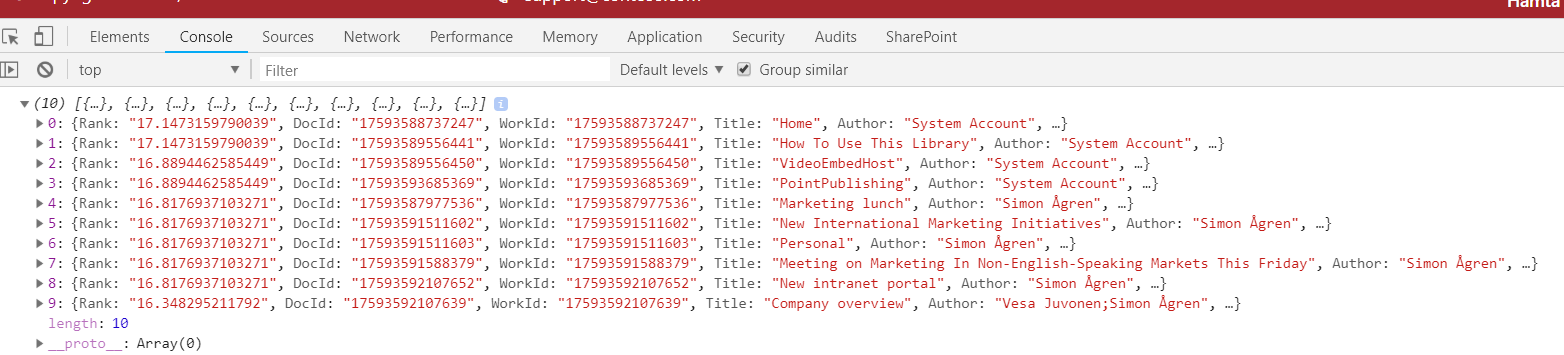
I did the following in the SPEditor console (In a communicationsite), and it did work for me.
import { sp, SearchQuery, SearchResults } from "@pnp/sp";

sp.search("IsDocument:true").then((r: SearchResults) => {
    console.log(r.PrimarySearchResults);
});
 simonagren
on 7 Sep 2018
simonagren
on 7 Sep 2018
Heii Simon,
Thanks for your Reply. I could figure it out.
The "Properties" Attribute solved the Problem. In my case all the "Modern Team Sites" are private and within the team site and in central search could get results.
sp.search({
Querytext: this.queryText,
EnableSorting: true,
SelectProperties: this.selectedProperties,
RowLimit: 5000,
TrimDuplicates:false,
Properties:[
{
Name:"EnableDynamicGroups",
Value:{
BoolVal:true,
QueryPropertyValueTypeIndex:3
}
}
]
}).then((data: SearchResults) =>{});
ChitraSMudumba
on 7 Sep 2018
Glad to hear it worked out for you :)
simonagren
on 8 Sep 2018
Thanks! Going to close this as resolved.
 patrick-rodgers
on 8 Sep 2018
patrick-rodgers
on 8 Sep 2018
Related issues
 DennisGaida
·
3Comments
DennisGaida
·
3Comments
 jcosta33
·
3Comments
jcosta33
·
3Comments
 ahsanranjha
·
3Comments
ahsanranjha
·
3Comments
 AJIXuMuK
·
3Comments
AJIXuMuK
·
3Comments
 KieranDaviesV
·
3Comments
KieranDaviesV
·
3Comments
Most helpful comment
Heii Simon,
Thanks for your Reply. I could figure it out.
The "Properties" Attribute solved the Problem. In my case all the "Modern Team Sites" are private and within the team site and in central search could get results.
sp.search({
Querytext: this.queryText,
EnableSorting: true,
SelectProperties: this.selectedProperties,
RowLimit: 5000,
TrimDuplicates:false,
Properties:[
{
Name:"EnableDynamicGroups",
Value:{
BoolVal:true,
QueryPropertyValueTypeIndex:3
}
}
]
}).then((data: SearchResults) =>{});