Pnpjs: Best approach to filter managed metadata column
Is it possible to filter managed metadata column using pnp filter ?
 harshdamaniahd
All 11 comments
Hi @harshdamaniahd
You are spamming old threads as well as starting this one. The best way to get a question answered is to ask it once as clearly as possible and be patient. So, what exactly would you like to accomplish? I see in some of the other threads you mention id? Can you provide details on your scenario?
 patrick-rodgers
on 19 Jun 2018
patrick-rodgers
on 19 Jun 2018
I have a taxonomyfield called "Organization".
This field i have used in one library , now i am trying to filter data in library based on Organization ..but i dont think it is possible using pnp js
web.lists.getByTitle(libraryName).items.
top(topQuery).
orderBy("Modified", false).
filter("Title ne 'Home'").
select("Title", "FileRef", "GUID", "Description",
"Organization", "Contact/Title", "Modified")
.expand("Contact").usingCaching({
key: key.workSpaceNews,
expiration: Util.dateAdd(new Date(), typeofexpiration, expiration.minutes),
storeName: "session"
}).get();
Hence i tried using caml , but it returns result as empty
var query = {
"ViewXml": '<View> <ViewFields>'+
'<FieldRef Name="Name" />'+
'</ViewFields><RowLimit>3</RowLimit><Query><Where><In>' +
'<FieldRef LookupId="TRUE" Name="Organization" />' +
'<Values>'+
'<Value Type="Integer">' + termid+
'</Value>'+
'<Value Type="Integer">' + termid +
'</Value>'+
'</Values></In></Where></Query></View>'
};
await web.lists.getByTitle(newsWorkspace.libraryName).getItemsByCAMLQuery(query).then((result)=>{
debugger;
console.log(result);
}).catch((ex)=>{
debugger;
})
@patrick-rodgers , I tried this.
Requirement : Filter a library based on three taxonomy columns
Here in the below code i am using TaxCatchAll to filter and I am able to filter by business_x0020_unit column (Taxonomy Field).But is this right approach ...Is there any other way...
What if i want to filter by Business_x0020_Unit and Geo_x0020_location ..how will it work ?
return await web.lists.getByTitle(newsWorkspace.libraryName).items.
top(topQuery).
orderBy("Modified", false).
filter("Title ne 'Home' and (TaxCatchAll/IdForTerm eq \'"
+ result.termId + "\' or TaxCatchAll/IdForTerm eq \'" + guid + "\')").
select("Title", "TaxCatchAll/IdForTerm", "TaxCatchAll/Term", "FileRef", "GUID", "Description",
"Business_x0020_Unit", "Geo_x0020_Location", "Competence_x0020_Area", "Contact/Title", "Modified")
.expand("TaxCatchAll/IdForTerm,TaxCatchAll/Term,Contact")
.usingCaching({
key: key.workSpaceNews,
expiration: Util.dateAdd(new Date(), typeofexpiration, expiration.minutes),
storeName: "session"
}).get();
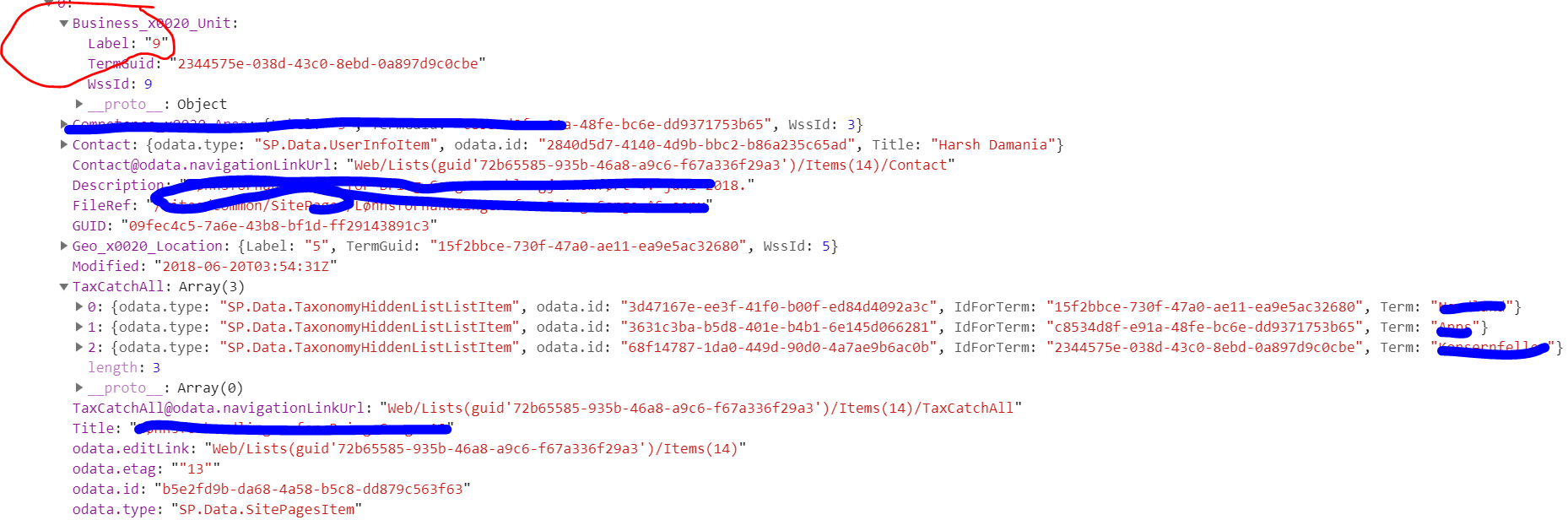
Also for business_x0020_unit , the label value is different ?
harshdamaniahd
on 20 Jun 2018
There isn't another way to filter - you can continue to append filter parameters. Though a better approach depending on the number of items might be to query all the items in the list and create an index on the client side. Alternatively you could use an OOTB list view web part with the filters applied (if they are static) - or provide an interface with tabs or similar allows folks to view certain categories.
It is good you are using caching, that should help your performance.
The label value is the default label value, so that is coming from the data.
patrick-rodgers
on 20 Jun 2018
@patrick-rodgers thank you for the suggesstion , I need to filter on load as my webparts are rendered based on these taxonomy field conditions. Yes i am using caching as well.
I just wanted to know that the value of the label in termstore is "HR" , but this is what I get here
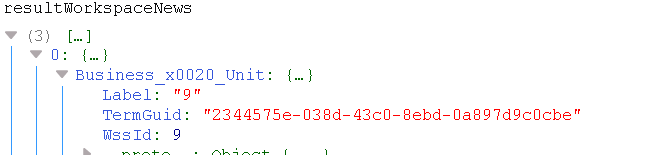
I think sometime ago , i was getting the actual value and now suddenly it gives me number
harshdamaniahd
on 21 Jun 2018
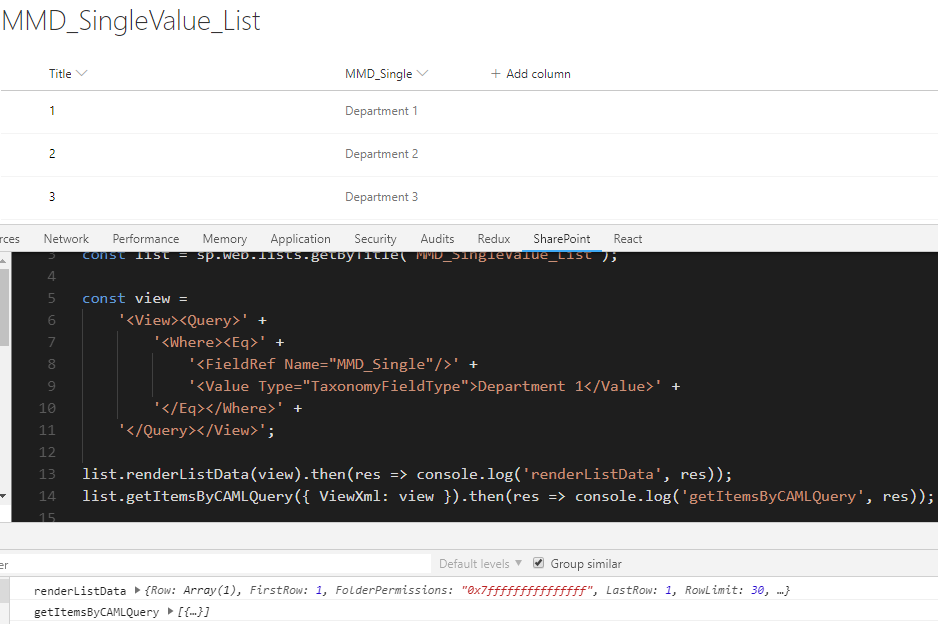
I guess it's a well-known REST API/OData issue: when requesting lists items with MMD field with a single term selection option the Label doesn't contain display text.
Alas, nothing can be done within the library to fix it. Luckily, SP REST API is not only the OData but much more and there are other options, like getItemsByCAMLQuery, renderListData, renderListDataAsStream:



 koltyakov
on 21 Jun 2018
koltyakov
on 21 Jun 2018
@koltyakov thank you for ur suggesstion.
As you can see in this code , I am comparing by Term ID ? . I dont think filtering by ID works in caml.
I tried the above code..but it works only for TermName
return await web.lists.getByTitle(newsWorkspace.libraryName).items.
top(topQuery).
orderBy("Modified", false).
filter("Title ne 'Home' and (TaxCatchAll/IdForTerm eq \'"
+ result.termId + "\' or TaxCatchAll/IdForTerm eq \'" + guid + "\')").
select("Title", "TaxCatchAll/IdForTerm", "TaxCatchAll/Term", "FileRef", "GUID", "Description",
"Business_x0020_Unit", "Geo_x0020_Location", "Competence_x0020_Area", "Contact/Title", "Modified")
.expand("TaxCatchAll/IdForTerm,TaxCatchAll/Term,Contact")
.usingCaching({
key: key.workSpaceNews,
expiration: Util.dateAdd(new Date(), typeofexpiration, expiration.minutes),
storeName: "session"
}).get();``
harshdamaniahd
on 21 Jun 2018
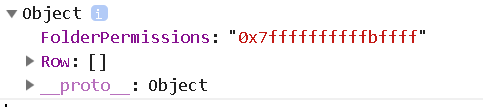
I tried this and does not work
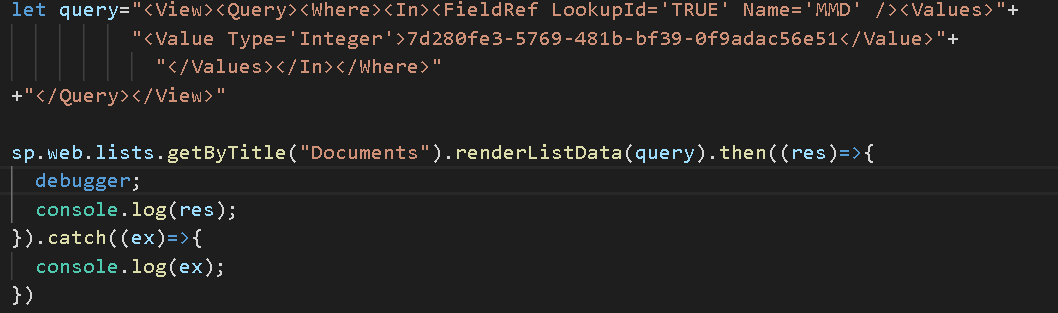
It returns nothing , but data is present
harshdamaniahd
on 21 Jun 2018
@harshdamaniahd,
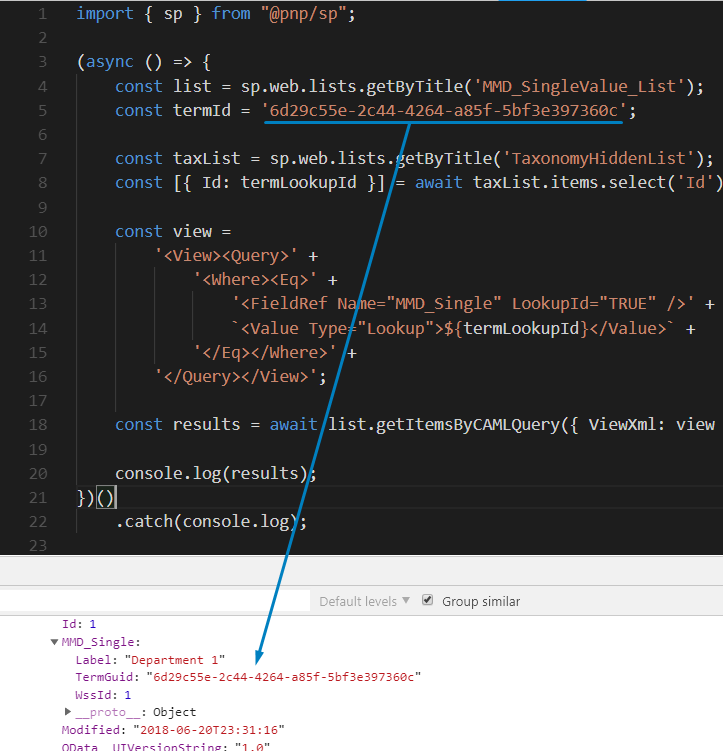
How about:
import { sp } from "@pnp/sp";

(async () => {
    const list = sp.web.lists.getByTitle('MMD_SingleValue_List');
    const taxList = sp.web.lists.getByTitle('TaxonomyHiddenList');

    const termId = '6d29c55e-2c44-4264-a85f-5bf3e397360c';

    const [{ Id: termLookupId }] = await taxList.items.select('Id').filter(`IdForTerm eq '${termId}'`).get();
    const view =
        '<View><Query>' +
            '<Where><Eq>' +
                '<FieldRef Name="MMD_Single" LookupId="TRUE" />' +
                `<Value Type="Lookup">${termLookupId}</Value>` +
            '</Eq></Where>' +
        '</Query></View>';

    const results = await list.getItemsByCAMLQuery({ ViewXml: view });
    console.log(results);
})()
    .catch(console.log);
This worked for me. Yet maybe there is a more robust approach.
koltyakov
on 26 Jun 2018
@koltyakov ..thanks
This helps
harshdamaniahd
on 27 Jun 2018
Cool! Going to close as answered.
koltyakov
on 27 Jun 2018
Related issues
 simkessy
·
3Comments
simkessy
·
3Comments
 alirobe
·
3Comments
alirobe
·
3Comments
 simonagren
·
3Comments
simonagren
·
3Comments
 SpliceVW
·
3Comments
SpliceVW
·
3Comments
 unnieayilliath
·
3Comments
unnieayilliath
·
3Comments
Most helpful comment
@harshdamaniahd,
How about:
This worked for me. Yet maybe there is a more robust approach.