Category
- [ ] Enhancement
- [x] Bug
- [ ] Question
- [ ] Documentation gap/issue
Version
Please specify what version of the library you are using: [1.0.3]
Expected / Desired Behavior / Question
I'm trying to synchronize files with a service that allows all characters in the filename. To get around the forbidden characters, I'm replacing the forbidden ones with Unicode lookalikes: " ﹡ / ﹕ ﹤ ﹥ ﹖ \ │.
When I'm then uploading files with this new name, the unicode is replaced with U.
Steps to Reproduce
sp.web.getFolderByServerRelativePath(path).files.addChunked(filename, ...)
does not retain Unicode characters in the name.
 wmertens
All 9 comments
I think that is SharePoint doing it on the back end, we don't do any character substitutions that would impact this.
 patrick-rodgers
on 16 May 2018
patrick-rodgers
on 16 May 2018
So, how to rename using this library?
The web interface renames using a POST to .../GetList(...)/Items(...) with body {"__metadata":{"type":"SP.Data.Shared_x0020_DocumentsItem"},"FileLeafRef":"Test \uff02 \ufe61 \uff0f \ufe55 \ufe64 \ufe65 \ufe56 \uff3c \uffe8.pdf"}
wmertens
on 16 May 2018
You can use the getItem() method of file followed by the update method on the returned item instance and pass in the properties you want to update:
{ FileLeafRef:"Test \uff02 \ufe61 \uff0f \ufe55 \ufe64 \ufe65 \ufe56 \uff3c \uffe8.pdf"}
Docs here on files and here on items.
patrick-rodgers
on 17 May 2018
Note that when I upload a file via the web interface, it retains its special characters. This is how it uploads ﹕ ﹤ ﹥ ﹖ \ │.pdf to SOME/WHERE in shared docs:
- First check if the file already exists with a POST to
https://x.sharepoint.com/sites/APP/_api/web/GetFolderByServerRelativePath(DecodedUrl=@a1)/Files
- with empty body and URL parameters:
@a1:'/sites/APP/Shared Documents/SOME/WHERE'$filter:Name eq '﹕ ﹤ ﹥ ﹖ \ │.pdf'- This should return
{"d":{"results":[]}} - I wonder how embedded
'in path and filename are handled
- Then start the upload with a POST
https://x.sharepoint.com/sites/APP/_api/web/GetFolderByServerRelativePath(DecodedUrl=@a1)/Files/AddStubUsingPath(DecodedUrl=@a2)/StartUpload(uploadId=@a3)
- with empty body and URL parameters:
@a1:'/sites/APP/Shared Documents/SOME/WHERE'@a2:'﹕ ﹤ ﹥ ﹖ \ │.pdf'@a3:guid'47b779d2-4113-42e3-8ebc-9ebbfb658d53'- this returns
{"d":{"StartUpload":"0"}}
- The same call as in 1), this time returning the uploading file metadata as the sole element in the array
- Presumably some chunks, I need to check with a bigger file
- The last chunk with POST to
https://x.sharepoint.com/sites/APP/_api/web/GetFileByServerRelativePath(DecodedUrl=@a1)/FinishUpload(uploadId=@a2,fileOffset=@a3)
- with the file data in the body and URL parameters:
@a1:'/sites/APP/Shared Documents/SOME/WHERE/﹕ ﹤ ﹥ ﹖ \ │.pdf'@a2:guid'47b779d2-4113-42e3-8ebc-9ebbfb658d53'@a3:0- This returns the file metadata
This results in the file being uploaded with the correct name. So it seems to me that pnpjs should do the same?
wmertens
on 18 May 2018
@wmertens, Hm... that is what I just tried:
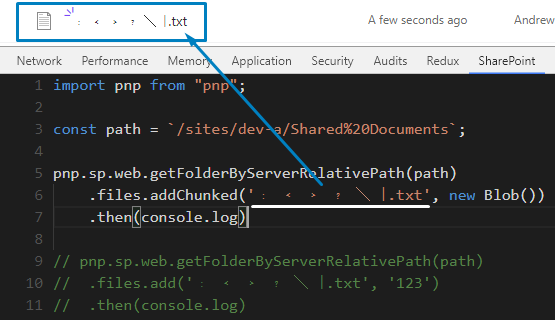
Can it be in how you replace the characters, the incoming string?
 koltyakov
on 18 May 2018
koltyakov
on 18 May 2018
Oh so it's working for you? Hmmm. I'll do some further testing.
wmertens
on 18 May 2018
Yes, it works for me. It's likely that the string is converted in the middle before being passed to PnPjs in your case.
koltyakov
on 18 May 2018
@wmertens, did you manage to overcome the issue? I almost convinced it is not on the library side.
koltyakov
on 5 Jun 2018
Well I've been sidetracked, but until I get greater clarity in what's going on I'll close this. I'll reopen if it turns out to be an issue here after all.
Thanks for your assistance!
wmertens
on 5 Jun 2018
Related issues
 DennisGaida
·
3Comments
DennisGaida
·
3Comments
 simkessy
·
3Comments
simkessy
·
3Comments
 ITAndy23
·
3Comments
ITAndy23
·
3Comments
 unnieayilliath
·
3Comments
unnieayilliath
·
3Comments
 AJIXuMuK
·
3Comments
AJIXuMuK
·
3Comments