Pnpframework: [BUG] ConvertTo-PnPPage Access Denied Error
### Reporting an Issue
I am using Version1.3.0 PnP.Powershell. to convert a classic page to modern page on another site collection. But it fails when I try to execute below command
ConvertTo-PnPPage -Identity "sourcepage.aspx" -PublishingPage -TargetWebUrl "https://xxxxx.sharepoint.com/sites/modernuat/EmployeeResources"
Expected behavior
Classic Page should get copied over to the sitepages library under the new modern communication site.
Actual behavior
I get an error message like below. It says I do not have permissions. I have site collection admin access on both Source and destination site collections. Multifactor authentication is enabled and I have used -useWebLogin for authentication. I don't have permission to access SP Tenant Admin pages.
ConvertTo-PnPPage : {"odata.error":{"code":"-2147024891,
System.UnauthorizedAccessException","message":{"lang":"en-US","value":"Access denied. You do not have permission to
perform this action or access this resource."}}}
ServerErrorTraceCorrelationId: 7b43aa9f-9027-b000-bfd5-6bcf98bf8299
At line:1 char:1
ConvertTo-PnPPage -Identity "sourcepage.aspx" -PublishingPa ...
- CategoryInfo : WriteError: (:) [ConvertTo-PnPPage], Exception
- FullyQualifiedErrorId : EXCEPTION,PnP.PowerShell.Commands.Pages.ConvertToClientSidePage
Steps to reproduce behavior
Connect-PnPOnline $sourceSiteUrl -UseWebLogin
ConvertTo-PnPPage -Identity "sourcepage.aspx" -PublishingPage -TargetWebUrl "https://xxxxx.sharepoint.com/sites/modernuat/EmployeeResources"
What is the version of the Cmdlet module you are running?
PnP.Powershell 1.3.0
Which operating system/environment are you running PnP PowerShell on?
- [ ] Windows
 PrasadMadhavan
All 10 comments
Can you try to repeat the error for occuring and immediately after that enter:
Get-PnPException
Please post the output of that cmdlet here. It could help us to determine exactly where it goes wrong on your end.
 erwinvanhunen
on 12 Feb 2021
erwinvanhunen
on 12 Feb 2021
Thanks for your reply. Here is the output of Get-PnPException
PS C:Windows\System32WindowsPowerShell\v1.0> Get-PnPException
Message : {"odata.error":{"code":"-2147024891,
System.UnauthorizedAccessException","message":{"lang":"en-US","value":"Access denied. You do not
have permission to perform this action or access this resource."}}}
ServerErrorTraceCorrelationId: 8398aa9f-30c6-b000-d1ad-b1e11a55c481
Stacktrace : at
Microsoft.SharePoint.Client.ClientContextExtensions.
--- End of stack trace from previous location where exception was thrown ---
at System.Runtime.ExceptionServices.ExceptionDispatchInfo.Throw()
at System.Runtime.CompilerServices.TaskAwaiter.HandleNonSuccessAndDebuggerNotification(Task task)
at Microsoft.SharePoint.Client.ClientContextExtensions.
--- End of stack trace from previous location where exception was thrown ---
at System.Runtime.ExceptionServices.ExceptionDispatchInfo.Throw()
at System.Runtime.CompilerServices.TaskAwaiter.HandleNonSuccessAndDebuggerNotification(Task task)
at PnP.Framework.PnPCoreSdkAuthenticationProvider.GetRequestDigest()
at PnP.Core.Services.BatchClient.
--- End of stack trace from previous location where exception was thrown ---
at System.Runtime.ExceptionServices.ExceptionDispatchInfo.Throw()
at System.Runtime.CompilerServices.TaskAwaiter.HandleNonSuccessAndDebuggerNotification(Task task)
at System.Runtime.CompilerServices.ConfiguredTaskAwaitable.ConfiguredTaskAwaiter.GetResult()
at PnP.Core.Services.BatchClient.
--- End of stack trace from previous location where exception was thrown ---
at System.Runtime.ExceptionServices.ExceptionDispatchInfo.Throw()
at System.Runtime.CompilerServices.TaskAwaiter.HandleNonSuccessAndDebuggerNotification(Task task)
at System.Runtime.CompilerServices.ConfiguredTaskAwaitable.ConfiguredTaskAwaiter.GetResult()
at PnP.Core.Services.BatchClient.
--- End of stack trace from previous location where exception was thrown ---
at System.Runtime.ExceptionServices.ExceptionDispatchInfo.Throw()
at System.Runtime.CompilerServices.TaskAwaiter.HandleNonSuccessAndDebuggerNotification(Task task)
at System.Runtime.CompilerServices.ConfiguredTaskAwaitable1.ConfiguredTaskAwaiter.GetResult()
at PnP.Core.Model.BaseDataModel1.
--- End of stack trace from previous location where exception was thrown ---
at System.Runtime.ExceptionServices.ExceptionDispatchInfo.Throw()
at System.Runtime.CompilerServices.TaskAwaiter.HandleNonSuccessAndDebuggerNotification(Task task)
at System.Runtime.CompilerServices.ConfiguredTaskAwaitable.ConfiguredTaskAwaiter.GetResult()
at PnP.Core.Model.BaseDataModel1.<GetAsyncInternal>d__35.MoveNext()
--- End of stack trace from previous location where exception was thrown ---
at System.Runtime.ExceptionServices.ExceptionDispatchInfo.Throw()
at System.Runtime.CompilerServices.TaskAwaiter.HandleNonSuccessAndDebuggerNotification(Task task)
at System.Runtime.CompilerServices.ConfiguredTaskAwaitable1.ConfiguredTaskAwaiter.GetResult()
at PnP.Core.Model.BaseDataModel1.<GetAsync>d__31.MoveNext()
--- End of stack trace from previous location where exception was thrown ---
at System.Runtime.ExceptionServices.ExceptionDispatchInfo.Throw()
at System.Runtime.CompilerServices.TaskAwaiter.HandleNonSuccessAndDebuggerNotification(Task task)
at System.Runtime.CompilerServices.ConfiguredTaskAwaitable1.ConfiguredTaskAwaiter.GetResult()
at PnP.Core.Services.PnPContextFactory.
--- End of stack trace from previous location where exception was thrown ---
at System.Runtime.ExceptionServices.ExceptionDispatchInfo.Throw()
at System.Runtime.CompilerServices.TaskAwaiter.HandleNonSuccessAndDebuggerNotification(Task task)
at System.Runtime.CompilerServices.ConfiguredTaskAwaitable.ConfiguredTaskAwaiter.GetResult()
at PnP.Core.Services.PnPContextFactory.
--- End of stack trace from previous location where exception was thrown ---
at System.Runtime.ExceptionServices.ExceptionDispatchInfo.Throw()
at System.Runtime.CompilerServices.TaskAwaiter.HandleNonSuccessAndDebuggerNotification(Task task)
at System.Runtime.CompilerServices.TaskAwaiter`1.GetResult()
at PnP.Core.Services.PnPContextFactory.Create(Uri url, IAuthenticationProvider
authenticationProvider)
at Microsoft.SharePoint.Client.PageExtensions.AddClientSidePage(Web web, String pageName,
Boolean alreadyPersist)
at PnP.Framework.Modernization.Publishing.PublishingPageTransformator.Transform(PublishingPageTra
nsformationInformation publishingPageTransformationInformation)
at PnP.PowerShell.Commands.Pages.ConvertToClientSidePage.ExecuteCmdlet()
at PnP.PowerShell.Commands.PnPSharePointCmdlet.ProcessRecord()
ScriptLineNumber : 1
PrasadMadhavan
on 12 Feb 2021
Can you try to repeat the error for occuring and immediately after that enter:
Get-PnPExceptionPlease post the output of that cmdlet here. It could help us to determine exactly where it goes wrong on your end.
Hi @erwinvanhunen,
First of all, thanks for your help!
I'm also experiencing this issue. Please find below the exception returned by PnP
Get-PnPException : Unable to cast object of type 'System.Management.Automation.IncompleteParseException' to type 'System.Management.Automation.ErrorRecord'.
At line:1 char:1
- Get-PnPException
~~~~
- CategoryInfo : NotSpecified: (:) [Get-PnPException], InvalidCastException
- FullyQualifiedErrorId : System.InvalidCastException,PnP.PowerShell.Commands.Base.GetException
 LogicElite
on 16 Feb 2021
LogicElite
on 16 Feb 2021
@LogicElite / @PrasadMadhavan : would it be possible to create a Fiddler trace and share that? I've tried to repro within my lab but did not yet succeed, a Fiddler trace will show which specific API call fails and why that happens. You can share the Fiddler with [email protected] in case you want to keep it private. Thx.
 jansenbe
on 16 Feb 2021
jansenbe
on 16 Feb 2021
I have emailed you the fiddler trace, Thanks.
PrasadMadhavan
on 16 Feb 2021
Thanks for sharing the Fiddler trace @PrasadMadhavan. I see where things fail, but for now I've no idea why it happens. Can you always reproduce this issue or is it more randomly?
Can you try to to connect using -UseWebLogin and then call Add-PnPPage -Name test.aspx: this will create a modern page using the same API's as page transformation is doing, want to see if this shows the same issue or not.
jansenbe
on 17 Feb 2021
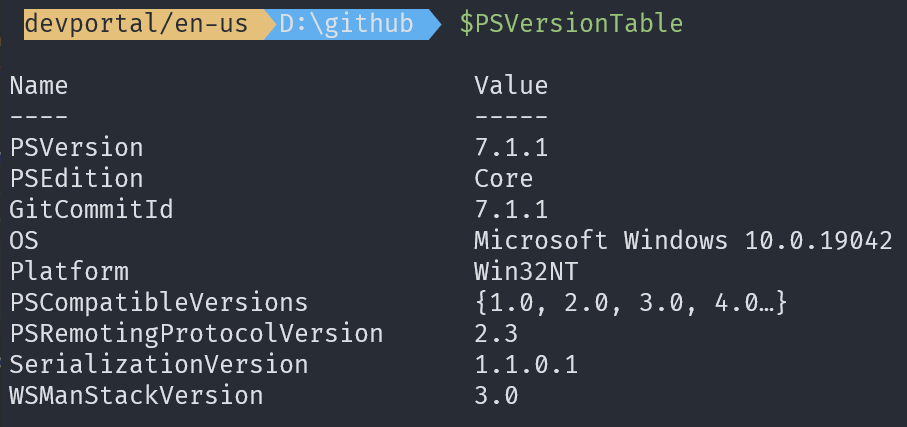
@LogicElite / @PrasadMadhavan : can you also let us know what PS version you're using?
jansenbe
on 17 Feb 2021
@LogicElite / @PrasadMadhavan : we managed to reproduce this with using PnP PowerShell in PowerShell 5 and have fixed this. Please retest with tomorrow's nightly build or alternatively install PowerShell 7 and use that.
jansenbe
on 17 Feb 2021
I just upgraded to PowerShell and the error has gone! Thanks a lot for your help.
PrasadMadhavan
on 17 Feb 2021
@LogicElite / @PrasadMadhavan : we managed to reproduce this with using PnP PowerShell in PowerShell 5 and have fixed this. Please retest with tomorrow's nightly build or alternatively install PowerShell 7 and use that.
Hi @jansenbe,
I tried using PowerShell 7, it creates the page and the target but is unfortunately throwing a critical error for some pages stored within the Enterprise Wiki.
Please find the critical error received below:
Error: [Summary] A critical error occurred - transformation did not complete Error: SharePoint Rest service exception StackTrace: at PnP.Core.Services.BatchClient.ProcessSharePointRestBatchResponseContent(Batch batch, String batchResponse)
at PnP.Core.Services.BatchClient.ProcessSharePointRestBatchResponse(SPORestBatch restBatch, String batchResponse)
at PnP.Core.Services.BatchClient.ExecuteSharePointRestBatchAsync(Batch batch)
at PnP.Core.Services.BatchClient.ExecuteBatch(Batch batch)
at PnP.Core.Model.BaseDataModel`1.RequestAsync(ApiCall apiCall, HttpMethod method, String operationName)
at PnP.Core.Model.SharePoint.FileCollection.AddTemplateFileAsync(String serverRelativePageName, TemplateFileType templateFileType)
at PnP.Core.Model.SharePoint.Page.SaveAsync(String pageName)
at PnP.Core.Model.SharePoint.Page.Save(String pageName)
at PnP.Framework.Modernization.Publishing.PublishingPageTransformator.Transform(PublishingPageTransformationInformation publishingPageTransformationInformation)
Page that are having the error throw the following while loading them:
NoComponentId
CorrelationID : 5330ac9f-b04a-b000-aef6-50df463060fb
Thanks for your help and support.
LogicElite
on 17 Feb 2021
Related issues
 KiranTalikoti
·
4Comments
KiranTalikoti
·
4Comments
 luismanez
·
6Comments
luismanez
·
6Comments
 fowl2
·
3Comments
fowl2
·
3Comments
 diver7
·
6Comments
diver7
·
6Comments
 derhallim
·
5Comments
derhallim
·
5Comments