Pnp-sites-core: First Release Tenant Deploying Content Types fails
Thank you for reporting an issue or suggesting an enhancement. We appreciate your feedback - to help the team to understand your needs, please complete the below template to ensure we have the necessary details to assist you. If you have a actual question, we would ask you to use SharePoint Developer Group at Microsoft Tech Community. Thanks!
Which PnP repository should you use to report the issue?
Please navigate to the appropriate repository by clicking on the link below and create your issue there. You can delete this section after you have navigated to the correct repository.
- PnP Samples - https://github.com/OfficeDev/PnP
- PnP Sites Core - https://github.com/OfficeDev/PnP-Sites-Core
- PnPjs - https://github.com/pnp/pnpjs
- PnP PowerShell - https://github.com/OfficeDev/PnP-PowerShell
Category
[x] Bug
[ ] Enhancement
Environment
[x] Office 365 / SharePoint Online
[ ] SharePoint 2016
[ ] SharePoint 2013
If SharePoint on-premises, what's exact CU version:
Hi,
We are running on a first release tenant with some PnP Provisioning scripts. Approximately 24hrs ago we noticed that our provisioning scripts were failing. After a lot of investigation I have came to the conclusion that some server side code is causing this. We have tested the same scripts on other tenants (not first release) and they work fine.
Here is the example script I am now using:
<?xml version="1.0"?>
<pnp:Provisioning xmlns:pnp="http://schemas.dev.office.com/PnP/2018/07/ProvisioningSchema">
  <pnp:Preferences Generator="OfficeDevPnP.Core, Version=3.7.1903.0, Culture=neutral, PublicKeyToken=5e633289e95c321a" />
  <pnp:Templates ID="CONTAINER-TEMPLATE-73CBFEA3C54546809BA20EAD4BC0A5C3">
    <pnp:ProvisioningTemplate ID="TEMPLATE-73CBFEA3C54546809BA20EAD4BC0A5C3" Version="1" BaseSiteTemplate="GROUP#0" Scope="RootSite">
      <pnp:ContentTypes>
        <pnp:ContentType ID="0x0100FA46988B78C6438D9F618CCDCA592331"
                         Name="One Project Document"
                         Group="Base Foundation Content Types"
                         Description="General Project Document Content Type">
            </pnp:ContentType>
      </pnp:ContentTypes>
    </pnp:ProvisioningTemplate>
  </pnp:Templates>
</pnp:Provisioning>
We get the error message:
Apply-PnPProvisioningTemplate : Value cannot be null.
Parameter name: s
At line:1 char:1
+ Apply-PnPProvisioningTemplate .\0001.xml
+ ~~~~~~~~~~~~~~~~~~~~~~~~~~~~~~~~~~~~~~~~
    + CategoryInfo          : WriteError: (:) [Apply-PnPProvisioningTemplate], ServerException
    + FullyQualifiedErrorId : EXCEPTION,SharePointPnP.PowerShell.Commands.Provisioning.Site.ApplyProvisioningTemplate
Thanks
Chris
 christopher-walker
All 17 comments
Thank you for reporting this issue. We will be triaging your incoming issue as soon as possible.
![msftbot[bot] picture](https://avatars.githubusercontent.com/in/26612?v=4&s=40) msftbot[bot]
on 14 May 2019
msftbot[bot]
on 14 May 2019
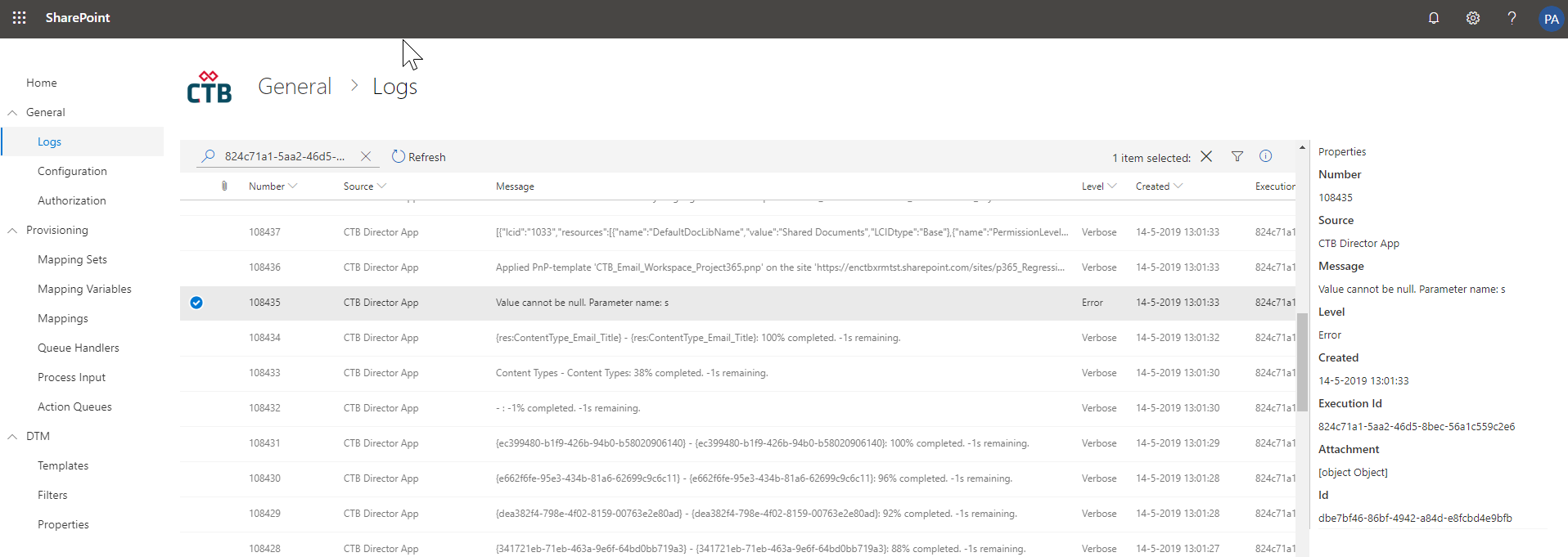
We see the same behaviour on applying a template on first release tenants, we run provisioning tests every morning on several tenants, so we found this bug about 9 hours ago and can still reproduce it. Although it seems that only first release tenants are affected by this bug, we're stuck right now on further testing our solutions on the specific tenants, so some help would be great!
With trace logging enabled:
 advdberg
on 14 May 2019
advdberg
on 14 May 2019
Same here. Starting today. First Release tenant.
This does not happen for the same content type every time but seems to be random.
 MrTantum
on 14 May 2019
MrTantum
on 14 May 2019
Same here. Starting today. First Release tenant.
This does not happen for the same content type every time but seems to be random.
Hi MrTantum :)
When I was testing I noticed that if the content type is already created it would get to the next one so if you keep running the pnp tempate it eventually succeeds but from the testing I have done if the template does not currently exist within the Site Collection then PnP Provisioning template will fail
christopher-walker
on 14 May 2019
@jansenbe @VesaJuvonen @wobba Do you guys know anything about a breaking change on first release O365 tenants since yesterday around SharePoint contenttypes?
advdberg
on 14 May 2019
We have the same problem. But first release tenant is configured for one user and it's another user than the user that run's the provisioning...
 konijntje2
on 14 May 2019
konijntje2
on 14 May 2019
We are experiencing the exact same issue starting today but on a Standard Release tenant.
 2toLeadJordan
on 14 May 2019
2toLeadJordan
on 14 May 2019
Was getting crazy after hours of trying to figure out why my templates suddenly stopped working, when I finally found this thread. Same here with Apply-PnPProvisioning !
One tenant is First Release and the other is Standard Release. This is an emergency!
 PzKfWg
on 14 May 2019
PzKfWg
on 14 May 2019
This seems to be a change in the oob APIs/server side code in the SharePoint Online and we are investigating this now actively. Gut feeling is that there has been a change on required properties at the content type object in server side, but we need to investigate more detailed what has happened here.
 VesaJuvonen
on 15 May 2019
VesaJuvonen
on 15 May 2019
thx @christopher-walker for providing simple and easy repro template for investigating this one.
VesaJuvonen
on 15 May 2019
Cross referencing duplicates in other repositories for tracking purposes.\
- SharePoint/PnP-PowerShell#2087
- SharePoint/sp-dev-docs#3947
VesaJuvonen
on 15 May 2019
As the issue seems to be in oob APIs, let's move any further discussions around it to following issue - SharePoint/sp-dev-docs#3947. All repro steps also without PnP template are more than welcome in the tenants which have the issue... if you have possibility to test things with native CSOM and without the template. This will rule out root cause options. Thx.
VesaJuvonen
on 15 May 2019
This specific issue has been fixed this morning in PnP Sites Core, with a workaround to avoid blocking provisioning. Now we're investigating if there are other impacted scenarios.
 PaoloPia
on 15 May 2019
PaoloPia
on 15 May 2019
Is this already available as package ? (in 3.9.1905)
 SimSpfx
on 15 May 2019
SimSpfx
on 15 May 2019
We are working on a short term fix to provide a workaround to avoid the server side issue... but let's please centralize all communications to SharePoint/sp-dev-docs#3947 issue to avoid confusion and too many overlapping threads. Thx.
VesaJuvonen
on 15 May 2019
Intermediate PnP Sites core release is available on nuget...if you're using .Net and the nuget packages then downloading the latest should get you unblocked. An updated PS release will follow shortly.
 jansenbe
on 15 May 2019
jansenbe
on 15 May 2019
Closing this as there's now a workaround available which skips the actual issue around the server side APIs. Please see SharePoint/sp-dev-docs#3947 for any further updates.
VesaJuvonen
on 16 May 2019
Related issues
 TVDKoni
·
3Comments
VesaJuvonen
·
5Comments
TVDKoni
·
3Comments
VesaJuvonen
·
5Comments
 nikolayyordanov
·
3Comments
nikolayyordanov
·
3Comments
 TanmayDharmaraj
·
4Comments
TanmayDharmaraj
·
4Comments
 jimmywim
·
4Comments
jimmywim
·
4Comments