Pnp-powershell: Import-PnPTaxonomy : Exception on line 4: Access denied.
Notice: many issues / bugs reported are actually related to the PnP Core Library which is used behind the scenes. Consider carefully where to report an issue:
- Are you using
Apply-SPOProvisioningTemplateorGet-SPOProvisioningTemplate? The issue is most likely related to the Provisioning Engine. The Provisioning engine is _not_ located in the PowerShell repo. Please report the issue here: https://github.com/officedev/PnP-Sites-Core/issues. - Is the issue related to the cmdlet itself, its parameters, the syntax, or do you suspect it is the code of the cmdlet that is causing the issue? Then please continue reporting the issue in this repo.
- If you think that the functionality might be related to the underlying libraries that the cmdlet is calling (We realize that might be difficult to determine), please first double check the code of the cmdlet, which can be found here: https://github.com/OfficeDev/PnP-PowerShell/tree/master/Commands. If related to the cmdlet, continue reporting the issue here, otherwise report the issue at https://github.com/officedev/PnP-Sites-Core/issues
Reporting an Issue or Missing Feature
Please confirm what it is that your reporting
We have tried a number of the Taxonomy PnP CommandLets and we are experiencing the same problem. We are trying to automate updates to the term store and as such the Connect-PnPOnline authentication method is using an App Registration with with TermStore.ReadWrite.All. We are successfully updating other parts of SharePoint using this method, but we can't update the term store.
Expected behavior
Please describe what output you expect to see from PnP-PowerShell Cmdlets
We expect the command to update the term store, either through import or directly adding new entries.
Actual behavior
Please describe what you see instead. Please provide samples of HTML output or screenshots


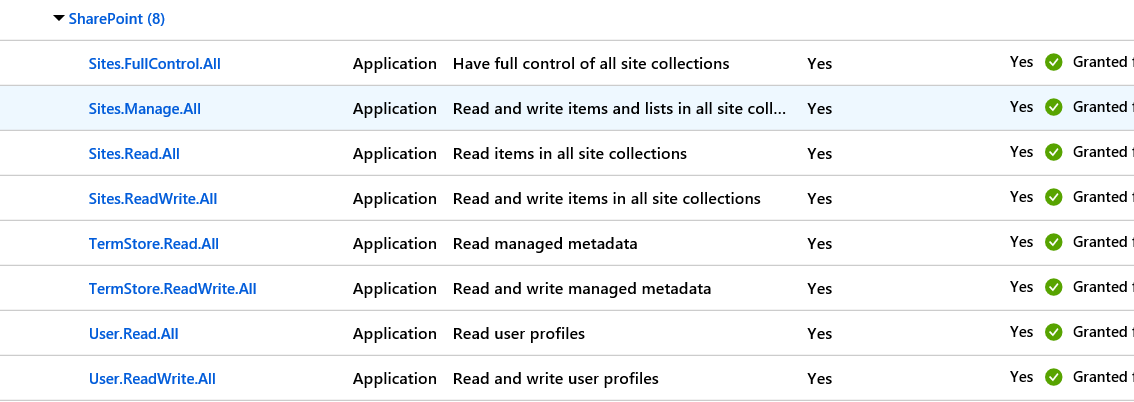
Steps to reproduce behavior
Please include complete code samples in-line or linked from gists
$NHConnection = Connect-PnPOnline -Url https://tenant.sharepoint.com/sites/test -tenant tenant.onmicrosoft.com -CertificatePath "C:\Temp\AutomationAccess.pfx" -ClientId 000000-0000-0000-000
Export-PnPTaxonomy -Path "C:\Temp\termstore.xml" -Connection $NHConnection
Import-PnPTaxonomy -Path "C:\Temp\termstore.xml" -Connection $NHConnection
Which version of the PnP-PowerShell Cmdlets are you using?
- [ ] PnP PowerShell for SharePoint Online
What is the version of the Cmdlet module you are running?
(you can retrieve this by executing Get-Module -Name *pnppowershell* -ListAvailable)
3.12.1908.1
How did you install the PnP-PowerShell Cmdlets?
- [ ] Installed through the PowerShell Gallery with Install-Module
 linusjody
All 4 comments
Thank you for reporting this issue. We will be triaging your incoming issue as soon as possible.
![msftbot[bot] picture](https://avatars2.githubusercontent.com/in/26612?v=4&s=40) msftbot[bot]
on 7 Aug 2019
msftbot[bot]
on 7 Aug 2019
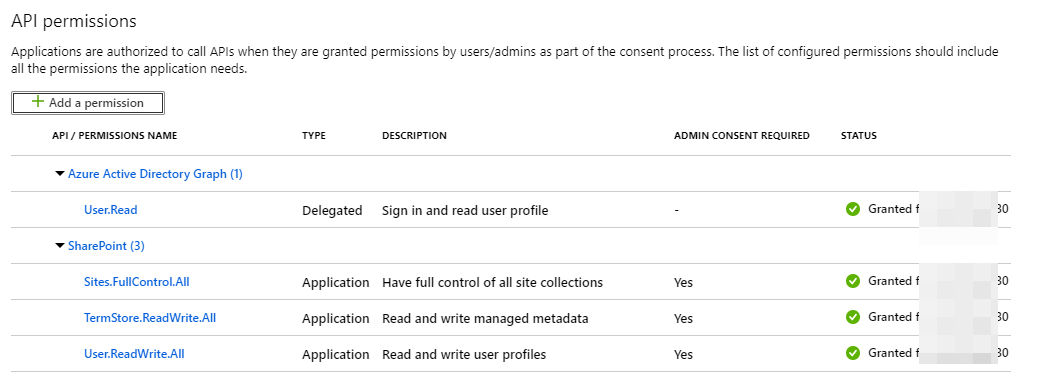
Just wanted to mention that we face exactly the same issue. We are using Connect-PnPOnline with Thumbprint switch. We can deploy everything/almost everything to the SharePoint Online tenant. The only issue is when we try to deploy custom Term Groups.
$AdminConnection = Connect-PnPOnline `
    -Thumbprint '3F662A18E394693DA8EFD6A6C214E155B4909323' `
    -Tenant <Tenant>.onmicrosoft.com `
    -ClientId 60546258-03d4-XXXX-8848-2965c75b75ee `
    -Url https://<Tenant>-admin.sharepoint.com -ReturnConnection

Connect-PnPOnline `
    -Thumbprint '3F662A18E394693DA8EFD6A6C214E155B4909323' `
    -Tenant <Tenant>.onmicrosoft.com `
    -ClientId 60546258-03d4-XXXX-8848-2965c75b75ee `
    -Url https://<Tenant>.sharepoint.com

Apply-PnPProvisioningTemplate -Path ./Core/PnP_TenantTaxonomy.xml -Connection $AdminConnection

App permissions
 Zerg00s
on 18 Sep 2019
Zerg00s
on 18 Sep 2019
@linusjody, Thanks to @wobba There is a solution to this issue in this article: techmikael.com/2018/08/modifying-terms-using-app-only-tokens.html
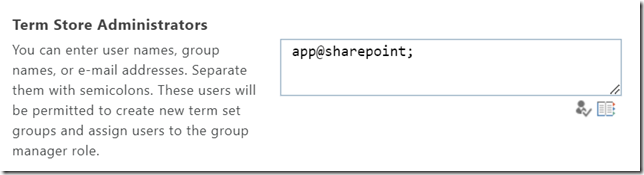
Turns out, we can add app@sharepoint account to the Term Store Administrators. That solves the issue.
Quote:
But turns out this is not entirely true – there is an undocumented work-around which seems to work just fine. The underlying principal for the app-only addin is i:0i.t|00000003-0000-0ff1-ce00-000000000000|app@sharepoint.
If you go to the term store admin center, and add app@sharepoint as a term store admin, it all works! Very handy, very undocumented, probably not supported – but hey – I’m running a script here.
Zerg00s
on 18 Sep 2019
And that approach is or will be publicly supported as well.
 wobba
on 19 Sep 2019
wobba
on 19 Sep 2019
Related issues
 JoshuaWalsh
·
16Comments
JoshuaWalsh
·
16Comments
 Chris-Leeworthy
·
28Comments
Chris-Leeworthy
·
28Comments
 chriswharton22
·
23Comments
chriswharton22
·
23Comments
 Forket
·
39Comments
Forket
·
39Comments
 NicholasMiller3
·
22Comments
NicholasMiller3
·
22Comments
Most helpful comment
@linusjody, Thanks to @wobba There is a solution to this issue in this article: techmikael.com/2018/08/modifying-terms-using-app-only-tokens.html
Turns out, we can add
app@sharepointaccount to the Term Store Administrators. That solves the issue.Quote: