Pnp-powershell: Invoke-PnPSiteDesign - Issue with Azure AD App only permission (ADAL)
Notice: many issues / bugs reported are actually related to the PnP Core Library which is used behind the scenes. Consider carefully where to report an issue:
- Are you using
Apply-SPOProvisioningTemplateorGet-SPOProvisioningTemplate? The issue is most likely related to the Provisioning Engine. The Provisioning engine is _not_ located in the PowerShell repo. Please report the issue here: https://github.com/officedev/PnP-Sites-Core/issues. - Is the issue related to the cmdlet itself, its parameters, the syntax, or do you suspect it is the code of the cmdlet that is causing the issue? Then please continue reporting the issue in this repo.
- If you think that the functionality might be related to the underlying libraries that the cmdlet is calling (We realize that that might be difficult to determine), please first double check the code of the cmdlet, which can be found here: https://github.com/OfficeDev/PnP-PowerShell/tree/master/Commands. If related to the cmdlet, continue reporting the issue here, otherwise report the issue at https://github.com/officedev/PnP-Sites-Core/issues
Reporting an Issue or Missing Feature
Please confirm what it is that your reporting : Issue
Invoke-PnPSiteDesign does not seem to work correctly with Azure AD App only permission (ADAL).
If SharePoint online tenant/modern team site is connected with Admin Credentials (Username/password) , It works fine and applies custom site design,
But when SharePoint online tenant/Modern team site is connected with Azure AD app authentication (with sufficient rights), It throws exception. More details are provided in Actual behaviour section, please validate and let me know If I am doing it in wrong way!. Thank you in advance!.
Expected behavior
When Invoke-PnPSiteDesign is executed with Azure AD app context (with sufficient rights), It has to apply Site design to mentioned modern team site
Actual behavior
If Modern team site is connected with Azure AD app permission, then if we try to execute Invoke-PnPSitedesign command, It throws 401 Unauthorized.
If Admin endpoint (Online Admin portal) is connected with Azure AD app permission first, Then if we try to execute Invoke-PnPSitedesign command (with proper WebUrl parameter), It throws "Url of the site is required".
Note: If modern team site is connected with Admin credentials, then if we try to execute Invoke-PnPSitedesign command, It works correctly
Screenshot below :
In below screenshot explains,
- Invoke-PnPSiteDesign cmd executed username and password, Works fine
- Invoke-PnPSiteDesign cmd executed with Azure AD app credentials (both admin endpoint and team site endpoint), throws exception

Steps to reproduce behavior
Please include complete code samples in-line or linked from gists
First scenario
Connect-PnPOnline -Url "{Admin site}" -CertificatePath "{Pfx certificate path}" -CertificatePassword {password} -ClientId "{client id}" -Tenant {xxx.onmicrosoft.com}
Invoke-PnPSiteDesign -Identity "{Site design Id}" -WebUrl {Site url}
Second scenario
Connect-PnPOnline -Url "{Modern team site url}" -CertificatePath "{Pfx certificate path}" -CertificatePassword {password} -ClientId "{client id}" -Tenant {xxx.onmicrosoft.com}
Invoke-PnPSiteDesign -Identity "{Site design Id}" -WebUrl {Site url}
Which version of the PnP-PowerShell Cmdlets are you using?
- [ ] PnP PowerShell for SharePoint Online
What is the version of the Cmdlet module you are running?
(you can retrieve this by executing Get-Module -Name *pnppowershell* -ListAvailable)
ModuleType Version Name
---------- ------- ---- ----------------
Binary 2.24.18... SharePointPnPPowerShellOnline
How did you install the PnP-PowerShell Cmdlets?
- [ ] MSI Installed downloaded from GitHub
 gurubn
All 6 comments
Can you try to connect to https://tenant-admin.sharepoint.com and re-try the command?
 wobba
on 6 Apr 2018
wobba
on 6 Apr 2018
Hi Mikael,
Thank you for the reply. I did try earlier with connecting to tenant admin endpoint, but received error as "Url of the site is required"(screenshot attached). Mentioned -WebUrl present in my tenant.
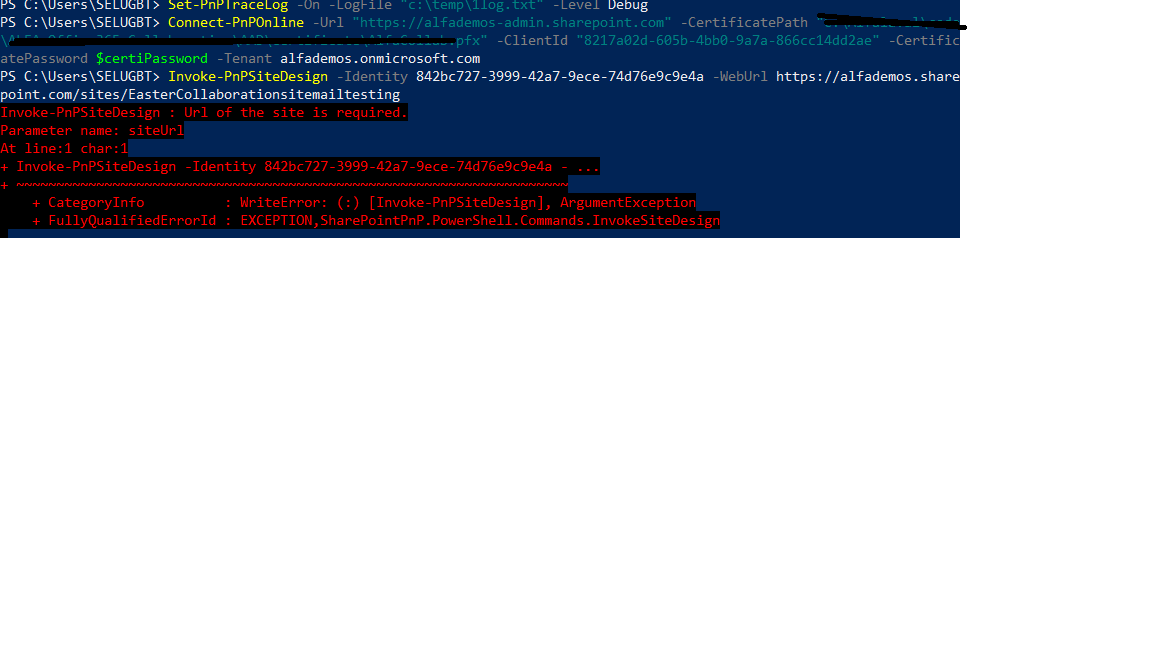
I generated log trace, when executing the command . Log trace looks like below.
powershell.exe Information: 0 : 04/06/2018 12:34:28: 087000f7-cc6a-4f3e-82d1-77330aee3d75 - AcquireTokenHandlerBase: === Token Acquisition started:
Authority:
Resource:
ClientId: 8217a02d-605b-4bb0-9a7a-866cc14dd2ae
CacheType: Microsoft.IdentityModel.Clients.ActiveDirectory.TokenCache (1 items)
Authentication Target: Client
powershell.exe Information: 0 : 04/06/2018 12:34:28: 087000f7-cc6a-4f3e-82d1-77330aee3d75 - TokenCache: Looking up cache for a token...
powershell.exe Information: 0 : 04/06/2018 12:34:28: 087000f7-cc6a-4f3e-82d1-77330aee3d75 - TokenCache: An item matching the requested resource was found in the cache
powershell.exe Information: 0 : 04/06/2018 12:34:28: 087000f7-cc6a-4f3e-82d1-77330aee3d75 - TokenCache: 57.667782455 minutes left until token in cache expires
powershell.exe Information: 0 : 04/06/2018 12:34:28: 087000f7-cc6a-4f3e-82d1-77330aee3d75 - TokenCache: A matching item (access token or refresh token or both) was found in the cache
powershell.exe Information: 0 : 04/06/2018 12:34:28: 087000f7-cc6a-4f3e-82d1-77330aee3d75 - AcquireTokenHandlerBase: === Token Acquisition finished successfully. An access token was retuned:
Access Token Hash: 5jYzClTwZzQC9DZ3yyemf0Oni57OVIj+Bt9br09go48=
Refresh Token Hash: [No Refresh Token]
Expiration Time: 04/06/2018 13:32:08 +00:00
User Hash: null
powershell.exe Information: 0 : 04/06/2018 12:34:28: d123a471-0b09-45e9-b089-988a1e3d3f6d - AcquireTokenHandlerBase: === Token Acquisition started:
Authority:
Resource:
ClientId: 8217a02d-605b-4bb0-9a7a-866cc14dd2ae
CacheType: Microsoft.IdentityModel.Clients.ActiveDirectory.TokenCache (1 items)
Authentication Target: Client
powershell.exe Information: 0 : 04/06/2018 12:34:28: d123a471-0b09-45e9-b089-988a1e3d3f6d - TokenCache: Looking up cache for a token...
powershell.exe Information: 0 : 04/06/2018 12:34:28: d123a471-0b09-45e9-b089-988a1e3d3f6d - TokenCache: An item matching the requested resource was found in the cache
powershell.exe Information: 0 : 04/06/2018 12:34:28: d123a471-0b09-45e9-b089-988a1e3d3f6d - TokenCache: 57.66366852 minutes left until token in cache expires
powershell.exe Information: 0 : 04/06/2018 12:34:28: d123a471-0b09-45e9-b089-988a1e3d3f6d - TokenCache: A matching item (access token or refresh token or both) was found in the cache
powershell.exe Information: 0 : 04/06/2018 12:34:28: d123a471-0b09-45e9-b089-988a1e3d3f6d - AcquireTokenHandlerBase: === Token Acquisition finished successfully. An access token was retuned:
Access Token Hash: 5jYzClTwZzQC9DZ3yyemf0Oni57OVIj+Bt9br09go48=
Refresh Token Hash: [No Refresh Token]
Expiration Time: 04/06/2018 13:32:08 +00:00
User Hash: null
powershell.exe Information: 0 : 04/06/2018 12:34:35: 323a76b6-0dc2-4a52-b04f-57a2f653d6dc - AcquireTokenHandlerBase: === Token Acquisition started:
Authority:
Resource:
ClientId: 8217a02d-605b-4bb0-9a7a-866cc14dd2ae
CacheType: Microsoft.IdentityModel.Clients.ActiveDirectory.TokenCache (1 items)
Authentication Target: Client
powershell.exe Information: 0 : 04/06/2018 12:34:35: 323a76b6-0dc2-4a52-b04f-57a2f653d6dc - TokenCache: Looking up cache for a token...
powershell.exe Information: 0 : 04/06/2018 12:34:35: 323a76b6-0dc2-4a52-b04f-57a2f653d6dc - TokenCache: An item matching the requested resource was found in the cache
powershell.exe Information: 0 : 04/06/2018 12:34:35: 323a76b6-0dc2-4a52-b04f-57a2f653d6dc - TokenCache: 57.546203195 minutes left until token in cache expires
powershell.exe Information: 0 : 04/06/2018 12:34:35: 323a76b6-0dc2-4a52-b04f-57a2f653d6dc - TokenCache: A matching item (access token or refresh token or both) was found in the cache
powershell.exe Information: 0 : 04/06/2018 12:34:35: 323a76b6-0dc2-4a52-b04f-57a2f653d6dc - AcquireTokenHandlerBase: === Token Acquisition finished successfully. An access token was retuned:
Access Token Hash: 5jYzClTwZzQC9DZ3yyemf0Oni57OVIj+Bt9br09go48=
Refresh Token Hash: [No Refresh Token]
Expiration Time: 04/06/2018 13:32:08 +00:00
User Hash: null
powershell.exe Information: 0 : 04/06/2018 12:34:36: 96fd0a45-307a-43f1-b409-1ed4bc8beca3 - AcquireTokenHandlerBase: === Token Acquisition started:
Authority:
Resource:
ClientId: 8217a02d-605b-4bb0-9a7a-866cc14dd2ae
CacheType: Microsoft.IdentityModel.Clients.ActiveDirectory.TokenCache (1 items)
Authentication Target: Client
powershell.exe Information: 0 : 04/06/2018 12:34:36: 96fd0a45-307a-43f1-b409-1ed4bc8beca3 - TokenCache: Looking up cache for a token...
powershell.exe Information: 0 : 04/06/2018 12:34:36: 96fd0a45-307a-43f1-b409-1ed4bc8beca3 - TokenCache: An item matching the requested resource was found in the cache
powershell.exe Information: 0 : 04/06/2018 12:34:36: 96fd0a45-307a-43f1-b409-1ed4bc8beca3 - TokenCache: 57.5416767066667 minutes left until token in cache expires
powershell.exe Information: 0 : 04/06/2018 12:34:36: 96fd0a45-307a-43f1-b409-1ed4bc8beca3 - TokenCache: A matching item (access token or refresh token or both) was found in the cache
powershell.exe Information: 0 : 04/06/2018 12:34:36: 96fd0a45-307a-43f1-b409-1ed4bc8beca3 - AcquireTokenHandlerBase: === Token Acquisition finished successfully. An access token was retuned:
Access Token Hash: 5jYzClTwZzQC9DZ3yyemf0Oni57OVIj+Bt9br09go48=
Refresh Token Hash: [No Refresh Token]
Expiration Time: 04/06/2018 13:32:08 +00:00
User Hash: null
gurubn
on 6 Apr 2018
Seems to work just fine running the commands below:
> Connect-PnPOnline -PEMCertificate $pemcert -PEMPrivateKey $pemkey -Tenant tenant.onmicrosoft.com -ClientId $adalapp -Url https://tenant-admin.sharepoint.com

> Get-PnPSiteDesign

Id                                   Title        Site Scripts
--                                   -----        ------------
bf51a199-1917-4366-b606-9c57ea89ff6e Easter Bunny {ca9f80ba-10c9-4504-8f6a-fb258d3bae73}

> Invoke-PnPSiteDesign -WebUrl https://tenant.sharepoint.com/teams/mysite -Identity bf51a199-1917-4366-b606-9c57ea89ff6e

Title                    OutcomeText Outcome
-----                    ----------- -------
Bruk temaet Easter Bunny             Success
You are right, It did work with admin endpoint :). Earlier I received error (Url of site required error) with admin endpoint, Looks like it was issue with my local setup.
I reinstalled March 2018 Online PnP module, re run same command now and It worked :).
Thanks a lot for your help!.
gurubn
on 13 Apr 2018
Yes thank You much @wobba - if You need to deploy something like this
Invoke-PnPSiteDesign -WebUrl "https://tenant.sharepoint.com/sites/name" -Identity f7a1edf5-1883-45f8-8657-4986db4cc28c
You need to connect to
$adminUrl = "https://tenant-admin.sharepoint.com/";
 Gennady-G
on 4 Sep 2019
Gennady-G
on 4 Sep 2019
@Gennady-G thank you, which I also had in my sample :)
wobba
on 5 Sep 2019
Related issues
 Forket
·
39Comments
Forket
·
39Comments
 DanielSanIT
·
59Comments
DanielSanIT
·
59Comments
 NerijusV
·
54Comments
NerijusV
·
54Comments
 heinrich-ulbricht
·
14Comments
heinrich-ulbricht
·
14Comments
 chriswharton22
·
23Comments
chriswharton22
·
23Comments
Most helpful comment
You are right, It did work with admin endpoint :). Earlier I received error (Url of site required error) with admin endpoint, Looks like it was issue with my local setup.
I reinstalled March 2018 Online PnP module, re run same command now and It worked :).
Thanks a lot for your help!.