Pnp-modern-search: Getting Started Documentation for Creating Templates (HandleBars Partials)
Problem
My problem is that it is an too high effort to start creating the templates and testing them.
I and my customers love the possibility to use PnP Search v4 and customizing the looks of the results.
As a non-developer, but with experience with scripting and low end web-dev, I find it hard to setup VSCode and a testing environment.
Wanted Experience
I want to use local development, and be able to use the search webpart and a local copy of the partial.
I need access to all styling and the page context in a SharePoint Environment.
I need access to all handlebar helpers that are included in the PnP Search v4 webparts.
I would like to run npm or yo or something similar to create a project with everything in place.
How I do this today
Today I use 2 methods:
- Using OneDrive, sync the partial to a site, and set that template partial on the PnP Search Results webpart on a SharePoint site.
Here I have what I need, but I have to refresh browser all the time to see the result of changes.
Using local Express Server and Handlebars.js to create templates, test them locally and then test them on a SharePoint site.
I miss the SharePoint context, and need to create my own helpers mimicing the ones that are build in PnP Search already.Tried to create an empty SPFx project, and use SharePoint Workbench, but here I do not have the PnP Search webpart.
How can I get the PnP Search webpart in here? Maybe there is a way to use this method, but not for me at this time and with my lack of competence.
Contribute
I want to contribute to the documentation and how-to's .
I need help to get started with a better way of doing stuff using vscode and local testing.
 PerOve
All 6 comments
So if the result web part had a "test" mode with dummy data, and we did live updates, or provide an update button from the template editor - would that help on the experience?
Or you upload the template to ODSP and edit it there, and reference the file.
- Upload .html file to a lib
- Click it
- Open in editor
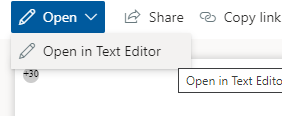
- Save
- Switch tab and reload
@sympmarc has started adding scenario docs to https://github.com/microsoft-search/pnp-modern-search/tree/main/docs/scenarios, so maybe something similar, or as page under getting started. We'll take anything :)
 wobba
on 15 Jun 2021
wobba
on 15 Jun 2021
I have tried editing the template in the webpart. I find it ok for replacing and adding a few data properties.
I have ended up with your second option, using a reference to a file in SP. This is also very nice since it can be reused in many webparts. Creating a SP Site called "Intranett resources" or something similar and using a Document library to store all templates is a very good solution. Then I can use the same reference on search webparts in sites all over the intranett.
I use OneDrive to sync the central library holding all templates.
Then I use VSCode to edit the templates.
When I save a change, OD syncs the files faster than I can refresh the webpage, so it almost "feels" like I am editing live.
It also gives me real search result data to work with.
I download the results as a json file from the debug template. I use this to reference the items and the theme. Awesome stuff!
Maybe I can write an article about this? What do you think?
PerOve
on 16 Jun 2021
If you could write something about storing and editing in SharePoint, and also the OneDrive sync step as an additional way for the advanced that would be great. And it should fit nicely with the other scenario documentation.
wobba
on 16 Jun 2021
Hi @PerOve really great scenario actually, I didn't think about using OD sync for template editing ;). Sure it would be great to write a tutorial in the documentation for this.
 FranckyC
on 16 Jun 2021
FranckyC
on 16 Jun 2021
1111 Are added with 3 new articles about templates.
A fourth is in my head about the OneDrive scenario.
PerOve
on 28 Jun 2021
Created 4 articles about this and have 3 of them merged with develop branch, and 1 pull request waiting for merging.
PerOve
on 29 Jun 2021
Related issues
 mbice
·
4Comments
mbice
·
4Comments
 stevebeauge
·
5Comments
stevebeauge
·
5Comments
 alexabramkin
·
3Comments
alexabramkin
·
3Comments
 PathToSharePoint
·
4Comments
PathToSharePoint
·
4Comments
 fijaz
·
3Comments
fijaz
·
3Comments
Most helpful comment
I have tried editing the template in the webpart. I find it ok for replacing and adding a few data properties.
I have ended up with your second option, using a reference to a file in SP. This is also very nice since it can be reused in many webparts. Creating a SP Site called "Intranett resources" or something similar and using a Document library to store all templates is a very good solution. Then I can use the same reference on search webparts in sites all over the intranett.
I use OneDrive to sync the central library holding all templates.
Then I use VSCode to edit the templates.
When I save a change, OD syncs the files faster than I can refresh the webpage, so it almost "feels" like I am editing live.
It also gives me real search result data to work with.
I download the results as a json file from the debug template. I use this to reference the items and the theme. Awesome stuff!
Maybe I can write an article about this? What do you think?