Pnp-modern-search: Search web parts fails in Safari
Version used
4.0.0
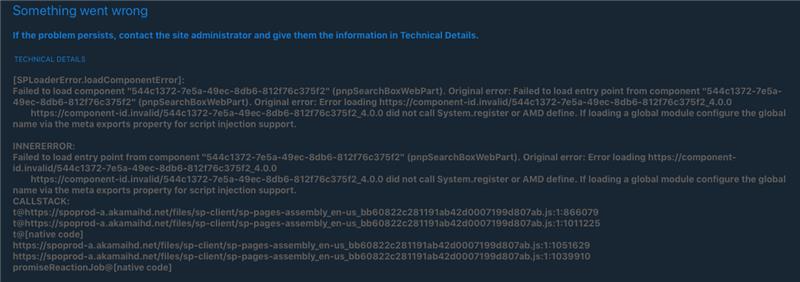
Search box, search results and search filter web parts fails with the following error message when using Safari. Other browsers works just fine:
Something went wrong
If the problem persists, contact the site administrator and give them the information in Technical Details.
TECHNICAL DETAILS
https://component-id.invalid/544c1372-7e5a-49ec-8db6-812f76c375f2_4.0.0 did not call System.register or AMD define. If loading a global module configure the global name via the meta exports property for script injection support.
INNERERROR:
Failed to load entry point from component "544c1372-7e5a-49ec-8db6-812f76c375f2" (pnpSearchBoxWebPart). Original error: Error loading https://component-id.invalid/544c1372-7e5a-49ec-8db6-812f76c375f2_4.0.0
https://component-id.invalid/544c1372-7e5a-49ec-8db6-812f76c375f2_4.0.0 did not call System.register or AMD define. If loading a global module configure the global name via the meta exports property for script injection support.
CALLSTACK:
t@https://spoprod-a.akamaihd.net/files/sp-client/sp-pages-assembly_en-us_bb60822c281191ab42d0007199d807ab.js:1:866079
t@https://spoprod-a.akamaihd.net/files/sp-client/sp-pages-assembly_en-us_bb60822c281191ab42d0007199d807ab.js:1:1011225
t@[native code]
https://spoprod-a.akamaihd.net/files/sp-client/sp-pages-assembly_en-us_bb60822c281191ab42d0007199d807ab.js:1:1051629
https://spoprod-a.akamaihd.net/files/sp-client/sp-pages-assembly_en-us_bb60822c281191ab42d0007199d807ab.js:1:1039910
promiseReactionJob@[native code]
To Reproduce
Browse page with search web parts using Safari
Expected behavior
Web parts should work using Safari
Screenshots
Desktop (please complete the following information):
- Safari (Desktop and iOS)
Additional context
Modern Search version 3.17.0 works fine in Safari
 jensotto
All 45 comments
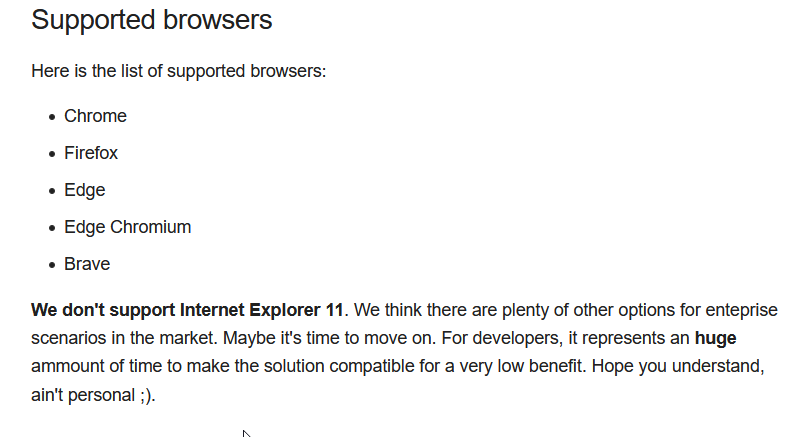
Hi @jensotto, actually Safari is not in the list of supported browsers:
 FranckyC
on 22 Jan 2021
FranckyC
on 22 Jan 2021
Oh, that explains it then. I assumed that Safari was supported. Will that be something that can be supported in the future? I don't use Safari my self, but I got feedback from some users that it failed for them using Safari.
jensotto
on 22 Jan 2021
Not the priority, but if someone is wiling to make this solution compatible with this browser, why not ;)
FranckyC
on 22 Jan 2021
I think supporting Safari should be an enhancement to be looked at. But it requires a developer with access to a mac. I'll re-open and tag it as enhancement.
 wobba
on 22 Jan 2021
wobba
on 22 Jan 2021
Just keep in mind that this will then render the web parts unusable on any iOS device (iPad/iPhone) as any third party browser is forced to use WebKit and will have the same issue (I tried this using Edge on an iPhone).
jensotto
on 22 Jan 2021
@wobba If MS can buy me a Mac maybe I can take look at it ;)
FranckyC
on 22 Jan 2021
@jensotto I agree, but we tried to focus on most popular browsers frist. Hard to cover everything unfortunately.
FranckyC
on 22 Jan 2021
I might crank up my old mac and give it a go - slow as it may be
wobba
on 26 Jan 2021
Note: You don't need macOS / a Mac for testing Webkit. A linux distribution is already enough. The browser "Epiphany" ("GNOME Web") uses Webkit as backend - the same backend as Safari.
So a Linux VM might be already enough.
 haecker-felix
on 6 Feb 2021
haecker-felix
on 6 Feb 2021
@wobba.
Good Day, Any plans for enhancing the feature to render in Safari?. The application we developed need to be accessed from both Desktop and iPad.
 sithender1
on 9 Feb 2021
sithender1
on 9 Feb 2021
No active plans, and anyone can take a look to get it working :)
wobba
on 9 Feb 2021
As @wobba said, not in the backlog right now unfortunately. If someone is willing to support this scenario, feel free to PR.
FranckyC
on 9 Feb 2021
@jensotto Tested the v4 package on Safari on a modern page, and no errors. Search box + result. Can you share more for repro?
I'm not using CDN by the way. macOS Catalina, Safari v14.0.3
wobba
on 18 Feb 2021
I didn't do much other than adding the web parts to the modern page. All web parts fails in Safari. I only have an iPhone with latest version installed to test with. I have no other Apple devices. The user that originally reported this had a MacBook.
We also did not have CDN enabled on the tenant when I reported this error, but now that (CDN) has been turned on, and the error message is slightly changed in that the URL now points to https://publiccdn.sharepointonline.com/
jensotto
on 19 Feb 2021
I'm not sure if it matters, but I have installed the app in a site collection scoped app catalog.
jensotto
on 19 Feb 2021
Here is the new error message:
SPLoaderError.loadComponentError]:
Failed to load component "544c1372-7e5a-49ec-8db6-812f76c375f2" (pnpSearchBoxWebPart). Original error: Failed to load URL 'https://publiccdn.sharepointonline.com/
Not sure why there is a certificate error. It works just fine for other browsers, and there is not much we can do with any possible certificate errors in SharePoint Online. This error is the same on iPhone and MacBook.
jensotto
on 19 Feb 2021
@jensotto I'll enable CDN on my dev tenant and see if that changes anything.
wobba
on 19 Feb 2021
@jensotto I have the exact same deployment (site collection app catalog) and resulting error messages as in your latest attempt. Works in all browsers but Safari (and by extension SharePoint and Teams apps in iOS).
 bwtaz5555
on 21 Feb 2021
bwtaz5555
on 21 Feb 2021
This seems related to #803. I have repro and seems @FranckyC regex are too advanced. I think we should try to re-work these to not use look-behind if possible.
wobba
on 28 Feb 2021
We are facing the same error message on Safari and also on the SharePoint App on iOS
SPLoaderError.loadComponentError]:
Failed to load component "544c1372-42df-47c3-94d6-017428cd2baf" (pnpSearchResultsWebPart). Original error: Failed to load entry point from component "544c1372-42df-47c3-94d6-017428cd2baf" (pnpSearchResultsWebPart). Original error: Error loading https://component-id.invalid/544c1372-42df-47c3-94d6-017428cd2baf_4.0.0
https://component-id.invalid/544c1372-42df-47c3-94d6-017428cd2baf_4.0.0 did not call System.register or AMD define. If loading a global module configure the global name via the meta exports property for script injection support.
The V3 webparts are working as expected.
 TitanRobot
on 2 Mar 2021
TitanRobot
on 2 Mar 2021
@TitanRobot we know what the issue is, just need to figure out the best rewrite of the regex for a fix. No need for others to comment :)
wobba
on 2 Mar 2021
Hi Guys,
This is a bit of an issue as it also means that the PnP Modern Search WebParts won't work in the Microsoft SharePoint App for iOS devices as I believe the SharePoint App takes advantage of the Safari browser on iOS devices. Perhaps wrong but we are seeing this issue on all iOS devices when using the SharePoint App in V4.1 of PnP Modern Search WebParts.
https://component-id.invalid/544c1372-42df-47c3-94d6-017428cd2baf_4.1.0 did not call System.register or AMD define. If loading a global module configure the global name via the meta exports property for script injection support.
INNERERROR:
Failed to load entry point from component "544c1372-42df-47c3-94d6-017428cd2baf" (pnpSearchResultsWebPart). Original error: Error loading https://component-id.invalid/544c1372-42df-47c3-94d6-017428cd2baf_4.1.0
https://component-id.invalid/544c1372-42df-47c3-94d6-017428cd2baf_4.1.0 did not call System.register or AMD define. If loading a global module configure the global name via the meta exports property for script injection support.
CALLSTACK:
t@https://modern.akamai.odsp.cdn.office.net/files/sp-client/sp-pages-assembly_da-dk_fa6a8dcf17c97244dd0e1988a0513170.js:65:19899
t@https://modern.akamai.odsp.cdn.office.net/files/sp-client/sp-pages-assembly_da-dk_fa6a8dcf17c97244dd0e1988a0513170.js:65:118345
t@[native code]
https://modern.akamai.odsp.cdn.office.net/files/sp-client/sp-pages-assembly_da-dk_fa6a8dcf17c97244dd0e1988a0513170.js:65:155728
https://modern.akamai.odsp.cdn.office.net/files/sp-client/chunk.systemjs-component-loader_da-dk_2ebb0419bb86e53022fa.js:1:66000
promiseReactionJob@[native code]
 myatix
on 7 Apr 2021
myatix
on 7 Apr 2021
It's a known issue and I did not have time to properly test this for the v4.1 release. Anyone is free to pick this up for a fix as well :)
wobba
on 7 Apr 2021
Hi Mikael,
Is this resolved then in any of the current builds, I would really like to test it if possible?
Cheers
Best regards
Alan
On 7 Apr 2021, at 19.42, Mikael Svenson @.*> wrote:
It's a known issue and I did not have time to properly test this for the v4.1 release.—
You are receiving this because you commented.
Reply to this email directly, view it on GitHub, or unsubscribe.
myatix
on 7 Apr 2021
@myatix The issue is open = not addressed
wobba
on 8 Apr 2021
@wobba Thanks for the reply! I understood from what you had previously written that you had found a solution but not tested it prior to the release of V4.1.
Sorry for the misunderstanding we are just about to Go Live with the new PnP Modern Search solution and this is a major issue for us.
myatix
on 8 Apr 2021
You are correct, but there is no build for it. Only local dev code on my machine.
wobba
on 8 Apr 2021
Hi Mikael,
Would you mind sharing it with me? Then we can try and create a build and
test it!
myatix
on 8 Apr 2021
I can see there are plenty of others having this issue...
931
myatix
on 8 Apr 2021
@wobba, can you provide any direction on an appropriate fix? This is something I could investigate & fix with incoming bandwidth. We certainly need to support this scenario. Thanks again for these amazing components!
 MakingThingsWorkToronto
on 9 Apr 2021
MakingThingsWorkToronto
on 9 Apr 2021
@MakingThingsWorkToronto, so it is correct what @wobba has found; it is an issue with the regex. Safari (webkit?) does not support negative lookbehind: https://caniuse.com/js-regexp-lookbehind.
The rendering is failing on TokenService
Changing the genericTokenRegexp:
From: private genericTokenRegexp: RegExp = /(??}(?!\)/gi;
To: private genericTokenRegexp: RegExp = /{[^{]?}/gi;
..solves the problem. Now, it is not possible to escape tokens, but as we are in production this is a quick and dirty workaround.
I have forked and made the change, but the negative lookbehind is used a ton of places in the source, so a lot of work needs to be done to have it working properly in Safari (will have a look at it when we decide to have 25 hours in a day :)).
 NaffOff
on 9 Apr 2021
NaffOff
on 9 Apr 2021
@MakingThingsWorkToronto \search-parts\src\services\tokenService\TokenService.ts#L29
Try change it to: private genericTokenRegexp: RegExp = /{[^\{]*?}/gi;
Has to be verified and tested properly for all token scenarios. Maybe even add some unit tests :)
wobba
on 9 Apr 2021
Looking forward to the fix! We are releasing new site tomorrow and just found out the search web part does not work on Ipad and iphone. Please let us know when it's going to be fixed! Thank you for all you do!!
 lraspbe
on 26 Apr 2021
lraspbe
on 26 Apr 2021
Should be fixed when #960 is part of the next release.
wobba
on 26 Apr 2021
@wobba Will this make it into 4.2?
 corriespondent
on 24 May 2021
corriespondent
on 24 May 2021
Yes
wobba
on 24 May 2021
Looks like the issue is not based on the browser but the issue is with IOS. If we are on IOS but in chrome we get the same issue. Can someone confirm.
 tmccleary
on 25 May 2021
tmccleary
on 25 May 2021
Chrome on iOS uses the same renderer as Safari under the hood. I’ve built and deployed the develop branch and confirm it now works on Safari/iOS.
 ellinge
on 25 May 2021
ellinge
on 25 May 2021
You said “Now” works. Does that mean there is an update that we need to deploy?
Terrence McCleary
Managing Partner
SP Solutions Group
Phone: 1-866-981-2921
Cell: 563-676-8128
Site: http://spsolutionsgrp.com
@.*D75183.26F1DEB0]
From: ellinge @.>
Sent: Tuesday, May 25, 2021 4:28 PM
To: microsoft-search/pnp-modern-search *@.>
Cc: Terrence McCleary @.>; Comment @.*>
Subject: Re: [microsoft-search/pnp-modern-search] Search web parts fails in Safari (#685)
Chrome on iOS uses the same renderer as Safari under the hood. I’ve built and deployed the develop branch and confirm it now works on Safari/iOS.
—
You are receiving this because you commented.
Reply to this email directly, view it on GitHubhttps://github.com/microsoft-search/pnp-modern-search/issues/685#issuecomment-848237153, or unsubscribehttps://github.com/notifications/unsubscribe-auth/AFZA5A7O7BE5ET5GYGPK4L3TPQB6NANCNFSM4WMSLOYQ.
tmccleary
on 25 May 2021
It’s not released yet but you can pull the source and build you own sppkg and deploy meanwhile. So in that sense it works now... not with the latest release (<4.2)
ellinge
on 25 May 2021
We have some other issues we need to address before releasing 4.2. You might not be affected by those and can build 4.2 yourself from the dev branch as @ellinge says.
wobba
on 26 May 2021
Thank you
From: Mikael Svenson @.>
Sent: Wednesday, May 26, 2021 2:57 AM
To: microsoft-search/pnp-modern-search *@.>
Cc: Terrence McCleary @.>; Comment @.*>
Subject: Re: [microsoft-search/pnp-modern-search] Search web parts fails in Safari (#685)
We have some other issues we need to address before releasing 4.2. You might not be affected by those and can build 4.2 yourself from the dev branch as @ellingehttps://github.com/ellinge says.
—
You are receiving this because you commented.
Reply to this email directly, view it on GitHubhttps://github.com/microsoft-search/pnp-modern-search/issues/685#issuecomment-848517592, or unsubscribehttps://github.com/notifications/unsubscribe-auth/AFZA5A3G7T6WADSDLMOJZKLTPSLUHANCNFSM4WMSLOYQ.
tmccleary
on 26 May 2021
Should be fixed in v4.2
wobba
on 3 Jun 2021
I just tested an upgrade from 4.1.0 to 4.2.3 and it worked! Excellent work! :)
 PerOve
on 14 Jun 2021
PerOve
on 14 Jun 2021
Thank you for doing extra verification 👍
wobba
on 14 Jun 2021
Related issues
 jimmywim
·
4Comments
jimmywim
·
4Comments
 vreezy
·
3Comments
vreezy
·
3Comments
 RichG82
·
3Comments
RichG82
·
3Comments
 mbice
·
4Comments
mbice
·
3Comments
mbice
·
4Comments
mbice
·
3Comments
Most helpful comment
Should be fixed when #960 is part of the next release.