Pnp-modern-search: refinabledecimal does not appear to work
i have a currency field in a list and one of my requirements is to have the $ range as shown below which works for classic refiner.
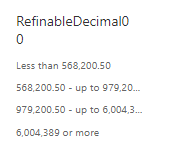
Can achieve this in the modern filters? as of now i don't even see any options to filter on (like it isnt even crawled but it is because it works in classic) for filtering but the refinablestring works but the format wont satisfy our needs.
 cpluceDev
All 19 comments
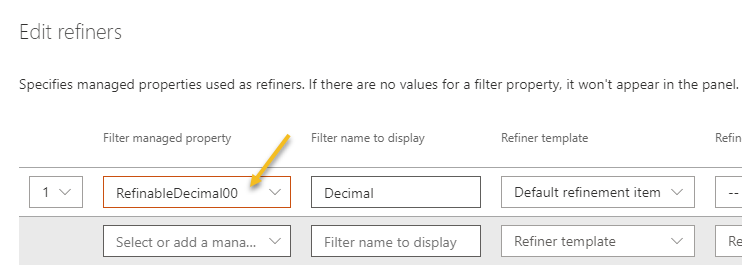
@cpluceDev what does it look like if you pick the Default refinement item template? And you can manually enter RefinableDecimal00 in the setup for it to show as long as your query return values in it.
 wobba
on 29 Sep 2020
wobba
on 29 Sep 2020

cpluceDev
on 29 Sep 2020
it works in the classic web part as illustrated in fist comment. seems straightforward.
cpluceDev
on 29 Sep 2020
refinableint also does not work. the column that is mapped is a currency column type
cpluceDev
on 29 Sep 2020
I have to map up some data to see if I can repro.
wobba
on 29 Sep 2020
if this helps any, i will say i have the same options for the refiner templates no matter what the refinable type i have entered for the filtered managed property. in th classic refiner web part is changes depending on what is selected
cpluceDev
on 1 Oct 2020
Found the error - and it's due to the change to bring back more buckets for strings. Working on a fix.
wobba
on 1 Oct 2020
thanks so much. i needed this. :)
cpluceDev
on 1 Oct 2020
as long as this web part has been in use, I cant believe no one else caught this :)
cpluceDev
on 1 Oct 2020
Pushed a fix to the dev branch, and will see if I have time to do a .3 release. OOF this week.
wobba
on 1 Oct 2020
Pushed a .3 release with the fix just now.
wobba
on 4 Oct 2020
thank you. will test today
cpluceDev
on 5 Oct 2020
will this give me the range template as illustrated above?
cpluceDev
on 5 Oct 2020
It will yes, as it divides results in 4 equal buckets. If you want custom buckets we need to add a setting.
wobba
on 5 Oct 2020
I downloaded and installed the latest version but it still does shows no results
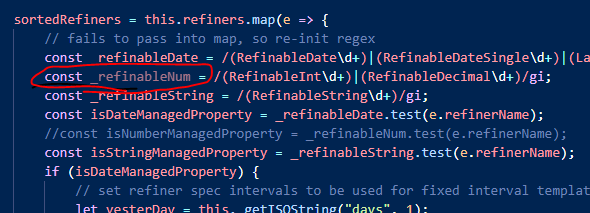
says it is declared but the value is never read.
cpluceDev
on 6 Oct 2020
I have this:

which in 3.15.3 shows as
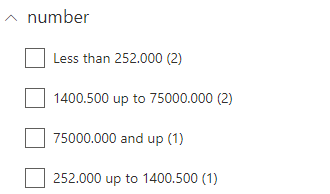
I left the regex in there in case we need it later, so it's correct it's not in use.
wobba
on 6 Oct 2020
i cant get this to work and my hosted workbench isn't working. it is like there was no updates applied to the web part. i did gulp bundle ship and gulp package ship
cpluceDev
on 6 Oct 2020
anything i can check? none of these are displaying any results.

cpluceDev
on 7 Oct 2020
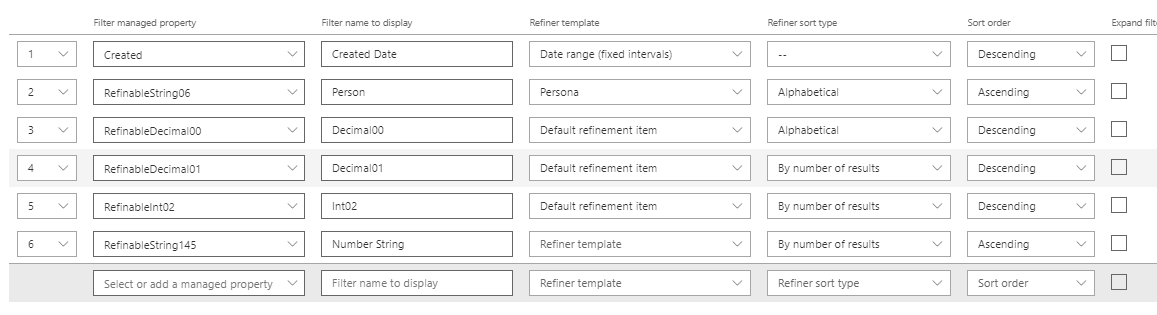
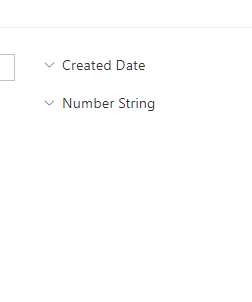
the Numebr string is mapped to same column as the decimal and integer
cpluceDev
on 7 Oct 2020
Related issues
 stevebeauge
·
5Comments
stevebeauge
·
5Comments
 PathToSharePoint
·
4Comments
PathToSharePoint
·
4Comments
 PrabhuChandar
·
3Comments
PrabhuChandar
·
3Comments
 jimmywim
·
4Comments
jimmywim
·
4Comments
 mbice
·
4Comments
mbice
·
4Comments