Pnp-modern-search: Page.Term.IDWithChildren token not resolved. ResultSources with any Page token not working either
Version used
3.14.2
Describe the bug
The Search results webpart is not working fine when you set it to search over a Result Source that uses the Page token (i.e: {Page.TaxFld.IDWithChildren}).
To Reproduce
Steps to reproduce the behavior:
- Add a Taxonomy field to the pages library
- Add some pages with the same Term in that field
- Creates a Result Source with a Query like: TaxMProperty: {Page.TaxFld.IDWithChildren}
- Configure the SRWP to use this new Result Source... You won´t get the expected results.
Expected behavior
Only the pages with the same Term (or any children term) appear.
Additional context
The SRWP is not able to replace the OOTB SharePoint Token {Page.TaxFld.IDWithChildren}. It does support the {Page.TaxFld.TermID}, but is replaced on client side, instead of server, and also, when the Result Source uses any Page token, the SRWP is not working properly.
@wobba @FranckyC I suggest the following approach (and happy to do a PR). The {Page} token should be included as it is in the Query template (no client side replacement). With just this, the query won´t work yet, we also need to pass the ListId and ListItemId as __Appended Query Properties__ (that can be obtained easily from Context). Image below is doing so using the Search Query tool:
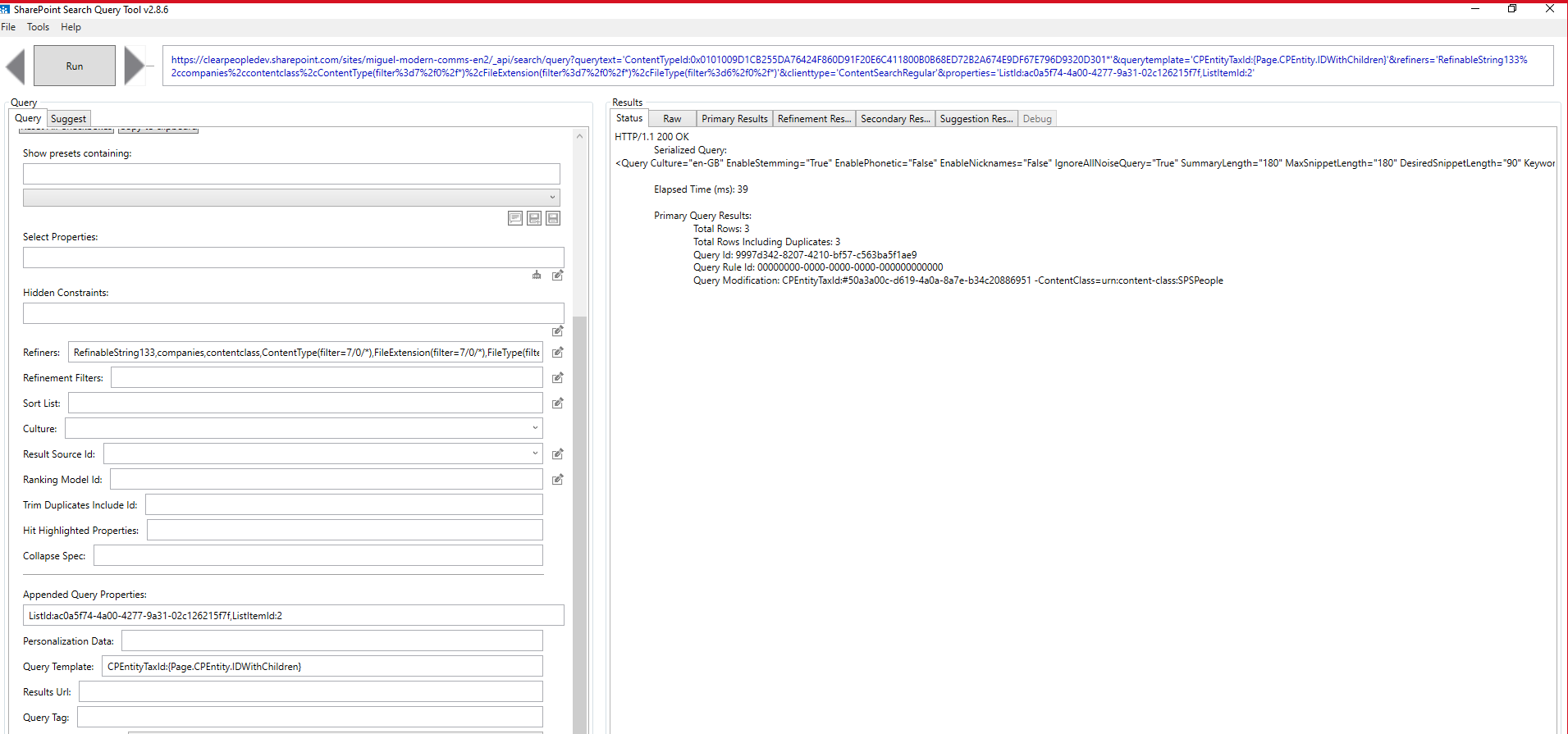
Note how __Query Modification__ is showing the token resolved by SharePoint, in server side.
With this approach, if we use a Result Source that uses the Page token, it also works fine:
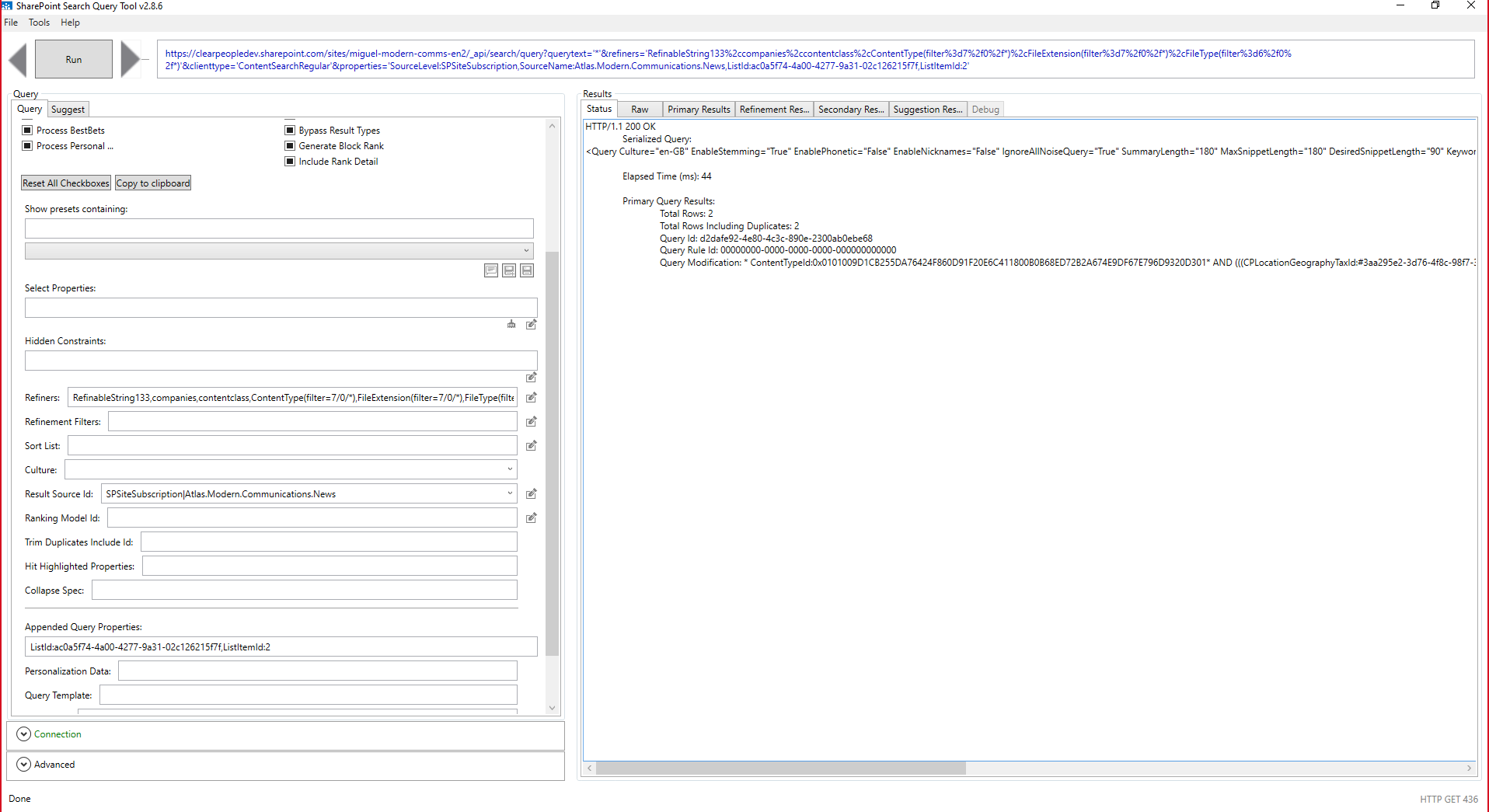
As per my tests, if you set the ListId and ListItemId as Query properties, but you don´t use the Page token, the search results are not being impacted, so the changes in source code would be:
- In _TokenService_ _replaceQueryVariables_ function, we don´t call the current _replacePageTokens_
- If spfx Context has a ListId and ListItemId value, we set them as _searchQuery.Properties_
With this approach, we can use any Page token supported OOTB by SharePoint, and also we fix the issue with ResultSources using the Page token.
Any thoughts?
Thanks!
 luismanez
All 12 comments
I'm fine with a PR which adds a setting to pass query variables as extra payload parameters. I don't want it as default as it adds extra payload which might not be needed. Completely forgot about this old "trick" that you can pass in any variable which will be evaluated on the server side :)
As search is moving towards the Graph Search API, supporting old classic features is less and less of a focus.
We could pass in all the custom query variables: https://microsoft-search.github.io/pnp-modern-search/search-parts/search-results/#custom-query-variables
 wobba
on 22 Jul 2020
wobba
on 22 Jul 2020
Thanks Mikael, good point about the possible un-needed extra payload. So just to confirm I´m understanding, this is what we´d do:
- Add a new Webpart property (toggle) like "Resolve Query Variables in Server side"
- If enable:
- In TokenService replaceQueryVariables function, we won´t replace any of the variables supported by SharePoint (https://docs.microsoft.com/en-us/sharepoint/technical-reference/query-variables). We still need to replace some Tokens that are not supported by SharePoint, like _CurrentYear_, _TenantUrl_ ...
- If spfx Context has a ListId and ListItemId value, we set them as searchQuery.Properties
- If not enable, we leave it as it is now (backwards compatibility)
Thanks!
luismanez
on 23 Jul 2020
We don't need to replace any client side as all can be passed down. Ideally we would only pass needed ones. I can think of having a key/value config on what to pass down as server evaluation. Since it's an advanced feature, then toggling to send as needed might work out.
Any thoughts on payload size vs flexibility?
wobba
on 23 Jul 2020
Might need more coffee, but not sure if I follow. My idea is to use the existing QueryTemplate property of the SRWP. In there, the user can specify any SP Query variable (Page.xyz, User.abc, {Today}...). Those "tokens" will be replaced by SP in server side, but the Page token needs to specify the ListID and ListItemID as Query properties (these 2 are the only extra payload I see, and is always needed, as maybe the Page token is used in a ResultSource).
However, also note that currently, the SRWP supports other tokens that are not supported by SharePoint Query variables (i.e: CurrentYear, TenantUrl), so for those tokens, we still need to resolve them in Client side.
Could you elaborate a bit more while I´m taking that extra coffee? :)
luismanez
on 25 Jul 2020
{User} token already work server side..{Page.Foo} ones does not, so you need to pass extra key/val pairs for those to work server side.
Page.Foo=ColVal;CurrentYear=2020 etc. Any extra prop passed on the payload in "additional query props" will work as a variable client side. Does that make sense? Which means we can support whatever we want of variables for server side eval. But ideally I only want to pass in those which are needed to reduce the payload.
wobba
on 25 Jul 2020
but with the change I´m proposing: LocationProp:{Page.Location} or Created={Today} are not extra props in "additional query props", but just a string in the "__QueryTemplate__" prop. So, any SP Query variable in the _QueryTemplate_ prop will be resolved in Server Side, as always as we provide the _ListId_ + _ListItemId_ in the "_additional query props_". These are the only 2 extra props in the payload.
For instance, we´ve updated the SRWP code, so now it always send the _ListID/ListItemID_ as extra props, and here are some screenshots that explains better what I say:
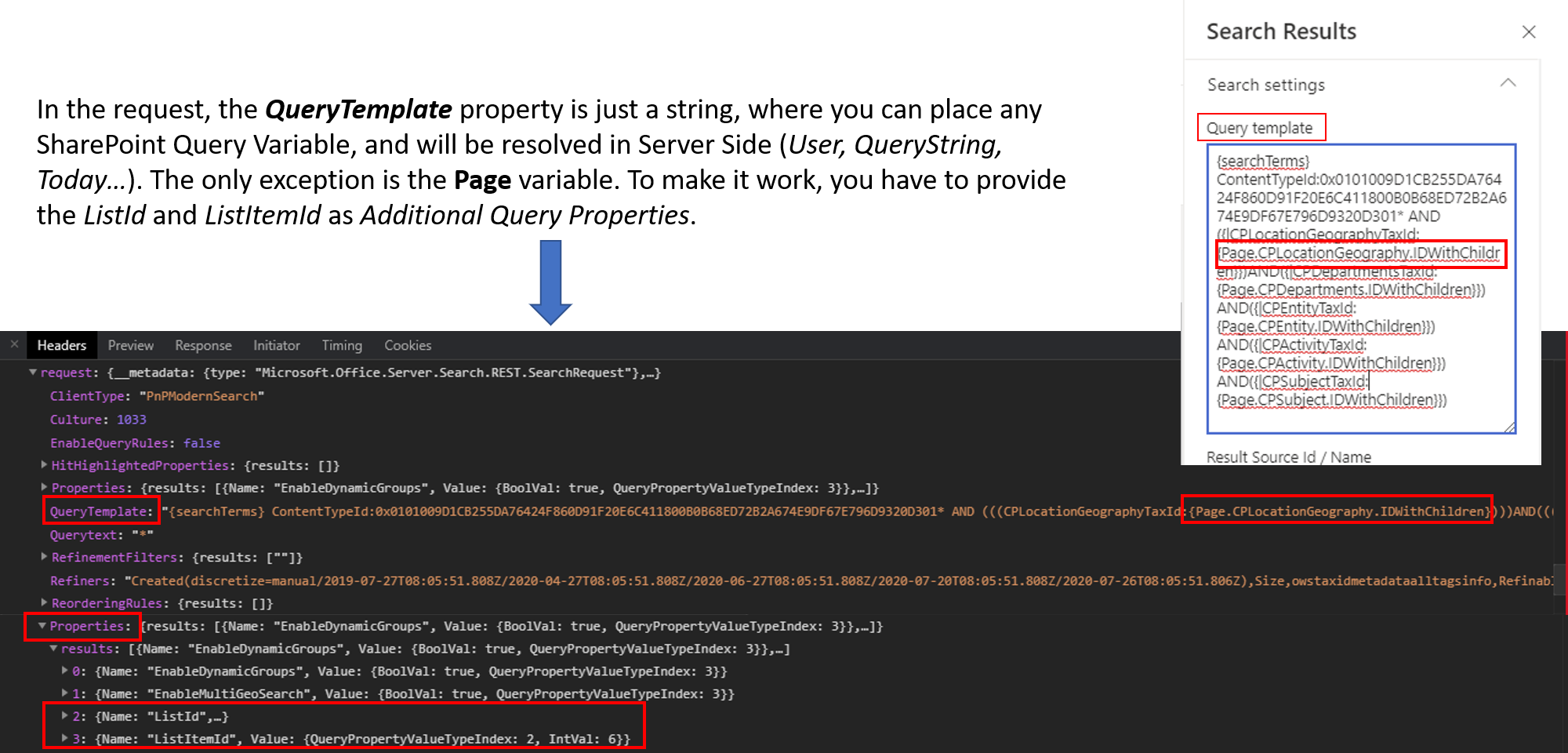
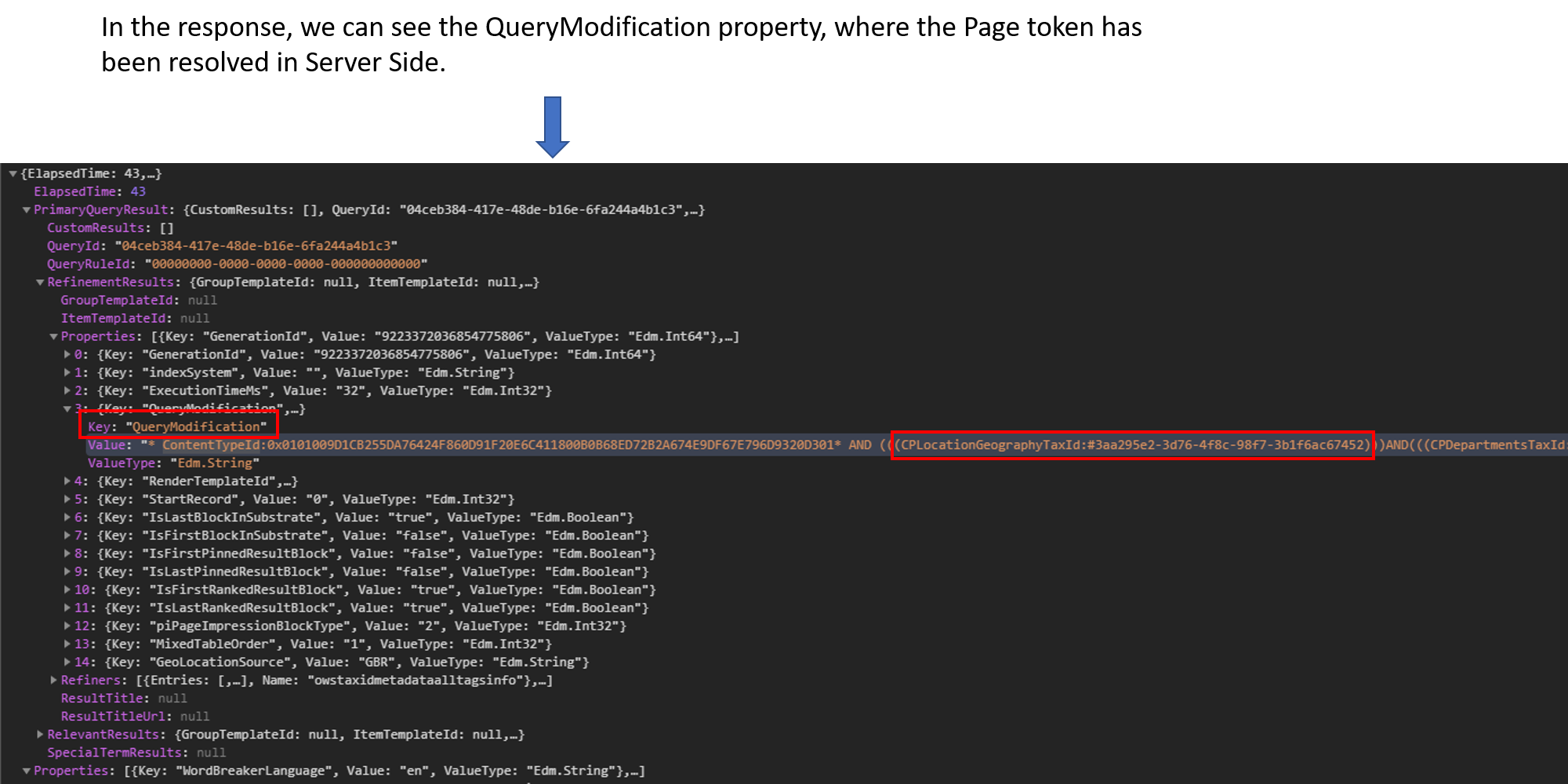
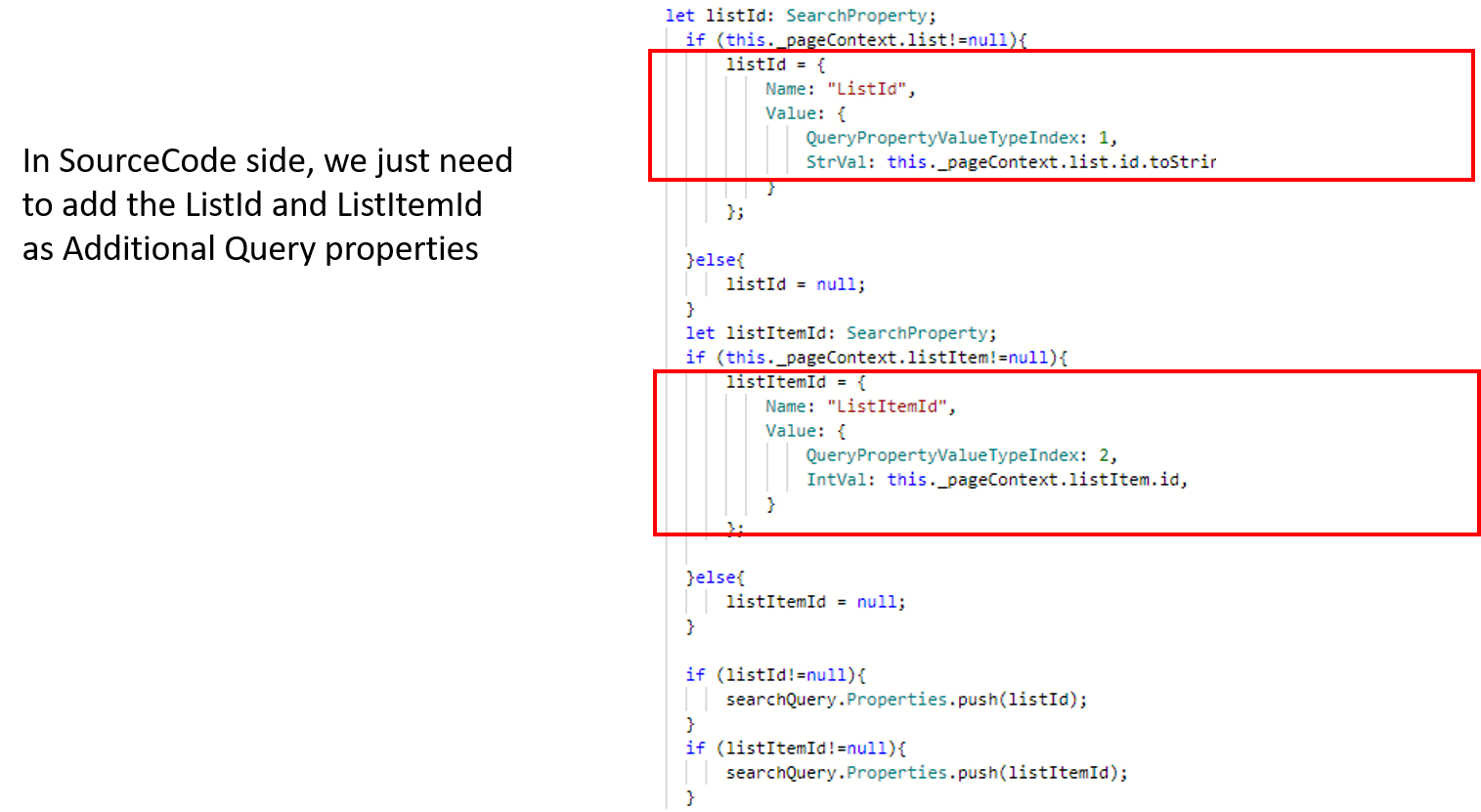
So, the extra payload is just 2 props, and with the new Toggle setting, are only added if the user configures the webpart to resolve QueryVariables in server side.
If that makes sense, I still have the question about what do we do when the user enables the Toggle, but in the _QueryTemplate_ property, uses some of the Tokens that are not supported SP Query variables, like _TenantUrl_
Thanks a lot for your help!
luismanez
on 27 Jul 2020
If what you are trying to say is that if you pass in ListId/ListeItemId, then Page. variables will work server side? That I didn't know :) If this is the case I think we should be able to send in those two for every request and maybe deprecate the client side eval of Page variables which we have today.
My other point is that any custom query variable we support like CurrentDate can work server side, if we just pass it along. So if we pass some extra ones to support more server side eval, why not have config to allow passing more in - and you can keep on using your classic result sources even better than in classic wp's :)
wobba
on 28 Jul 2020
Yeah, that´s exactly what I meant (ListId/ListItemId) :) During the last months we´ve been doing so and working fine so far.
About your other point, are you sure all the custom query variables will work server side? cos I´m comparing
https://microsoft-search.github.io/pnp-modern-search/search-parts/search-results/#custom-query-variables
vs
https://docs.microsoft.com/en-us/sharepoint/technical-reference/query-variables
and some Custom query variables are not supported by SharePoint, like: CurrentYear or TenantUrl
Also, what you mean by "_if we just pass it along_", because all these variables, are just passed as strings in the _queryTemplate_ property:
searchQuery.QueryTemplate = await this._tokenService.replaceQueryVariables(this._queryTemplate);
so, they are only passed if are present in the __QueryTemplate__ WP property (or Result Source). I mean, they are not passed as "additional query properties"
Thanks again.
luismanez
on 3 Aug 2020
Custom ones will work if you send them as part of the payload 🙂 Which means if you send in ListId/ListItemId you can use the variables {ListId} and {ListItemId} yourself. Feel free to PR on the level you want to.. and we can update the documentation accordingly.
wobba
on 4 Aug 2020
Added the code - will come in next release.
wobba
on 27 Aug 2020
Thanks @wobba Apologies I didn't do it, but it's been a tough month.
luismanez
on 27 Aug 2020
Not a problem and was quick to add.
wobba
on 28 Aug 2020
Related issues
 anoopt
·
4Comments
anoopt
·
4Comments
 polashivaprasad
·
5Comments
polashivaprasad
·
5Comments
 PathToSharePoint
·
4Comments
PathToSharePoint
·
4Comments
 RichG82
·
3Comments
RichG82
·
3Comments
 AmitTyagi1
·
5Comments
AmitTyagi1
·
5Comments