Pnp-modern-search: 'SortList' is not send on API calls towards SharePoint Search.
Version used
3.12.0
Describe the bug
'SortList' is not send on API calls towards SharePoint Search.
The API returns an error:

To Reproduce
Steps to reproduce the behavior:
- In the workbench add the 'Search Box' and 'Search Results' webpart
- Configure the 'Search Results' webpart and connect it to the 'Search Box'
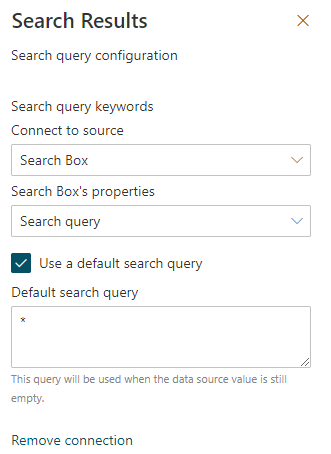
- Open up developer tools and filter the network tab for calls containing 'postQuery'
- Refresh te page. Check the 'postQuery' request payload and notice the 'SortList' property
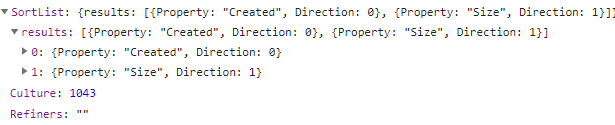
- Fill in a value in the 'Search Box' webpart and hit enter. This will perform a new 'postQuery' call.
Now the postQuery responds with status '400'. The response looks like
{
"odata.error": {
"code": "-1, Microsoft.Data.OData.ODataException",
"message": {
  "lang": "en-US",
  "value": "A null value was found for the property named 'Direction', which has the expected type 'Edm.Int32[Nullable=False]'. The expected type 'Edm.Int32[Nullable=False]' does not allow null values."
}
}
}
Cause:
The request payload does not contain configuration for the 'SortList' property

Additional context
This problem also occurs when switching between search verticals in the 'Search Vertical' webpart. Possibly the same root cause?
 LeemansBE
All 9 comments
As far as I've seen in a quick debugging, the issue is in file
_webparts\searchResults\components\SearchResultsContainer\SearchResultsContainer.tsx_
method ___getDefaultSortingValues__ line 712:
if (this.props.sortList.length > 0
            && this.props.sortableFields.length > 0
            && this.props.sortList[0].sortField === this.props.sortableFields[0].sortField) {
__this.props.sortableFields.length__ is empty, so is returning _sortField_ and _sortDirection_ as _null_
I guess we don´t want to set that property with a default value in webpart manifest, but not sure what´s best way to fix the issue, as I'm new here. Also, I think that method should never return the null values in any case.
@FranckyC @wobba if you provide some thoughts about how to fix it, I´m happy to do a PR.
Hope this helps.
 luismanez
on 6 May 2020
luismanez
on 6 May 2020
Hi @FranckyC @wobba I've created a PR (https://github.com/microsoft-search/pnp-modern-search/pull/240) that should fix the problems mentioned above. Could you maybe validate? Thx!
LeemansBE
on 6 May 2020
Haven´t tested it much, but is working for me with your changes.
Thanks!
luismanez
on 6 May 2020
I submitted a candidate PR #241. Hope that will help
 stevebeauge
on 6 May 2020
stevebeauge
on 6 May 2020
We have three potential fixes now :) I'd be happy for someone to eval and say which is better.
 wobba
on 6 May 2020
wobba
on 6 May 2020
Hi @wobba I think your PR works well!
Mine doesn't work 100% in edit scenario's. There is a page refresh needed in order to show the display results correctly while switching between ascending and descending. Seems to be working smoothly on your PR.
My vote goes out to your fix. Thx! 😄
LeemansBE
on 6 May 2020
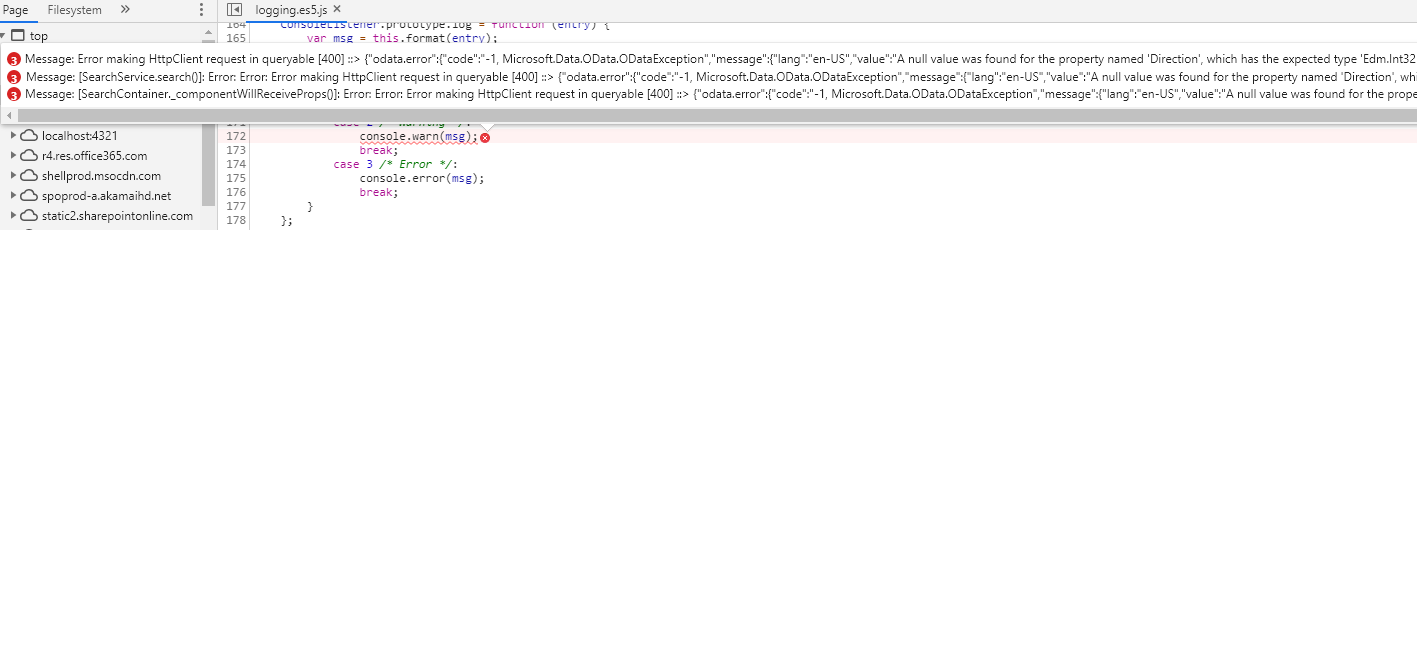
I have not configured "Filter" webpart, just configured "Search Box" and "Search result" webpart. when i do page refresh it works but when i input in Search Box then the error shows. So i am not using any sortin infact i have added the code above in tsx file but still issue exists.
 Narasireddy447
on 7 May 2020
Narasireddy447
on 7 May 2020
webpack:///.././node_modules/@pnp/logging/dist/logging.es5.js
Narasireddy447
on 7 May 2020
@Narasireddy447 We released a v3.12.1 which should fix this issue.
wobba
on 7 May 2020
Related issues
 jimmywim
·
4Comments
jimmywim
·
4Comments
 alexabramkin
·
3Comments
alexabramkin
·
3Comments
 mbice
·
3Comments
mbice
·
3Comments
 polashivaprasad
·
5Comments
polashivaprasad
·
5Comments
 MarcoSimon
·
5Comments
MarcoSimon
·
5Comments