Pnp-modern-search: How to use people search result template & simple list in a single search result webpart?
I would like to use search verticals for All items & People on a search result page. However I am not able to customize the template using result types.
If I just copy the default people result template and paste it for type people in result type it doesnt display anything.
Can you please help me in configuring the custom template to display both all items and people(with user image) results in a single webpart using result types?
Thanks for your help!
 Nowshad07
All 11 comments
@Nowshad07
Use the result type option in search result web part and change the template for individual file types like doc., people ., application etc.,
for example, to style people items please try the below steps
- Use the Debug template option to find the unique properties to differentiate people item types and other types by its properties. Normally for people item the file name will be PersonImmersive.aspx. use this in the result type.
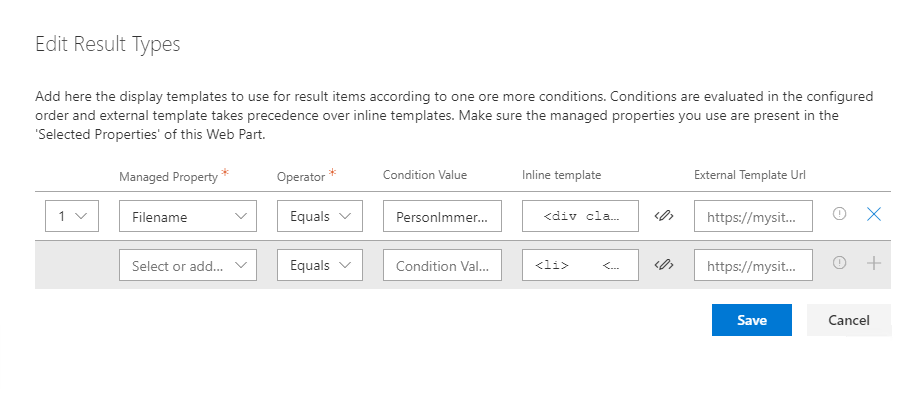
- select the custom template.
- go to result type and select the managed property, operator, condition value and inline template. (refer the screenshot above)
for inline template use the below div : (for people)
 pravin080317
on 3 Apr 2020
pravin080317
on 3 Apr 2020
Inline template for the people:
<div className={ styles.personaCard }>
     <a href='{{Path}}' target="_blank">
        <pnp-persona-card
        text='{{Title}}'
        image-url="/_layouts/15/userphoto.aspx?size=M&accountname={{last (split AccountName '|')}}"
        size={PersonaSize.size32}
        />
        </a>
         </div>
Save the changes and hopefully you can see the difference for the people items.
pravin080317
on 3 Apr 2020
There are multiple ways to target people, contentclass contains people is also one to use.
 wobba
on 5 Apr 2020
wobba
on 5 Apr 2020
Thank you for your response. @pravin080317 @wobba Sorry, I did not make it clear in my question.
I would like to use the pnp persona card in result type of the webpart, is it possible? this way I don't have to write my own html to display users and make it look like OOB search
<pnp-persona-card fields-configuration="{{JSONstringify ../../../peopleFields}}" item="{{JSONstringify item}}" persona-size="{{../../../personaSize}}" />
Thanks,
Nowshad
Nowshad07
on 5 Apr 2020
@Nowshad07 @pravin080317 just shared such a sample.
wobba
on 6 Apr 2020
@wobba Is there any sample or referrence to use PNPLivePersona Component to show the contact card on hover.
pravin080317
on 6 Apr 2020
@pravin080317 There is a hack to make this work, but we will not provide it as part of PnP Modern Search until there is a good supported solution for this. It's a bit complicated and I have been pursuing the issue for a while, even last week. Once the issue progresses I can share more. Short story is that it seems doable, but a couple of pieces needs to be resolved first.
wobba
on 6 Apr 2020
@Nowshad07 @pravin080317 just shared such a sample.
Sorry, just to confirm, it is not supported at this stage? bit confused with your comment - "just shared such a sample"
Thanks
Nowshad07
on 6 Apr 2020
You get the person rendering, not the on hover card. So there is no sample on doing the on hover. My bad for not reading it proper.
I also have on good authority that if you employ the hack (found on the interwebs) it will most likely stop working as that implementation is changing internally going forward.
wobba
on 6 Apr 2020
@wobba
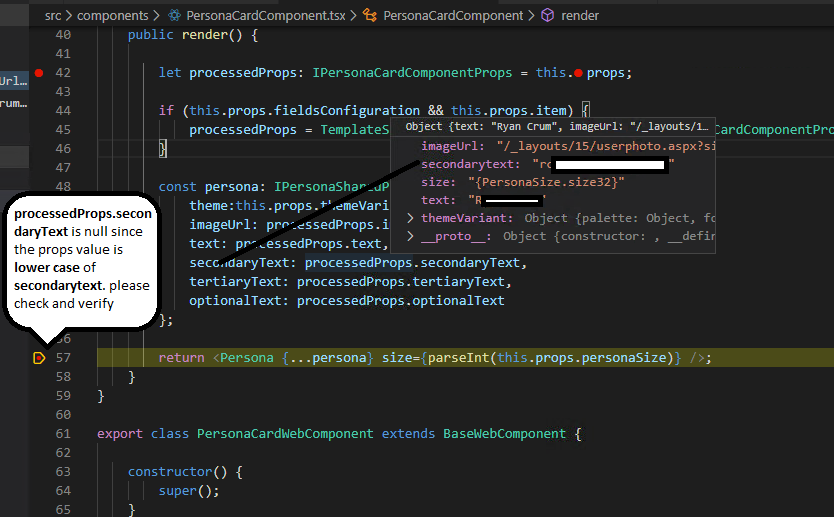
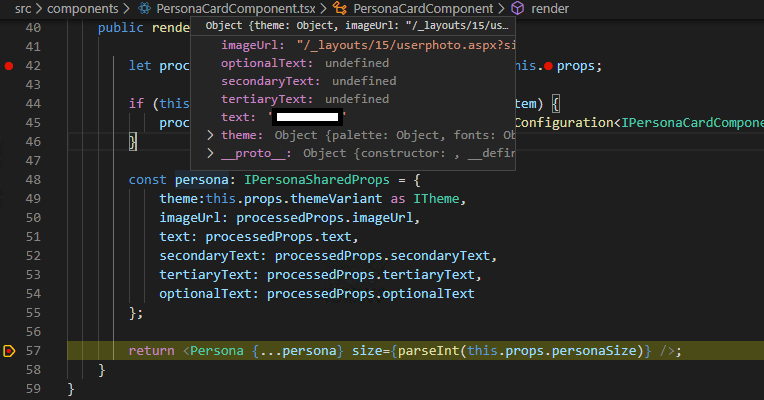
while rendering the personacardcomponent from the result types, the properties of optionaltext,secondarytext and tertiarytext is showing as undefined because of the casesensitive of second part of the letters "Text" "text". because of this persona rendering component is displaying only the image and text.
kinldy check on the below screenshots and let me know if i am wrong.
pravin080317
on 8 Apr 2020
<div className={ styles.personaCard }> <a href='{{Path}}' target="_blank"> <pnp-persona-card text='{{Title}}' image-url="/_layouts/15/userphoto.aspx?size=M&accountname={{last (split AccountName '|')}}" **secondaryText**='{{last (split AccountName '|')}}' size={PersonaSize.size32} /> </a> </div>
ref of calling persona component via result types
pravin080317
on 8 Apr 2020
Related issues
 mbice
·
4Comments
mbice
·
4Comments
 sympmarc
·
4Comments
sympmarc
·
4Comments
 PrabhuChandar
·
3Comments
PrabhuChandar
·
3Comments
 anoopt
·
4Comments
mbice
·
3Comments
anoopt
·
4Comments
mbice
·
3Comments