Pmbootstrap: Porting to Beaglebone Black
Hello :wave:
This is just a post letting people know I'll be working on porting pmOS to the Beaglebone Black* and would love help!
This is a great platform for experimenting, in my opinion, mainly due to the built-in serial port.
You can follow my commits in my fork
*I still have plans for more Android-y devices but I need to accrue more first....
 ethanrjones97
All 21 comments
Useful links:
- Offical and Community Wiki Pages: Good place for all the technical details.
Collection of Utilities from the Defunct Angstrom Project: Useful, but the scripts are woefully out of date.
U-Boot on the BBB: Guide to compile from U-Boot from source, very useful and should probably be done in an alpine chroot.
Port of Alpine to BBB: A little confused what's going on, I need to dig through the scripts more to see what's up. @BrianSidebotham any input?
Walkthough of Generic Linux on the BBB: Looks really thorough, going to be using a lot from this.
Mainline Kernel for am33x Devices!: Wow! The above link led me here, amazing work @RobertCNelson ! :+1:
ethanrjones97
on 19 Mar 2018
Accidentally closed the issue :sweat_smile: ignore this....
ethanrjones97
on 19 Mar 2018
Cool that you're attempting this port!
Alpine already has a u-boot-beaglebone package, and this is in the README.txt of the regular u-boot package (on which the BBB specific one depends):
-----------

- ROM looks for 1st partition with FAT, and loads MLO from it
- NOTE: MLO needs to be the first file created on this partition

- Install u-boot with:
  cp am335x_boneblack/{MLO,u-boot.img} /media/mmcblk0p1/
So it looks like Alpine already runs on the BBB. Here would be one way to install Alpine and then convert it to postmarketOS (not tested):
- download the generic arm tarball
- format the SD card with two partitions (fat32 and ext4)
- extract the archive to the ext4 partition
- copy
MLO(must be the first file!) andu-boot.imgfrom/usr/share/u-boot/am335x_boneblack/inside the tarball to the ext4 partition - write the uboot config to point to the kernel and initramfs
- test if it boots
- optionally convert it to a postmarketOS installation
If you get the Alpine installation working, I would recommend to register an account in the Alpine wiki and document the installation step by step for other users (as it seems like there isn't really a step by step guide yet).
With some code changes, we could also make it possible to get this working with pmbootstrap install --sdcard. But right now, it will format the boot partition as ext2 instead of fat32 and we don't have a mechanism to copy the MLO file as first file.
 ollieparanoid
on 20 Mar 2018
ollieparanoid
on 20 Mar 2018
@ollieparanoid the boot rom also supports raw boot, so if you can't guarantee MLO will be written first to fat.
sudo dd if=./MLO of=/dev/mmcblk0 count=1 seek=1 bs=128k
sudo dd if=./u-boot.img of=/dev/mmcblk0 count=2 seek=1 bs=384k
PS, one idea we've had after ELC.. Shove the MLO into raw boot, but leave the "u-boot.img" in the first partition. Then you get the best of both worlds, the bootloader will always find MLO and as "u-boot.img" grows bigger from more device tree's included, you won't run out of space in the 4MB hole we setup at the front of the drive.
Regards,
 RobertCNelson
on 20 Mar 2018
RobertCNelson
on 20 Mar 2018
Still fighting with u-boot, but making progress as it definitely boots the newer version.
ethanrjones97
on 21 Mar 2018
@ethanrjones97: at least some progress :+1:
You might need to cat the kernel together with the dtb file before you can boot it, in case this is not obvious.
ollieparanoid
on 21 Mar 2018
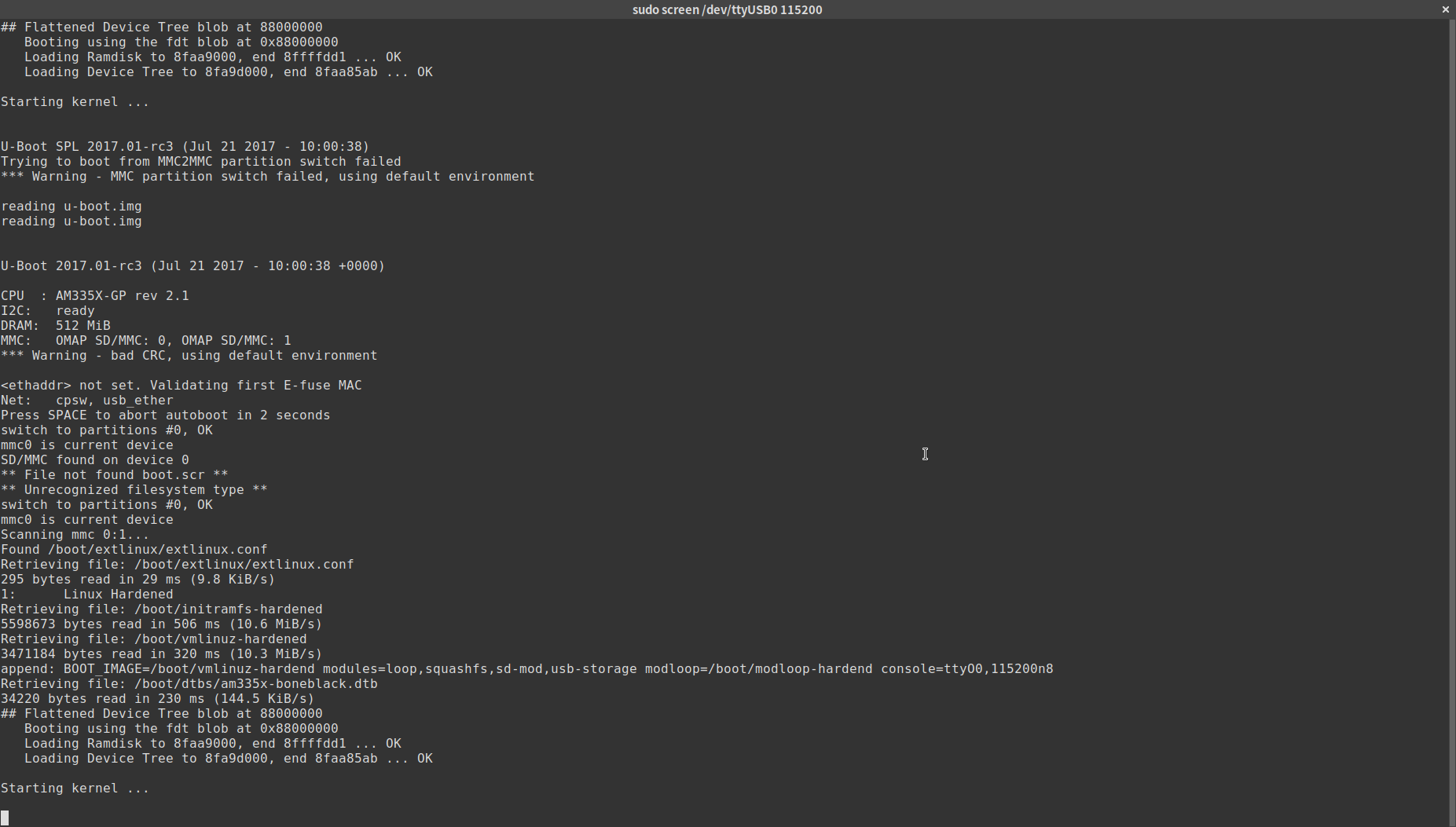
I've gotten it to almost boot the kernel, but it hangs at the "starting kernel" message...
ethanrjones97
on 22 Mar 2018
Removing the initramfs gives me the kernel - it just panics obviously.

ethanrjones97
on 23 Mar 2018
@ethanrjones97 you forgot to pass root=xyz
root=/dev/mmcblk0p1
or
root=/dev/mmcblk1p2
Regards,
RobertCNelson
on 23 Mar 2018
@RobertCNelson at least from what I've been hacking around with it, this version of alpine doesn't seem to "use" a it for root. Everything is contained in the initramfs and then some important bits are grabbed from the "root" (/boot and /apks)
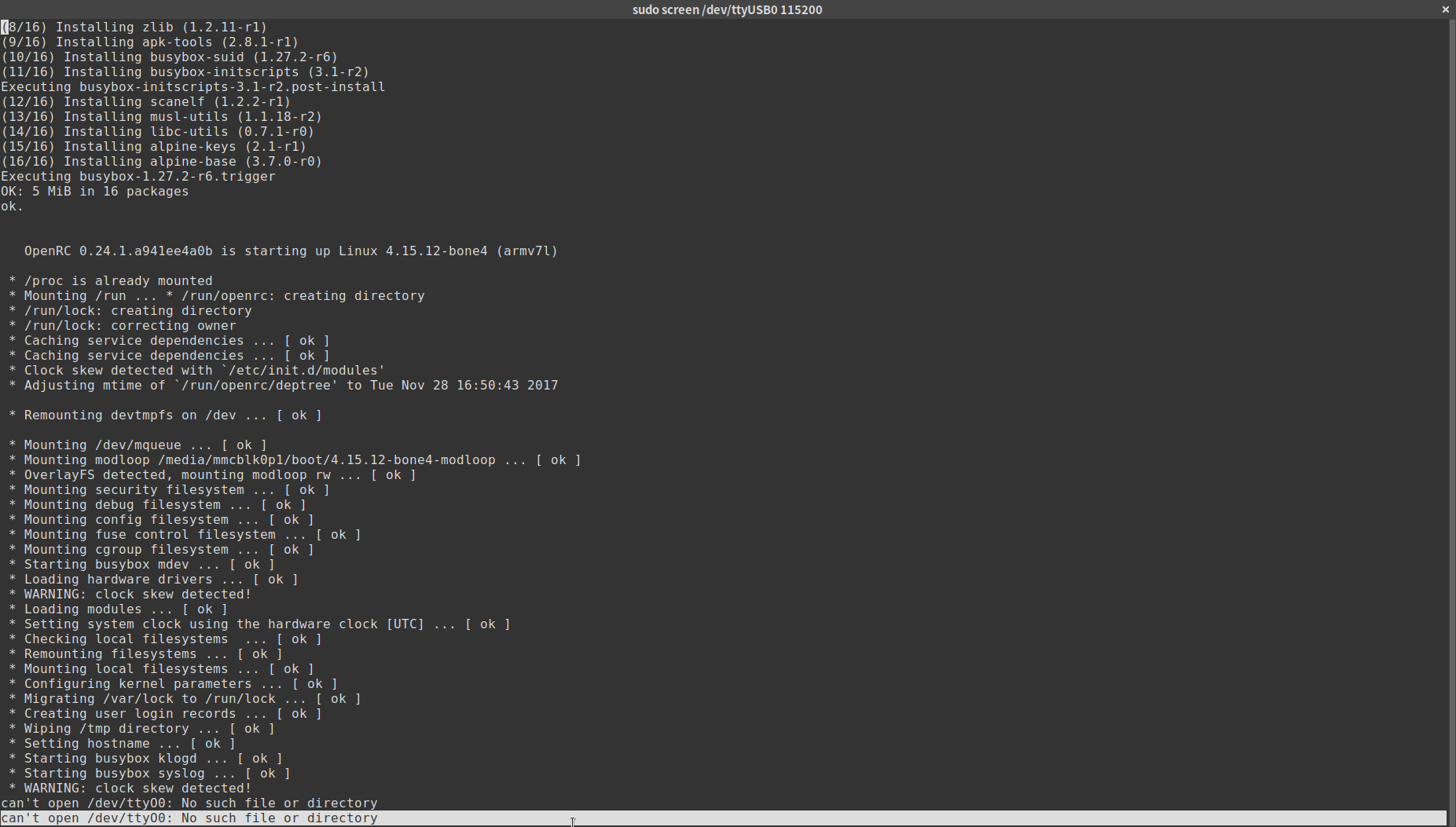
Currently I've got it to
- boot u-boot
- boot the kernel (thanks again for that!)
- load the initramfs
- mount the special modloop squashfs file
but then it just spams that "it can't find my console device".....to my console :man_shrugging: :man_facepalming:
ethanrjones97
on 23 Mar 2018
@ethanrjones97
ah, then just use root=/dev/ram, it should get you farther into initramfs
Since you can't find /dev/ttyO0, you probally don't have the correct kernel configs:
new generic serial driver:
CONFIG_SERIAL_8250_OMAP -> /dev/ttyS0
CONFIG_SERIAL_8250_OMAP_TTYO_FIXUP -> changes /dev/ttyOx from bootloader to /dev/ttySx (as passed thru /proc/cmdline)
(we use udev rules to map /dev/ttySx -> /dev/ttyOx for userspace compatibility...)
old serial:
CONFIG_SERIAL_OMAP -> /dev/ttyO0
CONFIG_SERIAL_OMAP_CONSOLE
Regards,
RobertCNelson
on 23 Mar 2018
@RobertCNelson I had a feeling it was related to something like that. The TI wiki page mentions:
CONFIG_OMAP_LL_DEBUG_UART3
In case of similar errors, but it seemed to have been removed / only applies to TI's kernels.
Thanks for all your help so far!
ethanrjones97
on 23 Mar 2018
that got ripped out in the device-tree transition...
RobertCNelson
on 23 Mar 2018
@RobertCNelson
good to know
Any books on this I should be reading/referencing? You clearly know your stuff.
ethanrjones97
on 24 Mar 2018
Oh, I've just been around the block with omap3's since 2.6.26. ;)
So the only book would be kernel.org's git tree, but that's missing another dozen or so things we tried that went nowhere. ;)
Regards,
RobertCNelson
on 24 Mar 2018
Was on a bit of a hiatus without my beaglebone or laptop.
I'm back now, implementing the configs suggested by @RobertCNelson :smile:
ethanrjones97
on 29 Mar 2018
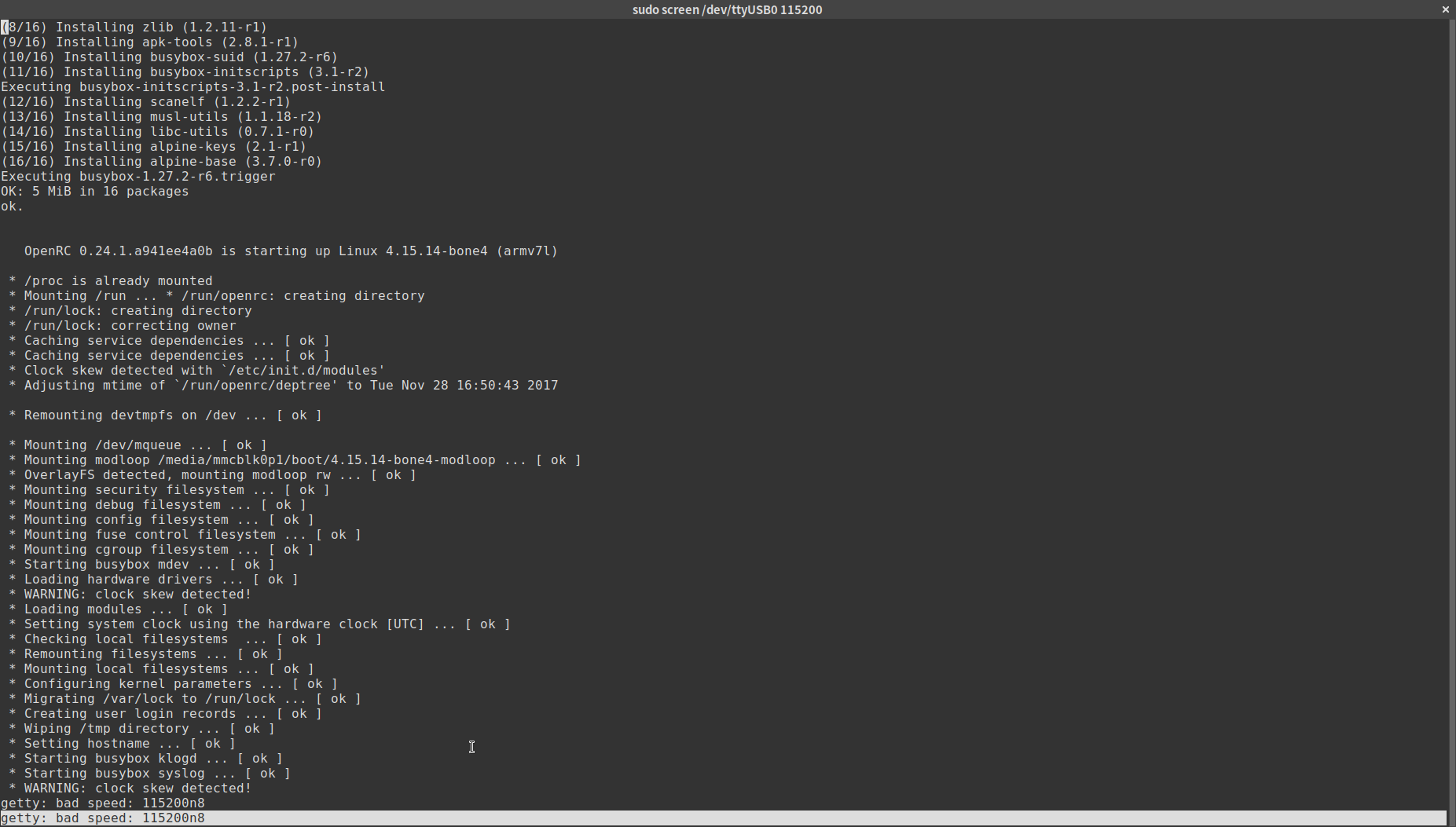
Attempted to boot it up with CONFIG_SERIAL_OMAP & CONFIG_SERIAL_OMAP_CONSOLE enabled. I'm now getting an error: getty: bad speed: 115200n8 very odd. I found a bug report opened for alpine's init which seemed to reference a similar problem, but it's apparently been patched...
For reference I'm using:
- @RobertCNelson 's 4.15.14 kernel, modules in Alpine's special "modloop" file
- initramfs from Alpine's downloads
ethanrjones97
on 29 Mar 2018
@ethanrjones97: Great research! I assume this error happened after enabling the postmarketOS repositories? If that is the case, it would make sense: postmarketOS has a postmarketos-mkinitfs package, which replaces Alpine's mkinitfs and works completely different (that design choice was made in the beginning, because we have a completely different use case).
After looking into the bug report you found, it seems that the following commits fixed the issue:
- https://github.com/alpinelinux/mkinitfs/commit/f50d400cee33bddfad1fea8094bcfee5878eeb5f
- https://github.com/alpinelinux/mkinitfs/commit/36da40325a76cfd7c10ed280e38d726232b86de1
Both of them modify the function setup_inittab_console() in their initramfs-init.in file. Alpine's mkinitfs and the pmOS one are under the same license (GPL2), so you could try to integrate that function (I'd use the latest version of it) into our initramfs and get the inittab console set up correctly that way. Our mkinitfs is in aports/main/postmarketos-mkintifs and you can use test/static_code_analysis.sh to check the shell syntax after each modifications, as well as trying to boot it with qemu-amd64.
ollieparanoid
on 30 Mar 2018
Sadly I still haven't got a shell. That happens right before I'm supposed to get one I think. This is still vanilla Alpine 3.7.0 for arm - minus kernel.
I've been in their IRC and appearantly the vanilla setup works fine for a couple people, I'm beginning to think I need an HDMI cable as it could be outputting to there. 🤔
ethanrjones97
on 30 Mar 2018
Yeah, then I would try it with the HDMI cable.
ollieparanoid
on 30 Mar 2018
HDMI cable was a bust however....
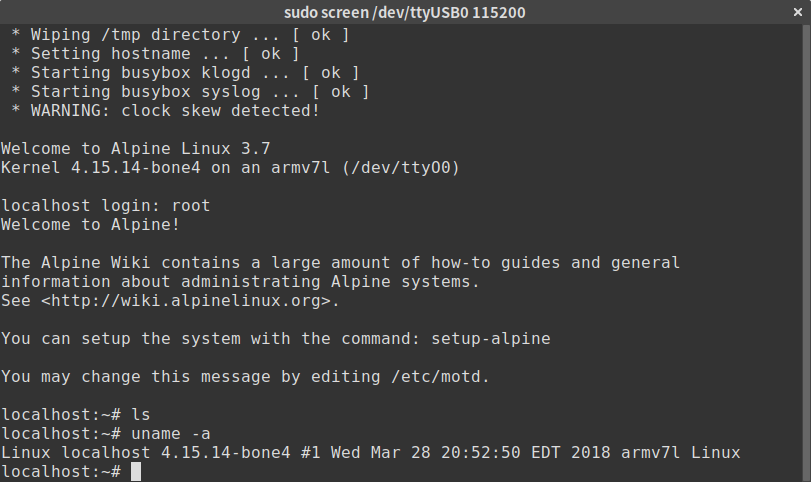
We have a shell!
ethanrjones97
on 4 Apr 2018
Related issues
 craftyguy
·
7Comments
craftyguy
·
7Comments
 montvid
·
3Comments
ollieparanoid
·
5Comments
ollieparanoid
·
5Comments
montvid
·
3Comments
ollieparanoid
·
5Comments
ollieparanoid
·
5Comments
 schvabodka-man
·
6Comments
schvabodka-man
·
6Comments
Most helpful comment
HDMI cable was a bust however....

We have a shell!