Pmbootstrap: Use Alpine's QEMU for "pmbootstrap qemu"
We want to use Alpine's Qemu for launching the VM, so we can avoid dealing with various QEMU versions/configurations shipped with the host distributions.
TODO:
- [ ] Fork Alpine's QEMU package, and add virgl (#543) and SDL2 support
- Run Alpine's QEMU as proof of concept from the host OS like shown here
- [ ] Headless version (for
--spice) - [ ] SDL2 version
- [ ] GTK version
- [ ] Headless version (for
- [ ] Adjust
pmbootstrap qemu:
- [ ] install the right QEMU package in the native chroot (depends on the VM architecture)
- [ ] Run
--spicewith Alpine's QEMU - [ ] Run GTK and SDL2 with Alpine's QEMU
- [ ] Proper upstreaming
- [ ] Upstream changes to Alpine's QEMU package
- [ ] Remove our fork of the package
 ollieparanoid
All 8 comments
If I understood @PureTryOut and @bhush9 right in #postmarketOS, using the following with QEMU 2.10 or above is required to get the terminal (or was it something else?) in Plasma Mobile working:
-device (virtio|qxl)-vga,xres=XRES,yres=YRES
That version is not in all the Linux distributions yet, which are used by people running pmbootstrap. If we used Alpine's QEMU, we could safely add this parameter.
ollieparanoid
on 28 Jan 2018
or was it something else?
It was something else 😉 With Qemu 2.10 or above it's possible to give custom dimensions to Virtio, so you can tell the VM to use a portrait mode resolution and such. So instead of the default 800x600, you could do 600x800, or 200x300, or whatever you prefer.
 PureTryOut
on 28 Jan 2018
PureTryOut
on 28 Jan 2018
It would be nice if someone with some extra time could take a look at this. It'd make pmbootstrap way more host independent, and it would make other arch emulation way easier for the users as well.
PureTryOut
on 30 May 2018
When #1509 is merged, we have a nice pmb.chroot.other.copy_xauthority() function, that makes it possible to start X11 applications from within the chroot and display them on the host's X11 server.
This should make it a lot easier already :)
ollieparanoid
on 30 May 2018
Interestingly it's possible to run a spice remote client (virt-viewer package) that is installed in chroot as well.
Headless version (for --spice)
Server QEMU / spice:
GBM_DRIVERS_PATH=./usr/lib/xorg/modules/dri/ \
./lib/ld-musl-x86_64.so.1 --library-path=./lib/:./usr/lib ./usr/bin/qemu-system-x86_64 \
-kernel /tmp/postmarketOS-export/initramfs-postmarketos-stable \
-initrd /tmp/postmarketOS-export/initramfs-postmarketos-stable \
-append "console=tty1 console=ttyS0 PMOS_NO_OUTPUT_REDIRECT" -m 1024 -redir tcp:2222::22 -serial stdio \
-drive file=/tmp/postmarketOS-export/qemu-amd64.img,format=raw -enable-kvm \
-L ./usr/share/qemu/ \
-device virtio-vga,virgl=on -vga virtio \
-spice gl=off,disable-ticketing,unix,addr=./tmp/run/spice.sock
Guest client installed in chroot:
pmbootstrap chroot -- XAUTHORITY=/home/pmos/.Xauthority DISPLAY=:0 remote-viewer spice+unix:///tmp/run/spice.sock
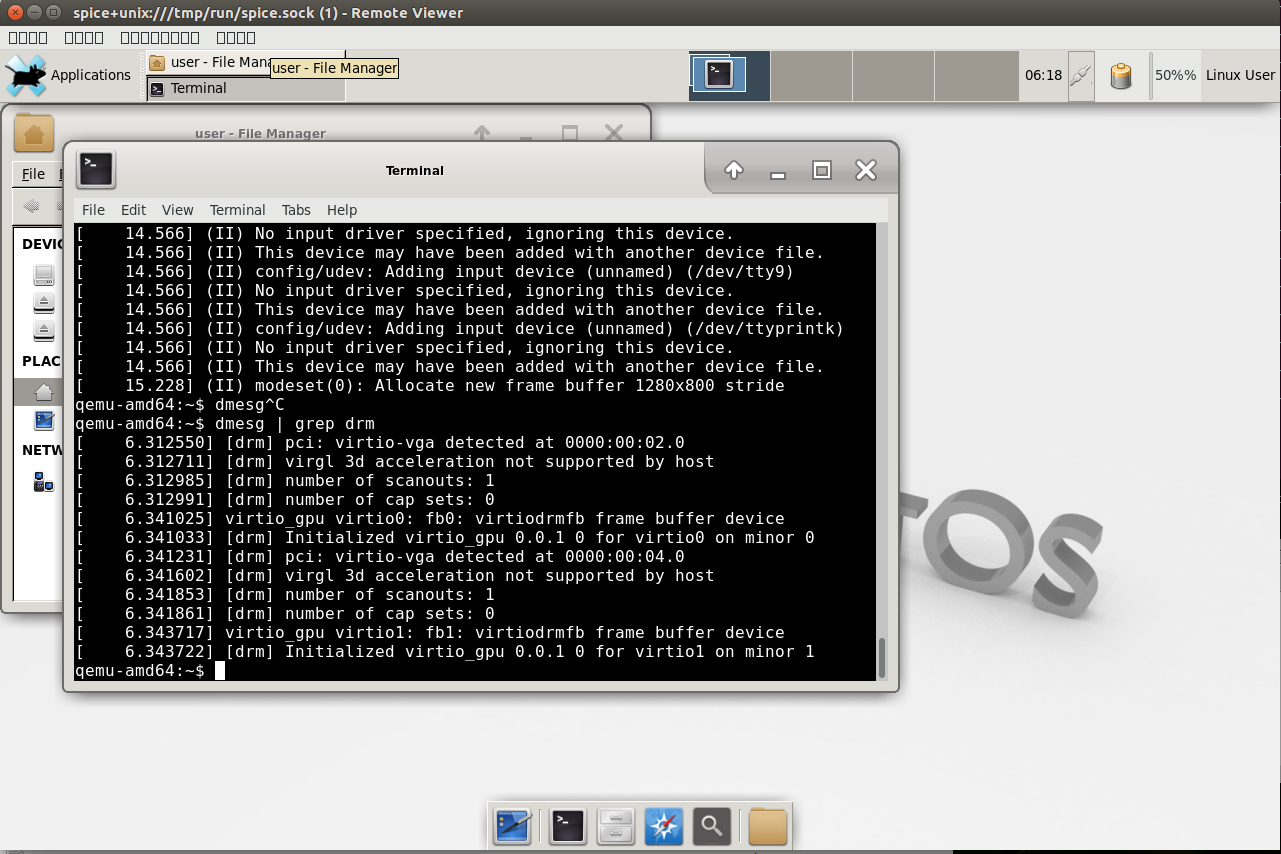
Problems:
- I haven't been able to get 3D acceleration to work. In the server qemu command I use
-spice gl=offwhen it'sgl=onall I get is a black screen. - Graphical programs from the chroot display text as all blocks. See the
remote-viewermenus in the screen shot.
SDL2 / GTK version
Instead of using the -spice options use -display gtk,gl=on. This doesn't run outside the chroot and gives the error below.
It does work within the chroot but the mouse cursor isn't visible at all. It is also erratic as described in previous issues.
qemu-system-x86_64: -redir tcp:2222::22: The -redir option is deprecated. Please use '-netdev user,hostfwd=...' instead.
qemu-system-x86_64: Display 'gtk' is not available.
 Decatf
on 24 Jun 2018
Decatf
on 24 Jun 2018
I haven't been able to get 3D acceleration to work.
If this is caused by virglrenderer, it's probably best to discuss this in #543.
Graphical programs from the chroot display text as all blocks.
No font is installed in the chroots. In pmb/build/menuconfig.py for example, we install "font-noto" before running X applications.
Instead of using the
-spiceoptions use-display gtk,gl=on. This doesn't run outside the chroot and gives the error below.
I assume that with "outside of the chroot" you mean that it uses the qemu-system-x86_64 from the host OS, like it is implemented right now. In that case, you host OS doesn't have the GTK display compiled in. See the help output:
$ qemu-system-x86_64 --help | grep display | grep gtk
-display gtk[,grab_on_hover=on|off][,gl=on|off]|
        "-display gtk"
It does work within the chroot but the mouse cursor isn't visible at all. It is also erratic as described in previous issues.
That is weird, we might need to install a cursor theme in the chroot as well?
All in all this is amazing progress, thanks for working on this! It might even make sense to drop the spice implementation, in which case we wouldn't need to worry about GL working with spice or not.
ollieparanoid
on 24 Jun 2018
I was too carried away with trying to get virgl working too and tried to make too much happen at once. Turns out it's not a very big change to use Alpine's QEMU. The branch is alpine-qemu. The pmbootstrap qemu command should work as before.
The mouse cursor issues I mentioned are all related to virgl. Putting the virgl stuff aside, using GTK/SDL or Spice works as it did running the host system QEMU.
No font is installed in the chroots. In pmb/build/menuconfig.py for example, we install "font-noto" before running X applications.
I don't know what happened but after some more working on this issue the fonts render properly. I didn't need to install font-noto.
I assume that with "outside of the chroot" you mean that it uses the qemu-system-x86_64 from the host OS, like it is implemented right now. In that case, you host OS doesn't have the GTK display compiled in.
By "outside of the chroot" I meant using the proof of concept method in this comment. I was also testing Alpine's QEMU by executing all the commands entirely within chroot native.
Anyways I have solved this one. The problem is due to QEMU using the dlopen (the glib equivalent) method to load modules. QEMU sdl and gtk modules are dlopen-ed at runtime. I've patched QEMU to take an env variable as a search path for modules:
https://github.com/Decatf/pmbootstrap/commit/5377f7007b6f52e3f5302709b73a7dc4a7df125b
Then point QEMU to paths within chroot:
https://github.com/Decatf/pmbootstrap/commit/1546e83e242e053f0be4b37a014f2cc0140fb6dd#diff-20438d2b09d75bb146a24e3d9adfcabfR124
Mesa also does the same thing which is what the GBM_DRIVERS_PATH and LIBGL_DRIVERS_PATH env variables are for. These are in the existing upstream mesa code so no patches needed there.
To try with virgl:
pmbootstrap qemu --device virtio-vga,virgl=on --display sdl,gl=on
or
pmbootstrap qemu --device virtio-gpu-pci,virgl=on --display sdl,gl=on
I've disabled the -vga virtio QEMU option because that results in no graphical desktop rendering at all. All together virgl has been not really working or very buggy on my system.
Decatf
on 26 Jun 2018
Wonderful! Would you like to make a PR?
ollieparanoid
on 26 Jun 2018
Related issues
 ghost
·
4Comments
ghost
·
4Comments
 ata2001
·
3Comments
ollieparanoid
·
5Comments
ata2001
·
3Comments
ollieparanoid
·
5Comments
 schvabodka-man
·
6Comments
ata2001
·
4Comments
schvabodka-man
·
6Comments
ata2001
·
4Comments
Most helpful comment
Interestingly it's possible to run a spice remote client (
virt-viewerpackage) that is installed in chroot as well.Headless version (for
--spice)Server QEMU / spice:
Guest client installed in chroot:
Problems:
-spice gl=offwhen it'sgl=onall I get is a black screen.remote-viewermenus in the screen shot.SDL2 / GTK version
Instead of using the
-spiceoptions use-display gtk,gl=on. This doesn't run outside the chroot and gives the error below.It does work within the chroot but the mouse cursor isn't visible at all. It is also erratic as described in previous issues.