Pmbootstrap: Package LuneOS user interface
LuneOS is a continuation of webOS, HP's discontinued and open sourced mobile operating system. Currently they are focusing on upgrading the user interface to use modern technologies such as Qt5 and Wayland, which would allow running the LuneOS interface on regular Linux. They provide build instructions for running these UI components outside of their OpenEmbedded-based distribution; those instructions may be useful to get LuneOS's UI running on postmarketOS.
 zhuowei
All 52 comments
Just like we did it in #161 with plasma-mobile, I recommend making a list of all required dependencies first (as a wiki page if there are many), then packaging one after another.
We have the strict package building mode #256 now, which should make it a bit easier (pmbootstrap build --strict package-name). Also related: #62
 ollieparanoid
on 25 Sep 2017
ollieparanoid
on 25 Sep 2017
Well, I don't like the look of the UI, but I love choice. Since I'm kinda stuck with Plasma Mobile right now anyway, I'll look into this. Seems easy enough from the little bit of reading I have done so far.
So, list of required components seem small (yay!). The following is required:
- Window manager: https://github.com/webOS-ports/luna-next
- Shell: https://github.com/webOS-ports/luna-next-cardshell
- https://github.com/openwebos/cmake-modules-webos
- Lemon, part of SQlite
- https://github.com/openwebos/libpbnjson
- https://github.com/openwebos/pmloglib
- https://github.com/webOS-ports/luna-service2
- https://github.com/webOS-ports/luna-sysmgr-common
Optional:
- Web-app launcher: https://github.com/webOS-ports/luna-webappmanager
- System manager: https://github.com/webOS-ports/luna-sysmgr
 PureTryOut
on 27 Sep 2017
PureTryOut
on 27 Sep 2017
The default icons for webos are kinda horrible but it has a very nice user experience. And if we port the HP touchpad then we kinda have the native shell running on it.
 MartijnBraam
on 27 Sep 2017
MartijnBraam
on 27 Sep 2017
I'm a bit less optimistic now. LuneUI is quite tightly integrated with LuneOS itself. It has some services which has to run at boot, and it has some hard deps on systemd. I guess we can patch these out eventually, but it'll take a while as of course the devs aren't as interested in running LuneUI outside of LuneOS as we are.
PureTryOut
on 29 Sep 2017
The services running at boot is something we can do, but the systemd dependencies really make it harder. Did you write down somewhere, which ones you encountered?
ollieparanoid
on 29 Sep 2017
So far I've encountered 2, of which one only has a dep because it offers a .service file (so it's easily patched out):
- luna-next: easily patched, only provides a .service file
- luna-service2: this actually has code depending on systemd, and will need more work to patch out
PureTryOut
on 29 Sep 2017
Thanks for listing that. Looks like there is more interest in getting the LuneOS UI running on pmOS.
@PureTryOut, how about putting what you have already in a branch in the pmbootstrap repo, so it 's a bit easier to collaborate on this?
Oh and they use Halium as base right now, so maybe upstream would be interested in a postmarketOS port, too.
ollieparanoid
on 30 Sep 2017
Also regarding luna-service2 and systemd:
The openwebos repo does not have systemd dependencies, and the webOS-ports repository is only 14 commits ahead of the openwebos repository, and almost all commits seem to be systemd related.
So to get it working at all, we could simply use the openwebos repository for now. Once LuneOS is working, we could make a PR, that makes systemd support optional again in LuneOS.
ollieparanoid
on 30 Sep 2017
I would like to say that I'm interested in help, although at this very moment, I don't have any idea what this project is -- but I do have pretty extensive experience with HP and LG and Open webOS, and I talk pretty frequently with LuneOS people, so would like to offer my knowledge.
 ericblade
on 1 Oct 2017
ericblade
on 1 Oct 2017
@ericblade: That is very kind of you! Check out our homepage for information about postmarketOS. While still at a very early stage, we have a high number of devices where at least touch screen and usb networking is working. postmarketOS development can be done in Qemu on the PC with only a few shell commands, no installation to a phone is required.
ollieparanoid
on 1 Oct 2017
@ericblade thanks! I can use the help! I do basically all development in Qemu, as it's way easier to test out.
I just pushed the postmarketos-ui-luna branch which has everything I've got so far. Right now we need to get rid of the systemd dependency of luna-service2, which like @ollieparanoid said, can probably be achieved for now by using the openwebos variant. Eventually the goal would be to make systemd optional in the webos-ports version of course.
PureTryOut
on 1 Oct 2017
I'm a weee bit out of touch with LuneOS development, as my life has been on a crash course in insanity for a while, so I'm not familiar with why exactly there's a dependency on systemd, but I suspect they would welcome changes to make it optional, probably.
ericblade
on 2 Oct 2017
I'm interested in getting this running on my devices, and I figured I should post some progress to avoid potentially duplicating work.
I set up a branch over at my fork with my work. I noticed that the systemd dependency was already patched out, and I've managed to get a few more components compiled, and found some more required dependencies:
- luna-sysmgr-ipc
- luna-sysmgr-ipc-messages
- nyx (hardware abstraction layer)
- nyx-modules
It's turning in to quite the rabbit hole though - to keep going I now need to implement the hardware abstraction layer on top of postmarketOS instead of libhybris. Luckily, that doesn't look to be too difficult, as it seems to not need everything working, just for it to build.
 magmastonealex
on 19 Nov 2017
magmastonealex
on 19 Nov 2017
Well, I've got it into a state where the UI starts in QEMU (need hardware acceleration right now, otherwise I'd run it on a phone too):

I didn't need to write the HAL to get here - though I'm beginning to suspect that's going to be a blocking issue sooner rather than later.
At this point, I've packaged up ~5 more webos-ports packages, and patched more to make sure everything compiles and runs.
The main issue right now is the mouse doesn't seem to work, which makes testing an interface designed for touchscreens difficult. Other than that, though, all of the core services seem to start happily and work properly.
@ollieparanoid Do you think this is a good place to merge my work back in to the feature branch, or should I wait until I've been able to test some more of the functionality? I personally think that this is probably a good place to do it, because there's a now a few independent places to do work for others who are interested in helping out, like
- getting the mouse to work (my next priority)
- running this on ARM (Needs a device with hardware acceleration & EGL support)
- Trying to get this running with software rendering (Mesa seems to theoretically support this, though I never got it working)
- getting the HAL working (Probably involved, but can support only a couple things at first)
- getting webapps to run (should theoretically just need to package luna-webappmanager)
- Packaging core luna apps (notes, messages, settings, etc.)
magmastonealex
on 23 Nov 2017
@magmastonealex what happens when you attempt to run without hardware acceleration? Are you using QTWayland's linuxfb backend (-platform linuxfb)?
zhuowei
on 23 Nov 2017
The first thing that luna-next-cardshell does is try and create an OpenGL context to draw into, which QTWayland's linuxfb backend doesn't support. This results in an error 'Failed to create OpenGL context', then the program aborts.
The correct solution is to get Mesa to handle rendering the opengl in software, so that QTWayland doesn't need to know it's not running with hardware acceleration. Performance is likely to be terrible on older phones though.
magmastonealex
on 23 Nov 2017
Hello, and congrats for the good work here!
I am one of the main devs of LuneOS, and I'll try to follow a bit the progress here; I don't have that much free time, so I won't be able to help much, but I can at least answer some questions that are hanging here:
- systemd: we switched to systemd for our init a while back, and all our services are now started this way. Of course there was no reason to keep the legacy init, so we just completely switched to systemd.
- OpenGL: recent QML makes use of OpenGLES 2.0; but that is a common thing on smartphones, even old ones
- apps: keep in mind that this compositor was not designed to support the launch of "foreign" native apps; we have limited support for popup windows, and multi-window apps will definitiely be awkward to use.
 Tofee
on 23 Nov 2017
Tofee
on 23 Nov 2017
Aha! Thanks for pointing out it's QML that depends on OpenGL. I've now got Luna starting using a software renderer.
OpenGLES 2.0 support is common in the GPUs, but because we don't have the Android/hybris layer providing acceleration, there's a lot of devices that don't support it when they're running postmarketOS (right now! That'll change.)
QT introduced software compositing for QML as of 5.8 (which they discuss here, and it looks like it at least starts when setting QT_QUICK_BACKEND=softwarerenderer. Again, without mouse support working, it's hard to test if that broke other things.
magmastonealex
on 23 Nov 2017
@magmastonealex Do you have a photo of LuneOS's UI on a physical device? I'm curious to see what it looks like.
zhuowei
on 24 Nov 2017
@zhuowei Sadly I don't. While setting that flag worked immediately on qemu even without virtio, it hasn't worked on my arm device. I'm probably missing a package somewhere that I had in my qemu environment.
I've also had QT issues - getting an illegal instruction error from QtQml, even on QT examples. I resolved that by building it from scratch in debug mode, but that brought a host of other issues.
edit: Apparently now I'm getting an arithmetic exception from ld-musl-armhf.so.1's __restore_sigs()
magmastonealex
on 24 Nov 2017
@zhuowei here are some screenshots of LuneOS that I took on a Nexus 5 device two months ago: https://www.dropbox.com/sh/53hfnonjuaw8h6z/AAAnUQ3OMYL98TTeVJPifzWOa?dl=0
Tofee
on 24 Nov 2017
@Tofee: Cool that you're following this thread and giving useful input. Having upstream folks around is always helpful 😃
@magmastonealex: Terrific work! 🎉 🎉 🎉
@ollieparanoid Do you think this is a good place to merge my work back in to the feature branch, or should I wait until I've been able to test some more of the functionality?
That is surely a good idea! I would even recommend merging it into the master repository some time soon, so we can provide binary packages.
For the sake of completeness, we might be able to work around devices with missing 3D drivers by using TinyGLES, which is a faster software renderer (I've documented what I know here). We didn't get far with it yet, but maybe someone wants to pick it up and look at it more.
ollieparanoid
on 25 Nov 2017
@magmastonealex So I tried building your branch for huawei-angler and can't get it to work. I would appreciate some advice on what I'm doing wrong.
What I did:
- grabbed your branch, rebased it on top of master
- Set user interface to "none" in pmbootstrap config
- attempted to build with
./pmbootstrap.py install --no-fde --add luna-next-cardshell,luna-sysmgr,luneos-components,mesa-dri-swrast
First error: luna-service2 was in luna-sysmgr's depends but not makedepends, so it failed to build. Fixed by using PR #935.
Second error: missing
backtracesymbol when building qt5-qtdeclarative. Patched the package to not make those calls.Third error: LunaNext's QML files are installed in /LunaNext instead of /usr/lib/qt5/qml/LunaNet. Fixed by symlinking the folder into the correct location
Final error encountered: a missing symbol.
localhost:/home/user# luna-next -platform linuxfb
** Message: App to allow in Low memory: org.webosports.app.phone
** Message: App to allow in Low memory: org.webosports.app.contacts
** Message: App to allow in Low memory: org.webosports.app.messaging
** (process:1734): WARNING **: Settings::load(): 6 application paths defined:
** Message: Running on qualcommtechnologies,incmsm8994 with hardware type desktop
xkbcommon: ERROR: failed to add default include path /usr/share/X11/xkb
WARNING: 15:57:55.544: Failed to create xkb context
WARNING: 15:57:55.645: Errors while loading shell from "/usr/palm/luna-next/shells/card/qml/main.qml"
WARNING: 15:57:55.646: (file:///usr/palm/luna-next/shells/card/qml/main.qml:24:1: plugin cannot be loaded for module "LunaNext.Compositor": Cannot load library /LunaNext/Compositor/liblunanext-compositor-qml.so: (Error relocating /LunaNext/Compositor/liblunanext-compositor-qml.so: _ZN29QWaylandQuickShellSurfaceItem11qt_metacallEN11QMetaObject4CallEiPPv: symbol not found)
import LunaNext.Compositor 0.1
^)
Oddly, the file containing the symbol seems to be built:
grep quickcompositor ../../pmbootstrap/log.txt
compiling /home/user/build/src/qtwayland-opensource-src-5.9.1/src/compositor/compositor_api/qwaylandquickcompositor.cpp
moc /home/user/build/src/qtwayland-opensource-src-5.9.1/src/compositor/compositor_api/qwaylandquickcompositor.h
compiling .moc/moc_qwaylandquickcompositor.cpp
moc /home/user/build/src/qtwayland-opensource-src-5.9.1/src/imports/compositor/qwaylandquickcompositorplugin.cpp
compiling /home/user/build/src/qtwayland-opensource-src-5.9.1/src/imports/compositor/qwaylandquickcompositorplugin.cpp
/usr/bin/qmake-qt5 -install qinstall /home/user/build/src/qtwayland-opensource-src-5.9.1/src/compositor/compositor_api/qwaylandquickcompositor.h /home/user/build/pkg/qt5-qtwayland/usr/include/QtWaylandCompositor/qwaylandquickcompositor.h
/usr/bin/qmake-qt5 -install qinstall /home/pmos/build/src/qtwayland-opensource-src-5.9.1/src/compositor/compositor_api/qwaylandquickcompositor.h /home/pmos/build/pkg/qt5-qtwayland/usr/include/QtWaylandCompositor/qwaylandquickcompositor.h
So I'm not sure why that file isn't linked in the final library file.
zhuowei
on 25 Nov 2017
@zhuowei You're a little early, I was just fixing up this stuff this morning, including building everything in strict mode. I haven't pushed yet with a bunch of the fixes :)
- Yep, there are a handful of packages that I didn't do this correctly on. This morning I created dev-packages where applicable
- This is because qt5-qtdeclarative is being built in debug mode to figure out why I was getting illegal instruction errors - this was more of a temporary thing for my own testing, you may not even need to build qt5-qtdeclarative yourself. Removing that package from aports/luna might be all you need.
- Yep. I'll fix the package before making the PR.
- This one was fun to figure out when it happened to me - you need qt5-qtquickcontrols2 as a depend/makedepend for qt5-qtwayland - I may have forgotten to push this file, or increment the rev so it would be built without
--force.
You're also likely to find when running that you need qt5-qtmultimedia, mesa, luna-init, and to export (at least):
export LD_PRELOAD=/usr/lib/libwayland-server.so.0export QT_QPA_PLATFORM=eglfsexport QT_QUICK_BACKEND=softwarerendererexport QML2_IMPORT_PATH=/
The last one is because of LunaNext as you mentioned. I'll fix that issue before I submit the PR.
You'll also need to run, at a minimum,
/usr/sbin/ls-hubd --conf /etc/luna-service2/ls-private.conf/usr/sbin/ls-hubd --public --conf /etc/luna-service2/ls-public.confluna-prefs-service -dLunaSysMgr -l debug
I'll add this info to the wiki at some point today as well.
magmastonealex
on 25 Nov 2017
@magmastonealex Thanks! Why do you need to preload wayland-server? Shouldn't qtwayland load that already?
zhuowei
on 25 Nov 2017
@zhuowei It should. It doesn't though.
Specifically, when running with luna-next, it won't link liblunanext-compositor-qml.so because it can't resolve references to wayland-server functions. But, when using ldd, it's able to resolve all of the references. I dug into it for an hour or two and gave up and just used LD_PRELOAD.
magmastonealex
on 25 Nov 2017
@zhuowei I re-read your post and noticed that when I built qt5-qtwayland without qtquickcontrols2, the files didn't even get built.
I'd be curious if readelf -Ws /usr/lib/libQt5WaylandCompositor.so.5 | grep Quick contains those symbols. If not, maybe the updated library didn't get installed for some reason? (That path is from memory, I don't have my pmOS device in front of me. it's something close to that filename though)
magmastonealex
on 25 Nov 2017
Just a progress update:
I put up PR #940 to bring some of the packages back to the pmbootstrap repository. Note that you can't get quite to the screenshot I posted anymore, as that was with a couple of services mocked out - though I didn't realize it at the time. luna-next won't finish startup right now, it stays with the pulsing 'luneOS' logo. I know why though - luna-appmanager never publishes it's 'startup finished' message, as it's waiting on WebAppManager to start.
I'm currently packaging luna-webappmanager, which should hopefully get luna-next to finish startup. luna-webappmanager will probably take a while, as I also need to package qt5-qtwebengine (basically Chromium) & qt5-qtwebchannel
magmastonealex
on 26 Nov 2017
You'll need configurator (https://github.com/webos-ports/configurator), activitymanager (https://github.com/webOS-ports/activitymanager), db8 (https://github.com/webOS-ports/db8) as well most likely for things to run. On first boot we run the FirstUse App (https://github.com/webOS-ports/org.webosports.app.firstuse) that will setup some things as well and mark some flags so afterwards you can fully use the system. Without these bits it's highly unlikely you could do anything useful really.
You'll need luna-appmanager for sure too, since it sets various flags as for example per: https://github.com/webOS-ports/luna-appmanager/commit/abf9257bdff0de0d85edc3119409e2a59223da75
 Herrie82
on 26 Nov 2017
Herrie82
on 26 Nov 2017
@Herrie82 Thanks for the info, that's super helpful!
I've been trying over the last few days to figure out all the packages that are needed to get a basic system running, and there's a lot of repos in the webOS-ports org (206!). Knowing what I need to package is a huge help.
magmastonealex
on 26 Nov 2017
Well in general the Open webOS repos (https://github.com/openwebos/) are the packages you'll need for a full OS. We've forked quite some and added patches for various reasons (either newer GCC, fixes etc), but it should give you more guidance compared to the 206 we have in webOS Ports.
Herrie82
on 26 Nov 2017
Just wanted to share some progress: I packaged lots more stuff, including everything Herrie82 mentioned (Thanks again for the tip! Would've taken me a lot longer to get here), and had success!
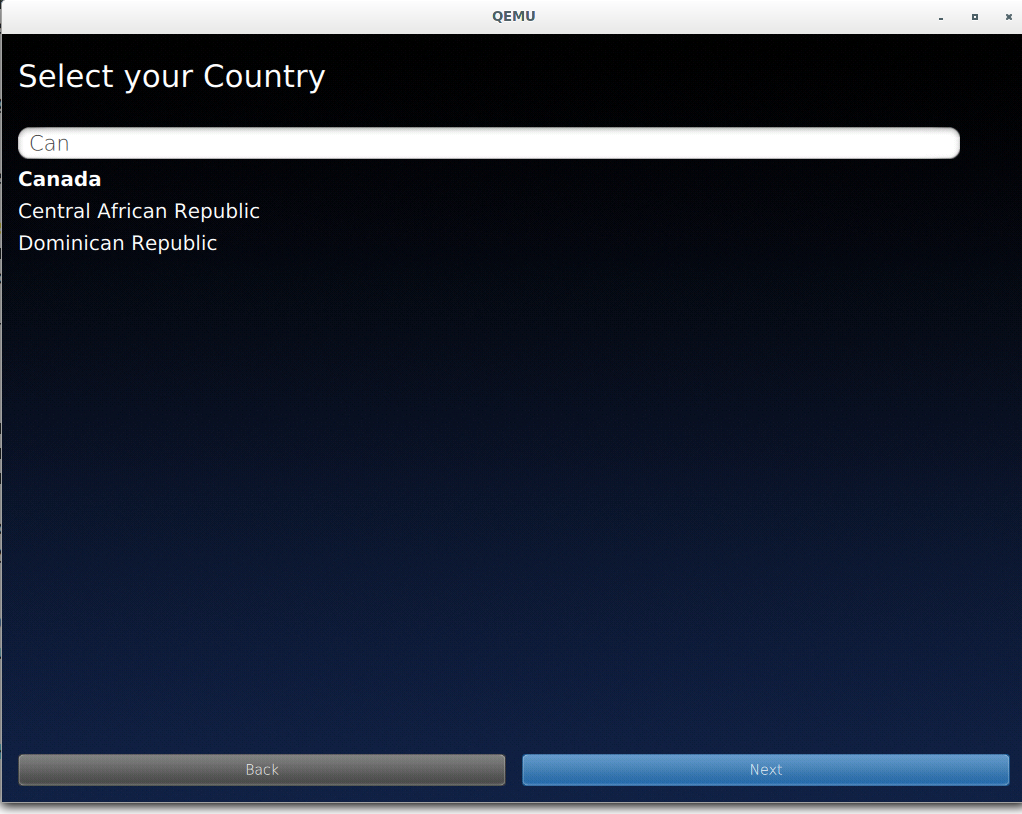
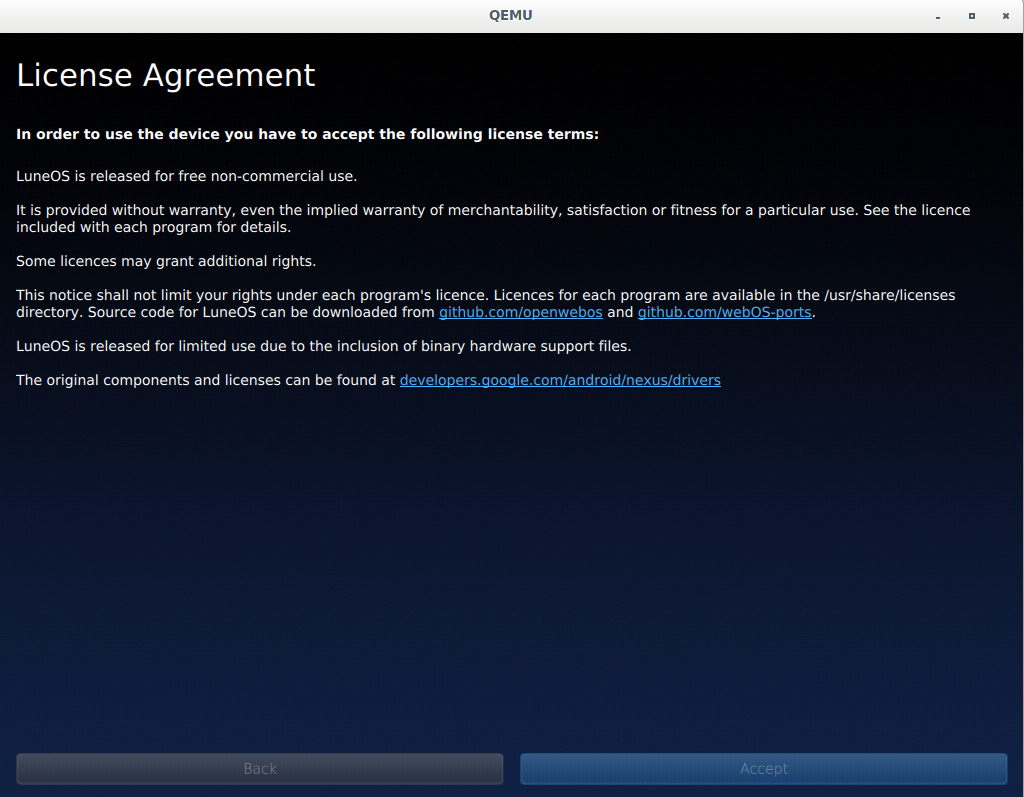
I can page through and browse the first use app.
I also managed to resolve the mouse issue, so the system is almost usable.
The unfortunate part is that once the first run app finishes... nothing happens. I still have some digging to do, but I have ideas.
magmastonealex
on 30 Nov 2017
That looks like great progress already! If you have any logs that you could share, I'd be happy to give feedback together with @Tofee since we both have been digging deep in the OS and things might ring a bell for us :)
Herrie82
on 30 Nov 2017
@Herrie82 Thanks for the offer! I may need your help investigating configurator's behavior.
I looked a little deeper, and once again it seems to come down to missing packages.
It looks like I'm missing systemui and applauncher at a minimum. That's what appmanager tries to start when it enters "normal" state (This wound up being a good reference).
I should also package app-services (+ dependencies). app-services contains services like account management that appmanager tries to use before entering the normal state that luna-next-cardshell is waiting for. There are lots of dependencies to add as well between these three new packages.
I also think that configurator isn't running properly and creating kinds, but I have a feeling that's either bad packaging, or a systemd incompatibility.
On another note, I've been trying to keep the wiki as up-to-date as I can, but it's hard to go into detail on some of the tasks, especially ones that I don't know if they need action or not. I opened up my personal Trello board that I've been using as a to-do list if anyone's interested in seeing some more detailed progress.
magmastonealex
on 1 Dec 2017
systemui = Power menu and a few more things. App Launcher = Just Type. Both are indeed required for luna-next-cardshell.
Herrie82
on 1 Dec 2017
I finally had a chance to sit down with this for a while, and made a bunch of progress! I packaged a few more things (enyo, applauncher, systemui, mojolauncher, patched qtwebengine), and got the shell to start:
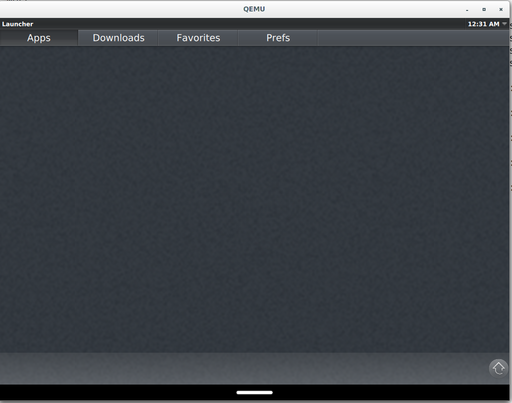

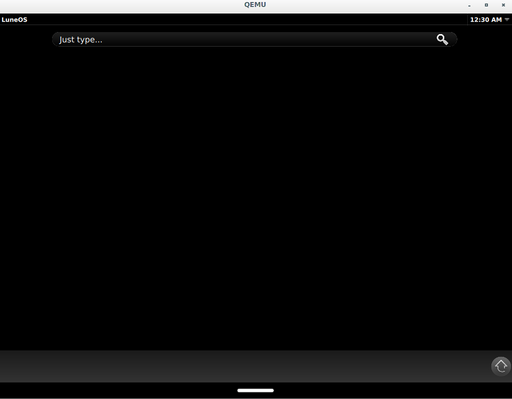
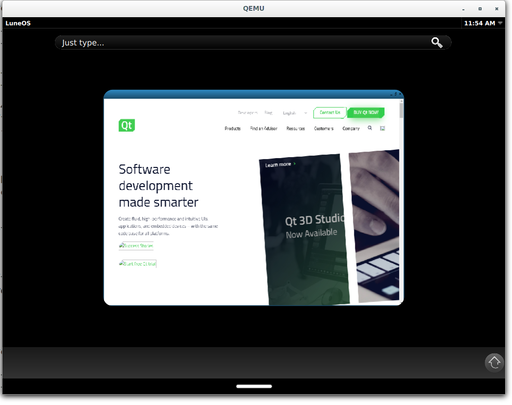
These screenshots are slightly misleading - I faked initial account creation, and mocked a couple minor things that should be packaged properly (so, from a clean install of postmarketos-ui-luna, you won't quite get here).
But still, luna-next-cardshell will start and let you use the launcher. And, the shell works with apps that you start outside of the launcher as well - the last screenshot there shows a minimal browser as a card on the home screen.
There's clearly still a long way to go, but I wanted to share some screenshots of where I'm at and some progress.
magmastonealex
on 5 Dec 2017
Amazing work!
Have you tried using XWayland, for example to run the pmOS demos app?
 JLIT0
on 5 Dec 2017
JLIT0
on 5 Dec 2017
That is amazing. Very nice that apps launched from outside of the LuneOS app launcher are still accounted for and handled correctly. (i'm guessing that goes for any Wayland app, probably?)
ericblade
on 5 Dec 2017
@JLIT0 Xwayland works, but it doesn't seem to have the style of integration that Weston provides (it looks like they do a bunch of custom wrapping to make it work, which we could eventually do as well). So, everything is stuck in one "window"/card:

@ericblade Yep, seems to be any Wayland app (minus weston demos, which seem to expect some weston-specific stuff, or at least stuff that Qt doesn't provide).
magmastonealex
on 5 Dec 2017
So I've been looking into getting this working with software rendering: I'm really not sure what's the best way forward.
Luna-next uses QtWayland and OpenGL (ES) to render its interface. Unfortunately, QtWayland's default software renderer, linuxfb, doesn't support OpenGL at all. To fix this, we could extend the linuxfb backend to create a software OpenGL somehow, or switch to a different backend.
I haven't tried extending linuxfb; however, it's worth noting that backends are all compiled as plugins, so we won't have to recompile Qt to modify/add a backend.
I've looked into switching to EGLFS (the EGL Full Screen) backend. We use this backend in accelerated QEMU, so it would be nice to use the same backend for unaccelerated. The EGLFS backend is also extensible with plugins for different display drivers.
I tried writing a plugin that would use software rendering through Mesa's Surfaceless EGL backend (which draws to an in-memory buffer; we would then copy the output to fb0 ourselves). Unfortunately, Mesa's Surfaceless backend is implemented with the kms_swrast DRI driver, which needs a GPU (i.e. a node in /dev/dri/) to allocate a buffer for the software renderer to draw into. Why, Mesa?!
Qualcomm devices may be able to create a DRI-compatible graphics node by enabling KGSL DRM support in the kernel, which would likely allow it to use the Surfaceless backend with kms_swrast. I haven't tested this, though.
There's a third option: the Weston developers ran into a similar problem when they wanted to do headless testing of Weston's OpenGL compositor. They concluded that the best way is to run Weston in software pixman (non-OpenGL) rendered mode, and then run a software OpenGL rendered Weston nested inside the first Weston. I guess we could try this, but swap out the second Weston for luna-next. This seems to be the most promising option right now.
Edit: re nested compositors: I tested on my Ubuntu 17.10 VM, and I can run the QtWayland sample compositors just fine inside Weston. In addition, weston-simple-egl works in the nested QtWayland compositor. So this seems feasible. I'll have to test on postmarketOS and with luna-next.
zhuowei
on 11 Dec 2017
@zhuowei Thanks for looking into that! That's a really great summary. It's good to know there's a few options moving forward.
If you're looking to test with luna-next on postmarketOS, it might be helpful to know that luna-next acts as a compositor even while it's in "bootup"/pulsing logo mode - just run a wayland client with XDG_RUNTIME_PATH=/tmp/luna-session. I believe what's in master right now will get you there. (though #878 might affect you, and prevent it from starting on ARM).
(also, I haven't forgotten about this project, but I've been super busy the last couple weeks. Should have some time to get back to porting this week)
magmastonealex
on 11 Dec 2017
@magmastonealex I got the pulsing to work on an unaccelerated QEMU VM (--display sdl) by running it inside Weston:
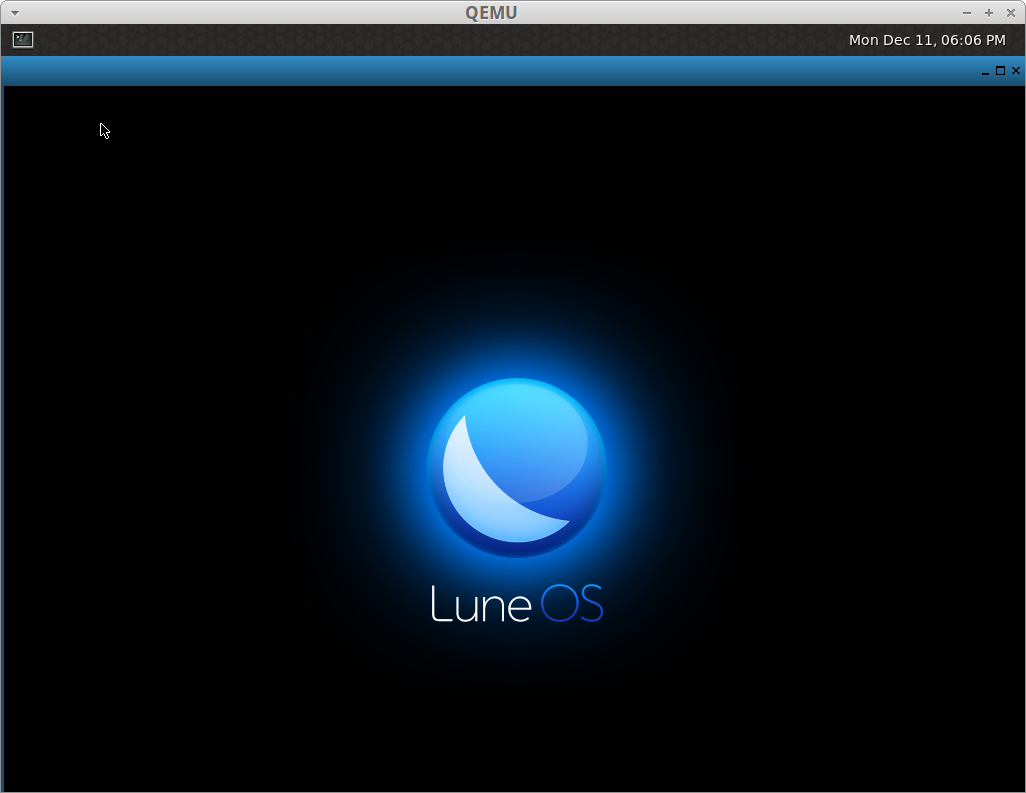
Xzibit must be proud.
To run luna-next inside a Weston:
You will need in pmbootstrap.cfg
qemu_mesa_driver = dri-swrast
extra_packages = weston,weston-backend-fbdev,weston-shell-desktop
After setting XDG_RUNTIME_DIR: in one SSH session
localhost:~# fbset -xres 1024 -yres 768 -depth 24
localhost:~# weston -B fbdev-backend.so -S host-weston --tty=1 --no-config
And in the other, modify start_luna.sh to pass in
export WAYLAND_DISPLAY=host-weston
export QT_QPA_PLATFORM=wayland
And then the logo comes up. My computer isn't fast enough to build QtWebEngine, so I can't get past this step. I would appreciate it if you can try this on your device or in qemu.
By the way, your branch's db8 APKBUILD is missing leveldb in the dependencies, and the QtWebEngine uses dbus-nox11, which isn't on the master branch anymore.
Edit: unfortunately, we can't use weston's fullscreen-desktop.so mode (which is designed to run nested compositors), since QtWayland dies with a "failed to load shell integration" error. I guess we could write a custom qtwayland plugin later on if we need fullscreen support in Weston.
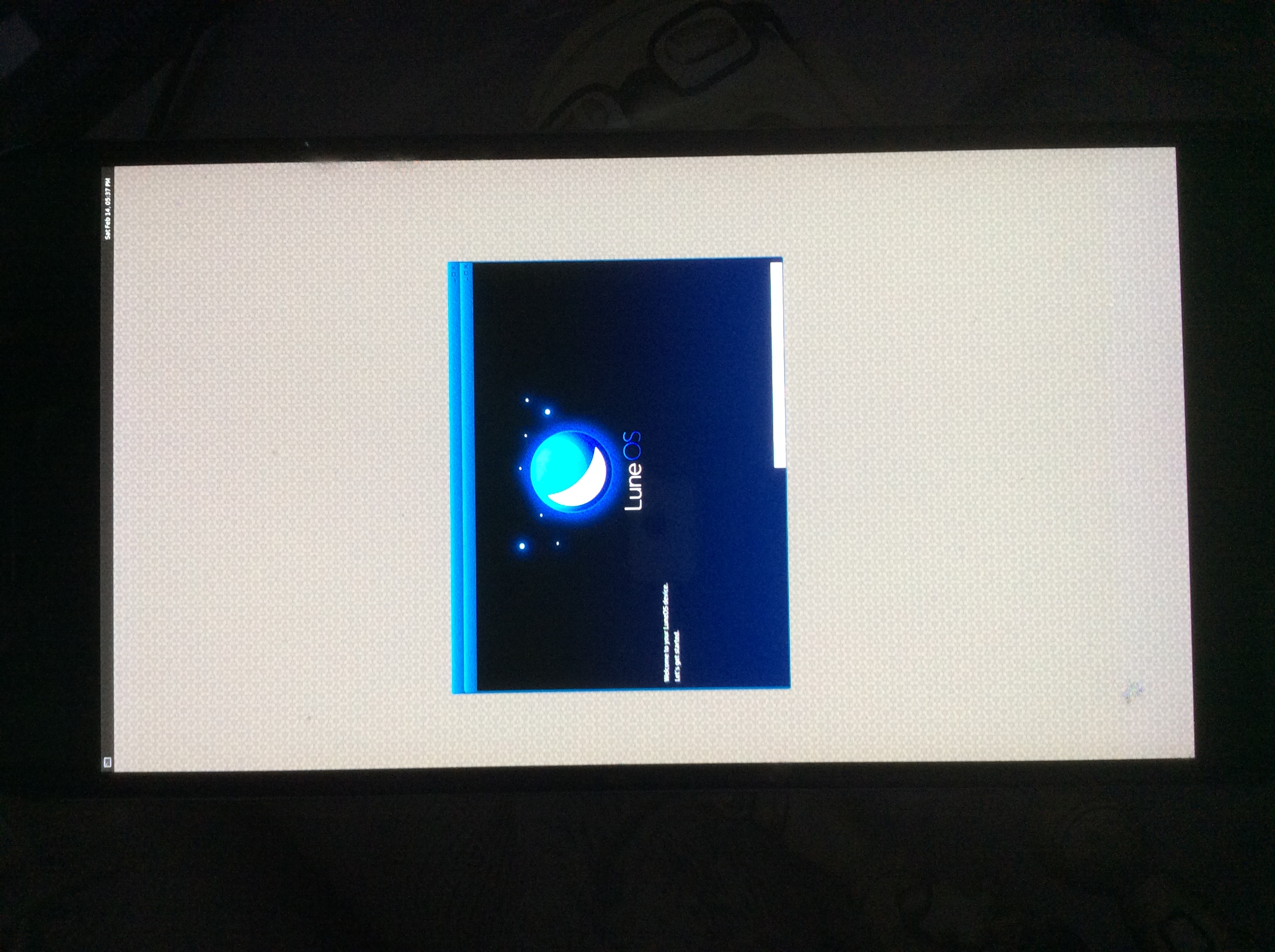
Edit 2: Nested compositors work on a real device (Nexus 6P/huawei-angler, aarch64.) Here's the first run app (manually started with QML2_IMPORT_PATH=/usr/palm/applications/org.webosports.app.firstuse qml-qt5 -platform wayland /usr/palm/applications/org.webosports.app.
firstuse/qml/main.qml) running inside luna-next, which is itself running inside Weston. I'm not sure how to tweak the window size to make it fill the screen.
zhuowei
on 11 Dec 2017
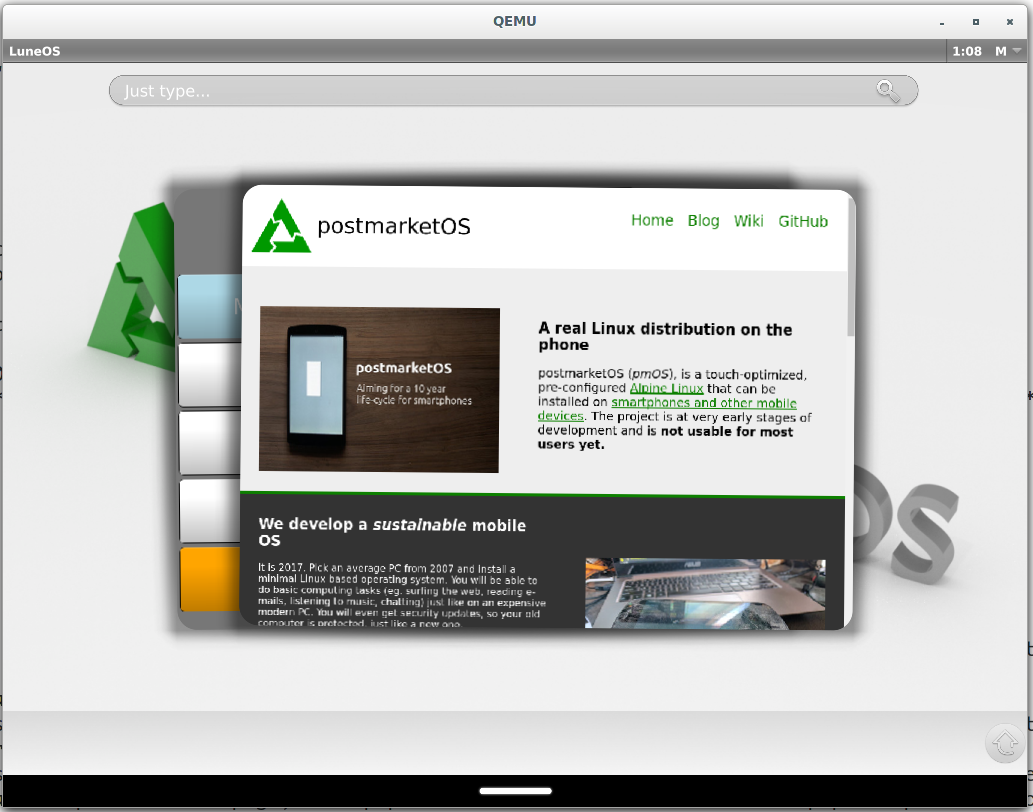
Well, I finally packaged enough stuff apparently. With a bunch of very minor code & config tweaks, I'm able to complete the first run app and get the shell running, including the ability to launch apps from the launcher. I've confirmed that configurator runs and initializes the database, and that the default local account is made. It looks like things are finally coming together!
I've still got a few tweaks to make, some testing, and some cleanup to do before I put up the PR, but it shouldn't be more than a few days before it's all ready to go I hope.
magmastonealex
on 14 Dec 2017
Wow, great job !
On Thu, Dec 14, 2017 at 4:29 AM, Alex Roth notifications@github.com wrote:
[image: luna-progress]
https://user-images.githubusercontent.com/2691799/33973882-5f4c0a6e-e053-11e7-998b-6e3325695e9b.pngWell, I finally packaged enough stuff apparently. With a bunch of very
minor code & config tweaks, I'm able to complete the first run app and get
the shell running, including the ability to launch apps from the launcher.
I've confirmed that configurator runs and initializes the database, and
that the default local account is made. It looks like things are finally
coming together!I've still got a few tweaks to make, some testing, and some cleanup to do
before I put up the PR, but it shouldn't be more than a few days before
it's all ready to go I hope.—
You are receiving this because you were mentioned.
Reply to this email directly, view it on GitHub
https://github.com/postmarketOS/pmbootstrap/issues/629#issuecomment-351598279,
or mute the thread
https://github.com/notifications/unsubscribe-auth/ACYXiAbZ__GFsQE39b8T8VXSgy6GkuFpks5tAJYjgaJpZM4PjTph
.
Tofee
on 14 Dec 2017
Looking great indeed! You might want to have a look into https://github.com/webOS-ports/luna-init for populating some initial bits like launcher, wallpaper etc.
Herrie82
on 14 Dec 2017
Well, with #1016/#1025 merged, it will likely be possible to run this on an actual armhf device at last.
To sum up what you need to try to get this going:
If your device doesn't have hardware openGL: e: See next comment below.
This should become much cleaner soon, once there are proper OpenRC files for the various components, and some smarter logic is done to figure out if we're running underneath Weston.
With hardware openGL, your life is probably much easier, just modify /usr/bin/start_luna.sh to remove the -plugin evdevkeyboard... argument, and change evdevmouse to evdevtouch, pointing at your touchscreen. Then, run /usr/bin/start_luna.sh.
Now, however you got here, you should theoretically have luna-next running, and the first-use app open, which you can page through (as always, clicking where "next" should be when you get to the black screen). Remember the trailing configurator commands detailed on the wiki needed for the apps to work correctly right now.
magmastonealex
on 20 Dec 2017
Well, I got a little further by using qt quick's software renderer for everything. The first use app will launch, but clicking the continue button doesn't work. This is a side effect I saw earlier of the software renderer - I never found a solution.
Here are the steps to get here. Sorry it's so long, hopefully it'll get simplified soon. If anyone has some patience and wants to try it out, it would be great to have someone else try these out and see if you get the same result - then at least I know it's not just my device.
- Install postmarketos-ui-luna
- Install weston,weston-backend-fbdev,weston-shell-desktop,weston-xwayland, xorg-server-xwayland, mesa-dri-swrast
- Tweak /usr/bin/start_luna.sh, commenting out everything after the
LunaSysServiceline, and removing the&from the end of that line. (basically, we need to run the GUI stuff separately). Run /usr/bin/start_luna.sh - (Based on @zhuowei's directions, get a wayland compositor running) In another shell:
export XDG_RUNTIME_DIR=/tmp/weston-session; weston -B fbdev-backend.so --modules=xwayland.so -S host-weston --tty=1 --no-config --pixman-type=2- In one more shell:
export DISPLAY=:0; export QT_QPA_PLATFORM=xcb; export QT_QUICK_BACKEND=software- _(note: I did try zhuowei's solution of using the "wayland" qpa platform, this requires also setting
LD_PRELOAD=/usr/lib/libwayland-server.sofor an unknown reason. But, in this mode, I couldn't even get the luneos logo to pulse)_ luna-next- _(Until this gets packaged, you may consider installing a luna-platform.conf file in
/etc/palm/to get a better resolution for your screen)_ - In yet another shell:
export QT_QPA_PLATFORM=wayland; export QT_QUICK_BACKEND=softwareLunaAppManager -t -c -u luna &_(after you run this you'll likely get to the home screen, but no apps will be usable yet as the accounts haven't been set up by the first use app)_LunaWebAppManager --verbose --allow-file-access-from-files- The first use app appears, but clicking continue won't advance the screen (looking at LunaAppManager debug output shows the tap registered:
fetchLocaleSuccess, meaning the second page loaded but isn't displaying)
I'm also working on openrc files right now to make this process a little nicer, but running into issues with dependencies & race conditions, as I expected.
e: It looks like I'll have a busy few days coming up. If others are interested in helping out, this board has a good amount of detail as to where things are at and what needs work to get this into a more usable state. It's a little easier to track detailed notes and status than the wiki page
magmastonealex
on 23 Dec 2017
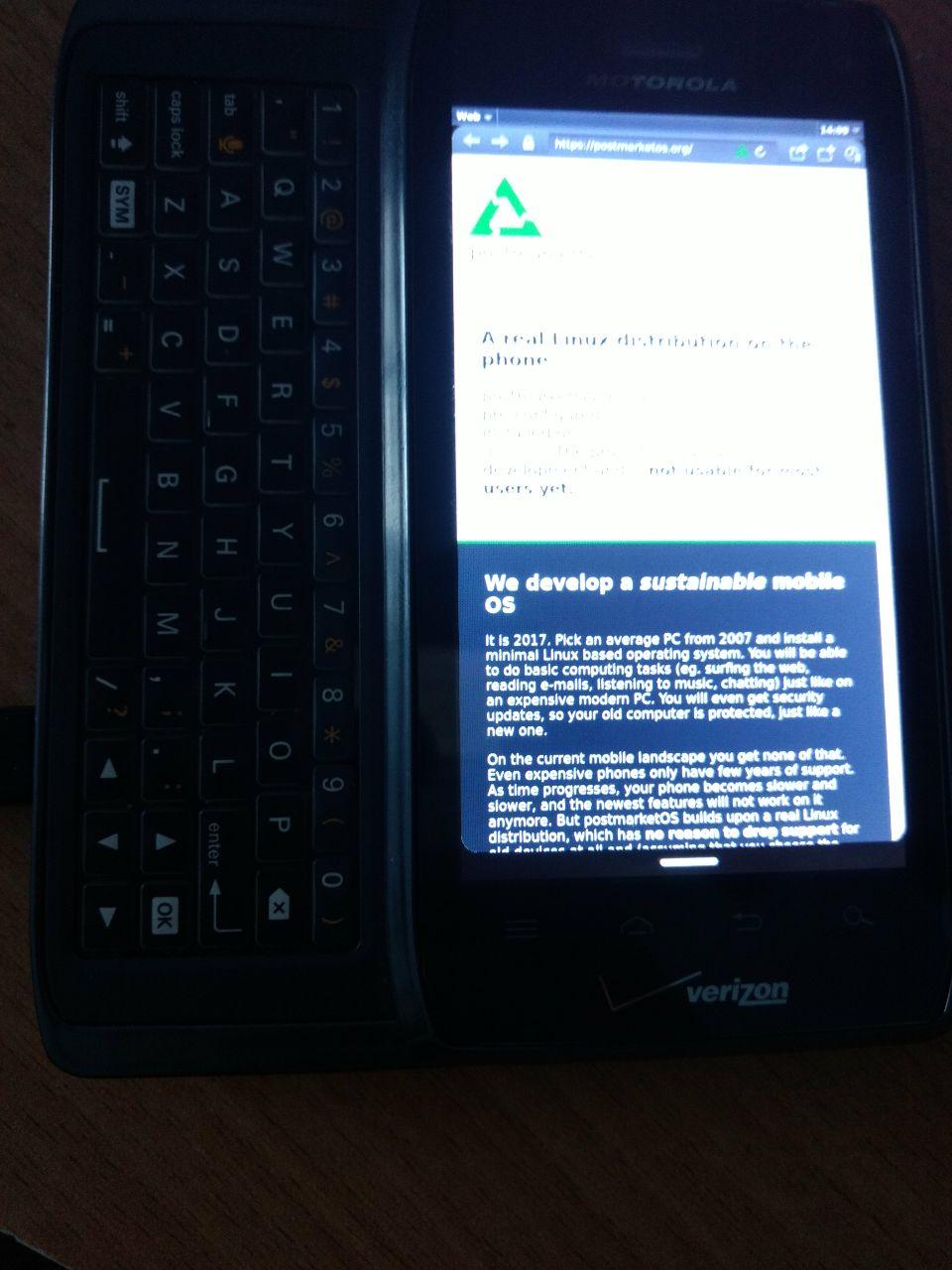
Got it working on Motorola Droid 4 with feature/libhybris branch. I followed instructions above, but instead of launching weston and using xcb platform did:
export EGL_PLATFORM=fbdev # should be hwcomposer for newer devices
export QT_QPA_PLATFORM=hwcomposer
LD_PRELOAD=/usr/lib/libwayland-server.so luna-next -plugin evdevtouch:/dev/input/event4 -plugin evdevkeyboard:/dev/input/event3 2>&1 | logger -t 'luna-next' &
sleep 5
export EGL_PLATFORM=wayland
export QT_QPA_PLATFORM=wayland
LunaAppManager -t -c -u luna 2>&1 | logger -t 'LunaAppManager' &
sleep 1
LunaWebAppManager --verbose --allow-file-access-from-files 2>&1 | logger -t 'LunaWebAppManager'
 NotKit
on 23 Dec 2017
NotKit
on 23 Dec 2017
 PabloCastellano
on 22 Mar 2018
PabloCastellano
on 22 Mar 2018
@PabloCastellano Yes we've seen that. UI not terribly useful but 30 or so of the released components that are under the hood are useful to migrate. There might be another dozen or 2 that could be useful in some way or form. However all code was released as a single commit, so migrating from the current code base is going to be a pain.
Herrie82
on 22 Mar 2018
Post by Herrie on 03/19/2018, 10:39 AM
Initial analysis from WebOS Ports side: Seems fairly complete and up-2-date, however our test build is still running to see if it builds successfully. 85 components have been open sourced of which roughly 30 are currently used by WebOS Ports for LuneOS and could potentially be updated, keeping in mind most of these components haven't been updated in LuneOS since work op Open webOS was stopped by LG at some point. To keep things in perspective: There are roughtly 2500 components used for building the whole OS, so 30 is a fairly small number. From the other 55 "new" components we'd need to assess on a 1 by 1 basis to see what might be possibly useful.
 eMPee584
on 16 Apr 2018
eMPee584
on 16 Apr 2018
Closing, we had it working. Right now it's broken because of #1459 though (help wanted!).
ollieparanoid
on 2 May 2018
Related issues
 Asara
·
6Comments
Asara
·
6Comments
 schvabodka-man
·
6Comments
schvabodka-man
·
6Comments
 craftyguy
·
7Comments
craftyguy
·
6Comments
craftyguy
·
7Comments
craftyguy
·
6Comments
 ghost
·
4Comments
ghost
·
4Comments
Most helpful comment
Got it working on Motorola Droid 4 with feature/libhybris branch. I followed instructions above, but instead of launching weston and using xcb platform did:
export EGL_PLATFORM=fbdev # should be hwcomposer for newer devices
export QT_QPA_PLATFORM=hwcomposer
LD_PRELOAD=/usr/lib/libwayland-server.so luna-next -plugin evdevtouch:/dev/input/event4 -plugin evdevkeyboard:/dev/input/event3 2>&1 | logger -t 'luna-next' &
sleep 5
export EGL_PLATFORM=wayland
export QT_QPA_PLATFORM=wayland
LunaAppManager -t -c -u luna 2>&1 | logger -t 'LunaAppManager' &
sleep 1
LunaWebAppManager --verbose --allow-file-access-from-files 2>&1 | logger -t 'LunaWebAppManager'