Pmbootstrap: Use the system and userdata partition on Android with LVM
The current layout is using only the system partition, in the following way:
/dev/install # system partition (or external sd card)
/dev/installp1 # unencrypted boot partition with kernels and initramfs files (not used yet, should be used by a bootloader at some point, so you could select the kernel you want to boot)
/dev/installp2 # encrypted root partition
New idea for the non-sdcard-installation, to make more use of the existing partitions, but not changing the partition layout (so it stays compatible with other Android ROMs!):
- use lvm over the /dev/installp2 and the userdata partition, so we have one big partition
- encrypt that partition with cryptsetup
- directly put the root partition on top of that
There has been some discussion in IRC, if we should split up the home and root partition, like in traditional GNU/Linux installations. The advantage is, that you can re-install everything on your root partition without touching /home. The disadvantage is, that you would need to specify the size in advance and can't change the size of root or home afterwards (except with another lvm layer, which makes it more complicated).
My proposal: do the new layout, with one root partition first.
If there is demand for the extra home partition, we could add an option for that later.
As always, this is open for discussion, please share your opinion :)
 ollieparanoid
All 25 comments
The disadvantage is, that you would need to specify the size in advance and can't change the size of root or home afterwards (except with another lvm layer, which makes it more complicated).
Huh? From what I understand of LVM, you can resize partitions as you please, as long as you don't make them smaller than the amount of data that is being used.
If you have a root partition of, say, 5GB, and a home partition of 10GB, you can grow root by just making home smaller on the front. Due to the way how LVM works, you shouldn't need to move any data. As long as the 10GB of home isn't used, resizing should be no problem.
 PureTryOut
on 6 Aug 2017
PureTryOut
on 6 Aug 2017
It is exactly like you said if we leave out the crypto layer. But with encrypting everything, it becomes more complicated. We would essentially have:
system   >  combine   \  cryptsetup \  split    >  /
userdata >  with LVM  /   partition /  with LVM >  /home
(Actually, we would also have the unencrypted boot partition, which is not part of the above scheme.)
ollieparanoid
on 6 Aug 2017
Ooh yeah forgot about that. Well to be honest, I think it's worth it. Having encryption seems to be more and more a must to have proper privacy, but we still like to have easily resizeable partitions. If we can get it this way, then definitely go for it. It's not that complicated anyway...
PureTryOut
on 6 Aug 2017
draft idea of the LVM implementation:
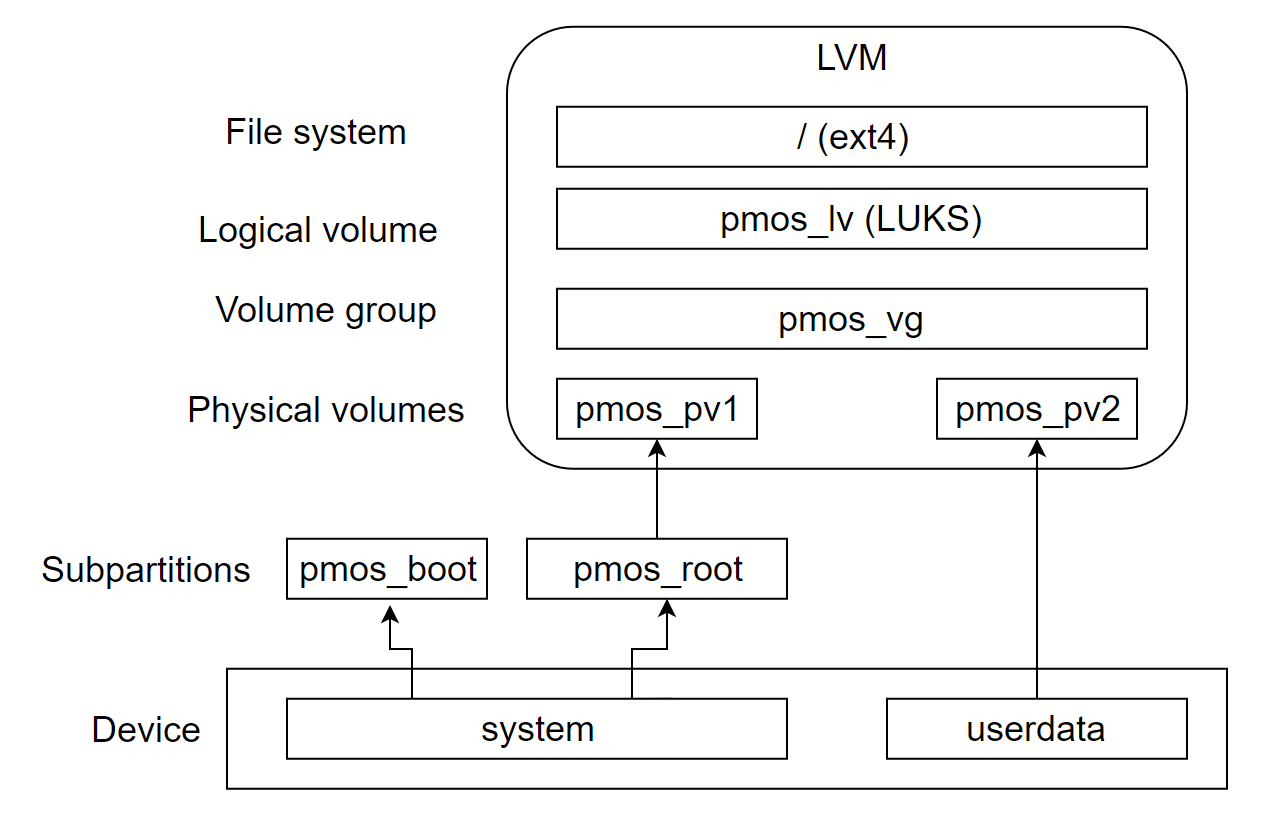
what do you think? it might work?
edit: probably we need to add a subpartition in the userdata to set it to the LVM type
 drebrez
on 23 Aug 2017
drebrez
on 23 Aug 2017
How does this handle non-android devices and sd card installations?
 MartijnBraam
on 23 Aug 2017
MartijnBraam
on 23 Aug 2017
@MartijnBraam what do you mean with "non-android" devices? in the deviceinfo or somewhere we will need some configuration to let decide if we want to use the userdata partition or not.
For the sd card we may have the LVM over it without any additional lvm physical volumes.
drebrez
on 23 Aug 2017
For example the n900 which doesn't have a system and userdata partition, also there is an apple and blackberry device in the devices list now
MartijnBraam
on 23 Aug 2017
@MartijnBraam I think it will work for those, the difference will be that the pmos_root subpartition like we have now, instead of containing the ext4 filesystem, it will contain the lvm and all the layers like in the drawing, without the pmos_pv2 part
drebrez
on 23 Aug 2017
hmm neat, we probably need some deviceinfo stuff for that then.
MartijnBraam
on 23 Aug 2017
So, just on the system partition (which I assume every device has) a boot partition, and a partition purely for LVM. Then on every other partition there might be also put LVM. The partitions could be specified in deviceinfo. From that point you end up in the LVM group in the image. Should work for every device ever no?
Do watch out with sdcards though. If you install pmOS to the device itself, an sdcard will only be used for additional storage, and can be pulled out by the user for quick transferring of files. You don't want your whole LVM setup to break because the user pulls the sdcard out...
PureTryOut
on 23 Aug 2017
@PureTryOut you are right about the sd card, if the user install pmOS in the device, if he wants to use the sdcard he can mount it separately and decide by his own if group it in the pmos LVM, not automatically.
drebrez
on 23 Aug 2017
Awesome graph!
@drebrez wrote:
probably we need to add a subpartition in the userdata to set it to the LVM type
Because then we do not need to change the partition type in the partition table?
That makes sense, I had not thought of that!
ollieparanoid
on 23 Aug 2017
Just a note about encryption: yes it's the latest craze but it is costly. Even though it might be naive, I don't use encryption on any of my devices and I'd like to have it optional. I see the value of encrypting a contingent home partition, but how would crypting system files help beyond access rights?
 eMPee584
on 9 Sep 2017
eMPee584
on 9 Sep 2017
@eMPee584: encryption became optional already, see #60. When you encrypt everything, you are giving out the least information possible, and thus you reduce your attack surface. If you want to discuss this more, you could start a thread in /r/postmarketOS for example, or ask in ##postmarketos-offtopic (in my opinion it would fit in better there than in the bug tracker). 👍
ollieparanoid
on 9 Sep 2017
@MoreRobustThanYou noted in #870, that there's also a big cache partition on (some?) Android devices. We could put another physical volume on it, just like with the userdata partition (see @drebrez' excellent graph).
ollieparanoid
on 4 Nov 2017
@ollieparanoid amazon-thor has a cache partition that's nearly 1 GB
 ghost
on 4 Nov 2017
ghost
on 4 Nov 2017
Whoa, we should definitely use that in some way!
ollieparanoid
on 4 Nov 2017
And who knows what other weird, large partitions other devices have?
ghost
on 4 Nov 2017
btw source on the 1 gb cache partition:
You may have noticed the ~1 GB cache partition on 3rd gen HDX devices that was used as temporary work space for chunky FireOS OTA updates. Typically <5% is used by Android which leaves a sizable block of space completely wasted. While it is possible to adjust partition boundaries to to expand either the System or Data partition that task is not for the faint of heart on an Android based device.
To make this LVM idea work, I think we need a common way to flash to multiple partitions across all flashers we use. I propose to use netcat for pmbootstrap flasher flash_system and (in a second step) allow it to flash multiple partitions at once: https://github.com/postmarketOS/pmbootstrap/issues/456#issuecomment-343686341.
ollieparanoid
on 11 Nov 2017
Good news, I have an initial working version of LVM, still have to verify that FDE still works and I will create the PR
drebrez
on 25 Dec 2017
Just tested it with FDE and everythings works. Still have to test it with the SDcard installation.
I already encountered some problems when you extend the LVM with other partitions and you flash a new system image with a new LVM volume, that's kind of broke it because you shouldn't have multiple LVM volume groups with the same name
Current work branch: https://github.com/postmarketOS/pmbootstrap/tree/feature/LVM
drebrez
on 26 Dec 2017
To resolve that, can't we just wipe the current partitions? Like, re-run mkfs.whatever on them before creating the new LVM volume?
PureTryOut
on 31 Mar 2018
@PureTryOut Maybe I wasn't clear. If I flash the rootfs image generated in pmbootstrap with the LVM inside, once it's on the device and I extend the volume to include other device partions, they all became part of the same LVM volume group and therefore they have the same id.
When I flash a new rootfs image, this time the LVM volume group will have the same name but different id, and that will cause troubles http://man7.org/linux/man-pages/man8/lvm.8.html#UNIQUE_NAMES
drebrez
on 1 Apr 2018
Here are some use cases I identified:
- rootfs image not flashed
- rootfs image flashed, boot partition present but:
- volume group missing
- logical volume missing
- multiple LVM volume groups with same name but different uuid
- rootfs image on SDcard
- SDcard inserted later
- volume extended to SDcard and boot without
- recovery installation
- qemu
drebrez
on 1 Apr 2018
Related issues
 ata2001
·
3Comments
MartijnBraam
·
5Comments
ollieparanoid
·
5Comments
ghost
·
4Comments
ollieparanoid
·
3Comments
ata2001
·
3Comments
MartijnBraam
·
5Comments
ollieparanoid
·
5Comments
ghost
·
4Comments
ollieparanoid
·
3Comments
Most helpful comment
draft idea of the LVM implementation:

what do you think? it might work?
edit: probably we need to add a subpartition in the userdata to set it to the LVM type