On CentOS 6, pm2 versions 0.10.5 and 0.10.7 at least (I don't know exactly when it started), pm2: Daemon is constantly spinning at 100% CPU. This is happening on at least 2 different servers so I can't see it's something specific, though we are running pm2-web and node-inspector in both, but apart from that just different web apps. Tried all the usual restarts and reboots.
 randomsock
All 64 comments
Can you show PM2 logs (tail -f ~/.pm2/pm2.log) ?
Process has been starrted in fork mode or cluster mode ?
Node.js version ?
 Unitech
on 15 Sep 2014
Unitech
on 15 Sep 2014
All processes clustered, but it's the Daemon itself that's spinning.
node 0.10.10
pm2.log:
[[[[ PM2/God daemon launched ]]]]
RPC interface [READY] on port 6666
BUS system [READY] on port 6667
Entering in node wrap logic (cluster_mode) for script /usr/local/bin/pm2-web
/usr/local/bin/pm2-web - id0 worker online
Entering in node wrap logic (cluster_mode) for script /usr/local/bin/node-inspector
/usr/local/bin/node-inspector - id1 worker online
Entering in node wrap logic (cluster_mode) for script /blah/blah/server.js
/blah/blah/server.js - id2 worker online
Entering in node wrap logic (cluster_mode) for script /blah/blah/server.js
/blah/blah/server.js - id3 worker online
Entering in node wrap logic (cluster_mode) for script /blah/blah/blah/node_modules/blah/server.js
/blah/blah/blah/node_modules/blah/server.js - id4 worker online
Entering in node wrap logic (cluster_mode) for script /blah/blah/blah/node_modules/blah/server.js
/blah/blah/blah/node_modules/blah/server.js - id5 worker online
Entering in node wrap logic (cluster_mode) for script /blah/blah/blah/blah/src/server.js
/blah/blah/blah/blah/src/server.js - id6 worker online
Entering in node wrap logic (cluster_mode) for script /blah/blah/blah/server.js
/blah/blah/blah/server.js - id7 worker online
Script /blah/blah/blah/server.js 7 exit
Entering in node wrap logic (cluster_mode) for script /blah/blah/blah/server.js
process with pid 2094 successfully killed
/blah/blah/blah/server.js - id7 worker online
Script /blah/blah/blah/server.js 7 exit
Entering in node wrap logic (cluster_mode) for script /blah/blah/blah/server.js
process with pid 2468 successfully killed
/blah/blah/blah/server.js - id7 worker online
randomsock
on 15 Sep 2014
+1
Ubuntu, pm2 v0.8.x
several time, eat up 100% CPU
--
Travis
在 2014年9月15日 下午5:55:22, randomsock ([email protected]) 写到:
All processes clustered, but it's the Daemon itself that's spinning.
node 0.10.10
pm2.log:
[[[[ PM2/God daemon launched ]]]]
RPC interface [READY] on port 6666
BUS system [READY] on port 6667
Entering in node wrap logic (cluster_mode) for script /usr/local/bin/pm2-web
/usr/local/bin/pm2-web - id0 worker online
Entering in node wrap logic (cluster_mode) for script /usr/local/bin/node-inspector
/usr/local/bin/node-inspector - id1 worker online
Entering in node wrap logic (cluster_mode) for script /blah/blah/server.js
/blah/blah/server.js - id2 worker online
Entering in node wrap logic (cluster_mode) for script /blah/blah/server.js
/blah/blah/server.js - id3 worker online
Entering in node wrap logic (cluster_mode) for script /blah/blah/blah/node_modules/blah/server.js
/blah/blah/blah/node_modules/blah/server.js - id4 worker online
Entering in node wrap logic (cluster_mode) for script /blah/blah/blah/node_modules/blah/server.js
/blah/blah/blah/node_modules/blah/server.js - id5 worker online
Entering in node wrap logic (cluster_mode) for script /blah/blah/blah/blah/src/server.js
/blah/blah/blah/blah/src/server.js - id6 worker online
Entering in node wrap logic (cluster_mode) for script /blah/blah/blah/server.js
/blah/blah/blah/server.js - id7 worker online
Script /blah/blah/blah/server.js 7 exit
Entering in node wrap logic (cluster_mode) for script /blah/blah/blah/server.js
process with pid 2094 successfully killed
/blah/blah/blah/server.js - id7 worker online
Script /blah/blah/blah/server.js 7 exit
Entering in node wrap logic (cluster_mode) for script /blah/blah/blah/server.js
process with pid 2468 successfully killed
/blah/blah/blah/server.js - id7 worker online
—
Reply to this email directly or view it on GitHub.
 trawor
on 15 Sep 2014
trawor
on 15 Sep 2014
After a pm2 updatePM2 is it still the same?
On Sep 15, 2014 11:57 AM, "Travis" [email protected] wrote:
+1
Ubuntu, pm2 v0.8.x
several time, eat up 100% CPU
Travis
在 2014年9月15日 下午5:55:22, randomsock ([email protected]) 写到:
All processes clustered, but it's the Daemon itself that's spinning.
node 0.10.10
pm2.log:
[[[[ PM2/God daemon launched ]]]]
RPC interface [READY] on port 6666
BUS system [READY] on port 6667
Entering in node wrap logic (cluster_mode) for script
/usr/local/bin/pm2-web
/usr/local/bin/pm2-web - id0 worker online
Entering in node wrap logic (cluster_mode) for script
/usr/local/bin/node-inspector
/usr/local/bin/node-inspector - id1 worker online
Entering in node wrap logic (cluster_mode) for script /blah/blah/server.js
/blah/blah/server.js - id2 worker online
Entering in node wrap logic (cluster_mode) for script /blah/blah/server.js
/blah/blah/server.js - id3 worker online
Entering in node wrap logic (cluster_mode) for script
/blah/blah/blah/node_modules/blah/server.js
/blah/blah/blah/node_modules/blah/server.js - id4 worker online
Entering in node wrap logic (cluster_mode) for script
/blah/blah/blah/node_modules/blah/server.js
/blah/blah/blah/node_modules/blah/server.js - id5 worker online
Entering in node wrap logic (cluster_mode) for script
/blah/blah/blah/blah/src/server.js
/blah/blah/blah/blah/src/server.js - id6 worker online
Entering in node wrap logic (cluster_mode) for script
/blah/blah/blah/server.js
/blah/blah/blah/server.js - id7 worker online
Script /blah/blah/blah/server.js 7 exit
Entering in node wrap logic (cluster_mode) for script
/blah/blah/blah/server.js
process with pid 2094 successfully killed
/blah/blah/blah/server.js - id7 worker online
Script /blah/blah/blah/server.js 7 exit
Entering in node wrap logic (cluster_mode) for script
/blah/blah/blah/server.js
process with pid 2468 successfully killed
/blah/blah/blah/server.js - id7 worker online—
Reply to this email directly or view it on GitHub.—
Reply to this email directly or view it on GitHub
https://github.com/Unitech/PM2/issues/710#issuecomment-55571129.
Unitech
on 15 Sep 2014
I updated to 0.10.7(from 0.8.x), and will keep an eye on it
--
Travis
http://fir.im
在 2014年9月15日 下午6:05:46, Alexandre Strzelewicz ([email protected]) 写到:
After a pm2 updatePM2 is it still the same?
On Sep 15, 2014 11:57 AM, "Travis" [email protected] wrote:
+1
Ubuntu, pm2 v0.8.x
several time, eat up 100% CPU
Travis
在 2014年9月15日 下午5:55:22, randomsock ([email protected]) 写到:
All processes clustered, but it's the Daemon itself that's spinning.
node 0.10.10
pm2.log:
[[[[ PM2/God daemon launched ]]]]
RPC interface [READY] on port 6666
BUS system [READY] on port 6667
Entering in node wrap logic (cluster_mode) for script
/usr/local/bin/pm2-web
/usr/local/bin/pm2-web - id0 worker online
Entering in node wrap logic (cluster_mode) for script
/usr/local/bin/node-inspector
/usr/local/bin/node-inspector - id1 worker online
Entering in node wrap logic (cluster_mode) for script /blah/blah/server.js
/blah/blah/server.js - id2 worker online
Entering in node wrap logic (cluster_mode) for script /blah/blah/server.js
/blah/blah/server.js - id3 worker online
Entering in node wrap logic (cluster_mode) for script
/blah/blah/blah/node_modules/blah/server.js
/blah/blah/blah/node_modules/blah/server.js - id4 worker online
Entering in node wrap logic (cluster_mode) for script
/blah/blah/blah/node_modules/blah/server.js
/blah/blah/blah/node_modules/blah/server.js - id5 worker online
Entering in node wrap logic (cluster_mode) for script
/blah/blah/blah/blah/src/server.js
/blah/blah/blah/blah/src/server.js - id6 worker online
Entering in node wrap logic (cluster_mode) for script
/blah/blah/blah/server.js
/blah/blah/blah/server.js - id7 worker online
Script /blah/blah/blah/server.js 7 exit
Entering in node wrap logic (cluster_mode) for script
/blah/blah/blah/server.js
process with pid 2094 successfully killed
/blah/blah/blah/server.js - id7 worker online
Script /blah/blah/blah/server.js 7 exit
Entering in node wrap logic (cluster_mode) for script
/blah/blah/blah/server.js
process with pid 2468 successfully killed
/blah/blah/blah/server.js - id7 worker online—
Reply to this email directly or view it on GitHub.—
Reply to this email directly or view it on GitHub
https://github.com/Unitech/PM2/issues/710#issuecomment-55571129.—
Reply to this email directly or view it on GitHub.
trawor
on 15 Sep 2014
Yes, same after updatePM2 still
randomsock
on 15 Sep 2014
All processes are clustered, in fork mode is it still the same ?
Unitech
on 15 Sep 2014
Yes still the same in fork mode.
Also I pm2 kill'd it, checked everything was gone, then just pm2 ping'd to start the Daemon - it was idle when on its own. As soon as I start any process (cluster or fork) the Daemon spins at 100%. Interestingly, when you stop all processes, the Daemon goes idle again.
randomsock
on 15 Sep 2014
Node.js version ? Can you contact me by email for further inspection https://github.com/Unitech
Unitech
on 15 Sep 2014
Exactly what I found out on my server
you can kill pm2 by pid to get rip of this, while pm2 kill can not kill the zombie pm2 process, check it with ps aux | grep pm2
--
Travis
http://fir.im
在 2014年9月15日 下午6:40:38, randomsock ([email protected]) 写到:
Yes still the same in fork mode.
Also I pm2 kill'd it, checked everything was gone, then just pm2 ping'd to start the Daemon - it was idle when on its own. As soon as I start any process (cluster or fork) the Daemon spins at 100%. Interestingly, when you stop all processes, the Daemon goes idle again.
—
Reply to this email directly or view it on GitHub.
trawor
on 15 Sep 2014
Can you kill pm2 (with pm2 kill or kill command) then start it again like
that:
$ DEBUG='*' pm2 start [...]
And see on the pm2.log what is happening?
On Sep 15, 2014 1:27 PM, "Travis" [email protected] wrote:
Exactly what I found out on my server
you can kill pm2 by pid to get rip of this, while
pm2 killcan not kill
the zombie pm2 process, check it withps aux | grep pm2
Travis
http://fir.im在 2014年9月15日 下午6:40:38, randomsock ([email protected]) 写到:
Yes still the same in fork mode.
Also I pm2 kill'd it, checked everything was gone, then just pm2 ping'd to
start the Daemon - it was idle when on its own. As soon as I start any
process (cluster or fork) the Daemon spins at 100%. Interestingly, when you
stop all processes, the Daemon goes idle again.—
Reply to this email directly or view it on GitHub.—
Reply to this email directly or view it on GitHub
https://github.com/Unitech/PM2/issues/710#issuecomment-55578192.
Unitech
on 15 Sep 2014
Yup! We are having this issue. 100% CPU. Here are the logs from pm2.log running with DEBUG off:
https://gist.github.com/sketchpixy/5af9893a4e14bc08573e
Output with DEBUG enabled:
https://gist.github.com/sketchpixy/f693674316340e4f2643
pm2.log with DEBUG enabled:
https://gist.github.com/sketchpixy/ab2893f6dd3ff8b23ecf
Node version: v0.10.25
pm2 version: 0.10.5
Will try with updatePM2 and exec_mode: fork_mode and get back to you.
 sketchpixy
on 15 Sep 2014
sketchpixy
on 15 Sep 2014
Did updatePM2 (bumped pm2 version to 0.10.7 before running) and changed to fork_mode. Still 100% CPU.
sketchpixy
on 15 Sep 2014
Are you also on CentOS ?
Unitech
on 15 Sep 2014
No its Ubuntu 14.04 LTS.
Currently i'm limiting the CPU usage to 5% (I'm assuming the daemon only monitors the process right?)
$ cpulimit -p $(cat ~/.pm2/pm2.pid) -l 5 -b
Please contact me at as AT unitech DOT io, I don't manage to reproduce that bug on CentOS neither on Ubuntu under 0.10.x and 0.10.30 with cluster mode and fork mode application.
Unitech
on 15 Sep 2014
Sure will do now
sketchpixy
on 15 Sep 2014
Okay @Unitech helped us debug this issue. The problem was with the server's node version. Once we upgraded to 0.10.30 the CPU's idle and not spinning anymore. Thanks @Unitech !
sketchpixy
on 15 Sep 2014
SOLVED here too by upgrading node to 0.10.31. Many thanks guys!
randomsock
on 15 Sep 2014
Great ! Thanks for your help to know this !
Unitech
on 15 Sep 2014
Noticed on our dev box that pm2 daemon is still doing around 30%, but narrowed it down to having a watch activated on one project. Since you would only do that in dev it's no big deal really, just thought I'd let you know.
randomsock
on 15 Sep 2014
When using --watch be sure to ignore the node_modules folder (https://github.com/Unitech/PM2#watch--restart)
Unitech
on 15 Sep 2014
I'm seeing the 100% CPU behavior on the daemon running processes in cluster mode on node 0.11.13. Unfortunately, upgrading node isn't really an option in this case until 0.12 drops.
 dnegstad
on 17 Sep 2014
dnegstad
on 17 Sep 2014
Could you try the latest PM2 version (0.10.8)
If it still happens, could you start the app with :
$ DEBUG='*' pm2 start [...]
And paste here the logs
Unitech
on 17 Sep 2014
+1 on this issue. However I am using an older version of node (0.10.22). I just recently upgraded pm2 from 0.7.7 to (0.10.8) and was not experiencing this.
When running a load test, we noticed that after upgrading pm2 versions our test ran at half this speed, though this could just be because of the excess cpu usage.
 kelaban
on 29 Sep 2014
kelaban
on 29 Sep 2014
Fork mode or cluster mode ? Are you still using the 0.10.22 ?
Unitech
on 30 Sep 2014
I'm having this same issue on Ubuntu 14.04 and 14.10
Versions:
node: v0.10.35
pm2: 0.12.3
It usually only happens on reboot ( used pm2 startup ubuntu ). After I do a pm2 restart it goes back down to 0% cpu...
 qrpike
on 8 Jan 2015
qrpike
on 8 Jan 2015
Do you use the watch option?
On Jan 7, 2015 9:14 PM, "Quinton Pike" [email protected] wrote:
I'm having this same issue on Ubuntu 14.04 and 14.10
Versions:
node: v0.10.35
pm2: 0.12.3—
Reply to this email directly or view it on GitHub
https://github.com/Unitech/PM2/issues/710#issuecomment-69126338.
Unitech
on 8 Jan 2015
No
_Quinton Pike_
Previously at: _Turner, _CNN, Google* and now at:* TST
http://qpike.com - and If you must: 404-402-7441
On Wed, Jan 7, 2015 at 9:35 PM, Alexandre Strzelewicz <
[email protected]> wrote:
Do you use the watch option?
On Jan 7, 2015 9:14 PM, "Quinton Pike" [email protected] wrote:I'm having this same issue on Ubuntu 14.04 and 14.10
Versions:
node: v0.10.35
pm2: 0.12.3—
Reply to this email directly or view it on GitHub
https://github.com/Unitech/PM2/issues/710#issuecomment-69126338.—
Reply to this email directly or view it on GitHub
https://github.com/Unitech/PM2/issues/710#issuecomment-69127760.
qrpike
on 8 Jan 2015
Having this issue, PM2 v0.12.4 God Daemon, 99+% CPU for the past 12 hours (while i was asleep)
Ubuntu 14.04.1 LTS (GNU/Linux 3.18.3-x86_64-linode51 x86_64)
node v0.10.25
I am now able to replicate this everytime. Anytime I start a pm2 application it spawns the same God Daemon process and uses up 100% cpu immediately.
Using pm2 monit, my application was using 0% CPU.
 viion
on 5 Feb 2015
viion
on 5 Feb 2015
Logs ?
Le jeu. 5 févr. 2015 à 11:00, Josh Freeman [email protected] a
écrit :
Having this issue, PM2 v0.12.4 God Daemon, 99+% CPU for the past 12 hours
(while i was asleep)—
Reply to this email directly or view it on GitHub
https://github.com/Unitech/PM2/issues/710#issuecomment-73021425.
 soyuka
on 5 Feb 2015
soyuka
on 5 Feb 2015
I removed -i max from the start up script my server has and it no longer runs at 100% cpu
this is a log with the extra parameter and it instantly being 100% CPU.
PM2: 2015-02-05 10:31:11: App name:chat.server id:0 online
PM2: 2015-02-05 10:31:26: App name:chat.server id:0 exited
PM2: 2015-02-05 10:31:26: Process with pid 1693 killed
PM2: 2015-02-05 10:31:26: Starting execution sequence in -cluster mode- for app name:chat.server id:0
PM2: 2015-02-05 10:31:26: App name:chat.server id:0 online
PM2: 2015-02-05 10:31:39: App name:chat.server id:0 exited
PM2: 2015-02-05 10:31:39: Process with pid 1747 killed
PM2: 2015-02-05 10:31:39: Starting execution sequence in -cluster mode- for app name:chat.server id:0
PM2: 2015-02-05 10:31:39: App name:chat.server id:0 online
PM2: 2015-02-05 10:35:49: pm2 has been killed by signal
PM2: 2015-02-05 10:39:44: [PM2][WORKER] Started with refreshing interval: 30000
PM2: 2015-02-05 10:39:44: [[[[ PM2/God daemon launched ]]]]
PM2: 2015-02-05 10:39:44: BUS system [READY] on port /home/xivpads/.pm2/pub.sock
PM2: 2015-02-05 10:39:44: RPC interface [READY] on port /home/xivpads/.pm2/rpc.sock
PM2: 2015-02-05 10:39:46: Starting execution sequence in -cluster mode- for app name:chat.server id:0
PM2: 2015-02-05 10:39:46: App name:chat.server id:0 online
PM2: 2015-02-05 10:40:22: [PM2][WORKER] Started with refreshing interval: 30000
PM2: 2015-02-05 10:40:22: [[[[ PM2/God daemon launched ]]]]
PM2: 2015-02-05 10:40:22: BUS system [READY] on port /home/xivpads/.pm2/pub.sock
PM2: 2015-02-05 10:40:22: RPC interface [READY] on port /home/xivpads/.pm2/rpc.sock
Your process is beeing constantly restarted that's why you have 100% cpu. Check your app logs too.
Node version ?
soyuka
on 5 Feb 2015
Node version v0.10.25
I'm not sure why it would be constantly restarting, it is no longer doing it without the -i max flag and when I run manually: node app.js it is fine. I also tried a different application and same result, a very simple "start socket.io" from their website (http://socket.io/get-started/chat/ - initial section) caused the same issue.
The app logs show nothing outside of the manual outputs I include and a few exceptions from yesterday which I have fixed now.
viion
on 5 Feb 2015
Don't use node v0.10.25 with the cluster mode.
See #389 for issues concerning sockets and the cluster mode.
soyuka
on 5 Feb 2015
Ah, cheers! Running in fork mode now and is fine.
viion
on 5 Feb 2015
Hey,
I'm running pm2 0.12.4 together with node v0.10.33 on Amazon Linux (EC2)
After a cold boot on a new instance, and a call to start a process (pm2 start script.js)
The God daemon uses ~100% cpu and does not complete the request.
If I kill the process and run the same 'pm2 start script.js' command, all works fine.
I'm using fork mode.
It doesn't create the .pm2 directory so I can't see the logs.
Thanks
 dewvow
on 5 Feb 2015
dewvow
on 5 Feb 2015
It doesn't create the .pm2 directory so I can't see the logs.
Maybe that's the problem?
soyuka
on 6 Feb 2015
Not sure..
'forever' runs fine and it also creates a homedir
On Feb 6, 2015 9:45 AM, "Antoine Bluchet" [email protected] wrote:
It doesn't create the .pm2 directory so I can't see the logs.
Maybe that's the problem?
—
Reply to this email directly or view it on GitHub
https://github.com/Unitech/PM2/issues/710#issuecomment-73198276.
dewvow
on 6 Feb 2015
node(v0.10.26) and pm2(0.12.1) and exec_mode is cluster_mode , cpu always 100+% , but change exec_mode to fork_mode it's fine
 yunheli
on 12 Feb 2015
yunheli
on 12 Feb 2015
Upgrade node from v0.10.26 to v0.12.7 fixed this problem.
My problem details:
We use node-v0.10.26 with pm2-v0.14.7
There is two "PM@ God Daemon" runing, one use 100% CPU,
After kill two "PM@ God Daemon" start pm2 again, still 100% CPU.
 tangxinfa
on 16 Sep 2015
tangxinfa
on 16 Sep 2015
ubunutu Upgrade node from v0.10.25 to v4.2.1 fixed this problem.
 SimplyY
on 22 Oct 2015
SimplyY
on 22 Oct 2015
I had the same issue when few processes of PM2 were started from different accounts. High CPU and disk ops... Eventually, but started once only the killing of PM2 God Daemon processes were helpful. Be sure that you manage your PM2 from root account. Do not start ANY PM2 command using your (not root) account. To check this run 'ps aux | grep PM2' and check process(es) owner(s). If this is the reason in your case then disable executing of PM2 for all accounts excluding root.
 iriand
on 1 Dec 2015
iriand
on 1 Dec 2015
@iriand what node and pm2 versions was that for? I haven't seen any problem since moving to node 0.12+.
I have to say, having separate 'private pm2' instances per account is really useful for teams of developers, so I'd rather this wasn't the problem. So far, it's been working really well for us.
One thing we did do on an older server was to dedicate one account for pm2, and specifically NOT the root account. This meant a single controlled environment, but without the security risks. Worth considering if you're still having to do that.
randomsock
on 16 Dec 2015
For me the issue was solved by using nvm. Specifically the ability to install npm packages globally without having to use sudo.
Here is some awesomeness I found very helpful.
 ghost
on 20 Dec 2015
ghost
on 20 Dec 2015
I am having the same issue with node v0.10.25 and pm2 1.0.0. Only seems to be in cluster mode.
 btply
on 21 Jan 2016
btply
on 21 Jan 2016
@randomsock node - 0.12.7, pm2 - 0.14.7
iriand
on 12 Feb 2016
@Unitech I am seeing 100% CPU spike and while checking strace I can see that gettimeofday() gets called continuously also clock_gettime()
Here is pm2 start debug logs : http://www.fpaste.org/324548/57806781/
Node version is 4.2.3 and pm2 version is 0.15.10.
 sagarghuge
on 18 Feb 2016
sagarghuge
on 18 Feb 2016
I have the same problem. The process runned from root and have very strange behavior - 2 processes eaten 100% CPU and a lot of RAM. Also I think that it will be great to have an ability to run processes under www-data user (like nginx/apache/etc).
Not cluster mode.
Ubuntu 14.04 LTS
NodeJS 0.10.45
PM2 1.1.3
Update:
The same happens with NodeJS 4.4.4 and PM2 1.1.3.
I have only started this simple script with Socket.IO and got 97% CPU under root user:
` // init Socket.IO
var io = require('socket.io')({path: '/websocket'});
io.sockets.on('connection', function (socket) {
    socket.json.send({'event': 'connected'});
});

io.listen(config.port, function() {
    console.log('listening on *:8081');
});`

I think it is very unsecure to have similar processes/daemons under root privilagies.
 nanom1t
on 23 May 2016
nanom1t
on 23 May 2016
Last couple of weeks, I have same issue - 100% CPU usage & my app hangs.
I tried reading logs but I didn't find any issue there.
My node version: 6.9.1 &
PM2 is : 2.4.4.
OS: Ubuntu 14.04
On an average my cpu usage is : ~5
Manually I am restarting all apps - pm2 restart all.
pm2.log:
fluid_admin@instance-2:~$ tail -15 .pm2/pm2.log
2017-04-12 09:55:30: Starting execution sequence in -fork mode- for app name:fluid-prod id:0
2017-04-12 09:55:30: App name:fluid-prod id:0 online
2017-04-14 13:53:21: Stopping app:fluid-prod id:0
2017-04-14 13:53:21: Stopping app:nedbserver id:1
2017-04-14 13:53:21: App [nedbserver] with id [1] and pid [32557], exited with code [0] via signal [SIGINT]
2017-04-14 13:53:21: pid=32574 msg=failed to kill - retrying in 100ms
2017-04-14 13:53:21: pid=32557 msg=process killed
2017-04-14 13:53:21: Starting execution sequence in -fork mode- for app name:nedbserver id:1
2017-04-14 13:53:21: App [fluid-prod] with id [0] and pid [32574], exited with code [0] via signal [SIGINT]
2017-04-14 13:53:21: App name:nedbserver id:1 online
2017-04-14 13:53:21: pid=32574 msg=process killed
2017-04-14 13:53:21: Starting execution sequence in -fork mode- for app name:fluid-prod id:0
2017-04-14 13:53:21: App name:fluid-prod id:0 online
App is running on GAE, OS is : Ubuntu 14.04.

I have moved from forever to pm2 6 months back. till recent time, it was working file. I don't know deal this problem. Can some one help me how to debug this issue.
ghost
on 14 Apr 2017
+1 very serious poblem. pm2 cpu usage is 100% or more, all pm2 commands response very very slow. this seem a disaster in production.
 yinrong
on 18 Sep 2018
yinrong
on 18 Sep 2018
@yinrong , did you manage to resolve?
 datawrangl3r
on 18 Sep 2018
datawrangl3r
on 18 Sep 2018
Please when you get this issue run a pm2 report and paste the output here
Unitech
on 18 Sep 2018
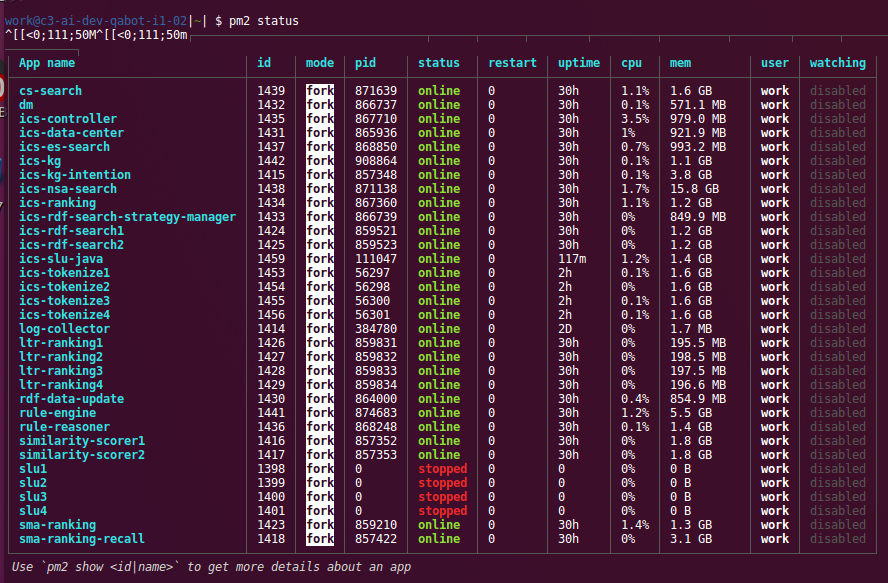
+1 pm2 is using in our dev servers. it happens every several days. not knowing what happend. pm2 is using more than 100% CPU. command line "pm2 xxx" hardly respond. processes under pm2 seems ok.
yinrong
on 18 Oct 2018
sorry i just ran 'pm2 kill'. I will paste result of 'pm2 report' next time.
yinrong
on 18 Oct 2018
Can you upgrade to the latest pm2 version, it has been optimized in terms of cpu usage
Unitech
on 18 Oct 2018
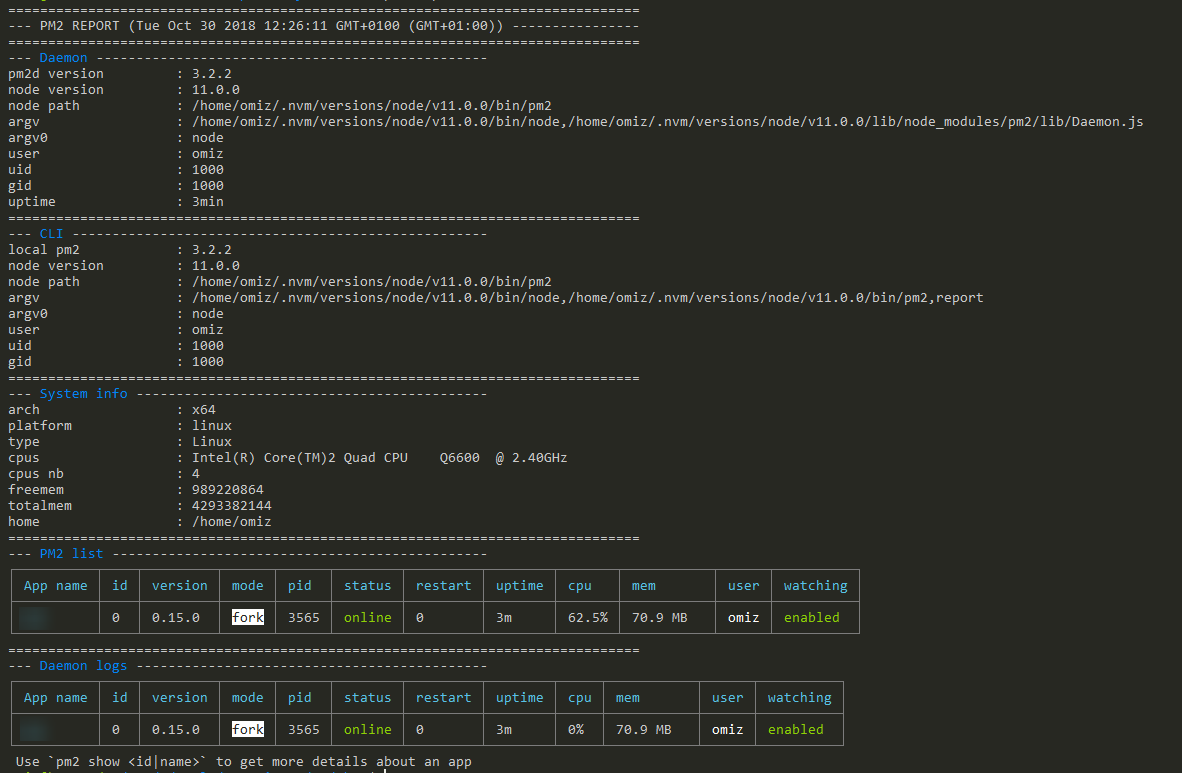
@Unitech this keeps going ever since i've upgraded to v3.x in my case (ubuntu via WSL)
 vBm
on 30 Oct 2018
vBm
on 30 Oct 2018
@Unitech
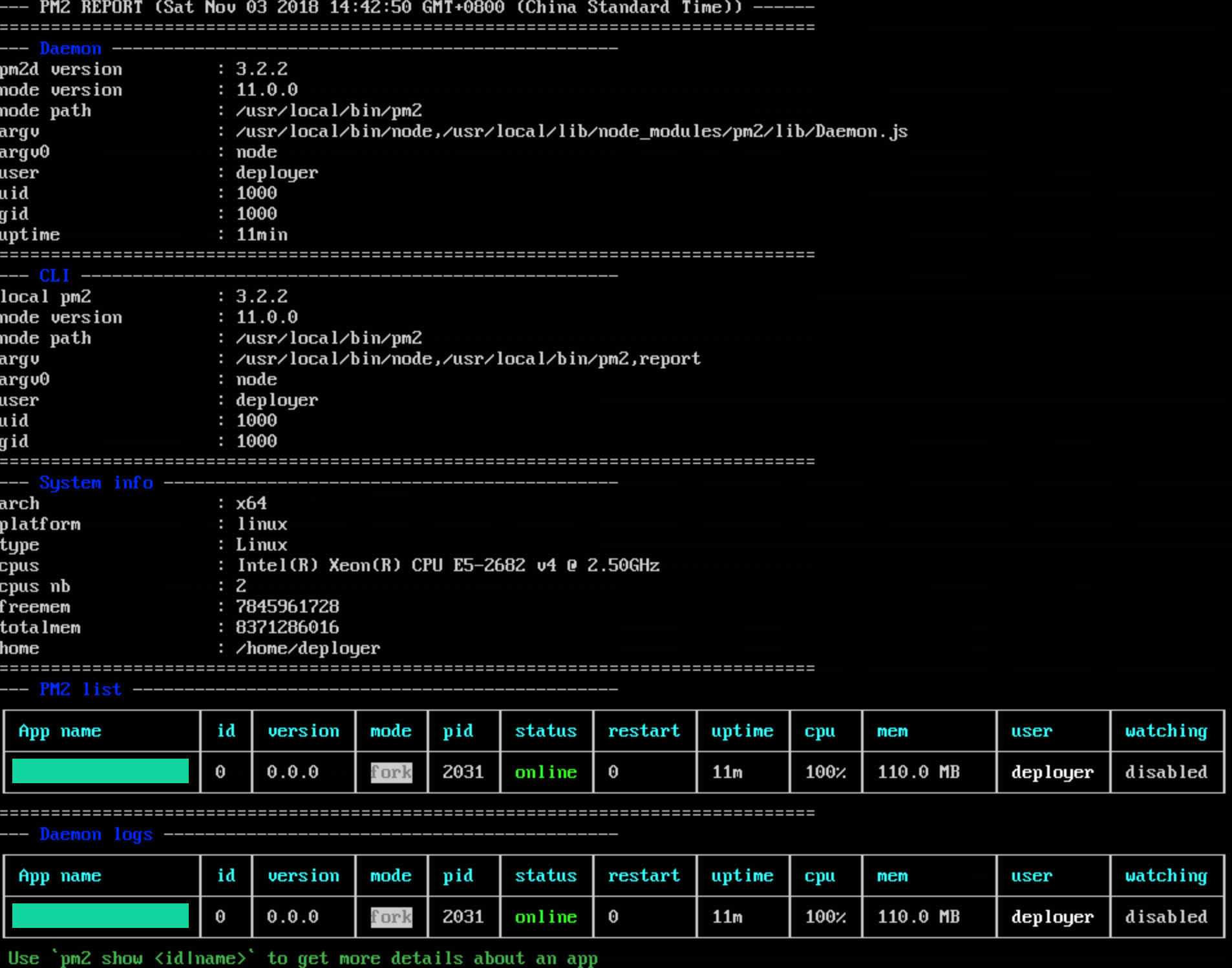
I am using the Sails app, and If I start with sails lift, the CPU is normal..
but with pm2, emmmm .. eat up 100%
[email protected]
 79229788
on 3 Nov 2018
79229788
on 3 Nov 2018
can you guys try ps aux |grep pm2 and kill pm2 running as other users and keep only one instance.
I did this, and 100% CPU problem is not happening recently.
yinrong
on 5 Nov 2018
@yinrong There are no other users involved. Thanks for info tho.
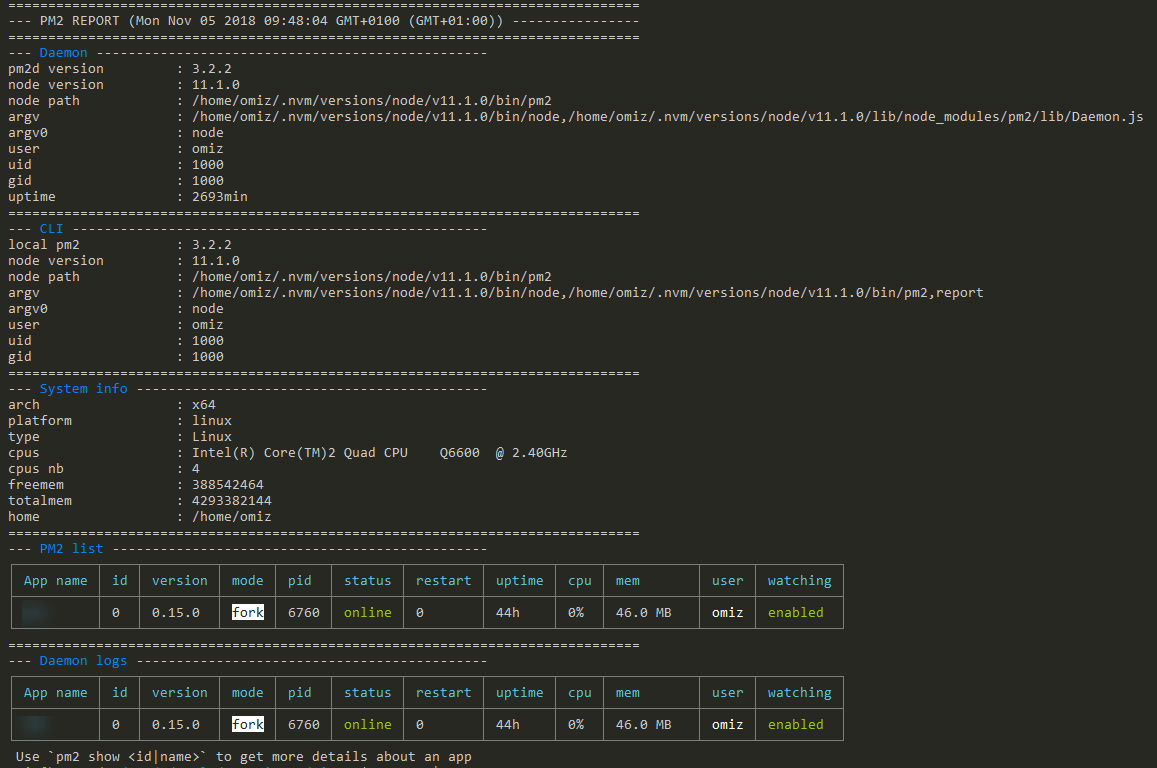
Luckily for me upgrading node to 11.1.0 fixed the problem on it's own.
vBm
on 5 Nov 2018
@Unitech pm2 is doing nothing according to the log, and still using 100% cpu.
pm2 will use 0% cpu if I stop stress test on my services.
what's pm2 doing? will it slow down my services?
[work@c3-ai-dev-ics-i1-01 ics-rdf-search]$ top

top - 18:06:00 up 3 days,  7:22,  2 users,  load average: 29.76, 20.85, 13.13
Tasks: 460 total,   6 running, 454 sleeping,   0 stopped,   0 zombie
%Cpu(s):  1.9 us,  0.3 sy,  0.0 ni, 97.8 id,  0.0 wa,  0.0 hi,  0.0 si,  0.0 st
KiB Mem : 13191774+total,   399428 free, 12425014+used,  7268168 buff/cache
KiB Swap:        0 total,        0 free,        0 used.  7007672 avail Mem

   PID USER      PR  NI    VIRT    RES    SHR S  %CPU %MEM     TIME+ COMMAND
646566 work      20   0 60.322g 0.017t  27140 S 970.6 14.0  20:30.89 java
356526 work      20   0 49.482g 3.640g  11180 S 629.4  2.9  51:34.84 java
555379 work      20   0 48.903g 0.010t  12116 S 117.6  8.3  10:02.66 java
603695 work      20   0 1732172 749800   9416 R 105.9  0.6  20:01.86 PM2 v3.2.2: God
619449 work      20   0 2815460 1.145g   5852 R 105.9  0.9   1:14.85 python
 84411 work      20   0 48.967g 4.957g  11216 S 100.0  3.9  19:26.39 java
619436 work      20   0 2810336 1.142g   5984 R  88.2  0.9   1:13.34 python
619445 work      20   0 2814576 1.144g   5932 S  88.2  0.9   1:12.03 python
619435 work      20   0 2812208 1.143g   6012 R  82.4  0.9   1:17.00 python
619437 work      20   0 2814820 1.147g   5996 R  70.6  0.9   1:14.67 python
338674 work      20   0 7880708 3.841g  11864 S  29.4  3.1   4:08.06 python
931888 work      20   0 13.572g 1.522g  11320 S  29.4  1.2  24:31.13 java
618987 work      20   0 6454092 197096   7244 S  23.5  0.1   0:40.35 python
 76284 work      20   0 49.010g 938872  10336 S  17.6  0.7   9:58.77 java
 81057 work      20   0 49.164g 2.221g  11312 S  17.6  1.8   3:14.12 java
120999 work      20   0 48.974g 683144  11092 S  17.6  0.5   6:06.81 java
619297 work      20   0 3007884 1.625g   4884 S  17.6  1.3   0:31.86 python
293046 work      20   0 49.681g 2.150g  14636 S  11.8  1.7  10:55.22 java
619295 work      20   0 3007880 1.625g   4740 S  11.8  1.3   0:29.05 python
673203 work      20   0  158244   4608   3600 R  11.8  0.0   0:00.03 top
907141 root      20   0  159844   3880   2088 S  11.8  0.0   0:27.81 heimdallrd
...
...

[work@c3-ai-dev-ics-i1-01 ics-rdf-search]$ pm2 report
===============================================================================
--- PM2 REPORT (Mon Nov 05 2018 18:06:07 GMT+0800 (CST)) ----------------------
===============================================================================
--- Daemon -------------------------------------------------
pm2d version         : 3.2.2
node version         : 8.11.4
node path            : /usr/bin/pm2
argv                 : /usr/bin/node,/usr/lib/node_modules/pm2/lib/Daemon.js
argv0                : node
user                 : work
uid                  : 10000
gid                  : 10000
uptime               : 372min
===============================================================================
--- CLI ----------------------------------------------------
local pm2            : 3.2.2
node version         : 8.11.4
node path            : /usr/bin/pm2
argv                 : /usr/bin/node,/usr/bin/pm2,report
argv0                : node
user                 : work
uid                  : 10000
gid                  : 10000
===============================================================================
--- System info --------------------------------------------
arch                 : x64
platform             : linux
type                 : Linux
cpus                 : Intel(R) Xeon(R) CPU E5-2620 v4 @ 2.10GHz
cpus nb              : 32
freemem              : 455458816
totalmem             : 135083765760
home                 : /home/work
===============================================================================
--- PM2 list -----------------------------------------------
┌─────────────────────────────────┬─────┬─────────┬──────┬────────┬────────┬─────────┬────────┬────────┬────────────┬──────┬──────────┐
│ App name                        │ id  │ version │ mode │ pid    │ status │ restart │ uptime │ cpu    │ mem        │ user │ watching │
├─────────────────────────────────┼─────┼─────────┼──────┼────────┼────────┼─────────┼────────┼────────┼────────────┼──────┼──────────┤
│ cs-search                       │ 28  │ N/A     │ fork │ 84411  │ online │ 0       │ 2h     │ 81.2%  │ 5.0 GB     │ work │ disabled │
│ dm                              │ 25  │ N/A     │ fork │ 427422 │ online │ 0       │ 58m    │ 2.8%   │ 1.4 GB     │ work │ disabled │
│ ics-controller                  │ 24  │ N/A     │ fork │ 76284  │ online │ 0       │ 2h     │ 30.2%  │ 913.4 MB   │ work │ disabled │
│ ics-data-center                 │ 21  │ N/A     │ fork │ 74496  │ online │ 0       │ 2h     │ 13%    │ 1.0 GB     │ work │ disabled │
│ ics-es-search                   │ 50  │ N/A     │ fork │ 120999 │ online │ 0       │ 114m   │ 18.5%  │ 665.2 MB   │ work │ disabled │
│ ics-kg                          │ 27  │ N/A     │ fork │ 81057  │ online │ 0       │ 2h     │ 9.5%   │ 2.2 GB     │ work │ disabled │
│ ics-kg-intention                │ 9   │ N/A     │ fork │ 338674 │ online │ 0       │ 77m    │ 13.4%  │ 3.8 GB     │ work │ disabled │
│ ics-nsa-search                  │ 289 │ N/A     │ fork │ 646566 │ online │ 1       │ 7m     │ 458.8% │ 17.6 GB    │ work │ disabled │
│ ics-ranking                     │ 22  │ N/A     │ fork │ 555379 │ online │ 0       │ 30m    │ 165.6% │ 10.4 GB    │ work │ disabled │
│ ics-rdf-search-7011             │ 341 │ N/A     │ fork │ 619360 │ online │ 0       │ 10m    │ 7%     │ 1.2 GB     │ work │ disabled │
│ ics-rdf-search-7012             │ 342 │ N/A     │ fork │ 619361 │ online │ 0       │ 10m    │ 11%    │ 1.2 GB     │ work │ disabled │
│ ics-rdf-search-7013             │ 343 │ N/A     │ fork │ 619362 │ online │ 0       │ 10m    │ 8.7%   │ 1.2 GB     │ work │ disabled │
│ ics-rdf-search-7014             │ 344 │ N/A     │ fork │ 619364 │ online │ 0       │ 10m    │ 9.5%   │ 1.2 GB     │ work │ disabled │
│ ics-rdf-search-7015             │ 345 │ N/A     │ fork │ 619377 │ online │ 0       │ 10m    │ 9.3%   │ 1.2 GB     │ work │ disabled │
│ ics-rdf-search-7016             │ 346 │ N/A     │ fork │ 619379 │ online │ 0       │ 10m    │ 10.9%  │ 1.2 GB     │ work │ disabled │
│ ics-rdf-search-7017             │ 347 │ N/A     │ fork │ 619384 │ online │ 0       │ 10m    │ 11.4%  │ 1.2 GB     │ work │ disabled │
│ ics-rdf-search-7018             │ 348 │ N/A     │ fork │ 619389 │ online │ 0       │ 10m    │ 11.4%  │ 1.2 GB     │ work │ disabled │
│ ics-rdf-search-strategy-manager │ 23  │ N/A     │ fork │ 75602  │ online │ 0       │ 2h     │ 30.4%  │ 2.2 GB     │ work │ disabled │
│ ics-slu-java                    │ 51  │ N/A     │ fork │ 293046 │ online │ 0       │ 80m    │ 42.5%  │ 2.1 GB     │ work │ disabled │
│ ics-tokenize-5006               │ 337 │ N/A     │ fork │ 619293 │ online │ 0       │ 10m    │ 7.6%   │ 1.6 GB     │ work │ disabled │
│ ics-tokenize-5007               │ 338 │ N/A     │ fork │ 619294 │ online │ 0       │ 10m    │ 8.8%   │ 1.6 GB     │ work │ disabled │
│ ics-tokenize-5008               │ 339 │ N/A     │ fork │ 619295 │ online │ 0       │ 10m    │ 7.6%   │ 1.6 GB     │ work │ disabled │
│ ics-tokenize-5009               │ 340 │ N/A     │ fork │ 619297 │ online │ 0       │ 10m    │ 8.3%   │ 1.6 GB     │ work │ disabled │
│ log-collector                   │ 0   │ N/A     │ fork │ 931740 │ online │ 0       │ 3h     │ 0%     │ 1.7 MB     │ work │ disabled │
│ ltr-ranking-60001               │ 335 │ N/A     │ fork │ 618987 │ online │ 0       │ 10m    │ 13.2%  │ 192.6 MB   │ work │ disabled │
│ ltr-ranking-60002               │ 336 │ N/A     │ fork │ 618988 │ online │ 0       │ 10m    │ 11.5%  │ 199.8 MB   │ work │ disabled │
│ mongo                           │ 3   │ N/A     │ fork │ 62642  │ online │ 0       │ 2h     │ 0%     │ 1.6 MB     │ work │ disabled │
│ neo4j                           │ 1   │ N/A     │ fork │ 555068 │ online │ 0       │ 30m    │ 0%     │ 2.4 MB     │ work │ disabled │
│ pv                              │ 26  │ N/A     │ fork │ 79924  │ online │ 0       │ 2h     │ 0.1%   │ 219.9 MB   │ work │ disabled │
│ q-es                            │ 2   │ N/A     │ fork │ 356524 │ online │ 0       │ 75m    │ 0%     │ 1.4 MB     │ work │ disabled │
│ rdf-data-update                 │ 19  │ N/A     │ fork │ 73023  │ online │ 0       │ 2h     │ 0.6%   │ 1.2 GB     │ work │ disabled │
│ redis                           │ 4   │ N/A     │ fork │ 62785  │ online │ 0       │ 2h     │ 0%     │ 1.7 MB     │ work │ disabled │
│ rule-engine                     │ 29  │ N/A     │ fork │ 351442 │ online │ 0       │ 75m    │ 5.7%   │ 8.2 GB     │ work │ disabled │
│ rule-reasoner                   │ 20  │ N/A     │ fork │ 73876  │ online │ 0       │ 2h     │ 1.8%   │ 1.8 GB     │ work │ disabled │
│ similarity-scorer-9801          │ 364 │ N/A     │ fork │ 619531 │ online │ 0       │ 10m    │ 4%     │ 1.8 GB     │ work │ disabled │
│ similarity-scorer-9802          │ 365 │ N/A     │ fork │ 619532 │ online │ 0       │ 10m    │ 9.7%   │ 1.8 GB     │ work │ disabled │
│ similarity-scorer-9803          │ 366 │ N/A     │ fork │ 619533 │ online │ 0       │ 10m    │ 6.1%   │ 1.8 GB     │ work │ disabled │
│ similarity-scorer-9804          │ 367 │ N/A     │ fork │ 619537 │ online │ 0       │ 10m    │ 4.5%   │ 1.8 GB     │ work │ disabled │
│ similarity-scorer-9805          │ 368 │ N/A     │ fork │ 619552 │ online │ 0       │ 10m    │ 7.1%   │ 1.8 GB     │ work │ disabled │
│ similarity-scorer-9806          │ 369 │ N/A     │ fork │ 619583 │ online │ 0       │ 10m    │ 6.2%   │ 1.8 GB     │ work │ disabled │
│ similarity-scorer-9807          │ 370 │ N/A     │ fork │ 619632 │ online │ 0       │ 10m    │ 8.6%   │ 1.8 GB     │ work │ disabled │
│ similarity-scorer-9808          │ 371 │ N/A     │ fork │ 619655 │ online │ 0       │ 10m    │ 4.8%   │ 1.8 GB     │ work │ disabled │
│ sma-ranking-17831               │ 349 │ N/A     │ fork │ 619435 │ online │ 0       │ 10m    │ 19.4%  │ 1.1 GB     │ work │ disabled │
│ sma-ranking-17832               │ 350 │ N/A     │ fork │ 619436 │ online │ 0       │ 10m    │ 20.7%  │ 1.1 GB     │ work │ disabled │
│ sma-ranking-17833               │ 351 │ N/A     │ fork │ 619437 │ online │ 0       │ 10m    │ 21.9%  │ 1.1 GB     │ work │ disabled │
│ sma-ranking-17834               │ 352 │ N/A     │ fork │ 619438 │ online │ 0       │ 10m    │ 22.8%  │ 1.1 GB     │ work │ disabled │
│ sma-ranking-17835               │ 353 │ N/A     │ fork │ 619439 │ online │ 0       │ 10m    │ 24%    │ 1.1 GB     │ work │ disabled │
│ sma-ranking-17836               │ 354 │ N/A     │ fork │ 619440 │ online │ 0       │ 10m    │ 23.7%  │ 1.1 GB     │ work │ disabled │
│ sma-ranking-17837               │ 355 │ N/A     │ fork │ 619441 │ online │ 0       │ 10m    │ 23.6%  │ 1.1 GB     │ work │ disabled │
│ sma-ranking-17838               │ 356 │ N/A     │ fork │ 619442 │ online │ 0       │ 10m    │ 23.3%  │ 1.1 GB     │ work │ disabled │
│ sma-ranking-17839               │ 357 │ N/A     │ fork │ 619443 │ online │ 0       │ 10m    │ 23%    │ 1.1 GB     │ work │ disabled │
│ sma-ranking-17840               │ 358 │ N/A     │ fork │ 619444 │ online │ 0       │ 10m    │ 23%    │ 1.1 GB     │ work │ disabled │
│ sma-ranking-17841               │ 359 │ N/A     │ fork │ 619445 │ online │ 0       │ 10m    │ 23.1%  │ 1.1 GB     │ work │ disabled │
│ sma-ranking-17842               │ 360 │ N/A     │ fork │ 619446 │ online │ 0       │ 10m    │ 21.6%  │ 1.1 GB     │ work │ disabled │
│ sma-ranking-17843               │ 361 │ N/A     │ fork │ 619447 │ online │ 0       │ 10m    │ 19.8%  │ 1.1 GB     │ work │ disabled │
│ sma-ranking-17844               │ 362 │ N/A     │ fork │ 619448 │ online │ 0       │ 10m    │ 24.4%  │ 1.1 GB     │ work │ disabled │
│ sma-ranking-17845               │ 363 │ N/A     │ fork │ 619449 │ online │ 0       │ 10m    │ 23.3%  │ 1.1 GB     │ work │ disabled │
│ sma-ranking-recall              │ 14  │ N/A     │ fork │ 349424 │ online │ 0       │ 76m    │ 0%     │ 3.1 GB     │ work │ disabled │
└─────────────────────────────────┴─────┴─────────┴──────┴────────┴────────┴─────────┴────────┴────────┴────────────┴──────┴──────────┘
===============================================================================
--- Daemon logs --------------------------------------------
/home/work/.pm2/pm2.log last 20 lines:
PM2        | 2018-11-05T17:59:19: PM2 log: App [ics-rdf-search1:31] exited with code [0] via signal [SIGKILL]
PM2        | 2018-11-05T17:59:19: PM2 log: App [ics-rdf-search2:32] exited with code [0] via signal [SIGKILL]
PM2        | 2018-11-05T17:59:20: PM2 log: App [ics-rdf-search1:31] starting in -fork mode-
PM2        | 2018-11-05T17:59:20: PM2 log: App [ics-rdf-search2:32] starting in -fork mode-
PM2        | 2018-11-05T17:59:20: PM2 log: App [ics-rdf-search1:31] online
PM2        | 2018-11-05T17:59:20: PM2 log: App [ics-rdf-search2:32] online
PM2        | 2018-11-05T17:59:36: PM2 log: Stopping app:ics-rdf-search1 id:31
PM2        | 2018-11-05T17:59:36: PM2 log: pid=647362 msg=failed to kill - retrying in 100ms
PM2        | 2018-11-05T17:59:36: PM2 log: pid=647362 msg=failed to kill - retrying in 100ms
PM2        | 2018-11-05T17:59:37: PM2 log: pid=647362 msg=failed to kill - retrying in 100ms
PM2        | 2018-11-05T17:59:37: PM2 log: App [ics-rdf-search1:31] exited with code [1] via signal [SIGINT]
PM2        | 2018-11-05T17:59:37: PM2 log: pid=647362 msg=process killed
PM2        | 2018-11-05T17:59:37: PM2 log: Stopping app:ics-rdf-search2 id:32
PM2        | 2018-11-05T17:59:37: PM2 log: pid=647363 msg=failed to kill - retrying in 100ms
PM2        | 2018-11-05T17:59:37: PM2 log: pid=647363 msg=failed to kill - retrying in 100ms
PM2        | 2018-11-05T17:59:37: PM2 log: pid=647363 msg=failed to kill - retrying in 100ms
PM2        | 2018-11-05T17:59:37: PM2 log: pid=647363 msg=failed to kill - retrying in 100ms
PM2        | 2018-11-05T17:59:37: PM2 log: pid=647363 msg=failed to kill - retrying in 100ms
PM2        | 2018-11-05T17:59:37: PM2 log: App [ics-rdf-search2:32] exited with code [1] via signal [SIGINT]
PM2        | 2018-11-05T17:59:37: PM2 log: pid=647363 msg=process killed

Please copy/paste the above report in your issue on https://github.com/Unitech/pm2/issues
Same issue, on Ubuntu 14.04
node v10.16.3
edit:
upgraded node to v12 and it didn't help
 oyatek
on 28 Aug 2019
oyatek
on 28 Aug 2019
Same issue here..
I'm also facing the issue with pm2 is consuming 100% CPU.
Version Details:
pm2 ---> 4.4.0
node ---> v12.16.3
npm ---> 6.14.4
 smchinna
on 31 May 2020
smchinna
on 31 May 2020
I just tried out PM2 and ran into this problem. I use node version v14.15.1 so I guess that shouldn't be the problem.
I discovered that you can just as easily run node servers with supervisor, which I am familiar with and is very stable. I thought that it would be appropriate to use node related technology to run a node project. But I got proven differently. I'll just stick to supervisor for this.
 gitaarik
on 27 Nov 2020
gitaarik
on 27 Nov 2020
Related issues
 liujb
·
3Comments
liujb
·
3Comments
 cchan
·
3Comments
cchan
·
3Comments
 xzycn
·
3Comments
xzycn
·
3Comments
 shaunwarman
·
3Comments
shaunwarman
·
3Comments
 mario-mui
·
3Comments
mario-mui
·
3Comments
Most helpful comment
I have the same problem. The process runned from root and have very strange behavior - 2 processes eaten 100% CPU and a lot of RAM. Also I think that it will be great to have an ability to run processes under www-data user (like nginx/apache/etc).
Not cluster mode.
Ubuntu 14.04 LTS
NodeJS 0.10.45
PM2 1.1.3
Update:
The same happens with NodeJS 4.4.4 and PM2 1.1.3.
I have only started this simple script with Socket.IO and got 97% CPU under root user:
` // init Socket.IO
var io = require('socket.io')({path: '/websocket'});
I think it is very unsecure to have similar processes/daemons under root privilagies.