Pm2: Deploy failed, failed to clone, fatal: Too many arguments.
What's going wrong?
When I run pm2 deploy production setup on my local PC, it always shows:
 pm2 deploy production setup
--> Deploying to production environment
--> on host X.X.X.X
  ○ hook pre-setup
  ○ running setup
  ○ cloning [email protected]:taoweicn/quiz-game.git
  ○ full fetch◙
fatal: Too many arguments.◙◙usage: git clone [<options>] [--] <repo> [<dir>]◙◙    -v, --verbose         be more verbose◙    -q, --quiet           be more quiet◙rting◙tu
    --bare                create a bare repository◙    --mirror              create a mirror repository (implies bare)◙tory◙nks, always copy◙p as shared repository◙]◙◙l
    --template <template-directory>◙                          directory from which templates will be used◙    --reference <repo>    reference repository◙able <repo>◙◙>◙D
    -u, --upload-pack <path>◙                          path to git-upload-pack on the remote◙    --depth <depth>       create a shallow clone of that depth◙nce <time>◙◙hc
    --no-tags             don't clone any tags, and make later fetches not to follow them◙    --shallow-submodules  any cloned submodules will be shallow◙dir <gitdir>◙◙ryo
    -4, --ipv4            use IPv4 addresses only◙    -6, --ipv6            use IPv6 addresses only◙    --filter <args>       object filtering◙◙◙
  failed to clone◙
◙
Deploy failed◙
I thought it might be a problem with git, but I can git clone this repository(run git clone [email protected]:taoweicn/quiz-game.git) on the remote server manually.
The git version on the remote server is git version 2.17.0.
How could we reproduce this issue?
My config:
ecosystem.config.js
module.exports = {
  apps : [
    {
      name      : 'quiz-game',
      script    : 'app.js',
    }
  ],
  deploy : {
    production : {
      user : 'root',
      host : 'X.X.X.X',
      ref  : 'origin/master',
      repo : '[email protected]:taoweicn/quiz-game.git',
      path : '/home/website/quiz-game',
      'post-deploy' : 'yarn && yarn build'
    }
  }
};
Supporting information
Local PC:
--- Daemon -------------------------------------------------
pm2d version         : 2.10.2
node version         : 8.10.0
node path            : undefined
argv                 : C:\Program Files\nodejs\node.exe,C:\Users\twchn\AppData\Roaming\npm\node_modules\pm2\lib\Daemon.js
argv0                : node
user                 : undefined
uid                  : N/A
gid                  : N/A
uptime               : 159min
===============================================================================
--- CLI ----------------------------------------------------
local pm2            : 2.10.2
node version         : 8.10.0
node path            : undefined
argv                 : C:\Program Files\nodejs\node.exe,C:\Users\twchn\AppData\Roaming\npm\node_modules\pm2\bin\pm2,report
argv0                : node
user                 : twchn
===============================================================================
--- System info --------------------------------------------
arch                 : x64
platform             : win32
type                 : Windows_NT
cpus                 : Intel(R) Core(TM) i7-7700HQ CPU @ 2.80GHz
cpus nb              : 8
freemem              : 8715026432
totalmem             : 17024618496
home                 : C:\Users\twchn
Remote server:
--- Daemon -------------------------------------------------
pm2d version         : 2.10.2
node version         : 9.10.1
node path            : /usr/local/bin/pm2
argv                 : /usr/local/bin/node,/usr/local/lib/node_modules/pm2/lib/Daemon.js
argv0                : node
user                 : root
uid                  : 0
gid                  : 0
uptime               : 39min
===============================================================================
--- CLI ----------------------------------------------------
local pm2            : 2.10.2
node version         : 9.10.1
node path            : /usr/local/bin/pm2
argv                 : /usr/local/bin/node,/usr/local/bin/pm2,report
argv0                : node
user                 : root
uid                  : 0
gid                  : 0
===============================================================================
--- System info --------------------------------------------
arch                 : x64
platform             : linux
type                 : Linux
cpus                 : Intel(R) Xeon(R) CPU E5-26xx v3
cpus nb              : 1
freemem              : 115220480
totalmem             : 1040601088
home                 : /root
 taoweicn
All 7 comments
Same happens to me, I dont understand
 davidlondono
on 2 Jul 2018
davidlondono
on 2 Jul 2018
I have the same issue. Has anyone gotten a solution to this ?
 valayDave
on 25 Oct 2018
valayDave
on 25 Oct 2018
Same issue here and don't know why?
UPDATED: ssh server problem, I am using bitvise ssh server 7.x in Win10, after upgrade bitvise to 8.19, problem solved.
 kimown
on 22 Nov 2018
kimown
on 22 Nov 2018
I have solved this problem by using git bash instead of the original CMD, wish that can help you :)
@taoweicn @davidlondono @valayDave
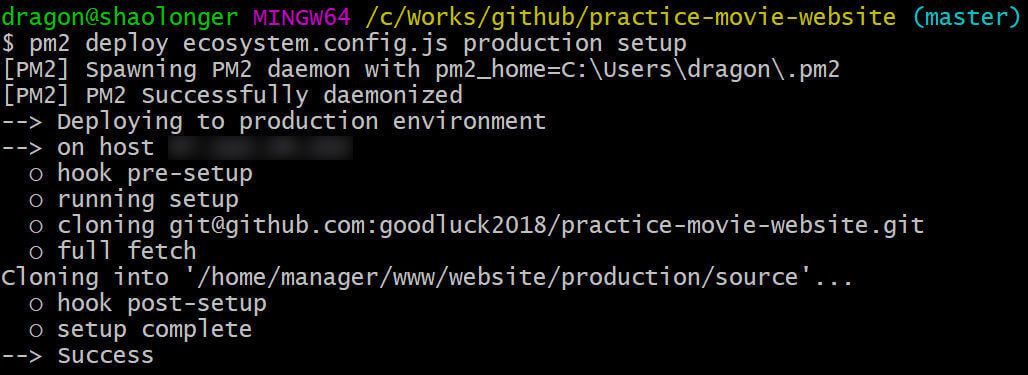
 shaolonger
on 14 Jan 2019
shaolonger
on 14 Jan 2019
@shaolonger That works for me.
Cmder and powershell and windows cmd, all of them didn't work ;(
 harrisoff
on 18 Jan 2020
harrisoff
on 18 Jan 2020
This issue has been automatically marked as stale because it has not had recent activity. It will be closed if no further activity occurs. Thank you for your contributions.
![stale[bot] picture](https://avatars3.githubusercontent.com/in/1724?v=4&s=40) stale[bot]
on 23 May 2020
stale[bot]
on 23 May 2020
I have solved this problem by using git bash instead of the original CMD, wish that can help you :)
@taoweicn @davidlondono @valayDave
我通过使用 git bash 而不是原始 CMD 解决了这个问题,希望它能够帮助您:)@taoweicn@davidlondono@valayDave
oh, my god!
Its works for me!
This question has been troubling me all afternoon!!!
 cuiko
on 7 Jul 2020
cuiko
on 7 Jul 2020
Related issues
 mario-mui
·
3Comments
mario-mui
·
3Comments
 morfies
·
3Comments
morfies
·
3Comments
 xzycn
·
3Comments
xzycn
·
3Comments
 lefam
·
3Comments
lefam
·
3Comments
 chaos-git
·
3Comments
chaos-git
·
3Comments
Most helpful comment
I have solved this problem by using git bash instead of the original CMD, wish that can help you :)

@taoweicn @davidlondono @valayDave