Expected behaviour
Starts at boot
Actual behaviour
Fail to start at boot
Steps to reproduce
pm2 start 'processName'
pm2 save
pm2 startup
Software versions used
OS         : Raspbian jessie on PI3
node.js    : 6.1.0
PM2        : 2.4.2
PM2 Log output
2017-03-02 12:37:50: ===============================================================================
2017-03-02 12:37:50: --- New PM2 Daemon started ----------------------------------------------------
2017-03-02 12:37:50: Time : Thu Mar 02 2017 12:37:50 GMT+0100 (CET)
2017-03-02 12:37:50: PM2 version : 2.4.2
2017-03-02 12:37:50: Node.js version : 6.10.0
2017-03-02 12:37:50: Current arch : arm
2017-03-02 12:37:50: PM2 home : /home/pi/.pm2
2017-03-02 12:37:50: PM2 PID file : /home/pi/.pm2/pm2.pid
2017-03-02 12:37:50: RPC socket file : /home/pi/.pm2/rpc.sock
2017-03-02 12:37:50: BUS socket file : /home/pi/.pm2/pub.sock
2017-03-02 12:37:50: Application log path : /home/pi/.pm2/logs
2017-03-02 12:37:50: Process dump file : /home/pi/.pm2/dump.pm2
2017-03-02 12:37:50: Concurrent actions : 2
2017-03-02 12:37:50: SIGTERM timeout : 1600
2017-03-02 12:37:50: ===============================================================================
2017-03-02 12:38:17: Starting execution sequence in -fork mode- for app name:mm id:0
2017-03-02 12:38:17: App name:mm id:0 online
2017-03-02 12:44:18: pm2 has been killed by signal, dumping process list before exit...
2017-03-02 12:44:18: Deleting process 0
2017-03-02 12:44:19: Stopping app:mm id:0
2017-03-02 12:44:19: App [mm] with id [0] and pid [1947], exited with code [0] via signal [SIGTERM]
2017-03-02 12:44:19: pid=1947 msg=process killed
2017-03-02 12:44:19: [PM2] Exited peacefully
2017-03-02 12:44:24: ===============================================================================
2017-03-02 12:44:24: --- New PM2 Daemon started ----------------------------------------------------
2017-03-02 12:44:24: Time : Thu Mar 02 2017 12:44:24 GMT+0100 (CET)
2017-03-02 12:44:24: PM2 version : 2.4.2
2017-03-02 12:44:24: Node.js version : 6.10.0
2017-03-02 12:44:24: Current arch : arm
2017-03-02 12:44:24: PM2 home : /home/pi/.pm2
2017-03-02 12:44:24: PM2 PID file : /home/pi/.pm2/pm2.pid
2017-03-02 12:44:24: RPC socket file : /home/pi/.pm2/rpc.sock
2017-03-02 12:44:24: BUS socket file : /home/pi/.pm2/pub.sock
2017-03-02 12:44:24: Application log path : /home/pi/.pm2/logs
2017-03-02 12:44:24: Process dump file : /home/pi/.pm2/dump.pm2
2017-03-02 12:44:24: Concurrent actions : 2
2017-03-02 12:44:24: SIGTERM timeout : 1600
2017-03-02 12:44:24: ===============================================================================
2017-03-02 12:44:24: ===============================================================================
2017-03-02 12:44:24: --- Stopping PM2 --------------------------------------------------------------
2017-03-02 12:44:24: Time : Thu Mar 02 2017 12:44:24 GMT+0100 (CET)
2017-03-02 12:44:24: ===============================================================================
2017-03-02 12:44:24: RPC closed
2017-03-02 12:44:24: PUB closed
2017-03-02 12:44:24: PM2 successfully stopped
#
boot.log contains : Starting pm2 process manager... but if i go to daemon.log i can found this:
Mar 2 12:44:29 raspberrypi systemd[1]: Starting PM2 process manager...
Mar 2 12:44:37 raspberrypi systemd[1]: Failed to start PM2 process manager.
 martirius
All 14 comments
Could you retrieve the error of systemd via journalctl ?
 vmarchaud
on 2 Mar 2017
vmarchaud
on 2 Mar 2017
this is what i found:
Mar 02 17:17:02 raspberrypi systemd[1]: Configuration file /etc/systemd/system/pm2-pi.service is marked executable. Please remove executable permission bits. Proceeding anyway.
Mar 02 17:17:14 raspberrypi systemd[1]: pm2-pi.service start operation timed out.Terminating.
Mar 02 17:17:14 raspberrypi systemd[1]: Unit pm2-pi.service entered failed state.
martirius
on 3 Mar 2017
Just chmod the service file with good permission then,
vmarchaud
on 3 Mar 2017
It was not sufficient to remove executable permission, the problem remains. journaltcl report me now this:
Mar 03 14:24:45 raspberrypi systemd[1]: pm2-pi.service start operation timed out. Terminating.
Mar 03 14:24:45 raspberrypi systemd[1]: Unit pm2-pi.service entered failed state.
without the problem of execution permission.
Any solution?
martirius
on 3 Mar 2017
Can you share the unit file that has been generated ? (in /etc/systemd/system/pm2-pi.service)
vmarchaud
on 3 Mar 2017
Issue solved, changed timeout from 8 to 35, now it works perfectly
martirius
on 4 Mar 2017
Yeah depending on your rasberry cpu load it could take a while to start pm2.
vmarchaud
on 4 Mar 2017
Had the very same issue for months, took me hours until I ended up here.
 ooswald
on 4 Mar 2017
ooswald
on 4 Mar 2017
@ooswald and know it works? happy to know this is helpful for someone else :)
martirius
on 5 Mar 2017
@martirius where did you go to change the timeout? I edited the file directly, but will that persist across other operations? Is there a pm2 startup parameter I can specify?
 tc-mccarthy
on 9 Mar 2017
tc-mccarthy
on 9 Mar 2017
you need to tell systemd to reload the unit file with systemctl daemon-reload and then restart the pm2 service.
vmarchaud
on 9 Mar 2017
I got a timeout start up problem
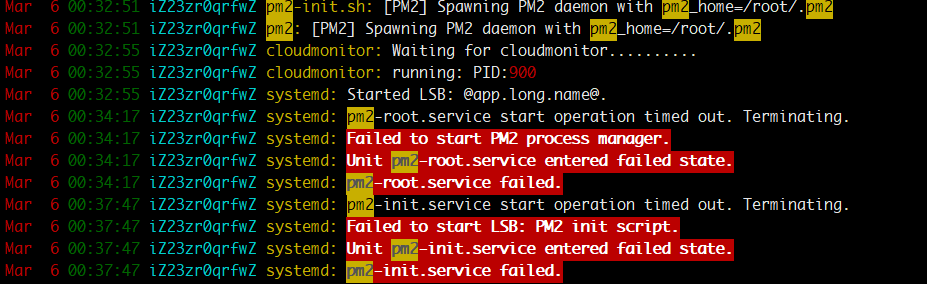
my pm2 start up is at /etc/systemd/system/pm2-root.service
just like this
[Unit]
Description=PM2 process manager
Documentation=https://pm2.keymetrics.io/
After=network.target

[Service]
Type=forking
User=root
LimitNOFILE=infinity
LimitNPROC=infinity
LimitCORE=infinity
Environment=PATH=/root/n/bin:/bin:/usr/local/sbin:/usr/local/bin:/usr/sbin:/usr/bin
Environment=PM2_HOME=/root/.pm2
PIDFile=/root/.pm2/pm2.pid

ExecStart=/root/n/lib/node_modules/pm2/bin/pm2 resurrect
ExecReload=/root/n/lib/node_modules/pm2/bin/pm2 reload all
ExecStop=/root/n/lib/node_modules/pm2/bin/pm2 kill

[Install]
WantedBy=multi-user.target
where to change the timeout config ?
I found there is a graceful timeout in a config.js
  GRACEFUL_TIMEOUT         : parseInt(process.env.PM2_GRACEFUL_TIMEOUT) || 8000,
  GRACEFUL_LISTEN_TIMEOUT  : parseInt(process.env.PM2_GRACEFUL_LISTEN_TIMEOUT) || 3000,
Is there the place I should change? What does the two timeout mean?
 amanda94
on 6 Mar 2018
amanda94
on 6 Mar 2018
Adding network-online.target as specified here to both /etc/systemd/system/pm2-learninglocker.service and /etc/systemd/system/pm2-root.service solved my issue.
[Unit]
Wants=network-online.target
After=network.target network-online.target

[....]

[Install]
WantedBy=multi-user.target network-online.target
 Pepedou
on 13 Sep 2018
Pepedou
on 13 Sep 2018
@martirius where did you go to change the timeout? I edited the file directly, but will that persist across other operations? Is there a pm2 startup parameter I can specify?
I think to change the timeout, in the [Service] section of /etc/systemd/system/pm2-pi.service add RestartSec=30
 jcummings2
on 7 Nov 2020
jcummings2
on 7 Nov 2020
Related issues
 getvega
·
3Comments
getvega
·
3Comments
 rajendar38
·
3Comments
rajendar38
·
3Comments
 jubairsaidi
·
3Comments
jubairsaidi
·
3Comments
 rangercyh
·
4Comments
rangercyh
·
4Comments
 morfies
·
3Comments
morfies
·
3Comments
Most helpful comment
@martirius where did you go to change the timeout? I edited the file directly, but will that persist across other operations? Is there a pm2 startup parameter I can specify?